

Kala: Learn Ukulele & Tuner
- 760.00
- 4.6
- Installs
- 500.00K
- Price
- Free

Screenshots



Analysis by Reviewed
I found Kala: Learn Ukulele & Tuner most useful when I treated it as a patient practice companion rather than a complete replacement for a teacher. It focuses on the basics that usually stop new ukulele players: holding the instrument comfortably, finding chords, keeping the strings in tune, and changing between shapes without losing the beat. That narrow focus is a strength. Instead of throwing a beginner into a huge library of music theory, it gives the first weeks of playing a clearer path.
After spending time with it, my view is simple: this is a friendly starting point for someone who has just bought a ukulele and wants guidance immediately, especially if tuning and chord changes still feel confusing. It is less convincing for an experienced player looking for detailed technique, deep musical analysis, or a broad creative workspace. The app is free to install, made by Musopia, and sits in the Music & Audio category. Its average rating is 4.6 from around 5.8 thousand ratings, which matches my impression that its beginner-first approach works well for many casual learners.
How the lessons feel when you are actually learning
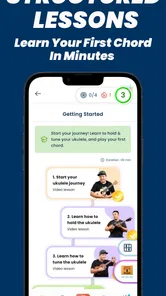
The most valuable part of the experience is the way it breaks a potentially vague goal into small actions. “Learn the ukulele” can mean anything from memorizing a few campfire chords to reading notation and arranging songs. Kala keeps the early target practical: get the instrument ready, understand the chord shapes, and make recognizable music without feeling lost.
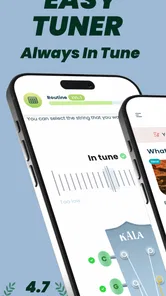
I especially liked using the tuner before starting a lesson. Beginners often assume a wrong-sounding chord means their fingers are in the wrong position, when the real problem is that one or more strings are out of tune. Putting tuning at the front of a practice session removes that uncertainty. It also creates a useful habit: tune first, then judge your playing. That is a small workflow choice, but it can prevent a new player from practicing an incorrect sound for several days.
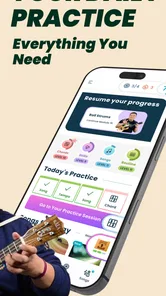
The lesson format is better suited to short, repeated sessions than to one long sitting. I would use it for ten or fifteen minutes, put the phone near the instrument, and repeat one chord transition until my fingers stopped hesitating. This is more productive than racing through several lessons just to feel progress. The app gives beginners a structure, but the real improvement still comes from repeating the awkward parts.
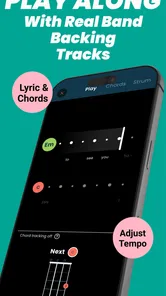
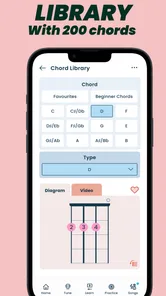
Another practical strength is that the material connects chords with songs instead of presenting every shape as an isolated diagram. That matters psychologically. A chord becomes easier to remember when I can immediately hear how it contributes to something musical. Even when a transition is still rough, having a recognizable goal makes practice feel less like memorizing a chart.
The tuner also helps answer a question many first-time players have: “Is the instrument ready, or am I doing something wrong?” That makes the app useful before the lesson even begins. I would not rely on a phone tuner in a loud room, but in a quiet bedroom or living room it is a convenient way to establish a consistent starting point.
More From Our News Desk

 Gmail
GmailGmail in a Busy Inbox: Who Benefits Most?
From first account to crowded workday, Gmail earns its place through dependable search and flexible sorting—but its best fit depends on how much inbox maintenance you can tolerate.

 Prime Video
Switching to Prime Video: What Changes in Your Viewing Routine
Prime Video can make a compelling second home for streaming, but switching means learning a different catalog, rental layer, and route from browsing to playback.

 Universal TV Remote Control
Universal TV Remote Control Works Best as a Reliable Backup
A phone remote earns its place through quick setup and reliable habits. Here is how to get more from Universal TV Remote Control—and where its limits show.

 Weather - By Xiaomi
Weather by Xiaomi Review: Clear at a Glance, Less Clear Up Close
Xiaomi’s weather app makes everyday forecasts quick to scan, but its calm surface can leave useful details and recovery paths harder to find than they should be.

 X
XX Under Pressure: Can It Recover When Posting Goes Wrong?
A resilience-focused review of X, examining setup, mistaken posts, interruptions, weak connections, and the gaps that matter when recovery needs to be dependable.

 Clash of Clans
Clash of Clans Is Won Between the Battles
Its raids are quick; its community is a long-term project of coordination, teaching, rivalry, and shared responsibility—with all the friction that entails.
Latest News



A useful routine for the first week
My recommended routine is deliberately simple. I would begin by tuning every string, then review only the chord shapes introduced in the current lesson. After that, I would choose one transition that feels slow and practice moving between the two shapes without strumming at first. Once the fingers can land more reliably, I would add a gentle downstroke and use the lesson or song material to check whether the change happens in time.
This order exposes a non-obvious benefit of the app: it separates mechanical problems from musical ones. If the fingers cannot form the chord, rhythm practice will not solve the issue. If the chord is clean but the song falls apart, the missing skill is probably timing. Keeping those tasks separate makes a short practice session more focused.
I would also keep the phone screen at eye level rather than flat beside the ukulele. Looking down repeatedly can make the instrument feel more awkward, and it encourages a player to stare at the diagram instead of listening. The app is most helpful as a prompt; the goal is gradually to look away from the screen and feel the chord shape with the fretting hand.
For someone sharing a home, headphones may help with lesson audio, but they do not solve the need to hear the acoustic ukulele itself. A quiet space remains preferable. That is not a flaw unique to this app, but it affects how smoothly the lessons fit into real life.
Where it stands beside other beginner options
Compared with learning from random video searches, Kala feels more organized. Video lessons can be excellent, but a beginner often has to decide which teacher to trust, whether the instrument is tuned correctly, and what to study next. This app puts those early decisions closer together. The trade-off is that a video teacher may demonstrate posture, hand movement, and musical feel in more expressive detail than an app interface can.
Compared with a paper chord chart, it is more active because tuning and guided instruction are part of the same experience. A chart is still faster when I already know what I want to play, and it never asks me to unlock a lesson or navigate a screen. For a complete beginner, though, the chart can feel like a wall of unfamiliar symbols. Kala earns its place by giving those symbols a learning sequence.
Compared with a private instructor, it is obviously less personal. An instructor can notice a tense wrist, a collapsing finger, or a rhythm problem and correct it immediately. Kala cannot replace that kind of observation. Its advantage is convenience and repetition: I can return to the same material whenever I have a few spare minutes, without arranging a lesson.
There is also a difference between learning songs and learning musicianship. The app is well suited to getting started with chords and basic accompaniment. Someone who wants to understand scales, ear training, advanced strumming, fingerstyle arrangements, or improvisation will eventually need another resource. I would see Kala as the first layer of a learning setup, not the entire setup.
The friction I noticed
The main limitation is the boundary between guided learning and independent playing. At first, a beginner benefits from being told what to do next. After the basic material becomes familiar, that same structure can feel restrictive if the player wants to jump directly to a particular song or technique. The app works best when I accept its progression instead of expecting a fully open-ended ukulele reference library.
There is also a motivational risk in any lesson app: completing a screen is not the same as playing comfortably. A learner can move forward while still struggling with clean chord changes. I would resist the temptation to measure progress only by lesson completion. The better test is whether I can form the chord quietly, strum it cleanly, and change to the next one without stopping.
The free entry point is helpful, but the presence of in-app purchases means the complete experience may involve paid options. Individual items range from $2.49 to $229.99, so I would examine the purchase screen carefully before committing to anything. The broad range is important: a low-cost optional item and a much larger purchase are not the same decision. I would first use the available free material to decide whether the teaching style suits me.
That purchase model may bother users who want every lesson available without thinking about upgrades. It also makes the app less attractive to someone shopping for a single, fixed-price course. On the other hand, a free starting point lowers the barrier for a person who is still unsure whether the ukulele will become a lasting hobby.
Device compatibility is another practical point. The current version is 3.19.3 and requires Android 8.0 or later. That makes it accessible on many relatively recent Android phones, but anyone using an older handset should check compatibility before planning around it. Since the app is designed to sit beside an instrument, a larger phone or tablet screen would be more comfortable than a small display, although the learning idea remains the same.
Who will get the most from it
I would recommend it first to an absolute beginner who owns, or is about to buy, a ukulele and wants a clear place to start. It is also a good fit for someone who learns better through short guided tasks than through reading a manual. Parents looking for an approachable music activity for a child may appreciate the Everyone content rating, though younger learners may still need help positioning the phone, tuning, and understanding finger placement.
It suits casual players particularly well. Imagine coming home after work, tuning the ukulele in the living room, and practicing two chord changes before dinner. You do not need a full music curriculum for that moment. You need a prompt, a manageable target, and a way to check that the instrument is ready. Kala fits that scenario better than a dense theory course or an unstructured collection of tutorials.
It can also help a returning player who learned a few chords years ago and wants to rebuild confidence. In that case, I would skip anything that feels too basic and use the tuner and song-oriented practice as a reset. The app is not only for someone touching a ukulele for the first time; it is also useful for someone who has forgotten where to begin.
I would not choose it as my main resource if I already play confidently, need advanced arrangements, or want detailed feedback on technique. A teacher, a specialist course, or a focused reference may be better for those goals. It is also not ideal for someone who dislikes guided mobile learning or wants to practice without a phone nearby. The app’s convenience is central to its appeal, so people who prefer an entirely screen-free routine should look elsewhere.
Small details that improve the learning workflow
One useful habit is to keep a written record of the two or three chord changes that cause the most trouble. The app can guide the session, but a note on paper makes the practice goal visible before the phone is opened. I would write something like “C to G, slow and relaxed” rather than “practice ukulele.” That turns a broad intention into a measurable task.
Another tip is to use the tuner as a diagnostic check, not just a starting button. If a chord sounds wrong, I would pluck each string separately before changing my hand position. If one string is consistently sharp or flat, the problem may be tuning; if the open strings sound fine but the chord does not, I would inspect finger placement and accidental muting. This simple test saves beginners from randomly squeezing harder.
I would also practice chord changes without trying to play the entire song every time. Songs are motivating, but they can hide the exact moment where the hand breaks down. Isolating the transition for a few repetitions makes the weakness obvious. Once it improves, returning to the song gives the exercise a musical purpose. This is where the app’s beginner structure becomes more powerful when combined with a little self-directed discipline.
Finally, I would listen for tension. New players often press too hard because they want every note to ring. If the chord is clean but the wrist, thumb, or shoulder feels strained, I would pause and reset rather than pushing through. No app can physically adjust my posture, so the learner has to supply that awareness. Kala can show the destination, but I still have to make the movement relaxed and sustainable.
Practical details before installing
The app is free to download and carries an Everyone age rating. Musopia released it on January 13, 2016, and the current version is 3.19.3. It has passed the half-million-install mark, which suggests that it has reached a substantial beginner audience without making popularity the sole reason to choose it.
Those details matter in different ways. The free price makes experimentation easy, while the in-app purchase range means I would avoid assuming that every part of the learning path is included at no cost. The age rating makes it broadly approachable, but a child or young beginner may still benefit from an adult helping with tuning and the first few sessions.
Before installing, I would ask myself what I actually want from a ukulele app. If the answer is “help me tune, learn basic chords, and start playing songs,” this is a sensible match. If the answer is “teach me everything from music theory to advanced performance,” the app is likely to feel like only an opening chapter.
My overall verdict is positive because the product understands its job. It does not need to turn a phone into a conservatory. It needs to make the first steps less intimidating, and it does that by connecting setup, chords, lessons, and practical playing in one beginner-friendly place.
Kala: Learn Ukulele & Tuner is therefore worth trying for new players who want structure without immediately paying for private tuition. I would recommend starting with the free material, tuning before every session, and judging progress by cleaner transitions rather than completed lessons. For advanced musicians, the ceiling will arrive quickly. For the person who has a ukulele waiting in the corner and keeps saying “I should learn that,” this may be exactly the gentle push needed to begin.
Kala: Learn Ukulele & Tuner Frequently Asked Questions
What devices can run Kala: Learn Ukulele & Tuner?
Kala: Learn Ukulele & Tuner is available for Android and iOS devices, with Android support starting at version 8.0. It is a Music & Audio app from Musopia, and its age rating is Everyone. Before downloading, check that your device’s operating system meets the requirement and that you have enough room for the app and any learning content you choose to use.
Is Kala: Learn Ukulele & Tuner free to download, and what does it cost to use?
The app is free to download, so you can get started without paying upfront. It also offers in-app purchases, with prices ranging from $2.49 to $229.99 per item. What you can access at no cost may differ from paid content or features, so review the purchase details shown in your app store before choosing an offer.
What is Kala: Learn Ukulele & Tuner, and who is it designed for?
Kala: Learn Ukulele & Tuner is an educational app for people who want to learn ukulele, whether they are complete beginners or players looking to improve their technique. It combines guided lessons, song tutorials, practice tools, and a digital tuner in one place. The structured approach makes it suitable for casual learners, while more experienced users can use the song library and tuner for regular practice.
Does Kala include a ukulele tuner, and is it accurate enough for beginners?
Yes, the app includes a built-in tuner designed to help users tune their ukulele before practicing or playing songs. It listens through the device microphone and indicates whether each string is too high, too low, or correctly tuned. Accuracy can depend on microphone quality, background noise, and how clearly the string is played, so tuning in a quiet environment and checking each string carefully is recommended.
Can I learn ukulele songs with Kala even if I have never played before?
The app is designed to make ukulele learning approachable for beginners. Lessons generally introduce essential skills such as holding the instrument, understanding chords, following strumming patterns, and changing between chords. Song-based practice can make progress feel more enjoyable, although users should still expect to repeat exercises regularly. Learning speed depends on practice time, coordination, and the difficulty of the selected songs.
Pros
- Beginner-friendly lessons with clear
- step-by-step guidance.
- Built-in tuner helps users keep the ukulele accurately tuned.
- Short practice sessions fit easily into busy daily routines.
- Useful chord and strumming references support independent practice.
- Suitable for learning popular songs at a comfortable pace.
Cons
- Some lessons or songs may require a paid subscription.
- Limited advanced theory may disappoint experienced players.
- An internet connection may be needed for certain content.
- Tuner accuracy can depend on microphone quality and background noise.
- The app may not cover every ukulele style or playing technique.











