

Junk File Rescue
- 4.00
- 4.3
- Installs
- 10.00K
- Price
- Free

Screenshots
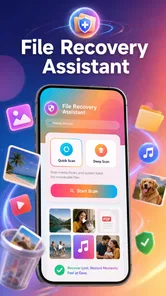
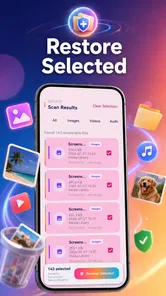
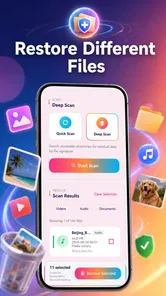
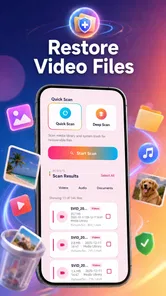
Analysis by Reviewed
I approached Junk File Rescue as a practical storage tool rather than something I would open for entertainment. Its promise is simple: scan a device for recoverable photos and videos, then help bring back files that have disappeared. That makes it appealing after an accidental deletion, a failed cleanup, or a moment when an important memory seems to be gone. The more interesting question, though, is whether it deserves a permanent place on a phone once that initial emergency has passed.
My short answer is that it can be useful as a focused recovery option, but its lasting value depends heavily on how often you lose media and how much confidence you have in your normal backup routine. It is free, aimed at everyone, and made by Susan Litwiller Executive NeuroCoaching LLC. The app has reached over ten thousand installs and holds a 4.3 average from around sixteen ratings, which suggests a modest but generally positive early reception rather than a long-established track record.
What the first week feels like
The first week is where this app makes the strongest impression. When a photo or video vanishes, people usually do not want a complicated file-management lesson. They want to know whether the file is still somewhere on the device. A dedicated scanner gives that problem a clear starting point: open the tool, inspect what it can find, and decide whether anything useful can be restored.
I like that the purpose is easy to understand. The app is not trying to be a full gallery replacement, cloud drive, or general-purpose cleaner. Its identity is centered on photo and video recovery, so the most natural time to use it is after an obvious loss. That focus is valuable when you are stressed and do not want to sort through unrelated storage categories.
A realistic example would be deleting a group of family photos while clearing space before a trip, then realizing later that one of them mattered. In that situation, I would stop making further changes to the phone, open the scanner, and review the results carefully. The important habit is to act quickly and avoid filling the same storage with new downloads or recordings. Recovery tools generally have a better chance when deleted space has not been reused, so the app should be treated as an early response, not a guarantee.
The first scan also teaches you something about your own storage habits. You may discover that old media is still present in places you had forgotten, or that a supposedly clean device contains more visual clutter than expected. That can be useful even when you do not recover the exact file you wanted. It turns a vague feeling of “my phone lost something” into a more concrete look at what remains accessible.
There is a trade-off here. A scan can show possible results, but finding a thumbnail does not automatically mean the original file will return perfectly. A damaged, overwritten, or incomplete item may be less useful than its preview suggests. I would therefore inspect recovered material before deleting anything else, and I would save important results somewhere separate as soon as possible.
More From Our News Desk

 Gmail
GmailGmail in a Busy Inbox: Who Benefits Most?
From first account to crowded workday, Gmail earns its place through dependable search and flexible sorting—but its best fit depends on how much inbox maintenance you can tolerate.

 Prime Video
Switching to Prime Video: What Changes in Your Viewing Routine
Prime Video can make a compelling second home for streaming, but switching means learning a different catalog, rental layer, and route from browsing to playback.

 Universal TV Remote Control
Universal TV Remote Control Works Best as a Reliable Backup
A phone remote earns its place through quick setup and reliable habits. Here is how to get more from Universal TV Remote Control—and where its limits show.

 Weather - By Xiaomi
Weather by Xiaomi Review: Clear at a Glance, Less Clear Up Close
Xiaomi’s weather app makes everyday forecasts quick to scan, but its calm surface can leave useful details and recovery paths harder to find than they should be.

 X
XX Under Pressure: Can It Recover When Posting Goes Wrong?
A resilience-focused review of X, examining setup, mistaken posts, interruptions, weak connections, and the gaps that matter when recovery needs to be dependable.

 Clash of Clans
Clash of Clans Is Won Between the Battles
Its raids are quick; its community is a long-term project of coordination, teaching, rivalry, and shared responsibility—with all the friction that entails.
Latest News



Because the app is free, trying it during a genuine recovery situation carries less financial friction than committing to a paid utility first. That does not remove the need for caution. I would still avoid treating any recovery result as a replacement for a backup, and I would not assume that every missing item can be restored simply because the scanner finds traces of it.
Who gets the most from the initial scan
This is a good fit for someone who accidentally removed personal photos, lost videos during a messy storage cleanup, or wants a straightforward first attempt before moving to a more technical solution. It may also help a less technical family member who would struggle with desktop recovery software and only needs a simple phone-based workflow.
It is less suitable for someone who needs forensic-grade recovery, works with irreplaceable professional footage, or expects a precise explanation of every storage block. In those cases, a computer-based recovery service or a specialist backup system may be the better choice. Junk File Rescue is easier to approach, but ease of use should not be confused with unlimited recovery power.
Whether it earns space after the emergency
After the first successful scan, the app faces a harder test. Recovery tools often feel essential when a file is missing and unnecessary once the problem is solved. That is not a criticism unique to this product; it is the nature of the category. A tool can be worthwhile without being something I open every day.
For month-to-month value, I see two sensible roles. The first is keeping it available as an emergency utility, especially if your phone is used for family photos, travel clips, or work media that is not always copied elsewhere. The second is using it occasionally as part of a storage review, not as a routine cleaner but as a way to investigate whether old or deleted media is still occupying attention and space.
I would not run scans simply because the app is installed. Repeated scanning without a specific reason can become a maintenance ritual with little payoff. A better approach is to connect its use to events: before a major phone cleanup, after discovering a missing recording, or when moving media to a new device. That makes the app part of a clear workflow instead of another icon competing for attention.
One non-obvious benefit is psychological rather than technical. Having a recovery tool ready can make you less likely to panic and start deleting or reinstalling things at random. The best sequence is calm and deliberate: stop unnecessary activity, scan once, review possible matches, restore only what matters, and then create a separate copy. The app is most useful when it supports that sequence rather than encouraging repeated experimentation.
Another practical insight is to separate recovery from organization. If the scan finds a mixture of old images, duplicates, and files you do not recognize, do not turn the recovery session into a full gallery cleanup. First preserve the items you may need. Sorting and deleting can wait. Mixing those jobs increases the chance of removing something before you have checked it properly.
Version 1.0.3 indicates that the app is still at an early stage of its product life. That is not automatically bad, but it does affect how I judge long-term reliance. A newer utility may improve over time, yet I would keep independent backups for anything irreplaceable rather than making this single app responsible for my memories.
What it does not replace
The app should not replace automatic photo backup, a second copy on a computer, or a deliberate export before resetting a phone. Those alternatives prevent loss; a recovery scanner attempts to respond after loss. Prevention is usually less stressful and more dependable.
It also does not replace the file tools already built into Android or iOS for checking trash folders, recently deleted albums, and cloud libraries. I would check those first because they may preserve the original item in a more complete and recognizable form. Junk File Rescue becomes more interesting when the normal places no longer show what you need.
Compared with a general storage cleaner, its advantage is concentration. A cleaner may be better for identifying large downloads, temporary files, or duplicate content, while this app is more directly relevant to missing visual media. Compared with desktop recovery software, its advantage is convenience, while the desktop option may be preferable for complicated cases or a larger amount of data.
The maintenance burden and the points where fatigue begins
The maintenance burden is fairly light if I treat this as an on-demand tool. I would keep it installed only if I regularly handle valuable media on the phone or have a history of accidental deletions. Otherwise, it may become an app I remember only after a problem, at which point reinstalling a free utility may be perfectly reasonable.
The main source of fatigue is uncertainty. A recovery scan can produce hope before it produces a usable file. Reviewing possible results takes patience, especially when filenames are unclear or when several similar images appear. If you need one specific video, browsing a large set of candidates may feel slower than checking a recently deleted folder or a cloud backup.
There is also a risk of false confidence. A successful recovery can encourage someone to postpone backups, thinking that lost files can always be brought back. I would use the opposite lesson: if the app helps recover something important, immediately improve the backup routine that failed to protect it. Recovery should be the exception, not the monthly storage plan.
Another limitation is the phone-only context. If the device is damaged, inaccessible, encrypted in a way the app cannot work around, or already heavily reused after deletion, a mobile scanner may not be enough. In those situations, continuing to rescan is unlikely to be the smartest next step. A professional service or a computer-based workflow may justify its extra complexity.
Privacy is also part of the decision whenever an app examines personal media. I would be especially careful with sensitive photos and videos, and I would read the app’s permission prompts and privacy details before granting access. The recovery goal may be urgent, but that is exactly when people tend to approve everything without thinking. A cautious review of what the app is asking to access is worth the extra minute.
The Everyone content rating makes the app approachable for a broad audience, including households where a family member may need help recovering pictures. Still, simple presentation does not remove the need for adult guidance when the files are private or when a child is using a shared device. The important decision is not only whether the app is easy to open, but whether the person using it understands what should be restored and where it should be saved.
Small habits that make the tool more useful
- Stop creating new media first. If a deletion was recent, avoid recording videos, downloading large files, or installing several other apps before attempting recovery.
- Check ordinary recovery locations. Look through recently deleted albums, file-manager trash, and existing backups before spending time on a deeper scan.
- Restore selectively. Save the important items first instead of recovering every result and creating another clutter problem.
- Make a second copy immediately. Move recovered files to a computer, external storage, or a trusted backup destination before continuing to clean the phone.
- Do not confuse scanning with maintenance. Use the app after a real loss or before a planned cleanup, not merely because a calendar reminder says to scan.
These habits reveal the app’s proper place. It is not a magic undo button and not a substitute for storage discipline. It is a safety net that works best when the user protects the remaining evidence and knows when to stop trying.
My long-term verdict on Junk File Rescue
After the novelty fades, I would judge Junk File Rescue by usefulness rather than frequency. I do not need a recovery app to be a daily habit. If it is available when I accidentally remove a meaningful photo or video, that can be enough to justify keeping it, particularly because it is free and its purpose is immediately understandable.
Its strongest audience is people who want a low-barrier first attempt at recovering visual memories directly from a phone. It is also reasonable for anyone who periodically performs risky storage cleanups and wants a recovery-focused tool nearby. The app’s modest install base and small rating sample mean I would view it as an early, practical utility rather than a proven cornerstone of a backup strategy.
I would skip it as a permanent resident if my photos already synchronize reliably and I rarely delete anything by mistake. In that case, the built-in recently deleted area and regular backups may cover the situations that matter, while a dedicated scanner adds little. I would also choose another route for business-critical footage, damaged devices, or losses that require a documented and technically advanced recovery process.
For everyone else, the sensible approach is to install it when the need is real, use it carefully, and keep expectations grounded. Check normal backups first, avoid overwriting the deleted space, review results instead of restoring blindly, and create a separate copy of anything recovered. Those steps matter more than repeatedly opening the app.
My final view is positive but measured: Junk File Rescue earns lasting space when it serves as a quiet emergency tool, not when it is forced into a daily cleaning routine. It offers a simple answer to a stressful problem and may save a valuable image or recording. Its long-term value comes from being ready at the right moment, while its main weakness is that no scanner can provide the certainty of a good backup made before the loss.
Junk File Rescue Frequently Asked Questions
What should I check before installing Junk File Rescue?
Junk File Rescue is a free Tools app from Susan Litwiller Executive NeuroCoaching LLC, with an Everyone content rating. Before installing, check that your device runs a compatible operating system and that you are downloading the app from an official store. Its store summary says it can scan device storage and restore lost photos and videos, so consider whether those are the functions you need.
Can Junk File Rescue restore photos or videos I have lost?
The app’s store summary describes scanning device storage and restoring lost photos and videos. If you try this feature, follow the app’s prompts and review any items it identifies before taking action. Recovery is not guaranteed for every file or situation, so avoid writing new data to storage where a missing item was saved and keep backups of important photos and videos whenever possible.
What is Junk File Rescue, and what does it do?
Junk File Rescue is a mobile cleaning utility designed to help identify files that may be taking up unnecessary storage space. Its store summary also describes scanning device storage and restoring lost photos and videos. Before confirming a cleanup, review the results carefully because some files may still be useful to you.
Is Junk File Rescue safe to use on Android or iPhone?
The app can be useful when downloaded from an official store and granted only the permissions it genuinely needs. However, no cleaner should be treated as completely risk-free. Check its privacy policy, developer information, and requested permissions before using it. On iPhone, system restrictions may limit what it can scan compared with Android.
Can Junk File Rescue delete personal photos, videos, or important documents?
Junk File Rescue should normally identify removable clutter rather than intentionally erase personal content, but automated recommendations can sometimes include files you want to keep. Always inspect the proposed cleanup list before tapping delete, especially when it includes large files, duplicate photos, downloads, or messaging-media folders. Create a backup of important data first.
Pros
- Quickly identifies cached and leftover files taking up storage.
- Simple interface makes cleanup accessible for less technical users.
- Offers control over which files are removed before cleaning.
- Can help improve available storage on devices with limited space.
- Useful file categorization makes large storage consumers easier to find.
Cons
- Some detected files may require careful review before deletion.
- Cleaning results can vary depending on the device and Android version.
- Frequent notifications may feel intrusive for some users.
- Advanced cleanup features may be restricted to premium access.
- It may not remove data stored inside every third-party app.









