

Jollibee - Order & Rewards
- 467.00
- 4.8
- Installs
- 100.00K
- Price
- Free

Screenshots
Analysis by Reviewed
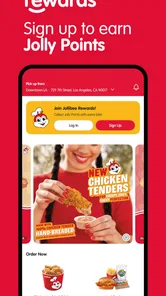
I tried Jollibee - Order & Rewards as a practical way to handle a fried-chicken order without switching between a restaurant website, a delivery service, and a separate loyalty system. It is a free Food & Drink app from Honeybee Foods Corporation, and its purpose is refreshingly focused: help me place a Jollibee order and keep the rewards side close at hand. That narrow focus is also its main appeal. I am not opening it to browse every restaurant in town; I am opening it because I already want Jollibee.
The app has a 4.8 average from around 10K ratings, with more than 400 written reviews, and it has passed 100K installs. Those figures suggest that it has found a dependable audience, although popularity alone does not guarantee that every ordering session will feel equally smooth. My overall impression is that it works best as a repeat-order companion: once I know what I like, where I want it delivered, and how I prefer to use rewards, the experience becomes more direct than starting from a broad delivery marketplace.
How the ordering experience feels in everyday use
The first thing I notice with a restaurant-specific app is whether it gets me to the useful part quickly. A general delivery app usually asks me to search, compare restaurants, review delivery choices, and then navigate a restaurant page that may not show every option as clearly as the restaurant’s own service. Jollibee - Order & Rewards takes the opposite approach. It is built around one brand, so the journey is less about discovery and more about making a decision.
That makes it particularly suitable for a familiar weekday order. Imagine arriving home tired, wanting a meal for the family, and already knowing that one person wants chicken, another wants a side, and someone else will ask about dessert at the last minute. I would rather open a focused app than search through several unrelated menus. The value is not just fewer taps; it is less mental sorting. I can concentrate on the meal instead of filtering out restaurants I will not use.
The trade-off is obvious. If I am comparing Jollibee with pizza, burgers, local restaurants, or grocery delivery, this app cannot replace a multi-restaurant service. Its speed comes from commitment to one chain, not from giving me more choice. For a user who is still deciding what kind of food to eat, a broad delivery platform is usually the better starting point.
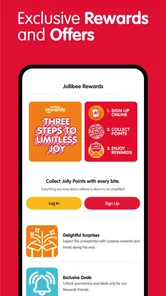
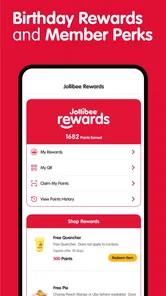
The rewards element changes the way I think about the app. Instead of treating an order as a one-off transaction, I can use the same place to work toward exclusive rewards. That is useful when I order from Jollibee repeatedly, especially if I am ordering for a household or a regular lunch routine. I would not install it solely for a once-a-year craving, but frequent customers have a clearer reason to keep it available.
Speed expectations before placing an order
Perceived speed depends on more than how quickly screens appear. I care about how fast I can move from opening the app to confirming the right meal, and whether the rewards part interrupts that flow. A focused restaurant app has a natural advantage here because it does not need to load a marketplace full of unrelated brands. On a normal session, I would expect the experience to feel more purposeful than a general delivery app, particularly when I already know what I want.
More From Our News Desk

 Instagram
Instagram’s Power Comes From Its Place in Your Phone
A close look at how Instagram turns Meta’s reach, recommendation systems and everyday camera habits into durable platform power—and what that costs users.

 Gmail
GmailGmail in a Busy Inbox: Who Benefits Most?
From first account to crowded workday, Gmail earns its place through dependable search and flexible sorting—but its best fit depends on how much inbox maintenance you can tolerate.

 Prime Video
Switching to Prime Video: What Changes in Your Viewing Routine
Prime Video can make a compelling second home for streaming, but switching means learning a different catalog, rental layer, and route from browsing to playback.

 Universal TV Remote Control
Universal TV Remote Control Works Best as a Reliable Backup
A phone remote earns its place through quick setup and reliable habits. Here is how to get more from Universal TV Remote Control—and where its limits show.

 Weather - By Xiaomi
Weather by Xiaomi Review: Clear at a Glance, Less Clear Up Close
Xiaomi’s weather app makes everyday forecasts quick to scan, but its calm surface can leave useful details and recovery paths harder to find than they should be.

 X
XX Under Pressure: Can It Recover When Posting Goes Wrong?
A resilience-focused review of X, examining setup, mistaken posts, interruptions, weak connections, and the gaps that matter when recovery needs to be dependable.
Latest News



There is still a difference between browsing and reordering. Browsing takes more attention because I am checking menu choices, portions, extras, and the destination for the order. A repeat customer can move faster because the decisions are already made. My practical tip is to decide the delivery address and the basic meal before opening the app. That sounds minor, but it prevents the ordering process from becoming a slow series of interruptions when I am hungry or in a hurry.
I also recommend reviewing the basket carefully before confirming. A fast interface is not helpful if I rush past an unwanted side, overlook a quantity, or fail to notice how the reward is being applied. The best use of this app is not blindly tapping through; it is using the brand-focused layout to reduce the time spent searching while still taking a moment to verify the final order.
For a group order, I would prepare the list outside the app first. Write down each person’s main item and any important additions, then enter it in one pass. This is more reliable than passing the phone around while everyone changes their mind. It also makes the reward decision easier: I can see the complete basket before deciding whether using a reward now is better than saving it for another visit.
What happens during heavy-use moments
The app becomes more valuable when the order is slightly complicated. A single meal is easy to arrange through almost any channel, but a family order tests whether a restaurant-specific tool remains understandable when there are several items and a reward to consider. I find the focused nature helpful because I am not juggling multiple restaurant pages. The challenge is that a larger basket demands more careful checking, especially when several similar items are involved.
Busy periods are where expectations need to stay realistic. An app can make the ordering steps clear, but it cannot make the kitchen, courier, or local restaurant process instant. I would not interpret a delay after confirmation as automatically meaning the app itself is slow. The useful distinction is between a sluggish ordering interface and a meal that takes time to prepare or deliver. This app addresses the first part; it does not remove the real-world limits of food service.
When I am ordering for a workplace or a family gathering, I would use the app earlier rather than waiting until everyone is already hungry. That gives me time to check the basket and deal calmly with any ordering friction. For a last-minute meal, I would keep the order simple. The fewer custom decisions I make under pressure, the less chance there is of selecting the wrong item or missing a reward opportunity.
Heavy use also means repeated use. Someone who opens the app several times a week will care about whether it remains comfortable as a routine, not just whether it works once. The rewards function gives repeat customers a reason to return, but it also means I should pay attention to the balance between earning and spending. A reward is most useful when it fits the order I actually want; forcing an order just to use one can turn a benefit into unnecessary spending.
Reliability, recovery, and the moments that matter
For an ordering app, reliability is not merely staying open. I want confidence that my selections remain understandable until the final step, that I can recognize whether an order has been submitted, and that I will not accidentally repeat an order after a confusing interruption. These are the moments I would watch most closely when using Jollibee - Order & Rewards, particularly on a weak connection or during a crowded meal period.
My safest habit is to pause after submitting rather than immediately tapping again. If the screen feels delayed, I would first check the order status or confirmation area before attempting a second purchase. That simple recovery habit matters more than chasing a theoretical fastest workflow. Duplicate orders are a bigger problem than spending a few extra seconds verifying what happened.
I also prefer to keep the app updated. The current version is 4.11.1, so users who have an older installation should check that their version is current before relying on it for an important group meal. Updates can matter for compatibility and for fixing small ordering problems, even when the app’s central purpose has not changed. I would especially do this before a planned gathering rather than discovering an issue when everybody is waiting for dinner.
The developer is Honeybee Foods Corporation, which gives the app a direct connection to the Jollibee ordering experience rather than making it an unrelated third-party menu viewer. That does not mean every local delivery situation will behave identically, but it does make the app feel like the appropriate channel for someone who wants the brand’s own ordering and rewards relationship in one place.
Recovery is also about knowing when to stop troubleshooting inside the app. If an order appears uncertain, I would avoid repeatedly submitting it and instead use the available order information to establish whether the first attempt went through. If the problem is with delivery timing, restaurant availability, or a specific location, switching to a different ordering channel may be more practical than repeatedly refreshing the same screen. The app is useful, but it should not become the only tool I am willing to use when a meal is time-sensitive.
Device constraints and the practical fit
The app supports devices running iOS 9 or later, which gives it a broad compatibility range. That is helpful for people who keep an older iPhone and do not replace devices frequently. At the same time, an older operating system can affect the overall feel of any modern app, even when installation is possible. I would expect the smoothest experience on a reasonably maintained device with enough free space and a stable connection, while an aging phone may make menus, transitions, or checkout feel less immediate.
Because this is an ordering tool rather than a game or a media-heavy service, I would not choose it for demanding graphics or long sessions. Its resource demands should be easier to live with than those of an entertainment app, but the practical concern is still the phone’s condition. A nearly full device, an outdated system, or an unstable network can make a simple order feel frustrating. Before blaming the app, I would test the connection, close unnecessary apps, and make sure the phone has room for normal updates.
The app is rated Everyone, so its intended audience is broad. That makes sense for a family restaurant ordering tool, but younger users may still need an adult to handle the final purchase decisions, address details, and reward choices. The age label tells me the app is generally accessible; it does not remove the need for ordinary care when ordering food or entering delivery information.
Resource-conscious users will probably appreciate that they do not need to keep the app open all day. I would open it when I am ready to plan or place an order, then close it when finished. That approach keeps the app in its proper role and avoids turning a simple food-ordering tool into another constantly active part of my phone routine.
Rewards are most useful when they support a real routine
The rewards feature is the strongest reason to choose this app over a general delivery service when I already buy Jollibee. Exclusive rewards can make repeat orders feel more worthwhile, but the smart approach is to treat them as a bonus attached to meals I would have purchased anyway. I would not increase an order merely to reach a reward unless the extra food genuinely makes sense for the people eating it.
For a regular customer, I would check the rewards area before building the basket, then decide whether the current order is a good opportunity to use something. This reverses the common mistake of finishing checkout first and only then discovering that a reward could have influenced the order. It also helps me avoid choosing a reward that does not match the size or purpose of the meal.
There is a useful trade-off between convenience and flexibility. A restaurant-specific rewards system can be more relevant than generic delivery-app discounts because it is tied to the food I already want. However, a marketplace may still be better if its broader promotions reduce the total cost of a mixed order or if I want to compare delivery choices. The right option depends on whether loyalty to Jollibee is part of my normal eating pattern.
How it compares with the usual alternatives
Compared with ordering through a general delivery marketplace, this app feels more focused and less cluttered for Jollibee customers. I would choose it when I want a direct route to one restaurant and care about its exclusive rewards. The marketplace wins when I want to compare restaurants, combine options, or use a wider delivery ecosystem that I already rely on.
Compared with a mobile browser, the dedicated app is more convenient for repeat use because it gives the ordering relationship a permanent place on my phone. A browser can be perfectly adequate for a one-time order and may suit someone who does not want another app installed. The dedicated app makes more sense when I order often enough for rewards and quick access to outweigh the extra installation.
Compared with ordering by phone, the app gives me a visual record of the basket, which is useful for checking quantities and avoiding misunderstandings. A phone call may be preferable for someone who needs to explain an unusual situation or is uncomfortable entering details on a screen. For ordinary menu orders, I prefer the app because I can review what I selected before committing.
Who should use it, and who should skip it
I would recommend it to regular Jollibee customers, households that repeat similar orders, and anyone who wants exclusive rewards connected to those purchases. It is also a sensible choice for people who dislike browsing a large delivery marketplace when they have already made up their mind. The free price removes the main barrier to trying it, and the broad compatibility helps people using older iPhones.
I would skip it if Jollibee is only an occasional impulse and I already have a preferred delivery service. I would also avoid making it my only option for a highly time-sensitive event until I had used it enough to understand my local ordering routine. Someone who wants to compare many restaurants, split an order across brands, or manage every meal from one marketplace will probably be happier elsewhere.
My most practical recommendation is to use it for a normal, low-pressure order first. Explore the menu, review how the rewards fit into the basket, and learn where confirmation information appears. After that, it becomes easier to use during a busy evening because I am no longer learning the workflow while trying to feed several people.
Final performance verdict
Jollibee - Order & Rewards succeeds because it concentrates on a clear job: ordering Jollibee food while keeping rewards connected to the experience. In my view, that focus should make routine ordering feel more efficient than searching a broad marketplace, especially for repeat customers. Its perceived speed is strongest when I already know what I want, while larger baskets and busy delivery periods still require patience and a careful final review.
The app’s stability should be judged by the whole ordering chain, not just by how quickly its screens respond. A restaurant-specific tool can simplify selection and reward management, but it cannot control every kitchen or delivery variable. I appreciate that distinction because it leads to better habits: update the app, prepare group orders in advance, verify confirmation before retrying, and keep another option available when timing is critical.
With a 4.8 average, over 100K installs, a free download, and an Everyone rating, it is an easy recommendation for the audience it is designed for. The current 4.11.1 release and support for iOS 9 or later also make it approachable for many iPhone users. My honest verdict is that this is a practical loyalty-and-ordering companion, not a universal delivery solution. If Jollibee is already part of your regular food routine, I think the focused ordering path and rewards can justify keeping it installed. If you mainly want variety, comparison, or one app for every restaurant, a broader alternative will serve you better.
Jollibee - Order & Rewards Frequently Asked Questions
Is Jollibee - Order & Rewards free to download?
Yes, Jollibee - Order & Rewards is free to download. You can install it to explore its ordering and rewards features, while any food you choose to buy is a separate purchase. Before placing an order, review the total shown in the app, including applicable fees, so you know what you will be charged.
Which devices can run Jollibee - Order & Rewards?
The app is available for Android and iOS devices, and the listed minimum operating system requirement is version 9. Check your device’s software version before downloading, and use the official app store for your platform to find the current release. Keeping your device’s operating system and the app updated can help you access the latest available features.
What is Jollibee - Order & Rewards?
Jollibee - Order & Rewards is the official mobile app for ordering Jollibee food, browsing the current menu, and accessing available promotions. Depending on your location, you can place an order for delivery, pickup, or store collection. The app also brings loyalty features into one place, allowing eligible users to earn and redeem rewards while managing their account and previous orders.
Can I use the app to order Jollibee delivery or pickup?
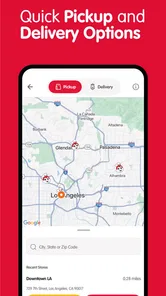
Yes, the app is designed to support convenient food ordering, although the exact options depend on the country, branch, operating hours, and delivery coverage in your area. After entering your location, you can usually choose between delivery and pickup when those services are available. Before paying, carefully check the selected branch, estimated preparation time, delivery fees, and order details.
How do rewards work in Jollibee - Order & Rewards?
The rewards system allows registered customers to collect points, stamps, or other promotional benefits according to the program available in their region. Rewards may be earned through qualifying purchases made with the app and can sometimes be redeemed for selected menu items or discounts. Program rules, expiration dates, minimum spends, and eligible products can change, so review the terms shown in the app.
Pros
- Earn rewards points from eligible purchases.
- Convenient ordering for pickup or delivery.
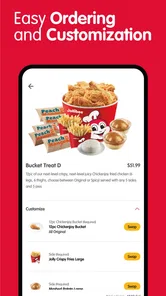
- Menu customization is available for many items.
- Stores saved orders for faster repeat purchases.
- App promotions can offer useful discounts.
Cons
- Rewards and promotions may vary by location.
- Delivery availability depends on nearby Jollibee branches.
- Peak-time orders may take longer than expected.
- Some menu items may be unavailable in the app.
- Account registration is required for personalized rewards.











