J4T Multitrack Recorder
- 784.00
- 4.3
- Installs
- 50.00K
- Price
- $3.49
Screenshots
Analysis by Reviewed
When I’m comparing music apps, I pay attention not only to what they can record, but also to how much effort it takes to start and whether I can use them comfortably in the places where ideas actually happen. That is where J4T Multitrack Recorder makes a clear case for itself: it keeps the focus on building a small recording from separate parts, without asking me to approach a phone like a full production studio. It is a paid music and audio app from Jaytronix, rated Everyone, with an average of 4.3 from around 2,300 ratings and over 50,000 installs. Version 4.95 supports Android 7.0 and later, and costs $3.49. I’d consider that price when deciding whether I want a dedicated multitrack sketchpad rather than a free, single-purpose recorder.
Quick capture or planned session?
The most useful question before installing is what I expect to do with a recording. If I want to preserve a melody, try a chord progression, or hear a vocal against a basic accompaniment, a compact multitrack tool can be a better fit than a voice recorder. If I want to edit a complex arrangement, keep many alternate takes, or build a finished production, I would look toward a more expansive mobile DAW instead. J4T’s appeal is not that it covers every stage of music-making; it is that its limited scope can make a rough idea easier to capture.
I also wouldn’t assume that “simple” means effortless for every person. Recording involves handling a phone, using touch controls, and judging sound through whatever listening setup is available. A short test session is a practical way to learn whether the app’s interaction style works for me before I rely on it for a song idea. I’d try it in the room and with the headphones or speaker I expect to use, rather than judging it only by how the first screen looks.
Getting comfortable with the interface
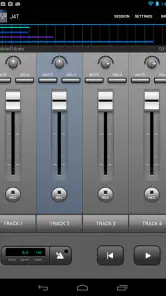
First things first, downloading and setting up the J4T Multitrack Recorder is a breeze. I hopped onto the Play Store, and within minutes, the app was ready to roll. The interface is pretty straightforward, which is great because who has time to read a manual these days, right? It’s designed to get you recording without any fuss, and it delivers exactly that.
Readable enough for quick sessions
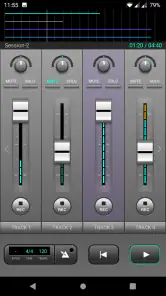
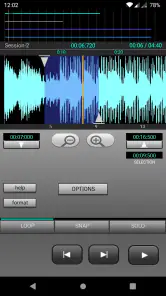
For me, a clean recording screen matters because I often open an app with an idea already in my head. J4T keeps the job focused on recording and shaping a small arrangement rather than surrounding it with the broad production workspace you might find in a full digital audio workstation. That can make the first session less intimidating, though anyone who wants detailed visual editing or a larger project view may find this compact approach restrictive.
One practical habit helps: decide what each track is for before recording. I might reserve one for a scratch vocal, another for a chord pattern, and leave the remaining tracks for a lead line or a rhythm layer. That simple plan makes the limited track count feel intentional instead of frustrating, and it also makes later level and pan adjustments easier to understand.
Features That Hit the Right Note
What I really dig about this app is its simplicity paired with functionality. You can record up to four tracks, which is perfect for laying down vocals, guitar, bass, and drums separately. Plus, it supports WAV and OGG file formats, so compatibility is never an issue.
More From Our News Desk

Clash of Clans Is Won Between the Battles

Android Auto Makes the Case for Quieter Car Software

MobiOffice: Transforming Mobile Productivity with Seamless Integration

EA SPORTS FC™ Mobile Soccer: Redefining Mobile Sports Gaming

How Microsoft OneDrive Became a Mobile Productivity Giant

How Google Translate Breaks Language Barriers Effortlessly
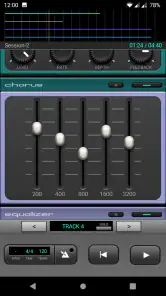
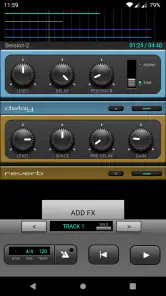
The app also offers some neat mixing options. Adjusting volume levels and panning is intuitive, making it easy to tweak your tracks to perfection. And oh, let’s not forget the effects! Reverb, delay, and equalizer settings are at your disposal, adding that professional touch to your recordings.
A useful sketchpad, not a full studio
That four-track ceiling is the key trade-off. It suits a song sketch, a layered voice-and-instrument demo, or a quick arrangement that helps me remember a chorus. It is less suitable when a project needs many separate takes, elaborate editing, or a large set of instruments. Compared with the usual all-in-one mobile DAWs, J4T is appealing when I want fewer decisions between opening the app and recording; a more expansive app is the better choice when detailed production and room to grow matter more than speed.
A sensible workflow is to record the most important part first, then add only layers that improve the idea. I’d also listen back before reaching for effects: reverb or delay can make a rough demo feel more complete, but too much can blur timing and make it harder to judge the performance. Keeping an unembellished version of the idea in mind makes those controls more useful than simply adding polish by habit.
Performance and confidence during a take
Performance-wise, the app runs smoothly on my device. I’ve yet to encounter any crashes or glitches, which is a huge relief when you’re in the middle of a creative flow. The response time is quick, with minimal latency, so you can record and playback your tracks without any annoying lag.
For an important idea, I still like to do a quick playback after the first layer before building on it. That catches a muffled vocal, an unwanted room sound, or a performance that feels different from what I heard while playing. It also helps me decide whether another part will genuinely add something. This small checkpoint matters more in a four-track project: if a weak first layer sets the direction, there is less room to compensate later with extra parts.
Motor and sensory considerations
For a musician with limited time or a preference for a direct workflow, a focused recorder can reduce the number of steps between an idea and a saved demo. In a quiet room, I can listen closely and adjust a part without the visual and sonic busyness of a complex production suite. But recording still asks for careful tapping and attentive listening: if precise touch interactions or subtle audio details are difficult for you, the compact controls and sound-based work may not feel effortless. I would try a short test recording before committing to a longer session.
It helps to separate capturing from judging. I might record a phrase while an idea is fresh, then listen again later at a comfortable volume and make level or pan changes when I have more attention to spare. That can be less tiring than trying to perform, operate controls, and critically mix at the same time. For anyone who finds repeated touch adjustments difficult, planning the track roles and recording order beforehand can also reduce unnecessary trips between controls.
Usability: For Musicians, By Musicians
One thing I genuinely appreciate is that the app seems designed with musicians in mind. It’s not cluttered with unnecessary features that bog down your workflow. Instead, it focuses on what matters most: capturing and refining your music. Whether you’re a budding songwriter or a seasoned musician, you’ll find this app gets the job done without a hitch.
That said, a direct interface is not the same as a guarantee that every control is easy to see or reach. I would check the screen in the lighting where I normally record and make sure I can identify the track I mean to change before adjusting it. A small habit like changing one setting at a time and listening back can prevent confusion, especially when working quickly or sharing the phone with someone else who is helping with a take.
When and where it works best
A realistic use for me is catching a melody during a break: I can lay down a vocal or instrument idea, then add a couple of supporting parts later when I have more time. That is more dependable than trusting myself to remember the exact rhythm and phrasing. For a noisy commute or a place where playing aloud would bother others, however, recording may be awkward; the app cannot make the surroundings quiet, and I would save detailed listening and mixing for somewhere calmer.
Another useful situation is rehearsing a short arrangement at home. I can record a chord pattern, add a vocal or melody, and use playback to hear whether the parts work together before asking other musicians to learn them. I would keep each take deliberately simple and avoid trying to capture a whole rehearsal as though the phone were a dedicated recording setup. The app’s value here is in communicating an idea clearly, not in replacing a carefully planned group recording.
It is also worth being clear about what a phone demo is for. J4T can help me preserve an arrangement and hear how a few parts sit together, but I would not treat a compact multitrack sketch as a substitute for a full studio workflow when I need extensive editing or a polished, complex production. If the goal is simply to keep a songwriting idea, its limited scope is a strength. If the goal is to build a dense finished track, I’d choose a more capable workstation.
Files, portability, and the next step
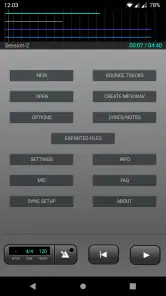
Support for WAV and OGG gives the app two practical ways to handle recorded audio, but I would still decide how a project fits into my broader workflow before starting a serious recording. If I expect to continue work elsewhere, I’d make a short test project first and check that the result suits the next tool I plan to use. A format being familiar does not, by itself, guarantee that every later editing step will feel convenient.
For a quick demo, keeping the arrangement and playback together on the phone is often the point. For a project I expect to develop, I would treat J4T as the sketch stage: use it to settle the musical idea, then move to a larger production environment if I need more tracks or detailed editing. That boundary makes the app easier to recommend honestly. It is a focused way to work out a part, not a promise that every later production task will fit into the same small setup.
Remaining barriers and who should skip it
The main barriers are practical rather than mysterious: four tracks impose a firm creative limit, and recording quality depends on the phone, the room, and how carefully I capture each part. I also would not assume that every control will suit every hand or that the screen will be comfortable in every lighting condition. A brief trial run can answer the personal question better than a feature list: record a short phrase, adjust a level, pan a track, and play it back.
If you are choosing between this and a basic voice recorder, the difference is the ability to build a small arrangement and balance its parts rather than keeping one long take. If you are choosing between it and a full mobile DAW, the trade is the reverse: J4T offers a narrower, more approachable task, while a larger workstation is preferable for expanded track counts and deeper production tools. I’d skip J4T if you already know you need those broader capabilities, or if you want a free option before paying for a dedicated recorder.
I would also pause if I mainly need spoken-word recording, long uninterrupted interviews, or a way to capture sound in places where I cannot monitor playback. A basic recorder may be a more direct choice for those jobs, while a full DAW makes more sense for a musician who wants detailed editing and room for larger arrangements. J4T is most convincing when the task is specifically to turn a few musical layers into a usable demo, rather than to be an all-purpose audio tool.
Final Thoughts: A Handy Tool for Every Musician
In conclusion, if you’re looking for a reliable and user-friendly multitrack recording app, the J4T Multitrack Recorder is definitely worth checking out. It’s simple yet effective, allowing you to focus on what truly matters – making music. So next time you have a melody stuck in your head, just grab your phone and let this app help you turn it into a masterpiece.
An inclusive verdict
I see J4T as a practical option for people who want a straightforward way to capture and layer musical ideas, especially songwriters who value a quick start over a deep production toolkit. Its focused layout may feel less demanding than a full DAW, but that alone does not make it accessible for everyone; comfort depends on your vision, dexterity, hearing, device, and recording environment. My advice is to use the short test workflow above and decide whether the controls and listening process feel comfortable to you. If they do, the one-time purchase can make sense for compact demos; if they do not, a simpler recorder or a more flexible workstation may fit your needs better.
J4T Multitrack Recorder Frequently Asked Questions
Is J4T Multitrack Recorder free to download, and what does it cost?
J4T Multitrack Recorder is a paid Music & Audio app from Jaytronix, priced at $3.49. It is aimed at capturing song ideas and making demos, so consider whether a straightforward multitrack recorder fits your needs before purchasing. Its Everyone content rating makes it suitable for a broad audience, though the app’s recording and editing tools are primarily relevant to musicians and audio enthusiasts.
Which devices and operating systems can run J4T Multitrack Recorder?
The app requires Android 7.0 or later, so check your device’s Android version before downloading. J4T Multitrack Recorder is an Android app, and its practical performance can also depend on the device you use for recording and playback. If your phone or tablet meets the minimum requirement, you can use it to work on song ideas and demos while away from a computer.
What is J4T Multitrack Recorder and what are its main features?
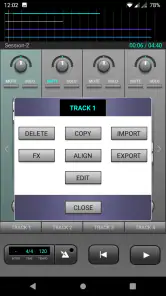
J4T Multitrack Recorder is a versatile audio recording app designed for musicians and audio enthusiasts. It allows users to record and mix up to four tracks with ease. Key features include a user-friendly interface, support for WAV and MP3 formats, import and export functions, and various audio effects like reverb and chorus. It's an essential tool for anyone looking to capture and edit audio on the go.
Is J4T Multitrack Recorder suitable for professional audio production?
While J4T Multitrack Recorder offers robust features for mobile recording, it is primarily designed for quick, on-the-go projects. It is excellent for sketching musical ideas or creating demos but may not replace professional desktop recording software for detailed production work. However, it integrates well with other tools, enabling users to export tracks for further editing on professional platforms.
Can I use J4T Multitrack Recorder without any prior audio editing experience?
Yes, J4T Multitrack Recorder is designed to be user-friendly and accessible to users of all skill levels. The intuitive interface and straightforward controls make it easy for beginners to start recording and mixing audio. Additionally, the app includes help guides and tutorials to assist new users in navigating its features effectively.
Pros
- Easy-to-use interface for quick recording.
- Supports multiple audio formats.
- Offers real-time effects for editing.
- Allows track mixing with precision.
- Affordable with a one-time purchase.
Cons
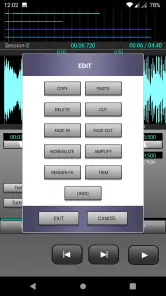
- Limited advanced editing features.
- No cloud backup integration.
- Interface feels slightly outdated.
- Occasional bugs in playback.
- No built-in instruments or loops.
- Category
- Music & Audio
- Version
- 4.95











