J-Novel Club
- 56.00
- 3.4
- Installs
- 100.00K
- Price
- Free

Screenshots

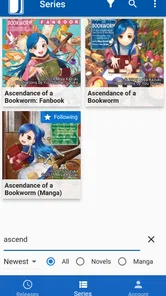
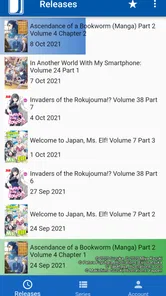
Analysis by Reviewed
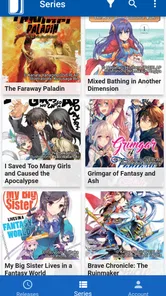
I approached J-Novel Club as a reading app rather than a general-purpose digital library. Its focus is clear: light novels and manga, with a catalog built around Japanese titles and their English reading experience. That narrow purpose is its biggest appeal, but it also explains why the app will feel very different from a broad ebook platform. If you already know the kinds of stories you want, it can be a convenient place to keep up with them. If you expect every popular book, comic, or translated series to appear in one search, you may find the selection more limited than expected.
The app comes from M12 Media and sits in the Books & Reference category. It is free to install, carries a Teen content rating, and has passed the one-hundred-thousand-install mark. Its average rating is 3.4 from more than three hundred ratings, which suggests a mixed experience rather than a universally smooth one. After spending time with it, my impression is that the reading idea is stronger than the surrounding convenience: the core purpose is easy to understand, while account, catalog, and access questions are where a new reader is most likely to hesitate.
What using J-Novel Club feels like in everyday reading
The first thing I would tell a friend is to treat this as a dedicated home for light novels and manga, not as a replacement for Kindle, Google Play Books, Apple Books, or a regular comics reader. Those broader alternatives are often better when I want to bring books from different publishers into one shelf. J-Novel Club makes more sense when my priority is following its particular collection and reading it in the environment intended for those works.
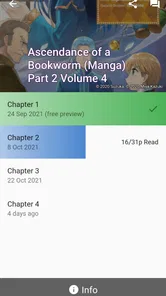
That distinction matters during the first few minutes. A reader may search for a title, see a result, and assume that finding it means the entire work is immediately available. In practice, discovery and access are separate decisions. I recommend checking the title page carefully before settling in: look at whether the item is a novel or manga, identify the volume or part, and confirm what the app is asking me to do before I begin reading. This small pause prevents the most common kind of disappointment—starting a series from the wrong point or reaching an access prompt after already deciding what to read.
The app is free, but it includes in-app purchases ranging from $7.99 to $49.99 per item. I would not interpret the free download as meaning that every title is included without further cost. Instead, I see the free entry point as useful for browsing the service and deciding whether its catalog suits me. A cautious reader can explore first, then spend only after checking the exact title, volume, or reading option involved.
That approach is especially helpful for someone who reads slowly. If I only have a few minutes on a commute or before bed, I do not want to commit to a purchase before knowing whether the series matches my taste. I would use the free portion to sample the writing, inspect the presentation, and see whether the app fits my routine. For a dedicated fan, that extra checking becomes a sensible habit rather than a burden.
The places where new readers usually get stuck
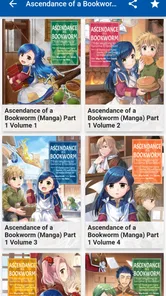
Catalog navigation is the first likely friction point. Light novels and manga can be organized by series, volume, and format, and those labels do not always answer the question a reader actually has: “Where should I start?” I find it safer to identify the series name first and then verify the sequence of the specific item. Searching by a partial title can also produce several related entries, so I would avoid opening the first result automatically.
More From Our News Desk

Weather by Xiaomi Review: Clear at a Glance, Less Clear Up Close

X Under Pressure: Can It Recover When Posting Goes Wrong?

Clash of Clans Is Won Between the Battles

Android Auto Makes the Case for Quieter Car Software

MobiOffice: Transforming Mobile Productivity with Seamless Integration

EA SPORTS FC™ Mobile Soccer: Redefining Mobile Sports Gaming
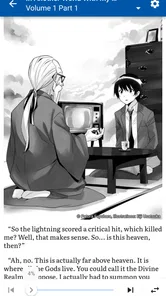
A second sticking point is the difference between reading on a phone and reading on a larger screen. A phone is convenient for short sessions, but manga panels and small text can make me zoom or reposition more often. Light novels are generally easier to handle in a narrow portrait layout, while illustrated pages benefit from a larger display. If a page looks cramped, I would first rotate the device, adjust the reading orientation if the app offers that option, or try a tablet before assuming the title itself is poorly formatted.
Another source of confusion is an account or purchase prompt appearing at an unexpected moment. I would not immediately conclude that the app has lost my access. First, I would check whether I am signed into the same account used when the title was obtained, then reopen the title from the library or account area rather than from a fresh search result. This is basic troubleshooting, but it addresses a surprisingly common difference between “the title is visible” and “the title is available to me.”
Readers should also pay attention to their connection when opening a new volume or switching between sections. If a cover or page takes longer than expected, waiting briefly and retrying is more useful than repeatedly tapping the same control. Repeated taps can make it unclear whether the app is responding slowly or has received several commands. I prefer to return to the previous screen once, reopen the item, and see whether the problem follows the title or only affected that particular attempt.
A calmer setup before the first serious reading session
My recommended setup is simple. Install the current version, which is 3.4.1, on a device running Android 7.0 or later, then open the app with a stable connection. I would sign in before spending time organizing a reading list or making any purchase. That way, the account state is established from the beginning, and it is easier to tell whether a missing title is a catalog issue, an access issue, or merely a session problem.
I would also test one short reading session before planning a long trip around the app. Open a title, move through several pages, leave it, and return to it. This checks the practical parts of the experience that a store description cannot show: whether the text is comfortable on my screen, whether I can find my place again, and whether the app behaves predictably after being interrupted. A five-minute test can save a lot of frustration later.
For manga, I would test the device in both portrait and landscape orientations. Portrait is often natural for single-page reading, but landscape may make wide artwork easier to inspect. For light novels, I would test font comfort rather than simply choosing the smallest text that fits more words on screen. Reading speed is not improved if I am constantly squinting or losing my place.
Notifications and background activity are also worth considering as part of a personal routine, although I would not change settings blindly. If the app feels slow after several other apps have been open, I would close unused apps and restart the reader before changing system-wide settings. If the issue disappears after a restart, that points toward a temporary device condition rather than a permanent problem with the title.
Because the content rating is Teen, I would still check individual series descriptions before handing the device to a younger reader. A broad age label is useful as a starting point, but it is not a substitute for deciding whether a particular story suits the person who will read it. That is a practical step for parents and for anyone sharing an account or tablet with family members.
Recovering a reading workflow when something goes wrong
When a title does not open, I use a short recovery sequence instead of trying random fixes. First I check the connection and make sure the app is not simply waiting for a response. Next I close and reopen the title. If that fails, I restart the app completely and try again. Only after those steps would I consider reinstalling, because reinstalling can create extra account and library work without addressing a temporary loading problem.
If a purchase or access state looks wrong, I verify the account before doing anything irreversible. I would avoid buying the same item again merely because it is visible in the catalog. The important distinction is whether the app recognizes the account that should have access. Signing out and back in can help refresh that state, but I would record which account I used first so I do not accidentally switch to a different one and make the situation harder to understand.
When my place in a book seems to disappear, I would search for the title again and inspect the series structure rather than assuming the reading history is gone. A volume-based service can make it easy to open a related entry instead of the exact one I was reading. I also prefer to stop at a clear chapter or page boundary before leaving a session; that gives me a reliable mental marker if the app later reopens at a nearby location.
A useful habit is to separate content problems from app problems. If one title fails while other titles open normally, I would note the exact series and volume and avoid changing every device setting. If everything fails, then I would investigate the connection, account session, and app restart in that order. This method is less dramatic than immediately blaming the reader, but it produces clearer information and usually gets me back to reading faster.
For a long journey, I would prepare earlier rather than waiting until the moment I board. Open the titles I expect to read while connected, confirm that the relevant pages are accessible, and keep the device charged. I would not assume that a title I can see in a search result will behave exactly the same way without a connection. Testing beforehand is the practical difference between a dependable travel setup and discovering a problem after the network disappears.
When the app is not the real cause of the trouble
Some complaints that appear to be about J-Novel Club are really caused by the device. Older phones may struggle when storage is nearly full, several apps are active, or the operating system is under pressure. In that situation, delayed page changes or a slow return from the background can affect any reading app. I would check available storage, restart the phone, and test another demanding app before deciding that this reader is uniquely unstable.
Display settings can also change the reading experience. A very bright screen, aggressive battery saving, or a system font configuration that does not suit the reader can make pages feel uncomfortable even when the app is functioning correctly. I prefer to adjust brightness and battery settings for the reading session first. If text remains difficult to read, the issue may be the screen size or eyesight needs rather than the catalog or software.
Connection quality is another easy culprit. A weak Wi-Fi signal can make browsing appear inconsistent, especially if covers or pages load at different times. I would test the same action on a stronger network and avoid judging the app from one crowded public connection. If the behavior changes with the network, the sensible next step is to improve the connection or retry later, not repeatedly reinstall the application.
There is also a difference between wanting a specific series and wanting a broad reading ecosystem. If my main goal is to combine library loans, independent ebooks, comics from several stores, and personal documents, a general ebook platform will probably be more convenient. If I want a focused place for light novels and manga associated with J-Novel Club, this app has a clearer reason to exist. The better choice depends on whether specialization feels like focus or limitation to me.
I would also skip it if I dislike checking volume order and access details. The app rewards readers who take a moment to understand the catalog. Someone who wants a single tap from search to an unrestricted full book may prefer a service with a more uniform purchase model. Likewise, readers looking mainly for print-book reference material, audiobooks, or a wide mix of unrelated genres are unlikely to get the most from this particular app.
Who will get the most value from it
The strongest audience is a reader who already enjoys Japanese light novels or manga and wants a dedicated place to follow that interest. For that person, the focused catalog can be more useful than a huge but unfocused bookstore. The app also suits readers who alternate between short sessions: a few pages during a break, a chapter at night, or a longer weekend reading block. Its purpose is easy to return to because I am not sorting through unrelated media every time I open it.
It can also work for someone exploring the category for the first time, provided that person is willing to browse patiently. I would start with one series rather than trying to understand the entire catalog at once. Read enough to decide whether the translation style, artwork, and pacing fit my taste, then consider whether a paid item is worthwhile. This is a better introduction than buying several volumes based only on a cover or title.
For families, the Teen rating means I would make the selection personally rather than giving a child unrestricted access and assuming all titles feel identical. For serious collectors, I would think about how this app fits beside existing stores and reading tools instead of expecting it to replace them. Its value is highest when it fills a specific gap in my reading habits, not when I force it to become an all-purpose library.
The free installation makes experimentation relatively straightforward, but the purchase range means I would set a personal spending rule. For example, I might sample one series, decide whether I want the next volume, and keep track of which account made the purchase. That workflow reduces accidental duplication and makes the service easier to manage over time.
My practical verdict after weighing the friction
I see J-Novel Club as a specialized reading app with a clear audience and a less forgiving first-use experience than its simple store summary suggests. The central idea works for me: bring light novels and manga into one focused destination and make it easy to return to the kinds of stories I actually follow. The trade-off is that I need to pay attention to catalog structure, account state, device comfort, and the difference between free access and paid items.
The mixed average rating of 3.4 reflects why I would recommend a measured trial rather than an automatic endorsement. I would install it if I specifically wanted J-Novel Club’s style of content, test a title on my own device, and confirm the reading flow before buying anything. I would choose a broader ebook or comics service instead if my priority were a single shelf for many publishers, formats, and unrelated books.
My final advice is practical: start with a stable connection, sign in first, verify the series and volume, test the page display, and keep account details consistent. If a problem appears, restart the app and separate title-specific trouble from device-wide trouble before making major changes. For readers who want focused access to light novels and manga, the app is worth trying; for everyone else, its specialization may feel more restrictive than helpful.
J-Novel Club Frequently Asked Questions
What devices and operating systems can run the J-Novel Club app?
J-Novel Club is a mobile reading app for Android and iOS. On Android, it requires version 7.0 or later, so checking your device’s software version before downloading can help avoid compatibility issues. Once installed, you can use it to explore the service’s light novel and manga offerings. App availability and features may vary by platform.
What is J-Novel Club, and what kind of content does it offer?
J-Novel Club is a digital reading service focused primarily on Japanese light novels and related manga. Its catalog includes fantasy, romance, science fiction, adventure, and isekai titles, with new translations released in parts as they become available. The app is designed for readers who want officially licensed English translations rather than unofficial fan translations, although the selection depends on current publishing rights.
Can I read J-Novel Club titles for free, or do I need a subscription?
J-Novel Club offers some content that can be sampled or read without paying, including previews and selected portions of books. However, a subscription or other purchase options may be required for complete access, early chapter releases, premium content, or downloadable reading. The app is free to download, with in-app purchases listed from $7.99 to $49.99 per item. Pricing and benefits can vary by region and platform, so it is worth checking the current membership details before subscribing.
Does the J-Novel Club app support offline reading?
Offline reading availability depends on the title, account status, and the features supported by the current version of the app. In general, eligible books or chapters can be saved for reading when an internet connection is unavailable, which is useful during travel. Users should download content in advance and confirm that it appears in their library before going offline.
Are J-Novel Club books available as complete volumes or released chapter by chapter?
J-Novel Club is known for publishing many translations in parts, allowing readers to follow ongoing series before a complete volume is released. This approach is convenient for users who enjoy regular updates, but it may feel slower if you prefer reading an entire book at once. Completed volumes are also available for many series, depending on licensing and publication progress.
Pros
- Official English translations of many Japanese light novels and manga.
- New chapters often arrive shortly after their Japanese release.
- Subscription includes access to a large rotating digital library.
- Pre-publication reading lets members follow stories before ebook releases.
- Available on mobile and web
- with convenient reading progress sync.
Cons
- Most premium content requires a paid membership or separate ebook purchase.
- The catalog focuses on niche genres and may not suit every reader.
- Some series are removed from the subscription library after completion.
- Reading requires an internet connection for much of the available content.
- Translation schedules and chapter availability vary between different series.











