

iReal Pro
- 787.00
- 4.7
- Installs
- 500.00K
- Price
- $21.99

Screenshots
Analysis by Reviewed
I usually reach for a practice app when I know what I want to work on but don’t have other musicians available to play it with me. iReal Pro is built for that gap: it gives me chord charts and a backing band I can adjust, so I can work through a tune at my own pace. It’s a focused music and audio app from Technimo, and its strongest appeal is to players who want to practice changes, timing, and improvisation rather than learn a song from a full recording.
Starting with a tune and a goal
The useful first question is not simply what song to play, but what I want to improve. If I’m stumbling over a progression, I can slow the tempo and stay with the harmony. If I’m preparing to play with other people, I can bring the tempo closer to the one I expect and practice keeping my place. The accompaniment makes the exercise feel less isolated than reading a chart alone, while still leaving me responsible for playing the part.
That distinction matters when choosing between this and a regular music player. A recording gives you a fixed performance to follow; here, the chart and adjustable backing are the practice environment. I wouldn’t use it as a replacement for listening closely to an artist’s phrasing or learning a specific arrangement. I would use it when I need repeatable time on a chord sequence and want room to make my own musical decisions.
Who gets the most from a virtual band
I think the best fit is someone who can already read chord symbols and wants a dependable way to turn them into active playing. A jazz guitarist working through standards, a pianist checking a progression in a new key, or a singer rehearsing harmony at a comfortable pitch can all make a session more purposeful here. The app doesn’t have to teach the underlying theory for that kind of practice to be useful; it gives the player a framework in which to apply what they know.
For a beginner who is still unsure what a chord symbol means, the experience may feel like being handed a map without instructions. I’d pair it with lessons or a teacher rather than expect the app to explain harmony step by step. Similarly, a listener who mainly wants complete songs, lyrics, or a faithful version of a favorite recording should stick with a music player. The strength here is not passive listening; it is making choices while the accompaniment continues.
From chart to practice session
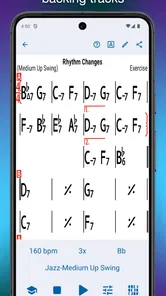
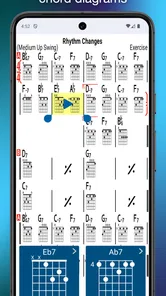
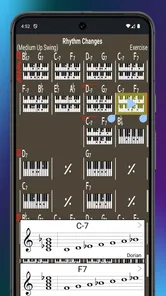
First off, let’s talk about the main functionality of iReal Pro. This app is like having a band in your pocket. You can practice with a virtual band that accompanies you as you play. It’s not just any band; you can customize the style, tempo, and key to suit your personal needs. This flexibility makes it a fantastic tool for anyone looking to improve their improvisation skills or just jam along with different genres.
Building a useful session
One practical approach is to begin with a comfortable tempo, play through the form without stopping, and notice where the changes catch me out. Then I can repeat the tune more slowly, focusing on those transitions instead of treating every bar as equally difficult. Once the progression feels steadier, raising the tempo in small steps is more useful than jumping straight to performance speed. The backing keeps moving, so I also practice recovering after a missed change instead of restarting every time.
More From Our News Desk

 Gmail
GmailGmail in a Busy Inbox: Who Benefits Most?
From first account to crowded workday, Gmail earns its place through dependable search and flexible sorting—but its best fit depends on how much inbox maintenance you can tolerate.

 Prime Video
Switching to Prime Video: What Changes in Your Viewing Routine
Prime Video can make a compelling second home for streaming, but switching means learning a different catalog, rental layer, and route from browsing to playback.

 Universal TV Remote Control
Universal TV Remote Control Works Best as a Reliable Backup
A phone remote earns its place through quick setup and reliable habits. Here is how to get more from Universal TV Remote Control—and where its limits show.

 Weather - By Xiaomi
Weather by Xiaomi Review: Clear at a Glance, Less Clear Up Close
Xiaomi’s weather app makes everyday forecasts quick to scan, but its calm surface can leave useful details and recovery paths harder to find than they should be.

 X
XX Under Pressure: Can It Recover When Posting Goes Wrong?
A resilience-focused review of X, examining setup, mistaken posts, interruptions, weak connections, and the gaps that matter when recovery needs to be dependable.

 Clash of Clans
Clash of Clans Is Won Between the Battles
Its raids are quick; its community is a long-term project of coordination, teaching, rivalry, and shared responsibility—with all the friction that entails.
Latest News



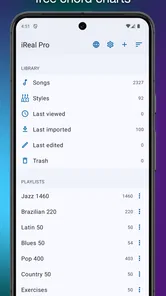
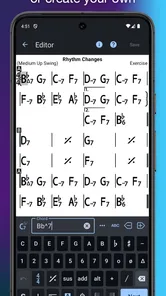
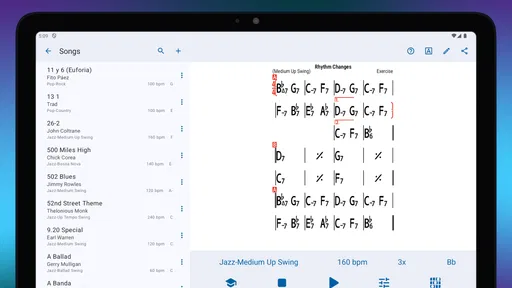
The chord chart library gives that workflow a starting point across jazz, pop, rock, and other styles. I can also make my own charts, which is helpful when I want to work on an original progression or adapt material for a rehearsal. A chart is only as useful as the way I enter and organize it, though: checking the progression before a session saves me from building practice around an accidental chord or an awkward layout.
Changing the chart to fit the player
One of the standout features is the chord chart library. iReal Pro comes with a vast collection of chord charts for jazz, pop, rock, and many other genres. Plus, you can create your own chord charts if you’re feeling creative. This is particularly handy if you’re working on original compositions or need to tweak existing songs to fit your style.
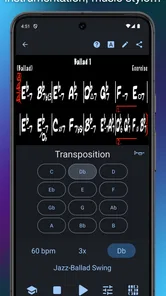
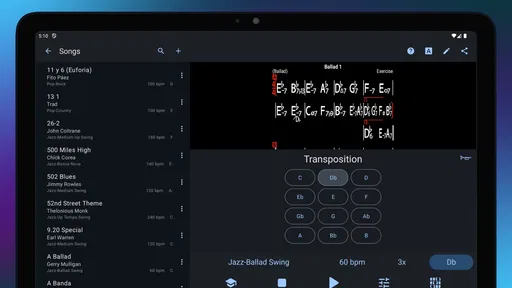
Another aspect worth mentioning is the app’s ability to transpose music effortlessly. If you’ve ever struggled with playing in different keys, this feature will make your life a lot easier. Just a few taps and you can change the key of any song, which is perfect for vocalists needing to match their range.
For a singer, transposing can turn a chart into a more comfortable practice reference; for an instrumentalist, it can help rehearse the same harmony in another key. I find it most valuable when I treat that as deliberate practice rather than a shortcut: moving a tune across keys can expose whether I understand the changes or have memorized one familiar shape. If my goal is to reproduce a particular recording exactly, though, a general-purpose chart and backing track may not match its arrangement.
Making the backing serve the exercise
The user interface is intuitive and easy to navigate, even for those who aren’t tech-savvy. I found myself quickly getting the hang of it, and the design does not distract from the core function of the app. Everything is logically laid out, making it easy to jump straight into a practice session without any fuss.
Moreover, iReal Pro supports playback customization, allowing you to adjust the volume of each instrument in your virtual band. This means you can focus on specific parts of the music, which is incredibly beneficial for targeted practice.
That control is useful for more than simply making one instrument louder. I can lower a part that competes with what I’m trying to hear, or make the accompaniment less dominant while I work on my own timing and sound. A simple home routine might be to pull up a chart before a short evening practice, play it once to find the trouble spots, then repeat only with a slower tempo and a quieter backing. It gives the session a clear purpose without needing a bandmate to be free at the same time.
A small routine that improves the handoff
For a realistic rehearsal day, I’d use the app at home to settle the form and identify any changes I need to check, then take that preparation into the room with other players. I would not assume that everyone is using the same chart simply because the title matches. Before playing together, I’d confirm the key, form, and any intended repeats with the group. That quick conversation matters because a chart is a working reference, not a guarantee that musicians share the same arrangement.
There is also a useful trade-off in how I prepare: practicing only at a slow tempo can make the harmony feel comfortable without preparing me for the pressure of a faster performance. I’d use slow playback to isolate a problem, then return to a more realistic pace and keep going even if I make a mistake. That last step is easy to skip, but it’s what turns an exercise into rehearsal for staying in time with other people.
Sharing, rehearsing, and the handoff
Another fantastic thing about iReal Pro is its community. Users can share their chord charts, which means you have access to a constantly growing library. This feature fosters a sense of community and collaboration, perfect for those who love to connect with other musicians.
Shared charts can make it easier to get from a practice idea to a rehearsal starting point, but I’d still check a chart against what the group intends to play. Players may use different forms, voicings, or arrangements, and a convenient shared reference does not automatically mean everyone has the same version in mind. Agreeing on the key and structure before rehearsal is a small step that can prevent a lot of confusion.
The app also regularly updates its content, ensuring you have fresh material to work with. This ongoing support shows the developers' commitment to providing a robust tool for musicians.
Where it fits—and where it doesn’t
I’d recommend this to instrumentalists, singers, and songwriters who already work with chord symbols and want a flexible companion for repetition, transposition, or trying ideas over changes. It is less suitable for someone who wants guided lessons, notation-led instruction, or a polished backing track that recreates a specific studio arrangement. In those situations, a lesson app, sheet-music tool, or the original recording may be a better match.
There is also a difference between practicing with a responsive group of people and practicing against programmed accompaniment. The virtual band gives me a steady context, but it cannot react to my phrasing or follow a spontaneous change in dynamics the way live musicians can. I see it as a bridge to playing with others, not a substitute for rehearsal. Its value depends on whether I arrive with a clear musical task; without one, it can be easy to cycle through charts without making much progress.
The app has a 4.7 average from around 18,000 ratings and has passed 500,000 installs. It is rated for Everyone, and its listed price is $21.99, with in-app purchases at $6.99 per item. That is a substantial upfront choice compared with a basic player, so I’d consider how often I’ll use chord charts and adjustable accompaniment before buying. For a player who returns to those tools regularly, the dedicated practice workflow is the point; for occasional listening, it is probably more app than needed.
What to weigh before choosing it
Compared with the usual alternatives, this sits between a static chord sheet and a conventional recording. A paper chart is simpler and leaves you free to imagine the sound, but it won’t provide a moving pulse. A recording offers real phrasing, tone, and arrangement, yet its tempo and performance are fixed. iReal Pro is the more practical choice when I want the same harmony to continue while I change the key, pace, or balance of the accompaniment. Each option serves a different job, so I wouldn’t treat one as a universal replacement for the others.
The price makes frequency of use especially important. If I expect to practice with charts several times a week, having the accompaniment ready can remove the hassle of assembling a session around other people’s schedules. If I only need a chart now and then, a simpler reference may be enough. I’d also think about whether I enjoy working from chord symbols: the app can support that habit, but it won’t make the habit itself appealing to someone who prefers learning by ear or following complete notation.
A practice tool with a clear purpose
In conclusion, whether you’re using it for practice, performance, or composition, iReal Pro offers a comprehensive solution for musicians of all levels. Its versatility and user-friendly design make it a must-have app for anyone serious about improving their musical skills. So, if you haven’t tried it yet, I highly recommend giving it a go and experience the benefits firsthand.
My more measured recommendation is to buy it when you can name the job you want it to do: run through changes, test a different key, or keep a solo going over a steady form. The release dates back to August 3, 2011, and the app’s enduring purpose is easy to understand: it makes focused repetition convenient. If your practice already revolves around chord charts, that convenience can earn its place; if you mainly need songs to listen to, I’d choose a simpler option.
iReal Pro Frequently Asked Questions
What kinds of musicians might find iReal Pro useful?
iReal Pro is designed as a music practice tool, so it may suit musicians who want chord charts and backing tracks as part of their routine. Its features can support different stages of learning and rehearsal, from working through a song to practicing with accompaniment. Whether it fits your needs depends on how you like to study music and which tools you use while practicing.
Can I use iReal Pro to work on songs at my own pace?
The app offers tempo adjustment and key transposition, giving you ways to adapt practice material to your current needs. You can slow a passage down or move a chart to another key, which can be helpful when learning unfamiliar material or rehearsing a part. These controls make it easier to shape a session around your pace rather than treating every chart as fixed.
Who develops iReal Pro, and what is its age rating?
iReal Pro is developed by Technimo and is rated Everyone, so its stated content rating is suitable for a broad audience. It is a music practice app rather than a game, and its focus is on chord charts and backing tracks. These details can help you decide whether the app’s purpose and audience fit what you are looking for before downloading it.
How much does iReal Pro cost, and are there in-app purchases?
iReal Pro costs $21.99, and it also offers in-app purchases priced at $6.99 per item. Consider both the initial purchase and those optional purchases when deciding whether it fits your budget. The app is centered on music practice, chord charts, and backing tracks, so its value will depend on whether those tools match the way you want to learn or rehearse.
What is iReal Pro and what does it offer?
iReal Pro is a versatile music practice tool designed for musicians of all levels. It offers an extensive library of chord charts for a wide range of genres, allowing users to practice with realistic-sounding accompaniments. The app also provides features like key transposition, tempo adjustment, and the ability to create custom charts, making it an essential tool for practicing musicians.
Pros
- Comprehensive chord library for musicians.
- Intuitive interface for easy navigation.
- Supports multiple genres of music.
- Realistic sound quality and playback.
- Customizable practice sessions.
Cons
- Subscription required for full access.
- Limited free version features.
- Occasional app crashes reported.
- No real-time collaboration feature.
- High learning curve for beginners.











