

IPTV
- 834.00
- 4.3
- Installs
- 10.00M
- Price
- Free

Screenshots
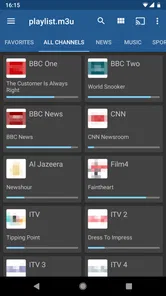
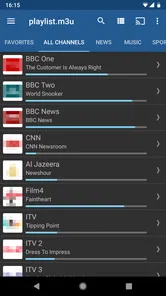
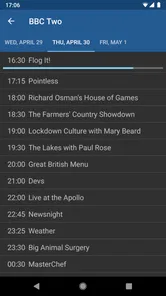
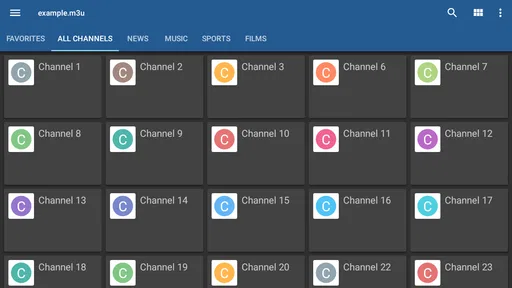
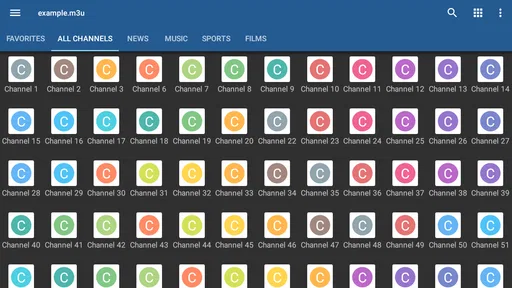
Analysis by Reviewed
When I consider IPTV as a practical choice, the clearest point is the cost: the app is free to install. That makes it easy to try without paying upfront, but free access to the app should not be confused with a promise that every channel or program is included at no cost. I’d treat it as a player for watching IPTV on an Android device, then check what source of channels I actually have before planning my viewing around it.
What the free app is useful for
For me, the appeal is having a dedicated place to watch IPTV on a phone or tablet rather than juggling a television setup. If I already have access to an IPTV source, an app like this can make that viewing routine more portable. The useful question is not simply whether the app costs anything, but whether it fits the way I watch: occasional viewing on a smaller screen is a different need from building a full living-room TV setup.
A realistic use would be checking a live program while away from home, then switching back to a larger screen later if that is part of your setup. On a commute or during a break, I’d use mobile data only if my plan and connection make streaming sensible; at home, Wi-Fi is the more comfortable default. That small choice matters because the app itself cannot make a weak connection reliable, and video can use data quickly.
Where it sits among video apps
IPTV is not the same proposition as a conventional subscription service with a built-in catalogue, or a video app that centers on clips and on-demand recommendations. Its focus is IPTV viewing on Android, so its value depends more on the channels or stream source you bring to the experience. If you want a ready-made library of films and series with a familiar browse-and-play routine, a mainstream streaming service may suit you better. If you want to watch IPTV on a mobile device, this is the more relevant kind of tool.
That distinction also helps set expectations about setup. Before relying on it for a particular event, I would confirm that my channel source is available and working, and test playback at home rather than waiting until I’m out. A short trial run can reveal whether the stream loads smoothly on my connection and whether the controls feel comfortable on my screen. It is a simple way to avoid discovering a setup snag at the moment I want to watch.
Who should try it, and who may prefer another option
I’d consider it if I already use IPTV and want a free Android app for viewing on the go, or if I’m curious about watching through this format without paying for the app first. It is less compelling for someone who expects the app itself to supply a complete entertainment package, or who mainly watches on a television and does not need a phone-based option. People who prefer a polished, ready-to-browse on-demand catalogue may also be happier with a service designed around that experience.
The practical trade-off is that “free” removes the app’s purchase cost, not every possible hurdle in watching. Your available channels, the strength of your internet connection, and your comfort with setting up an IPTV source all shape the result. I would not choose it on the assumption that it replaces every cable or streaming service; I’d choose it for the narrower job of bringing IPTV viewing to an Android device.
More From Our News Desk

 Gmail
GmailGmail in a Busy Inbox: Who Benefits Most?
From first account to crowded workday, Gmail earns its place through dependable search and flexible sorting—but its best fit depends on how much inbox maintenance you can tolerate.

 Prime Video
Switching to Prime Video: What Changes in Your Viewing Routine
Prime Video can make a compelling second home for streaming, but switching means learning a different catalog, rental layer, and route from browsing to playback.

 Universal TV Remote Control
Universal TV Remote Control Works Best as a Reliable Backup
A phone remote earns its place through quick setup and reliable habits. Here is how to get more from Universal TV Remote Control—and where its limits show.

 Weather - By Xiaomi
Weather by Xiaomi Review: Clear at a Glance, Less Clear Up Close
Xiaomi’s weather app makes everyday forecasts quick to scan, but its calm surface can leave useful details and recovery paths harder to find than they should be.

 X
XX Under Pressure: Can It Recover When Posting Goes Wrong?
A resilience-focused review of X, examining setup, mistaken posts, interruptions, weak connections, and the gaps that matter when recovery needs to be dependable.

 Clash of Clans
Clash of Clans Is Won Between the Battles
Its raids are quick; its community is a long-term project of coordination, teaching, rivalry, and shared responsibility—with all the friction that entails.
Latest News



In practical terms, I’d think of IPTV as a viewing tool rather than a source of entertainment by itself. The app is associated with Alexander Sofronov and sits in the video player and editing category, though its purpose here is watching IPTV on Android. It is free, rated for Everyone, and its long-running presence has drawn an average rating of 4.2 from around 110,000 ratings, with more than 10 million installs. Those figures suggest that many people have tried it, but they don’t tell me whether a particular channel source will work well for you; that depends on your own setup.
What to check before settling into a routine
One useful habit is to test the whole route from opening the app to playing a channel, not merely confirm that the app launches. If your IPTV source requires setup, keep the relevant details somewhere you can find them and enter them carefully. A typo or outdated source can look like an app problem when the actual issue is the information being used. I’d also try more than one channel, since a single successful stream doesn’t prove that every part of a source is functioning.
For a weekday routine, imagine you have a few minutes before an appointment and want to catch the start of a live program. I’d open the app on Wi-Fi first, check that the channel begins playing, and only then decide whether it makes sense to continue over mobile data. If the connection changes while travelling, pausing to reconnect or switching to a more stable network may be more sensible than repeatedly reopening the same stream. This is a small workflow, but it helps separate network trouble from setup trouble.
How to judge the viewing experience fairly
Streaming quality is a joint result of the player, the channel source, and the connection. I would not judge the app by one stutter on a crowded public network, nor assume that a smooth home test guarantees identical playback elsewhere. Try it in the places where you actually expect to watch. A phone held in one hand also creates a different experience from a tablet resting on a table, so check whether the controls and screen size suit your habits before making it your regular option.
There is a practical trade-off between convenience and screen size. A phone is handy for a quick check or a short break, but it is not automatically the best way to watch a long program. If you mainly want a shared, comfortable living-room experience, your television setup or a service designed around that screen may be the better choice. I see the mobile format as a complement for specific moments, not a universal replacement for every way of watching video.
What kind of value does free access offer?
Because there is no upfront app purchase, trying it is a low-commitment decision. That is useful if you already have an IPTV source and want to see whether mobile viewing fits your day. The value becomes less clear if you must first arrange a source, learn a setup process, or troubleshoot streams, because those steps take time even when the player itself costs nothing. I’d weigh that effort against how often I expect to use IPTV on an Android device.
It is also worth keeping the distinction between the app and the content in mind. Free installation does not establish that channels are free, authorized, or included; you should use a source you have the right to access and understand any terms attached to it. I would not enter into a viewing plan based only on seeing a free player in the app catalog. Confirming the source first is the sensible step, especially if you are setting this up for someone else.
Where the limitations matter most
The main friction is that a player-centered approach asks you to bring more context than a typical on-demand app does. If you expect to open an app and immediately browse a familiar collection, an IPTV setup may feel less straightforward. A source can also vary in reliability, and changing networks can affect playback. Those are not small details for someone who wants effortless background viewing, so I’d choose a conventional streaming service instead if that is the priority.
Another limitation is fit: the app is specifically aimed at Android viewing. If your everyday device is an iPhone, or your main goal is to watch on a television without using an Android device, this may not match your needs. Before committing time to configuring it, make sure the device you intend to use is the one the app is meant for. A tool can be a good fit for its purpose and still be the wrong choice for a particular household.
Who is most likely to appreciate it?
I think the best match is someone who already knows what IPTV source they want to use, watches occasionally on an Android phone or tablet, and is comfortable testing a connection before relying on it. It may also suit someone who wants to explore mobile IPTV without paying to install the player. For that person, the free entry point and focused purpose can be genuinely useful, especially when the phone is a convenient second screen rather than the only screen in the home.
I’d steer away from it if you want a complete channel package, a guaranteed catalogue, or a setup that requires no preparation. It is also not the first option I’d recommend to someone who watches almost entirely on a large television or who needs a polished on-demand browsing experience. In those cases, the usual subscription platform, broadcast service, or TV-focused solution is more likely to match the expectation than a mobile IPTV player.
My practical verdict
As a free Android app, IPTV is worth considering when the viewing source is already in place and mobile access solves a real problem for you. I would install it, test the channels and connection at home, and use it for the situations where a phone or tablet is genuinely convenient. I would not treat the install count or average rating as a guarantee of stream quality, because your source and network shape that experience.
For a simple decision, ask yourself whether you want a player for IPTV you can already access, or a ready-made service that supplies and organizes its own programs. If it is the former, this app is a reasonable place to start at no app purchase cost. If it is the latter, choose an option built around a supplied catalogue instead. That is the distinction that makes the app useful for the right viewer and easy to skip for everyone else.
Have you ever found yourself flipping through channels, feeling like there’s nothing worth watching? Well, let me introduce you to IPTV – a game-changer in the world of television entertainment. With its ability to stream your favorite shows, movies, and live TV channels directly to your device, it’s like having a personal TV genie. Let’s dive into this app and see what makes it tick.
Seamless Streaming Experience
One of the first things that caught my eye with IPTV is its seamless streaming experience. Whether you're catching up on the latest episodes of your favorite series or diving into a new blockbuster, the app delivers a crisp, buffer-free experience. I was pleasantly surprised by how smoothly it ran on both Wi-Fi and mobile data. It feels like magic how it adapts to your internet speed to ensure the best quality without interruptions. I’d say it’s akin to having a cinema in your pocket.
Vast Library of Content
If variety is the spice of life, then IPTV is a full-blown spice market. The app boasts an extensive library that caters to all tastes – from drama and action to documentaries and kid-friendly content. What’s even more impressive is the regular updates, ensuring that there’s always something fresh to watch. I found myself exploring genres I never thought I’d be interested in, thanks to the app’s well-curated suggestions.
User-Friendly Interface
Now, let’s talk about the interface. I’m not the most tech-savvy person, but navigating IPTV felt like a breeze. The layout is intuitive, with everything neatly organized into categories. This means less time searching and more time enjoying your content. The search function is incredibly efficient, allowing you to find exactly what you’re looking for in seconds. It’s like the app knows what you want before you do!
Another nifty feature is the ability to create a personalized playlist. Imagine having all your favorite channels and shows lined up, ready to go, without the endless scrolling. It’s perfect for those lazy weekends or after-work wind-down sessions.
Compatibility and Accessibility
The versatility of IPTV is another point worth mentioning. It’s compatible with a wide range of devices – from smartphones and tablets to smart TVs and even PCs. This means you can take your entertainment with you, whether you’re on a road trip or just lounging at home. The app’s accessibility features also deserve a shout-out, with options for subtitles and audio descriptions that cater to everyone’s needs.
In conclusion, IPTV is more than just an app; it’s a revolution in how we consume television. With its vast library, user-friendly interface, and seamless streaming, it has something for everyone. If you’re tired of traditional TV and looking for a more personalized entertainment experience, give IPTV a try. You might just find yourself wondering how you ever lived without it!
IPTV Frequently Asked Questions
Can I watch channels immediately after installing IPTV?
Installing IPTV gives you a video player, but it does not automatically provide television channels or programs. You need a suitable IPTV source to view content, and the available selection depends on that source. Before downloading, consider whether you already have access to a service or playlist that works with the player; the app itself is the viewing tool rather than a bundle of programming.
What should I check before adding an IPTV source?
Check that the IPTV source comes from a provider you trust and that you are entitled to watch the content it offers. The source determines which channels and programs are available, so its reliability and terms matter to your viewing experience. It is also sensible to review how the provider supplies access details and to keep those details private, just as you would with other account information.
Does IPTV work over mobile data as well as Wi-Fi?
IPTV delivers video over the internet, so viewing depends on having an internet connection. You may be able to watch over mobile data or Wi-Fi, depending on your device, connection, and IPTV source. Streaming video can use a substantial amount of data, so check your mobile plan and connection conditions before watching away from Wi-Fi, particularly if you plan to stream for an extended period.
Can I use IPTV to watch on-demand programs as well as live television?
IPTV technology can be used to deliver both live broadcasts and on-demand content, but the available options depend on the IPTV service or source you use. The Alexander Sofronov app is a player for watching IPTV on Android; it does not determine which programs your source provides. Check the service details to see whether its selection includes the live or on-demand viewing you want.
Is IPTV an app or a television service?
IPTV is a way of delivering television over the internet, while the IPTV app by Alexander Sofronov is a video player for Android. Its short description is simply “IPTV,” and its purpose is to let you watch IPTV on an Android device. The app functions as the viewing tool; access to channels or programming depends on having a suitable IPTV source.
Pros
- Wide range of channels available
- High-quality streaming options
- User-friendly interface
- Affordable subscription plans
- Supports multiple devices
Cons
- Requires stable internet connection
- Some channels may buffer
- Limited offline content
- Ads in free version
- May not work with VPNs











