

IPTV Player - Smart Live TV
- 37.00
- 3.9
- Installs
- 10.00M
- Price
- Free

Screenshots
Analysis by Reviewed
I’d consider IPTV Player - Smart Live TV when I already have a playlist and want a straightforward way to watch it on a phone or tablet. Its appeal is practical rather than mysterious: the app is a video player for personal M3U and M3U8 playlists, so the quality of the experience depends heavily on the playlist I bring to it. That makes it more useful to someone who understands where their streams come from than to someone expecting an app to supply a ready-made TV service.
In my first week with a player like this, the satisfying part is getting a familiar channel list onto a mobile screen without turning the task into a larger media setup. I can see the appeal for a commute, a lunch break, or a spare room where I want to watch a source I already use elsewhere. The important distinction is that a player handles playback; it is not, by itself, a subscription, channel provider, or guarantee that a stream will work.
From quick setup to a lasting viewing habit
I’d use this section to judge the shift from a quick first play to a routine I’d actually keep: whether a few familiar channels are easy to return to, and whether the playlist stays dependable in the places I watch. I’d also pay attention to how much effort it takes to find a channel on a small screen, because that everyday friction often decides whether convenience lasts.
The first-week appeal is mostly about convenience
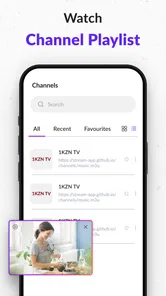
The initial test is simple: can I add my playlist, find the channel I want, and get video playing without repeatedly wrestling with the file or stream? M3U and M3U8 are playlist formats, which means the app’s usefulness begins with a source that is valid and accessible. If a channel is missing or fails to load, I would first check the playlist and connection rather than assume the player can repair the stream.
That division of responsibility is easy to overlook. A person moving from a television setup may expect every channel to appear and behave consistently, but a playlist can contain entries that are unavailable, slow, or poorly organized. My practical tip is to test a small number of frequently watched channels first. That gives a clearer sense of whether the source is dependable before I build a daily routine around it.
The app is free, rated for Everyone, and developed by Johran Pastoon App. It has an average rating of 3.9 from around seven thousand ratings, alongside more than ten million installs. Those figures suggest that many people have tried it, but I wouldn’t treat popularity as proof that any particular playlist will perform well: streams and network conditions remain central to the result.
Month-to-month value depends on your playlist
After the novelty of watching a channel on a different screen wears off, the useful question is whether I reach for the player repeatedly. Its recurring value is strongest when I already have a legitimate playlist that I use often and want available on a mobile device. In that case, it can serve as a convenient viewing endpoint rather than another place to discover or manage a full entertainment library.
More From Our News Desk

 Gmail
GmailGmail in a Busy Inbox: Who Benefits Most?
From first account to crowded workday, Gmail earns its place through dependable search and flexible sorting—but its best fit depends on how much inbox maintenance you can tolerate.

 Prime Video
Switching to Prime Video: What Changes in Your Viewing Routine
Prime Video can make a compelling second home for streaming, but switching means learning a different catalog, rental layer, and route from browsing to playback.

 Universal TV Remote Control
Universal TV Remote Control Works Best as a Reliable Backup
A phone remote earns its place through quick setup and reliable habits. Here is how to get more from Universal TV Remote Control—and where its limits show.

 Weather - By Xiaomi
Weather by Xiaomi Review: Clear at a Glance, Less Clear Up Close
Xiaomi’s weather app makes everyday forecasts quick to scan, but its calm surface can leave useful details and recovery paths harder to find than they should be.

 X
XX Under Pressure: Can It Recover When Posting Goes Wrong?
A resilience-focused review of X, examining setup, mistaken posts, interruptions, weak connections, and the gaps that matter when recovery needs to be dependable.

 Clash of Clans
Clash of Clans Is Won Between the Battles
Its raids are quick; its community is a long-term project of coordination, teaching, rivalry, and shared responsibility—with all the friction that entails.
Latest News



A realistic everyday use is checking a familiar live channel while preparing dinner, then returning to it later during a break. If the playlist is stable and the channel list is easy enough to navigate, that small convenience can become a habit. If the source changes frequently, however, the player may feel less dependable: I could spend more time tracking down playlist problems than actually watching.
This is where I’d compare it with the usual alternatives. A broadcaster’s own app may be the better choice when I mainly watch one service and want its official programming and account features. A broad on-demand video app is a better fit for browsing films and series. A general media center may suit someone who wants a more extensive home setup. IPTV Player makes most sense when the specific job is playing a personal M3U or M3U8 list, not replacing all those services at once.
Playlist upkeep is part of the real cost
The maintenance burden is not just a matter of opening the app. I have to keep the playlist itself usable: know where it comes from, make sure its entries are current, and decide whether its organization makes sense on a small screen. A channel name that is obvious on a desktop list may be hard to pick out quickly on a phone, so a carefully maintained source can save more time than repeated tapping inside the player.
One useful workflow is to keep a separate copy of the playlist source or its access details somewhere safe, rather than relying on memory when a device changes. If playback stops, I can then distinguish a player issue from a changed or unreachable stream. I would also test the same channel over the connection I expect to use: a stream that behaves well at home may be less reliable on a mobile connection.
There is a trade-off here. A player that accepts playlists can be flexible, but that flexibility shifts some responsibility to me. IPTV Player is not a shortcut around source quality, and it cannot make a poorly maintained list feel organized by magic. People who want an app that opens to a curated catalogue with minimal setup may find a conventional streaming service less work, even if it offers a different kind of content.
Where fatigue can set in
The main source of fatigue is friction between the simple promise of pressing play and the less simple reality of live streams. A broken entry, a slow connection, or a confusing playlist can interrupt viewing. When that happens, I would resist changing several things at once. Test another channel, check the network, and then verify the source; that order helps identify whether the problem follows one stream or affects playback more generally.
Another point to consider is the difference between live-TV browsing and on-demand discovery. A playlist player is built around the channels or streams supplied through a list. If I want recommendations, a polished catalogue, or a guided way to find new shows, that is a different expectation. The app’s role is narrower, and it is better judged by whether it handles the playlists I actually use than by comparing it to a service designed for exploration.
There can also be a habit cost: if I only watch a particular channel once in a while, maintaining access to its playlist may not be worth the effort. I would skip this app if I have no playlist source, do not want to manage one, or mainly watch content from established services with their own apps. It is also a less natural choice for someone who expects every channel to work simply because it appears in a list.
Version and fit for different viewers
The current version is 2.4, and the app supports Android 7.0 or later. That makes the operating-system requirement worth checking before installing, particularly if I plan to use an older spare phone as a dedicated screen. Since it is a mobile video player, I would also think about screen size and how often I need to interact with the channel list: a phone is handy for occasional viewing, while a larger display can be more comfortable for longer sessions.
The number of reviews is much smaller than the number of ratings: there are 37 reviews. I take that as a reason to make my own decision based on the workflow I need rather than reading broad popularity as a substitute for a personal test. The app has been available since December 26, 2025, so I would give special attention to whether it fits my current device and playlist rather than assuming that a large install count answers every practical question.
Does it earn lasting space?
For me, IPTV Player - Smart Live TV earns lasting space only when it solves a repeated, specific problem: playing a playlist I already trust on a device I use often. In that role, the free price removes a financial barrier to trying it, and the focused purpose is easy to understand. The app’s value is not that it replaces every way of watching video; it is that it can make a personal playlist more accessible when I want it.
I would recommend trying it to someone who knows what M3U or M3U8 source they intend to use and is comfortable doing basic playlist upkeep. I would steer a friend toward an official broadcaster app or a mainstream on-demand service if they want a complete, curated viewing experience with little setup. That is not a criticism of a playlist player so much as a reminder that the two solve different problems.
My long-term verdict is measured: the recurring value comes from a dependable playlist and a viewing routine, not from the player alone. If those are already in place, IPTV Player may be a handy part of a mobile viewing setup. If they are not, the initial curiosity can fade quickly into troubleshooting and list maintenance. I’d judge it by a simple test: after setting it up, do I return to it naturally, or do I keep having to repair the path to the video?
That is the difference between a useful everyday tool and an app that merely sounds convenient. IPTV Player is a focused option in the video-player category, and its appeal is clearest when I treat it as exactly that: a way to play my own playlist, with the source and upkeep remaining my responsibility.
A sensible trial before it becomes part of your routine
I’d make the first session a small, deliberate test rather than importing a long list and assuming the whole setup is ready. Choose a few channels you genuinely watch, try each one on the connection you expect to use most, and notice whether you can identify them quickly. This helps answer the practical question that matters more than a quick first impression: will opening the player save time on an ordinary day?
If you use a playlist at home and away, compare the same familiar stream in both situations before relying on it for a commute or a trip. A failure on one connection does not necessarily mean the whole playlist is unusable, and a successful test at home does not guarantee the same experience elsewhere. I would treat mobile viewing as convenient when it works, not as a substitute for checking how the source behaves under the conditions where I plan to watch.
Who is likely to appreciate the trade-off?
This setup is best suited to someone who already has a trusted, lawful source and values access to that source on a mobile device. It can also make sense for a household that wants a spare phone or tablet to serve as an occasional screen, provided the playlist is easy to maintain. The key advantage is control over which playlist you use; the matching responsibility is that you, rather than a curated service, have to keep that viewing path in working order.
I’d skip it if I want to install an app and immediately browse a ready-made selection, or if I rarely watch live streams and don’t want another list to maintain. I’d also choose an official app when a particular broadcaster is the main reason I watch, since that route is more directly built around its own programming. The better choice depends less on which app sounds broader and more on whether I want a player for a source I bring myself or a service that supplies and organizes its own content.
There is a useful distinction between a playlist being available and being pleasant to use. If I know the few channels I care about and their entries are clearly named, the list can be quick to navigate. If I have to scan an unwieldy set of unfamiliar labels every time, the convenience of having the stream on my phone may be offset by the effort of finding it. Tidying the source before making the app part of a daily habit can therefore matter as much as the playback step.
What to expect when something goes wrong
When a stream fails, I’d troubleshoot in a simple order instead of repeatedly reinstalling or changing unrelated settings. Try a different entry from the same list, then see whether the original source is still current and whether the connection is stable. If only one channel is affected, that points attention toward that entry; if several behave the same way, checking the playlist and network is a more useful next step than expecting a player to fix an unavailable stream.
That approach also makes the app easier to judge fairly. A playlist player sits between the source and the screen, so a disappointing result can come from different parts of that chain. Keeping a note of which entries work reliably can help you decide whether the app earns a regular place without turning every viewing session into a diagnostic exercise. If troubleshooting becomes routine, that is a sign the source or the overall approach may not suit your needs.
In the end, I see its strongest case as deliberately modest: a focused mobile player for people who already know what they want to watch and where their playlist comes from. Its lasting value depends on whether that arrangement fits naturally into your week. If it does, the convenience can outlast the novelty; if not, a broadcaster’s app or a more curated video service will probably feel easier to live with.
IPTV Player - Smart Live TV Frequently Asked Questions
What is IPTV Player - Smart Live TV, and what does it do?
IPTV Player - Smart Live TV is a media player designed to play television streams supplied by the user, typically through an M3U playlist or a compatible portal or service. It is not, by itself, a source of TV channels or on-demand programs. What you can watch depends on the playlist or service you add, the player’s compatibility with it, and the rights and availability of that content.
Does IPTV Player - Smart Live TV include channels or subscriptions?
Do not assume that downloading the app provides free channels, premium broadcasts, or a subscription. IPTV players generally provide playback tools, while users must obtain their own playlists or login details from a provider. Check the app listing and its setup instructions for supported formats and any optional paid features. Use legitimate services and make sure you are authorized to access the streams you add.
How do I add a playlist and start watching?
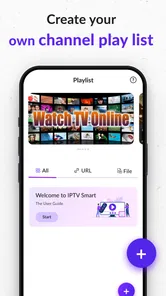
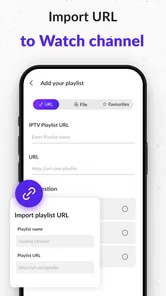
The usual setup is to open the app’s playlist or account section, then enter a playlist URL, upload a supported file, or provide credentials from a compatible IPTV provider. The exact steps and supported options can differ by app version and device. Have your provider’s details ready, check them carefully, and consult the app’s help information if a playlist fails to load or channels do not appear.
What internet connection and devices are needed for smooth playback?
Streaming quality depends on the stream itself, your internet connection, the device’s performance, and the provider’s capacity. A stable connection is usually more important than simply having a high advertised speed, especially when watching live video. Confirm that IPTV Player - Smart Live TV is available for your particular Android or iOS device and review its current store listing for compatibility, casting, or external-player support.
Is IPTV Player - Smart Live TV safe, and what should I check before downloading?
Download the app only from an official app store or a source you trust, and review its current permissions, privacy information, developer details, and recent user feedback. Avoid entering account credentials into links or services you cannot verify. Also check for in-app purchases, advertisements, and any subscription terms shown in the store listing, since these details can change between versions and platforms.
Pros
- Supports common IPTV playlist formats such as M3U.
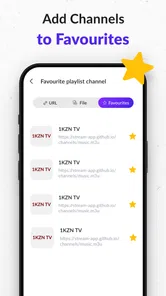
- Lets you organize channels into favorites for quicker access.
- Includes an electronic program guide when playlist data is available.
- Offers a TV-style interface that is easy to browse on larger screens.
- Can play streams from a playlist without requiring a traditional TV tuner.
Cons
- Does not provide TV channels or subscriptions; you must supply a playlist.
- Channel availability and stream quality depend on your IPTV provider.
- Some playlists may require manual setup or troubleshooting.
- EPG listings may be missing
- incomplete
- or out of date.
- Compatibility can vary across streaming formats and devices.











