Inmate Inbox
- 207.00
- 4.2
- Installs
- 100.00K
- Price
- Free

Screenshots
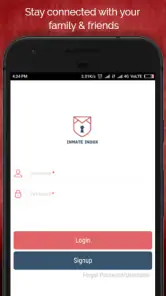
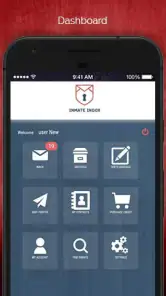
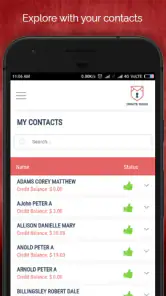
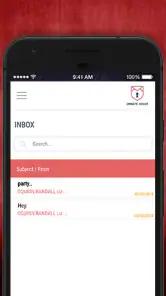
Analysis by Reviewed
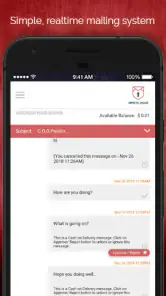
Staying in touch with someone in custody has a very different rhythm from ordinary messaging. A quick chat app assumes both people can answer whenever they want, while communication through an inmate service is usually more deliberate. That is where Inmate Inbox becomes useful: it gives families and friends a focused place to manage contact instead of treating every message like an instant conversation.
I reviewed it as a communication app from Inmate Inbox, and my impression is that its main value is not novelty. It is structure. The app is designed around keeping a connection active when replies may take patience and planning. That makes it relevant for relatives, close friends, and anyone who wants a clearer routine for staying connected with a person in custody.
It is free to install and is rated for Everyone, although some communication actions can involve in-app purchases ranging from about seven dollars to twenty dollars per item. That distinction matters: downloading the app costs nothing, but regular use may require budgeting. I would think of it less like a free instant messenger and more like a dedicated communication channel whose costs should be understood before making it part of a family routine.
Why a dedicated inbox changes the need for contact
In my experience, the biggest problem in this situation is not always finding words. It is maintaining a dependable habit. When communication is spread across letters, phone calls, and occasional updates, people can lose track of what they wanted to say or assume that silence means something personal. A dedicated inbox helps put the relationship in one visible place.
The app’s store summary says it is intended to help people stay connected with family and friends. That sounds simple, but the practical implication is important. It frames contact as an ongoing responsibility rather than a stream of casual notifications. I found that this encourages a different mindset: write when I have something meaningful to share, read carefully, and avoid expecting an immediate reply.
That slower expectation can be healthy. With ordinary messaging apps, I often send a short question and then check my phone repeatedly. Inmate Inbox is better suited to a message that has enough context to stand on its own. A useful note might include a family update, an answer to several earlier questions, encouragement for a difficult week, and one clear question for the next exchange.
This is one of the less obvious strengths of a specialized app. It can make communication more intentional simply because the setting does not encourage constant back-and-forth. If your goal is thoughtful contact, that change in pace is helpful. If you need live conversation, it is a poor substitute for a normal chat platform or a voice call.
You May Like

Clash of Clans Is Won Between the Battles

Android Auto Makes the Case for Quieter Car Software

MobiOffice: Transforming Mobile Productivity with Seamless Integration

EA SPORTS FC™ Mobile Soccer: Redefining Mobile Sports Gaming

How Microsoft OneDrive Became a Mobile Productivity Giant

How Google Translate Breaks Language Barriers Effortlessly
What the first setup feels like
The app is not something I would install casually just to browse. Its usefulness depends on having a specific person and a genuine reason to communicate. That means the first step is less about exploring entertainment features and more about understanding how the service fits into your relationship. Before spending money, I would decide how often I expect to write and whether the other person can respond through the same channel.
That small planning step prevents a common disappointment: assuming that installing the app automatically creates an instant conversation. It does not replace the practical arrangements behind communication with an inmate. The app is the communication interface, not a shortcut around every institutional or personal limitation.
I also recommend agreeing on a simple rhythm with family members who are involved. For example, one person can send routine household news while another handles personal updates. This avoids several relatives repeating the same information and gives the recipient a clearer picture of what is happening outside.
That workflow is especially useful when a family is under stress. Instead of everyone writing separately whenever they feel worried, the group can collect important updates and send a more coherent message. The result is less noise for both sides and a better chance that the recipient receives the information that actually matters.
Conversation flow: why longer messages work better
Inmate Inbox works best when I treat each exchange as a complete unit. I would begin by answering anything from the previous message, then add the most important news, and finish with a small number of questions. This order makes the message easier to follow and reduces the chance that the recipient has to guess which points need a response.
A practical pattern is to separate everyday news from emotional material. I might first mention a child’s school event or a change at home, then explain how I am feeling, and finally ask whether there is anything specific the person needs me to clarify. That structure does not make the message cold. It makes it easier to read and easier to answer.
One useful tip is to keep a private note on my phone during the week. Whenever something worth sharing happens, I add a short reminder rather than sending a string of disconnected thoughts. Before writing in the app, I turn those reminders into a single message. This saves attention and creates a more satisfying conversation than reacting to every small event separately.
I would also avoid using the app as a place to settle arguments in the heat of the moment. A slower channel gives me time to reread what I wrote, remove accusations, and explain the real issue. That pause is valuable, but it also means the app is not ideal for urgent conflict resolution. If something requires immediate clarification, a permitted direct call or another approved method may be more appropriate.
Another trade-off is emotional timing. A carefully written message can feel supportive, but waiting for an answer can be hard. I would not send a vulnerable message while expecting reassurance within minutes. The healthier approach is to write with the understanding that the message may be read later and answered when possible.
The hidden cost of attention
The app changes not only how messages are sent but also how I spend attention. A normal messenger can create a loop of alerts, previews, and repeated checking. A dedicated inmate communication tool can reduce that casual noise, but it can also make each notification feel unusually important. When a message arrives from someone I care about, I may be tempted to stop everything and respond immediately.
That emotional pull deserves a boundary. I found it more sustainable to choose a time of day for checking the inbox rather than treating every possible update as an emergency. A morning check can work for practical news, while an evening check may be better for a more reflective reply. The best schedule depends on the family, but having one is more useful than relying on impulse.
There is also an attention cost in composing a message well. Because the exchange may be slower, I may try to include too much. Long messages can be meaningful, yet an overloaded note can bury the main point. I prefer a clear opening, a few focused updates, and a warm closing. Brevity is not the same as indifference; it can show respect for the reader’s time and circumstances.
For families, I would create a shared list of topics before writing. It might include medical updates, school matters, appointments, birthdays, and questions that need an answer. This is a concrete advantage of using a dedicated channel: the family can turn scattered worry into an organized communication task.
At the same time, I would not let the app become the family’s only record of important information. If a message contains dates, arrangements, or details that must not be forgotten, I would keep a separate note. Communication tools are useful for sharing information, but they are not necessarily the best place to manage every household responsibility.
Boundaries that protect the relationship
Good communication in this setting needs boundaries on both sides. The person outside may feel pressure to provide constant emotional support, while the person inside may feel pressure to answer every question or reassure everyone. A healthy routine leaves room for delays, incomplete replies, and days when neither side has the energy for a long message.
I would be careful about promising a fixed response time. Even if the app makes sending a message straightforward, the recipient’s ability to read or answer can depend on circumstances beyond the app itself. A promise such as “I will write every Sunday” may be realistic; “I will always answer immediately” usually is not.
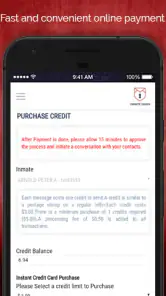
Money is another boundary worth discussing before regular use. Since the app is free to download but offers in-app purchases, families should decide who pays and what level of spending is comfortable. I would not hand the phone to a child and assume that every communication action is cost-free. The Everyone rating describes the audience suitability, not a guarantee that all usage has no financial consequences.
For the same reason, I would keep purchase decisions separate from emotional pressure. When someone is worried or missing a loved one, it is easy to spend without thinking. Setting a monthly communication budget in advance can make the service feel supportive rather than stressful.
Privacy also deserves common sense. I would avoid putting highly sensitive information into any message unless it is genuinely necessary, and I would check every recipient or contact detail before sending. A dedicated communication app may feel intimate, but that does not mean every personal detail belongs in every message.
The app is a better fit for people who can accept a measured pace and take responsibility for their own communication habits. I would skip it if I needed unrestricted real-time messaging, a broad social network, or a single app for every kind of conversation. Someone who rarely communicates with the intended recipient may also find the dedicated setup more effort than it is worth.
How it compares with ordinary alternatives
Compared with standard messaging apps, Inmate Inbox has a narrower purpose and a more focused audience. That limitation is also its reason to exist. General chat apps are excellent when both people are online, have compatible accounts, and can exchange messages freely. They are not designed around the slower, more structured needs of communicating with someone in custody.
Compared with traditional letters, the app feels more organized and easier to maintain as a routine. I do not have to rely on a loose stack of paper to remember what was discussed, and the inbox gives the relationship a digital home. However, people who value handwritten letters, physical keepsakes, or a slower reflective ritual may still prefer paper for some messages.
Compared with phone calls, the app gives me more control over wording. I can pause, edit, and make sure I have answered every point. A call offers warmth and immediacy that text cannot fully reproduce, so I see the two methods as complementary rather than interchangeable. If hearing a familiar voice is the central need, an app focused on written communication will not deliver the same experience.
There is also a difference between a specialized service and a general email account. Email is flexible, but that flexibility can make communication feel scattered. Inmate Inbox is more purposeful: I open it because I am there to communicate with a particular person. That focus can help families maintain a relationship, provided they are comfortable with the service’s purchase model and expected pace.
Who will get the most from it
I think the app is most useful for a close relative who wants a repeatable communication habit. A parent, partner, sibling, or trusted friend can use it to send organized updates without expecting a live exchange. It is also helpful for families who need to coordinate their messages so that the recipient receives one clear account of what is happening at home.
A realistic example would be a household preparing for a birthday while a family member is in custody. Instead of sending several rushed notes, relatives could gather the news, choose a few photos or details that are appropriate for their communication method, and write one thoughtful update. The recipient gets a fuller sense of the event, while the family avoids turning the occasion into a flood of fragmented messages.
The app may also suit someone who finds ordinary messaging emotionally exhausting. Because it is not built around constant availability, it can make it easier to write on a schedule and then return to daily life. That separation is valuable for people who want to remain supportive without carrying their phone as if it were a permanent emergency line.
On the other hand, I would not recommend it as the only tool for a family dealing with urgent logistics. If a matter requires immediate confirmation, a different approved channel should handle it. I would also look elsewhere if my priority were group chat, broad community interaction, multimedia entertainment, or instant replies from several people at once.
What the app’s numbers suggest about its place
Inmate Inbox has been available since May 25, 2018, and its current version is 4.16. It requires Android 7.0 or later, so owners of older devices should check compatibility before planning around it. The app has passed 100K installs and holds a 4.2 average from roughly 710 ratings, with 207 written reviews. Those figures suggest a real user base and generally positive reception, though they do not remove the need to judge whether its communication model fits your situation.
Its category is Communication, and that is the right way to understand it. I would not evaluate it by the standards of a social network or a feature-heavy chat platform. Its success depends on whether it helps two people maintain a dependable connection with less confusion and less pressure.
The developer, Inmate Inbox, has kept the product identity tightly tied to that purpose. I appreciate that focus because it makes the app easier to understand. The trade-off is that there is less reason to open it when I am not actively managing this particular kind of contact.
My verdict on the communication rhythm
After using it as a dedicated contact tool, I see Inmate Inbox as a practical option for people who need a more intentional way to stay connected with someone in custody. It does not erase the waiting, the emotional uncertainty, or the practical limits around communication. What it can do is give the relationship a clearer routine.
The strongest benefit is the change in rhythm. Instead of chasing instant replies, I can prepare a message, check it for clarity, and send it with realistic expectations. That slower approach can protect attention and make conversations more meaningful. It also encourages boundaries: decide when to check, decide how much to spend, and decide which information truly needs to be shared.
My main reservation is that the free download should not be confused with entirely free communication. The in-app purchase range makes budgeting part of the decision, and the app will not satisfy anyone looking for unrestricted live chat. Those are not minor details; they determine whether the service feels convenient or frustrating in everyday use.
For the right user, though, the focus is a genuine advantage. If I wanted to support a family member or friend through regular, thoughtful messages, I would consider installing it and first establish a realistic schedule. The best way to use it is as a calm communication routine, not as a replacement for instant conversation. That is the point at which this specialized app earns its place: it helps preserve connection while giving both sides enough space to communicate with care.
Inmate Inbox Frequently Asked Questions
Is Inmate Inbox free to download, and could using it cost money?
Inmate Inbox is free to download, but some features may involve in-app purchases. Before using a paid option, review the price shown in the app and check what the purchase covers, especially if you expect to message regularly. Charges can depend on the feature selected and the service arrangement, so make sure you understand the cost before confirming a transaction.
What devices can run Inmate Inbox?
Inmate Inbox is an app for mobile devices, and its minimum operating-system requirement is version 7.0. Check your device’s software version before downloading and make sure you are installing the app from a trusted app store. Keeping your operating system and the app updated can also help you use the available features and address compatibility issues.
What is Inmate Inbox, and who is the app designed for?
Inmate Inbox is a communication-focused app intended to help people stay in contact with incarcerated friends or family members. Depending on the facility and available services, users may be able to exchange messages, send approved content, or manage communication-related activities from a mobile device. Availability and features can vary by correctional institution, so it is important to confirm that the intended facility is supported before downloading.
Can I use Inmate Inbox to message someone in any correctional facility?
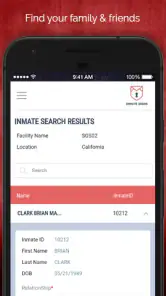
Not necessarily. Inmate communication services are usually connected to specific correctional facilities, agencies, or service providers, which means support may be limited by location. Before creating an account, check whether the inmate’s facility appears in the app’s supported list and whether that person is eligible to receive messages. Facility rules, approval procedures, and communication restrictions may also affect access.
Does Inmate Inbox require payment to send messages or use its features?
Some features of Inmate Inbox may be free to access, while messaging, media delivery, account services, or other communication options could involve fees. Pricing may depend on the correctional facility, the type of message, and the service arrangement in place. Review the applicable charges carefully before sending anything, because fees, limits, refunds, and payment rules may differ between facilities.
Pros
- Simple inmate-to-family messaging keeps communication organized.
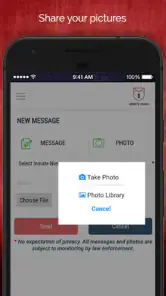
- Supports photo sharing to help maintain personal connections.
- Message history makes it easy to review previous conversations.
- Useful notifications help users notice replies promptly.
- Designed for correctional communication rather than general social networking.
Cons
- Availability depends on participating correctional facilities.
- Messages may be delayed by facility screening procedures.
- Communication features can vary by institution and location.
- Users may need to pay facility-specific messaging or media fees.
- Account setup may require approval and personal verification.

- Category
- Communication
- Version
- 4.16











