IEEE
- 62.00
- 4.1
- Installs
- 5.00M
- Price
- Free

Screenshots




Analysis by Reviewed
I find the IEEE app most useful when I want to follow engineering and computing topics without relying only on general tech headlines. It gives me a focused place to explore IEEE material, which can be valuable for coursework, professional reading, or simply understanding a technical subject in more depth. The trade-off is that this is a specialist education app, not a broad news reader: its value depends on whether IEEE’s publications and activities match what you want to learn.
Where people can get stuck
The first question I’d ask before settling in is what kind of access I need. Finding an article and being able to read its full text are not always the same thing in research publishing, so I would check the access options shown for a particular item rather than assume every result opens in full. If I only need an overview or a starting point for research, discovery can still be useful; if I need a specific paper for an assignment, I’d confirm access before building my workflow around it.
It also helps to approach a large technical library with a clear subject in mind. A broad search can bring up material that is relevant in different ways, while a focused phrase, author, or technical term gives me a more practical starting point. I’d save useful findings as I go and keep a separate note of why each item matters, especially when collecting sources for a project. That small habit makes a reading session easier to resume later.
Getting to Know the IEEE App
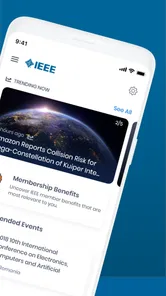
The IEEE app is designed for those who want to access a treasure trove of information on technology, engineering, and computing. Whether you’re a student, a professional, or just a tech enthusiast, this app offers a vast repository of journals, magazines, conferences, and standards right on your smartphone. It’s like carrying a mini-library wherever you go.
Features That Stand Out
First off, the user interface is clean and intuitive. Navigating through the app feels like a breeze, even if you’re not a tech wizard. You can easily search for articles, save your favorites, and even download content for offline reading. This feature is a lifesaver when you're on the go or stuck in places with spotty internet.
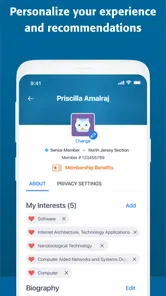
One of the highlights is the personalization aspect. The app lets you tailor your feed based on your interests. So, if you're into robotics or AI, you can set your preferences and get the latest updates on these topics right on your homepage. It’s like having a personal research assistant keeping you updated!
Making it work for a real study routine
For a realistic everyday use, I’d check my chosen topics during a short commute or between classes, then save a promising article to revisit when I have time to read carefully. Offline downloads are most useful when planned ahead: I’d open the material while connected, make sure it is available for later, and avoid treating a saved item as a substitute for keeping project notes. This turns quick browsing into a repeatable study habit instead of a stream of links I forget to return to.
More From Our News Desk

 Gmail
Gmail in a Busy Inbox: Who Benefits Most?
From first account to crowded workday, Gmail earns its place through dependable search and flexible sorting—but its best fit depends on how much inbox maintenance you can tolerate.

 Prime Video
Switching to Prime Video: What Changes in Your Viewing Routine
Prime Video can make a compelling second home for streaming, but switching means learning a different catalog, rental layer, and route from browsing to playback.

 Universal TV Remote Control
 Works Best as a Reliable Backup
A phone remote earns its place through quick setup and reliable habits. Here is how to get more from Universal TV Remote Control—and where its limits show.

 Weather - By Xiaomi
Weather by Xiaomi Review: Clear at a Glance, Less Clear Up Close
Xiaomi’s weather app makes everyday forecasts quick to scan, but its calm surface can leave useful details and recovery paths harder to find than they should be.

 X
X Under Pressure: Can It Recover When Posting Goes Wrong?
A resilience-focused review of X, examining setup, mistaken posts, interruptions, weak connections, and the gaps that matter when recovery needs to be dependable.

 Clash of Clans
 Is Won Between the Battles
Its raids are quick; its community is a long-term project of coordination, teaching, rivalry, and shared responsibility—with all the friction that entails.
Latest News



Compared with a general search engine or a broad technology-news app, IEEE is a more specialized route into engineering material and professional research. That focus is its strength if I need technical context, but it is not necessarily the fastest choice for a quick explanation of a new topic or everyday consumer-tech headlines. For those needs, an introductory course or a general news source may be easier; I’d use IEEE when I want to dig into the technical record.
Setup checks and recovery
If something does not appear to load, I’d start with simple checks rather than assume the content has vanished: confirm the phone has a working connection, retry the search with a more specific term, and reopen the app. For something I want to read offline, I’d verify the download before leaving a reliable connection. If a saved item is hard to find later, repeating the search and saving it again can be a practical fallback while I check whether I’m looking in the right place.
It is also worth separating app trouble from access or network friction. A slow connection can interrupt browsing, and a publication’s access conditions can affect what opens; neither automatically means the app itself is broken. When a particular item is the problem, I’d test another result and revisit the item when connected. If the wider app remains unresponsive, checking that the installed version is current and restarting the app are sensible first steps.
Why You Should Give It a Try
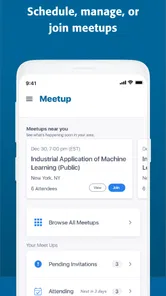
What’s really impressive is the access to a wide array of IEEE publications. For those who love to dive deep into research papers or industry standards, this app is a goldmine. Plus, it’s not just about reading; the app also provides insights into upcoming conferences and events, which is a great way to stay connected with the global tech community.
Moreover, the app’s ability to sync across your devices ensures that you can switch between your phone and tablet without missing a beat. It’s convenient and makes the app a flexible tool for both casual reading and serious research work.
Who it suits, and who may want another route
I’d recommend it most to engineering students, researchers, and professionals who already know they want IEEE-focused reading. Curious learners can also benefit if they enjoy technical material and are willing to follow references into more detailed work. It is less compelling for someone who mainly wants bite-size lessons, a guided beginner curriculum, or general science stories; a course app, textbook, or broad news source may serve those goals better.
The app is free, from IEEE, and rated for Everyone, which makes trying it a low-commitment way to see whether its material fits your interests. It has a 4.1 average from around 4,600 ratings, and has passed 5 million installs. Its current version is 3.5.0, and it runs on Android 8.0 or later. Those details help set expectations, but the best test is still whether you can find material you genuinely want to return to.
Using it without losing track of sources
When I’m gathering material for an assignment, I’d use the app as the discovery and reading stage, then keep a simple record elsewhere of each item’s title, topic, and relevance. That is especially helpful when several papers address similar ideas: a short note such as “background,” “method to compare,” or “possible citation” saves me from reopening everything just to remember why I saved it. It also gives me a dependable reference point if I later switch devices or change how I organize the project.
I’d also avoid trying to read every result in one sitting. A more useful routine is to scan a few titles, open only the most promising ones, and decide whether each deserves a deeper session. Technical material can demand concentration, so a quick browse is best treated as a way to choose what to read next, not as proof that I have understood the subject. If I’m new to an area, I’d pair a research article with a textbook or introductory explanation rather than expect a specialist paper to teach all the foundations.
What to expect from a focused technical library
One practical question is whether this can replace a web search. I wouldn’t use it that way. A general search engine is better for finding a quick definition, comparing many kinds of sources, or locating introductory explanations. IEEE is more useful when I specifically want technical reading associated with its publishing and professional ecosystem. I see the two as complementary: start broadly when I don’t know the vocabulary, then use focused searches here once I have the terms needed to find relevant material.
Another question is whether it suits someone who is not an engineer. It can, provided that person is comfortable with specialist reading and has a clear reason to explore a topic. A curious reader interested in how a technical field develops may find worthwhile material, but someone looking for short, guided lessons could find the experience demanding. The distinction is not simply expert versus beginner; it is whether you want to browse technical sources or be taught a subject step by step.
There is also a useful trade-off in having a personalized feed. Choosing interests can make a broad collection feel more relevant, but I would not let the feed become my only route through a topic. When working on something specific, I’d search directly for the relevant terminology and periodically check adjacent concepts. That way, personalization helps surface material without narrowing my research to only the subjects I already recognize.
When the app may not be the cause
If one item will not open, I would not immediately conclude that the whole app has failed. I’d compare it with another result, check the connection, and consider whether the issue applies only to that publication or access route. If browsing works elsewhere, the sensible next step is to return to the item later or use another legitimate way to locate material for the task. This keeps a single access snag from derailing a study session.
For a recurring problem, I’d note what I was doing when it occurred: searching, opening a particular item, or trying to read something saved for offline use. That simple distinction helps me choose a useful next check instead of repeating the same steps. I would also keep important assignment notes outside the app; saved reading is convenient, but it should not be the only place where I record deadlines, arguments, or citation details.
Final Thoughts
All in all, the IEEE app is a must-have for anyone passionate about technology and innovation. It’s packed with valuable information, user-friendly, and offers features that cater to both novices and experts in the tech field. So why not give it a whirl? Dive into the world of cutting-edge technology and let the IEEE app be your guide!
My practical verdict is more measured: I’d keep it if IEEE publications, standards, or event information are part of my regular learning, and I’d treat it as a focused companion rather than my only source. Before relying on it for a deadline, I’d test the exact material I need and save my own notes outside the app. If that routine feels natural, it can make technical reading easier to fit into the day; if not, a simpler learning resource may be the better choice.
IEEE Frequently Asked Questions
Who is the IEEE app intended for?
The IEEE app is an education app from IEEE, aimed at people who want a mobile gateway to the organization and its resources. It may be useful to students, researchers, engineers, and other professionals interested in electrical and electronics engineering. The app is free to download, and its content rating is Everyone, so it is suitable for a broad audience.
What is the primary purpose of the IEEE app?
The IEEE app serves as a comprehensive platform for accessing a plethora of resources related to electrical and electronics engineering. It enables users to stay updated with the latest research, conferences, and publications in the field. Additionally, the app provides networking opportunities with professionals and researchers, making it an essential tool for anyone involved in this industry.
How can I access IEEE research articles through the app?
Accessing IEEE research articles via the app is straightforward. Once you have installed the app, you need to sign in with your IEEE account. Navigate to the 'Publications' section where you can browse through a vast library of journals and articles. Some content may require a subscription or institutional access to view full texts.
Is the IEEE app free to use?
The IEEE app itself is free to download and use. However, accessing certain features such as full-text articles, premium content, or conference proceedings might require a subscription or membership. Users should check the specific requirements for each piece of content to understand any potential costs associated.
What platforms is the IEEE app available on?
The IEEE app is widely accessible on major mobile platforms including Android and iOS. This ensures that users can stay connected and access IEEE resources on-the-go, regardless of their preferred device. Simply visit the Google Play Store or Apple App Store to download the app to your smartphone or tablet.
Pros
- Comprehensive resource for engineers.
- Wide range of technical topics covered.
- High-quality research papers accessible.
- Global professional networking opportunities.
- Regular updates with latest tech trends.
Cons
- Membership fee may be expensive.
- Complex UI for new users.
- Limited free content availability.
- Occasional technical issues on mobile app.
- Requires stable internet for access.