

HyperClean AI
- 271.00
- 4.3
- Installs
- 1.00M
- Price
- Free

Screenshots

Analysis by Reviewed
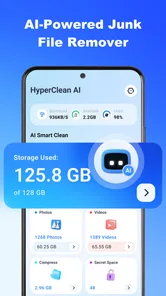
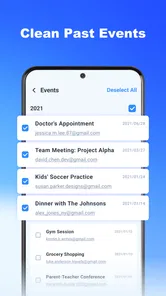
I installed HyperClean AI expecting a straightforward way to deal with the clutter that gradually takes over a phone. It is a free tools app from YIXIANG, built around finding duplicate photos, duplicate videos, and unwanted files. The first impression is easy to understand: instead of manually searching through a gallery or opening several storage menus, I can start one cleanup workflow and review possible space-saving actions in one place.
That first-week appeal is real, especially if your camera roll contains screenshots, repeated downloads, forwarded clips, and several versions of the same picture. The app’s store summary focuses on AI-assisted storage cleaning, but the more important question is whether that convenience remains useful after the initial tidy-up. My view is that it can earn a permanent place on the right phone, although it is not automatically better than the tools already built into Android or iOS.
The app is available at no upfront cost and is suitable for Everyone. It requires Android 6.0 or later, so compatibility should cover many older devices as well as newer ones. Its current version is V1.1.21, and the listing shows more than a million installs, with an average rating of 4.3 from roughly twelve thousand ratings. Those figures suggest that this is not an obscure experiment, but they do not remove the need to check every suggested deletion carefully.
What HyperClean AI feels like during the first week
During the first session, the most satisfying part is the change from vague anxiety to visible categories. “My phone is full” is not very actionable; duplicate images, oversized videos, and accumulated junk are much easier to evaluate. I find that this framing helps me make decisions faster because I can focus on the type of clutter rather than scrolling endlessly through every folder.
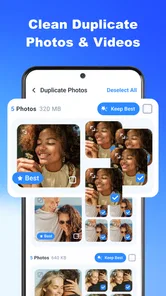
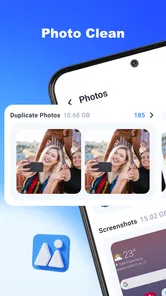
Duplicate photos are the most obvious starting point. A useful cleanup is not simply about deleting identical files. A burst of similar shots may include one sharp image, one with better framing, and several that are technically alike but worth keeping for different reasons. I would not select an entire group blindly. I would open the group, compare the thumbnails at full size, and keep the version that has the best focus, expression, or crop.
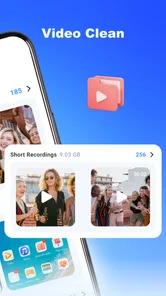
The same caution matters even more for videos. Two clips may look similar in a small preview while having different lengths or moments that matter. A short duplicate can be disposable, but a longer recording may contain the part you actually wanted. HyperClean AI is most helpful when it narrows the search; it should not replace the final decision.
One practical first-week routine is to begin with screenshots. They are usually easier to judge than personal photos because many are temporary references: delivery details, maps, error messages, product pages, or conversations. I can clear old screenshots with less emotional risk, then move to repeated camera images and finally to videos. This order makes the first cleanup feel controlled rather than destructive.
More From Our News Desk

 Gmail
GmailGmail in a Busy Inbox: Who Benefits Most?
From first account to crowded workday, Gmail earns its place through dependable search and flexible sorting—but its best fit depends on how much inbox maintenance you can tolerate.

 Prime Video
Switching to Prime Video: What Changes in Your Viewing Routine
Prime Video can make a compelling second home for streaming, but switching means learning a different catalog, rental layer, and route from browsing to playback.

 Universal TV Remote Control
Universal TV Remote Control Works Best as a Reliable Backup
A phone remote earns its place through quick setup and reliable habits. Here is how to get more from Universal TV Remote Control—and where its limits show.

 Weather - By Xiaomi
Weather by Xiaomi Review: Clear at a Glance, Less Clear Up Close
Xiaomi’s weather app makes everyday forecasts quick to scan, but its calm surface can leave useful details and recovery paths harder to find than they should be.

 X
XX Under Pressure: Can It Recover When Posting Goes Wrong?
A resilience-focused review of X, examining setup, mistaken posts, interruptions, weak connections, and the gaps that matter when recovery needs to be dependable.

 Clash of Clans
Clash of Clans Is Won Between the Battles
Its raids are quick; its community is a long-term project of coordination, teaching, rivalry, and shared responsibility—with all the friction that entails.
Latest News



The app also makes sense for someone preparing a phone for travel. Before downloading offline maps, taking holiday photos, or recording long clips, I would use it to remove obvious duplicates and forgotten downloads. The benefit is not just the amount of space recovered. It is also knowing which files are still present before a busy trip begins.
Another good use case is a phone shared with a family member who regularly saves media from messaging apps. In that situation, the owner may not know where the clutter comes from, while a category-based cleaner provides a more neutral way to inspect it. I would still ask the person who created the files before removing anything, particularly if the device contains work material or family archives.
The AI label sounds impressive, but I judge it by the quality of its suggestions rather than by the label itself. A cleaner earns trust when it groups likely duplicates without making the review process confusing. The practical value is therefore a combination of detection and presentation: finding candidates is only half the job, and showing them clearly is what makes a cleanup manageable.
For a new user, I recommend treating the first scan as an audit. Do not rush to press a final delete control. Look at which categories dominate, note whether the results are mostly screenshots or large recordings, and learn how the app presents selected items. That short inspection tells you whether HyperClean AI fits your habits better than the phone’s own storage screen.
Where it is genuinely more convenient than manual cleanup
Manual cleanup is slow because it asks me to remember where every type of file might be stored. I may check the gallery, a downloads folder, a messaging folder, and a file manager, then repeat the process when I find another group of images. A dedicated cleaner reduces that mental switching. Even if I ultimately delete only a modest selection, the review is more focused.
Compared with a basic file manager, the strongest advantage is visual decision-making. A file manager is excellent when I know the exact folder or filename, but it is less comfortable for comparing several similar photographs. HyperClean AI is better suited to the question, “Which of these near-identical items can go?” rather than, “Where is this particular document?”
Compared with a phone’s built-in storage recommendations, the choice is less clear. System tools generally have the advantage of being familiar and closely integrated with the device. They may be enough for clearing temporary material or reviewing large files. HyperClean AI becomes more attractive when duplicate media is the main problem and I want a dedicated review flow instead of a broad storage dashboard.
I would not install it solely because the phone is slow. Storage cleaning and performance improvement are related only in certain situations. Removing unnecessary files can make room, but it is not a universal cure for battery drain, an aging battery, poor mobile reception, or an app that behaves badly. Keeping that distinction in mind prevents disappointment.
Does it still matter after the first cleanup?
The long-term test begins after the obvious clutter is gone. A phone does not usually create a new mountain of duplicate photos every day unless the owner takes many pictures or receives a lot of media. That means the app’s recurring value depends on the user’s pattern, not just on the quality of the first scan.
For a person who photographs children, pets, products, events, or travel scenes, repeated images can return quickly. I can imagine using the app after a weekend event, when a camera roll contains many almost-identical attempts. In that workflow, the tool has a clear monthly role: review the recent batch while I still remember what each image is for.
For a lighter phone user, a monthly scan may be unnecessary. A quarterly check could be more sensible, especially if the device has plenty of free room. Running a cleaner out of habit is not automatically good maintenance. The best schedule is tied to a real trigger, such as a low-storage warning, a completed trip, or a large media transfer.
There is also value in using the app before a backup. I would first remove obvious duplicates, then review the remaining photo library, and only afterward create or verify a backup. This sequence avoids preserving clutter forever. However, I would never treat cleanup as a backup strategy. Important photos should exist somewhere safe before I make irreversible changes.
A second useful workflow is after moving content between phones. Transfers can leave the original and copied versions together, particularly when media has passed through more than one service. HyperClean AI can help identify the visual repetition, but I would check file locations and backup status before deleting anything. The app can identify candidates; it cannot know which copy is the one I intentionally want to preserve.
In month-to-month use, the app is therefore a maintenance assistant rather than a daily utility. That is not a criticism. Many good tools are valuable only when a specific problem appears. The question is whether the occasional convenience justifies keeping another app installed. If duplicate media is a recurring problem for you, the answer is more likely to be yes.
The maintenance burden is small, but not zero
The main burden is review time. An automated scan may be quick, but responsible deletion still requires attention. The more personal the library, the slower that final step becomes. I would rather spend a few minutes checking groups than discover later that a visually similar image was actually the only copy I wanted.
My preferred habit is to clean in narrow passes. I start with screenshots and obvious repeated downloads, then handle photos, and leave videos for last. This avoids mixing low-risk items with irreplaceable memories. It also keeps the decision fatigue under control because each category has a different standard for deletion.
I would also avoid cleaning immediately after an emotional event. After a wedding, a family gathering, or a trip, many images may look repetitive while still carrying different memories. Waiting until I can judge them calmly is a better maintenance practice than trusting an automatic selection simply because it saves time.
Another small but important habit is to inspect the review screen for accidental selections. Similarity is not the same as uselessness. A screenshot of a ticket, a receipt, or a medical instruction may resemble other screenshots while remaining important. The safest cleaner is not the one that deletes the most; it is the one that helps me make a confident choice.
The free entry point makes experimenting easy, but the app includes in-app purchases ranging from $6.99 to $39.99 per item. That changes how I evaluate its long-term value. I would use the free experience first and decide whether the recurring workflow saves enough time to justify any optional purchase. I would not pay simply because the first scan found a lot of clutter; the initial cleanup is often the most dramatic one anyway.
That pricing range also means users should pay attention before confirming a purchase. A person who only needs occasional duplicate removal may prefer the built-in system tools and a manual review. Someone with a constantly expanding media library may value a more dedicated experience. The right choice depends on frequency, not on the excitement of seeing a large cleanup list.
Where fatigue can set in
The novelty can fade when every scan produces familiar categories without revealing much new material. If my phone is already organized, opening a cleaner repeatedly may feel like maintenance for its own sake. This is the central long-term weakness: the app solves a recurring problem, but not every user has that problem often enough to need a permanent specialist.
There is also a psychological cost to reviewing near-duplicates. At first, the process feels productive. Later, comparing many similar photos can become tedious, especially when the differences are subtle. The app can reduce searching, but it cannot remove the human choice involved in deciding which memory, angle, or version matters most.
Video review may create even more friction. A thumbnail does not always show the important moment, and a user may need to open several clips before feeling safe deleting one. If your storage issue is mainly long videos, a file manager sorted by size may be a faster first step. HyperClean AI is more compelling when the problem is visual repetition rather than simply finding the largest files.
I also would not recommend it as the first choice for someone who is highly cautious about installing storage utilities. That person may be better served by the operating system’s own storage controls, because familiarity and integration can outweigh the convenience of a separate interface. Likewise, users managing professional media archives should use a more deliberate cataloging and backup workflow rather than relying on a consumer cleaner alone.
The app’s Everyone content rating makes it approachable for a broad audience, but simple access does not mean every cleanup decision is simple. Parents, older relatives, or less technical users may still need guidance before deleting personal media. I would show them how to review suggestions and explain that “duplicate” is a recommendation, not an instruction.
One trade-off I appreciate is that a focused cleaner can make clutter visible without requiring me to learn a complicated file system. The trade-off is that the cleaner’s convenience may encourage overconfidence. The more polished the suggested list feels, the more important it becomes to slow down before confirming removal.
Who should keep it installed?
I think HyperClean AI is a good fit for people whose phones regularly accumulate repeated photos, videos, screenshots, and downloaded media. It is particularly useful after travel, family events, frequent content sharing, or a phone migration. In those situations, the app addresses a specific recurring nuisance rather than offering an abstract promise of a faster device.
It is also a reasonable choice for someone who dislikes navigating folders. The visual approach makes the cleanup feel closer to sorting a photo album than managing a storage directory. That can be enough to turn an avoided chore into something I actually complete.
I would skip it if your main concern is documents, cloud organization, or detailed folder control. A dedicated file manager is likely better for those jobs. I would also skip it if your phone rarely runs low on space and your photo library is already carefully maintained. In that case, the built-in storage tools may cover the occasional check without adding another app to the routine.
For Android users on older supported devices, the minimum requirement of Android 6.0 is helpful. Still, compatibility alone does not guarantee an equally comfortable experience on every handset. I would judge it after the first scan: if the results are clear and the review controls feel understandable, it has earned a place; if the process feels uncertain, no amount of reclaimed space is worth losing trust.
The developer, YIXIANG, has positioned the product in the tools category rather than as a gallery replacement. That distinction matters. I see it as a cleanup layer that works around the media I already keep, not as the place where I should organize my entire digital life. Keeping that role limited makes the app easier to use responsibly.
My long-term verdict
After the first-week excitement fades, HyperClean AI remains useful when it is attached to a clear habit: a post-trip cleanup, a monthly review for heavy photographers, or a check before a backup and device transfer. It is less convincing as an app to open every day or as a universal performance booster.
The strongest reason to try it is its focused handling of visual clutter. It can save me from manually comparing large groups of similar media, and that convenience is meaningful when the camera roll has grown messy. The strongest reason to hesitate is that the final responsibility stays with me, especially for personal photos and videos.
Because it is free to start, I would recommend a cautious trial rather than an automatic purchase. Begin with low-risk screenshots and repeated downloads, learn how the suggestions are presented, and only then decide whether the workflow is better than the phone’s built-in tools. Keep important media backed up, review candidates individually, and do not confuse a cleaner with a complete device-maintenance solution.
My lasting-space verdict is positive, but conditional: keep it installed if duplicate media returns often enough that manual sorting annoys you. If your phone is already tidy, use it only when a real storage problem appears—or skip it and rely on the system tools already available. HyperClean AI earns its place through repeated practical savings, not through the novelty of its first scan.
HyperClean AI Frequently Asked Questions
What should I check before installing HyperClean AI?
HyperClean AI is a free Tools app from YIXIANG, with in-app purchases available. Before downloading, check that your device runs Android 6.0 or later and review the app’s permissions and purchase options. Its age rating is Everyone. These details can help you decide whether it fits your device and whether you are comfortable with the access a storage-cleaning tool may request.
How popular is HyperClean AI, and what do user ratings indicate?
HyperClean AI has more than 1 million installs and an average rating of 4.3 from around 12,000 ratings, with 271 written reviews. Those figures suggest that many people have tried it, but ratings are only a starting point rather than a guarantee that it will suit your needs. Read recent user feedback to understand how people describe its cleaning features and overall experience.
What is HyperClean AI and what does it do?
HyperClean AI is presented as a smart cleaning and optimization app designed to help users manage unnecessary files and improve device organization. Its listed focus is finding duplicate photos and videos and clearing junk files. Before deleting anything, review the suggested results carefully, since some files may still be useful to you.
Is HyperClean AI safe to use on Android or iPhone?
HyperClean AI can be useful when downloaded from an official app store and granted only the permissions it genuinely needs. However, no cleaning tool should be treated as completely risk-free. Read the privacy policy, check the developer information, and inspect the files selected for removal. Avoid unofficial APKs or modified versions, which may contain malware or request excessive access.
Can HyperClean AI delete important photos, documents, or app data?
The app should normally provide a review screen before permanent deletion, but users should not rely on automatic recommendations without checking them. Cleaning tools can sometimes classify downloads, videos, duplicates, or application data differently from the user’s expectations. Back up important photos and documents first, then confirm each category manually before using any deep-cleaning or removal feature.
Pros
- AI-assisted junk scanning helps identify files worth removing.
- Simple interface makes routine phone cleaning easy to understand.
- Can help free storage space when your device is running low.
- Quick scans are convenient for regular maintenance.
- Useful file categories make cleanup choices easier to review.
Cons
- Some recommendations may require manual checking before deletion.
- Cleaning results can vary depending on your device and storage habits.
- AI-based features may need internet access or additional permissions.
- Aggressive cleanup could remove files you intended to keep.
- Extra features or a subscription may be required for full access.









