

Huck's Bucks Bigg Rewards
- 645.00
- 4.0
- Installs
- 100.00K
- Price
- Free

Screenshots
Analysis by Reviewed
I approached Huck's Bucks Bigg Rewards as a practical question rather than a simple download decision: will a dedicated rewards app make visits to Huck's more useful, or will it become another icon I rarely open? Since it belongs to the Food & Drink category and is developed by Hucks, its purpose is quite focused. This is not a general restaurant guide, a grocery planner, or a broad coupon marketplace. It is a loyalty companion built around the Huck's experience.
That narrow focus is both its appeal and its main limitation. If Huck's is already part of your routine, a rewards app can be easier to justify than a generic savings tool because it keeps the relationship with one familiar brand in one place. If you only stop there occasionally, the benefit depends on whether you are willing to remember the app at the right moment. My overall impression is that the app makes the most sense when it becomes part of the checkout habit, not when it is treated as something to browse for entertainment.
What I looked for before deciding
When I assess a loyalty app, I first consider the effort involved. A free download is not automatically convenient if opening it, finding an account, or presenting a rewards identity makes a quick purchase slower. I also look at whether the app has a clear reason to stay installed. For a program centered on Huck's Bucks, that reason is the ability to keep rewards activity connected to visits instead of relying on memory, paper receipts, or a separate card.
The app has been available since June 8, 2020, and its current version is 43.01.01. Those details matter less than how the app fits into a real routine, but they do show that this is an established product rather than a brand-new experiment. It supports Android 7.0 and later, which makes it accessible to many older Android phones as well as newer devices. On iOS, the practical question is simply whether your device can run the version offered through its normal app store.
I also paid attention to the audience implied by the listing. The content rating is Mature 17+, so younger users and families should check that before treating it as a general-purpose rewards app for everyone in the household. That rating does not change the basic idea of earning or using food-and-drink rewards, but it is still a detail worth noticing before installation.
The public response gives the app a 4.0 average from around 1.9 thousand ratings, with roughly 643 written reviews and more than 100 thousand installs. I would read those figures as evidence of a real user base, not as a guarantee that every visit will feel smooth. Loyalty apps are especially sensitive to context: a customer standing at a busy counter has different needs from someone calmly checking an account at home.
The first-use experience and the habit it needs
The most important moment is not the initial download. It is the first purchase after installation. I would set up the app before arriving at Huck's, while I have time to read the screens and make sure I understand how the rewards identity is used. Doing that at the counter creates avoidable pressure, especially if the store is busy or the phone connection is unreliable.
More From Our News Desk

 Instagram
Instagram’s Power Comes From Its Place in Your Phone
A close look at how Instagram turns Meta’s reach, recommendation systems and everyday camera habits into durable platform power—and what that costs users.

 Gmail
GmailGmail in a Busy Inbox: Who Benefits Most?
From first account to crowded workday, Gmail earns its place through dependable search and flexible sorting—but its best fit depends on how much inbox maintenance you can tolerate.

 Prime Video
Switching to Prime Video: What Changes in Your Viewing Routine
Prime Video can make a compelling second home for streaming, but switching means learning a different catalog, rental layer, and route from browsing to playback.

 Universal TV Remote Control
Universal TV Remote Control Works Best as a Reliable Backup
A phone remote earns its place through quick setup and reliable habits. Here is how to get more from Universal TV Remote Control—and where its limits show.

 Weather - By Xiaomi
Weather by Xiaomi Review: Clear at a Glance, Less Clear Up Close
Xiaomi’s weather app makes everyday forecasts quick to scan, but its calm surface can leave useful details and recovery paths harder to find than they should be.

 X
XX Under Pressure: Can It Recover When Posting Goes Wrong?
A resilience-focused review of X, examining setup, mistaken posts, interruptions, weak connections, and the gaps that matter when recovery needs to be dependable.
Latest News



My practical tip is to keep the app somewhere easy to reach and to open it before joining the queue. That small change turns the app from a last-second search into part of the payment routine. I would also avoid assuming that installing it automatically handles every part of a transaction. The safest approach is to look at the available in-app instructions and follow the presentation or scanning process shown there.
This is one of the less obvious trade-offs with a brand-specific loyalty app: its value is often lost through forgetfulness rather than a lack of rewards. A customer can make several eligible visits and still feel disappointed if the app was left closed during those visits. The program rewards consistency in behavior, not just enthusiasm during the first day.
Where the focused design works well
The strongest part of Huck's Bucks Bigg Rewards is its focus. Instead of asking me to compare a long list of unrelated restaurants or manage several types of offers, it is designed around Huck's. That can make the app more relevant for regular customers. I do not need to search through a general food app hoping that a nearby promotion applies; I can use the dedicated loyalty channel when I am already choosing Huck's.
That distinction is important for people who make repeat stops during commutes, work breaks, or regular errands. A convenience-oriented food purchase is often decided quickly. In that setting, a specialized rewards app can be more useful than a discovery platform filled with restaurants I am not considering. The app does not need to persuade me where to eat; it needs to support a decision I have already made.
I also like the psychological clarity of separating loyalty activity from ordinary payment. A bank statement tells me what I spent, but it is not designed to show the relationship between visits and a brand’s rewards program. A dedicated app gives that activity a recognizable home. Even if I only check it briefly, that can make it easier to remember that rewards exist and should be used rather than forgotten.
Another useful workflow is checking the app before planning a stop, rather than only after buying something. If I am already passing a Huck's location, I can make a quick habit of opening the app, reviewing what is relevant to my account, and then completing the visit with the rewards process in mind. This is more effective than installing the app and waiting for it to remind me spontaneously.
A realistic everyday scenario
Imagine I am driving home after work and need a quick drink and snack. I already know Huck's is on my route, so a broad restaurant-discovery app adds little value. Before pulling in, I open Huck's Bucks Bigg Rewards and prepare for the visit. At the counter, I follow the app’s normal rewards procedure instead of trying to reconstruct it from memory. Afterward, I can check the account when I am parked, not while holding up the line.
That scenario shows where the app earns its place: repeated, predictable visits. The benefit is not that it transforms an ordinary purchase into a completely different experience. The benefit is that it gives the purchase a consistent loyalty step. Over time, that consistency is more important than whether the app looks exciting on a day when I am not visiting Huck's.
For a family member who visits only when traveling, the same workflow may not be worth the effort. They would need to remember the app, prepare it at the right time, and keep track of the program despite infrequent use. In that case, a general payment method or a broader rewards app may feel simpler, even if it is less specialized.
How it compares with the usual alternatives
I find the choice between a dedicated rewards app and a general food app comes down to whether I’m planning a Huck’s stop or deciding where to go. A broader app is more useful for comparing options across brands; this one makes more sense when Huck’s is already on my route and I want a focused rewards step. That distinction also helps me judge whether the routine will remain worthwhile beyond the first few visits.
Dedicated brand loyalty versus general food apps
The natural alternative is a general food-and-drink app that covers multiple restaurants, offers discovery tools, or combines several loyalty programs. Those apps are better when I am deciding where to eat, comparing categories, or moving between many brands. Their advantage is breadth. I can use one place for different destinations instead of maintaining a separate app for every chain or convenience stop.
Huck's Bucks Bigg Rewards wins when my decision is already made. Its narrower scope can reduce distraction and make the rewards purpose more obvious. I would choose it over a general alternative if Huck's is a regular stop and I want the loyalty relationship to be easy to find. I would choose the broader app if my visits are scattered across many businesses and I dislike managing brand-specific programs.
There is also a difference in how each type of app handles attention. A general platform may encourage browsing, while a dedicated rewards app is more transactional. That is good for someone who wants to get in, complete a purchase, and leave. It is less compelling for someone who expects menus, restaurant comparisons, delivery choices, or extensive local discovery from the same application.
Dedicated rewards versus paper, memory, and ordinary payment
Some customers will compare the app not with another app but with doing nothing. That option has no installation step and no screen to open. It is also the easiest way to miss rewards activity. If I visit Huck's often, relying on memory creates a quiet cost: I may forget to identify myself as a rewards customer, overlook an available benefit, or fail to build a consistent habit.
The trade-off is that the app adds a small amount of digital housekeeping. I need a compatible phone, enough battery at the right time, and the willingness to use the app as intended. For someone who values absolute simplicity and visits rarely, doing nothing may genuinely be better. For a frequent customer, the small routine is more defensible because it supports repeated use.
When a different option is the better choice
I would not recommend making this your main food app if you want restaurant discovery, delivery management, nutrition planning, or a single dashboard for many brands. The app’s identity is tied to Hucks, so its usefulness naturally follows your relationship with that business. A broader service will fit better if your meals and purchases change constantly.
I would also hesitate if you dislike account-based loyalty programs in general. A rewards app only works when the customer participates consistently. Downloading it out of curiosity, then forgetting it during actual visits, is unlikely to produce a satisfying experience. The right question is not whether the app is free; it is whether Huck's appears often enough in your week to justify one more digital habit.
The practical cost of switching
Because the app is free, the main cost of switching is not money. It is attention. I have to install it, learn the basic flow, remember to use it, and occasionally check whether my rewards activity is being recorded as expected. That is a modest burden, but it should be acknowledged honestly. A loyalty program can feel like work when the customer is already rushing.
The easiest way to reduce that friction is to attach the app to an existing trigger. For example, I would open it whenever I turn into a Huck's parking area, rather than trying to remember it randomly. I would also avoid experimenting with the interface while ordering. Preparing before the transaction protects both my time and the people behind me.
Another useful habit is separating account checking from checkout. I can prepare the rewards step before ordering, then review the result later when I am not under pressure. This makes it easier to notice whether the visit was handled correctly without turning the counter into a troubleshooting desk. It is a small workflow improvement, but it addresses one of the most common weaknesses of mobile loyalty systems: the wrong moment to learn how they work.
Phone changes are another switching consideration. If I replace my device or reset it, I should be ready to sign back into the same rewards account rather than assuming the app alone preserves everything. I would make sure I know the account details before deleting the old installation. That is sensible practice for any rewards service and especially important when the app represents a history of visits or benefits that I do not want to lose access to.
Who will get the most from it
This app is best suited to regular Huck's customers who want their visits to count toward a dedicated rewards relationship. It can also suit people who prefer a focused app over a crowded marketplace, provided they are comfortable using their phone during the purchase process. The strongest match is someone with a predictable route and a repeat reason to stop at Huck's.
It is less suitable for occasional travelers, people who rotate between many food brands, and anyone who does not want to manage another account or app. It is also not the right tool for someone seeking a full restaurant-planning experience. Those users may be happier with a general food platform or with the simplicity of paying normally and ignoring loyalty programs altogether.
My recommendation after weighing the trade-offs
I recommend Huck's Bucks Bigg Rewards to regular Huck's visitors, but I would not describe it as an essential food app for everyone. Its value comes from repetition and focus. If Huck's is already part of your weekly routine, the free price removes the biggest financial barrier, and the app gives that routine a dedicated place for rewards activity.
Before installing, I would make one simple decision: count how often I realistically expect to visit Huck's and whether I am willing to open the app before those visits. If the answer is yes, the app is worth trying. If the answer is no, a general alternative—or no loyalty app at all—may be more convenient.
My final view is positive but measured. The app is most useful when it disappears into a reliable checkout habit. It does not need to replace every food service on my phone, and it should not be judged as though it were a restaurant-discovery platform. As a focused Food & Drink app from Hucks, it succeeds when I want a straightforward way to support repeated visits and keep the rewards step close at hand. For that specific purpose, I would keep it installed; for everything beyond that purpose, I would choose a broader tool.
Huck's Bucks Bigg Rewards Frequently Asked Questions
What information should I check before installing Huck's Bucks Bigg Rewards?
Huck's Bucks Bigg Rewards is a Food & Drink app from Hucks, and it is free to download. It is rated Mature 17+, so check that age rating before installing. The app was released on June 8, 2020, and its current version is 43.01.01. It requires Android 7.0 or later; availability and requirements may differ on other platforms.
What is Huck's Bucks Bigg Rewards?
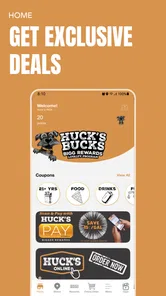
Huck's Bucks Bigg Rewards is the loyalty app for participating Huck’s Market locations. After creating an account, users can typically browse available promotions, collect rewards, and receive personalized offers linked to their purchases. The exact benefits may vary by store, location, and current campaign, so it is worth checking the app’s offer section before visiting a participating location.
How do I earn and redeem rewards in the app?
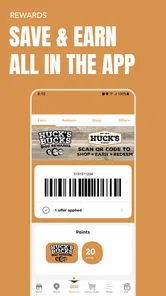
To earn rewards, sign in to your account and use the app’s linked loyalty identification method when making an eligible purchase, such as scanning a membership code or providing the registered phone number at checkout. Available rewards generally appear in the app once requirements are met. Before paying, check the reward’s terms, expiration date, and any product or location restrictions.
Is Huck's Bucks Bigg Rewards free to download and use?
The app is generally free to download and use, although you may need to create an account and provide basic information to participate in the rewards program. Downloading the application does not mean every promotion is automatically available to you, since offers can depend on your location, account status, and participating stores. Standard mobile data charges may still apply.
Does the app work at every Huck’s location?
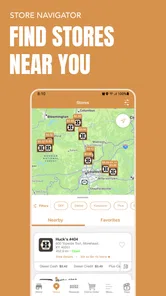
Huck's Bucks Bigg Rewards may not provide identical offers or functionality at every Huck’s location. Participation, available products, fuel promotions, and reward conditions can differ by store and region. If you are planning a specific purchase, open the app and review the location details or offer terms first. This helps avoid assuming that a reward is valid at all participating outlets.
Pros
- Simple interface makes earning and redeeming rewards easy.
- Offers multiple ways to collect points through everyday activities.
- Reward options can appeal to frequent Huck’s Market customers.
- Progress tracking helps users monitor points and available benefits.
- Free to download and convenient for participating loyalty members.
Cons
- Rewards are mainly useful to customers who regularly visit Huck’s locations.
- Some offers may be limited by store
- region
- or promotional period.
- Points and rewards may expire under the program’s terms.
- Requires account registration and sharing personal information.
- Earning rates can vary
- so valuable rewards may take time to reach.











