

Honeydew: Recipe Manager
- 482.00
- 4.8
- Installs
- 100.00K
- Price
- Free

Screenshots




Analysis by Reviewed
I tried Honeydew: Recipe Manager as the kind of food app I would open after saving too many recipe videos and realizing I still had no plan for dinner. Its central idea is appealing: turn cooking inspiration into a usable weekly plan instead of leaving it scattered across video feeds, screenshots, and notes. In my experience, that makes it most interesting for people who enjoy discovering recipes but struggle with the less exciting work of deciding what to cook.
Honeydew comes from Red Honey and sits in the Food & Drink category. It is free to install, rated for Everyone, and has built a strong early audience with an average score of 4.8 from around 20K ratings. That gives me confidence that the basic concept is landing with many users, although a high score does not remove the need to see whether its planning style matches your habits.
Where the first meal-planning problems usually appear
The biggest adjustment is learning to treat Honeydew as a planning tool rather than simply another place to collect recipes. If I only save attractive dishes without deciding when they fit into my week, the app cannot solve the underlying problem. The useful result comes from moving from inspiration to a practical sequence: choose meals, check what they require, and decide when each one makes sense.
That distinction matters because viral recipes are often designed to catch attention, not to make a balanced week easy. A quick pasta dish may look perfect on a busy evening, while a more involved recipe may be better reserved for a day when I can actually cook. I found it helpful to judge each recipe by time, ingredients, and cleanup before allowing it to take a place in the plan.
Users may also get stuck when a recipe video is visually clear but not precise. Short-form cooking content can leave quantities, temperatures, substitutions, or preparation order unclear. Honeydew can help organize the idea, but it cannot reliably replace careful reading or common kitchen sense. I would always review a recipe before shopping, especially when it involves unfamiliar ingredients or several cooking stages.
A practical habit is to build the week around two or three dependable meals first, then add more adventurous choices. This prevents the plan from becoming a collection of ambitious recipes that all demand attention at once. It also makes the app feel less like a test of discipline and more like a flexible menu I can adjust when the week becomes unpredictable.
What a realistic week looks like
Imagine I finish work on Monday with little energy, have more time on Wednesday, and want leftovers for lunch later in the week. I would place the simplest recipe on Monday, reserve the longer preparation for Wednesday, and choose a dish that stores well for the following day. That small change is more valuable than filling every available day with something new.
More From Our News Desk

 Instagram
Instagram’s Power Comes From Its Place in Your Phone
A close look at how Instagram turns Meta’s reach, recommendation systems and everyday camera habits into durable platform power—and what that costs users.

 Gmail
GmailGmail in a Busy Inbox: Who Benefits Most?
From first account to crowded workday, Gmail earns its place through dependable search and flexible sorting—but its best fit depends on how much inbox maintenance you can tolerate.

 Prime Video
Switching to Prime Video: What Changes in Your Viewing Routine
Prime Video can make a compelling second home for streaming, but switching means learning a different catalog, rental layer, and route from browsing to playback.

 Universal TV Remote Control
Universal TV Remote Control Works Best as a Reliable Backup
A phone remote earns its place through quick setup and reliable habits. Here is how to get more from Universal TV Remote Control—and where its limits show.

 Weather - By Xiaomi
Weather by Xiaomi Review: Clear at a Glance, Less Clear Up Close
Xiaomi’s weather app makes everyday forecasts quick to scan, but its calm surface can leave useful details and recovery paths harder to find than they should be.

 X
XX Under Pressure: Can It Recover When Posting Goes Wrong?
A resilience-focused review of X, examining setup, mistaken posts, interruptions, weak connections, and the gaps that matter when recovery needs to be dependable.
Latest News



For a household, I would also use the plan as a conversation starter rather than assuming that everyone will accept every selection. A recipe that looks exciting to one person may be impractical for another because of taste, allergies, equipment, or time. Reviewing those details before shopping reduces the chance of buying ingredients for a meal nobody wants.
The app is especially suitable for someone who already discovers recipes through videos and wants a bridge between watching and cooking. It is less convincing for a person who prefers a fixed cookbook, repeats a small set of meals, or needs highly structured nutritional control. In those cases, a traditional recipe manager or a dedicated meal-planning service may be a better fit.
Setup checks that prevent avoidable frustration
I would begin with a small trial rather than importing every recipe idea at once. Pick a few meals that represent different situations: one fast option, one recipe for a relaxed evening, and one that produces useful leftovers. This makes it easier to understand how Honeydew fits into your routine and exposes friction before the app becomes responsible for an entire week.
Before committing to a recipe, I would check whether the source gives enough information to cook confidently. A polished video can hide missing measurements or rely on ingredients that are difficult to find locally. If a recipe feels incomplete, I would treat it as inspiration and verify the method elsewhere instead of assuming the planner will fill in every gap.
It is also worth separating “want to try” recipes from meals that are genuinely suitable for the coming days. A saved idea can remain useful without belonging in the immediate plan. Keeping those two mental groups separate prevents the weekly schedule from becoming overloaded and makes it easier to choose meals based on real circumstances.
Honeydew runs on Android 7.0 or later, so compatibility should be straightforward for many Android users. The current version is 1.8.0, and I would check that the app is updated before troubleshooting a problem. An outdated installation can create confusing behavior that looks like a planning failure when the real issue is simply that the app is not running its latest available build.
The app is free, but it includes optional in-app purchases ranging from $0.99 to $199.99 per item. I would pay attention to the purchase screen and make sure I understand what an optional upgrade provides before confirming anything. The free starting point makes it easy to test the workflow, while the wide purchase range is a reason to avoid tapping through payment prompts casually.
Checks I make before blaming the app
When a recipe does not appear as expected, I first retrace the action that was supposed to create it. Did I save the correct item, finish the relevant step, or leave the screen before the action completed? Repeating the process carefully is often more useful than immediately assuming the entire collection has been lost.
I also check whether the problem affects one recipe or the whole planning workflow. A single awkward video may be a source-specific issue, while several missing items suggest a broader app or account problem. That distinction helps me choose a sensible response instead of deleting everything and starting over.
For general app trouble, I would close and reopen Honeydew, verify that the device has a stable connection when one is needed, and make sure there is enough free storage for normal operation. I would avoid repeatedly clearing app data unless I had already considered what local information might disappear. A cautious restart is preferable to a destructive reset when the cause is unclear.
Permissions and device settings can also create misleading symptoms. If the app needs access to something involved in importing or organizing content, I would review the relevant Android setting rather than repeatedly tapping the same button. I would only enable what is necessary for the action I am trying to complete.
Recovering a plan when the workflow breaks
My first recovery rule is simple: do not rebuild the entire week immediately. If one recipe fails to save or one planned meal becomes impractical, I would keep the rest of the schedule intact and replace only the affected item. This preserves the useful work already done and makes it easier to identify the original problem.
If a saved recipe seems to vanish, I would search for it using the same wording or source context I used originally, then compare the result with my notes. I would also look through the surrounding part of the collection rather than assuming the item was permanently deleted. Small organizational mistakes are easy to make when several similar dishes are saved close together.
When a video recipe is incomplete, I would write down the missing questions before trying again: how much of an ingredient is needed, whether the oven should be preheated, how long a step should take, or what texture signals completion. This turns vague frustration into a short verification task. It also prevents me from shopping for a recipe that I still cannot execute safely or confidently.
For a disrupted week, I would move toward simpler meals instead of trying to preserve the original ambition. A practical recovery plan might use one saved recipe, one familiar household meal, and one flexible dish based on ingredients already available. Honeydew is more useful when it supports that adjustment than when I treat its plan as a rigid commitment.
How I would rebuild without losing momentum
I would keep a short handwritten or device note of the meals selected for the next few days while resolving a serious app problem. That temporary backup is not glamorous, but it prevents a technical interruption from becoming a dinner emergency. Once the workflow is stable, I would return the information to the app in smaller pieces.
I would also test changes one at a time. If I update the app, change a device setting, and recreate the entire plan simultaneously, I will not know which action helped. A slower sequence gives a clearer answer and reduces the temptation to repeat risky steps.
Some friction is simply the result of using a visual recipe as a planning source. If a creator changes or removes a video, the original inspiration may no longer be easy to follow. In that situation, I would preserve the useful concept in a plain note and replace it with a recipe whose instructions are complete. The goal is a dependable meal, not loyalty to one particular clip.
When Honeydew is not the real cause
Meal planning problems often begin before an app is opened. An unrealistic schedule, a shopping list that ignores pantry supplies, or a recipe chosen for appearance rather than effort can make any planner feel disappointing. I found that the quality of the weekly plan depends heavily on honest estimates of energy, time, and willingness to clean up.
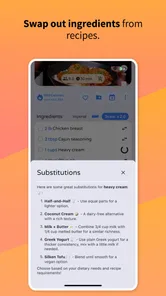
Ingredient availability is another common source of trouble. A recipe may be perfectly organized but still fail if a key item is unavailable or sold only in a larger quantity than I need. Before assigning it to a specific day, I would identify the ingredients that cannot be substituted easily. That makes it possible to swap the meal early instead of discovering the problem at cooking time.
Dietary needs deserve particular care. I would not assume that a visually appealing recipe is suitable for an allergy, medical diet, or strict eating plan simply because its ingredients look familiar. Honeydew can help me organize choices, but I remain responsible for checking labels, cross-contamination risks, and substitutions with appropriate care.
Time estimates can also be deceptive. A video may move quickly through chopping, resting, marinating, or cleanup, making the recipe appear faster than it is in an ordinary kitchen. I would add a buffer, especially when cooking for guests or trying a technique for the first time. This is one of the clearest ways to avoid blaming the app for a plan that was too optimistic from the start.
Compared with a standard cookbook, Honeydew feels more immediate and discovery-driven. A cookbook is usually better when I want tested structure, complete instructions, and a stable reference. Compared with a basic notes app, Honeydew is more purpose-built for turning recipe inspiration into a week, but a notes app may be better for highly personal substitutions, family rules, or detailed pantry tracking.
Compared with a grocery-focused planner, its appeal is the connection to the recipes that initially caught my attention. The trade-off is that viral content can be less consistent than professionally edited recipes. I would choose Honeydew when inspiration is my main obstacle, and a more structured alternative when precision, nutrition tracking, or inventory control matters more.
Who should try it, and who should skip it
I would recommend Honeydew to busy cooks who save many recipe videos, couples who need a shared starting point for weekly decisions, and beginners who want help turning scattered ideas into an actual menu. It can also suit someone who enjoys variety but needs a gentle push to decide what to cook before the evening arrives.
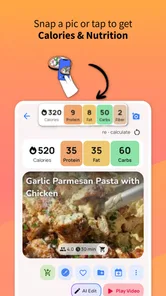
I would be more cautious recommending it to people who need exact nutritional calculations, strict medical-diet safeguards, or a fully controlled grocery inventory. I would also skip it if I dislike discovering recipes through video content or if I already have a reliable meal system that takes less effort than changing habits.
Its Everyone age rating makes it approachable for a broad audience, but age suitability does not mean every recipe is appropriate for every cook. Heat, knives, raw ingredients, and kitchen equipment still require normal supervision and judgment, particularly for children or inexperienced users.
My practical verdict after using the workflow
Honeydew’s strongest quality is not that it makes cooking effortless; it makes the decision-making stage feel more manageable. I like the way it encourages me to move from “that looks good” to “this fits on Wednesday and leaves enough time for everything else.” That is a small shift, but it addresses a real reason people abandon meal plans.
The app works best when I use it selectively. I would not fill the week with every appealing recipe, and I would not treat a saved video as a complete cooking instruction without checking it. The most reliable approach is to combine its discovery and planning strengths with my own judgment about ingredients, timing, dietary needs, and household preferences.
There is still some friction in translating informal recipe content into dependable meals. Users may need to verify details, replace unrealistic choices, or recover manually when a source is incomplete. Those limitations are important, but they do not erase the app’s usefulness for the right audience. They simply mean Honeydew is a planning companion, not a substitute for recipe testing or kitchen experience.
With over 100K installs, it has clearly reached beyond a tiny experiment, and Red Honey has continued developing it through the current release. I would start with the free experience, build a modest plan, and judge it by one practical question: does it help me cook meals I actually want and have time to make? If the answer is yes, Honeydew is a worthwhile way to turn recipe inspiration into a calmer weekly routine. If my priority is strict nutrition, detailed inventory, or fully verified recipes, I would choose a more specialized tool instead.
Honeydew: Recipe Manager Frequently Asked Questions
Who develops Honeydew: Recipe Manager, and what is its main focus?
Honeydew: Recipe Manager is developed by Red Honey and focuses on making recipe organization and meal planning easier. Its central idea is to turn viral recipe videos into a weekly meal plan, which may appeal if you often discover dishes while browsing online and want to bring those ideas into your cooking routine. It is a Food & Drink app aimed at keeping recipe inspiration practical and accessible.
What devices and operating systems should I check before downloading Honeydew?
Before installing, check that your device meets the app’s system requirements and that Honeydew is available in the app store you use. The listed minimum operating system is Android 7.0, while availability can vary by device and platform. Confirm compatibility on your own device before downloading, especially if you are using an older phone or tablet, so you can avoid installation issues.
Is Honeydew: Recipe Manager available for Android and iOS?
Honeydew: Recipe Manager is a mobile app in the Food & Drink category, developed by Red Honey. Its store summary focuses on turning viral recipe videos into a weekly meal plan, making it a potential fit if you like saving cooking ideas on your phone. Before downloading, check the app store on your device for compatibility and the latest version details.
What is Honeydew: Recipe Manager, and what can I use it for?
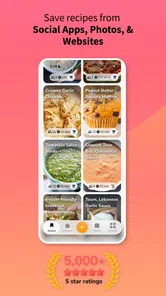
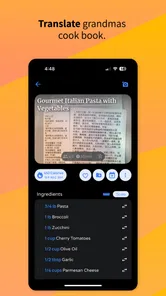
Honeydew: Recipe Manager is designed to help you collect, organize, and manage recipes in one convenient place. You can use it to save recipes you find online, keep personal family recipes, organize meals for easier planning, and refer to cooking instructions while preparing food. It is especially useful for users who want to replace scattered bookmarks, notes, screenshots, or printed recipes with a more structured digital cookbook.
Can Honeydew import recipes from websites or social media?
One of Honeydew’s most useful features is the ability to save recipes from online sources instead of manually copying every ingredient and instruction. Its store summary also highlights turning viral recipe videos into a weekly meal plan. The exact import experience can depend on the website, recipe format, and source where the recipe was found. Some pages may import cleanly, while others might require editing or manual adjustments. It is worth checking imported recipes before relying on them during cooking.
Pros
- Quickly saves recipes from websites and social media.
- Clean interface makes browsing and organizing recipes simple.
- Supports custom categories for flexible meal planning.
- Useful search tools help find saved recipes quickly.
- Keeps personal recipes organized in one convenient place.
Cons
- Some features may require a paid subscription or in-app purchase.
- Recipe imports may not work perfectly with every website.
- Limited collaboration options for sharing recipe collections.
- Requires internet access for some syncing and importing features.
- Advanced meal-planning tools may feel basic for frequent cooks.











