

heytea
- 76.00
- 4.3
- Installs
- 100.00K
- Price
- Free

Screenshots
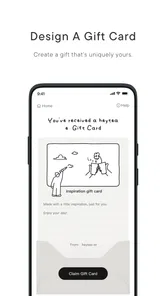
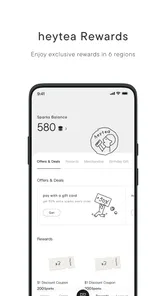
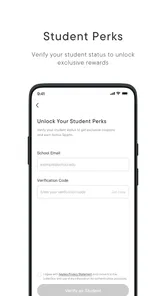
Analysis by Reviewed
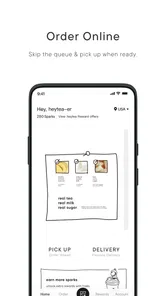
I found heytea most interesting when I treated it as a household ordering tool rather than just another food app. It belongs to the Food & Drink category and comes from the developer 喜茶, with a clear focus on the brand’s modern tea menu. The store summary describes it as “new style tea, by inspiration,” while the short description simply says “heytea.” Those phrases are brief, but they point toward the app’s main purpose: making it easier to explore and arrange a HEYTEA drink order from a phone.
In my experience, that narrow focus is both its appeal and its main limitation. If I already want a HEYTEA drink, a dedicated app feels more direct than opening a general delivery marketplace and searching through unrelated restaurants. If I am comparing prices, delivery areas, menus, or promotions across several places, a broader food app is usually more practical. I would therefore see this as a brand-specific companion for people who order from HEYTEA often, not as a complete replacement for every food-ordering service.
How heytea works in a shared household
The most realistic use case is a shared phone moment: someone at home asks what everyone wants, one person opens the app, and the group settles on drinks before placing an order. That sounds simple, but dedicated ordering apps can make this process less messy because the discussion stays centered on one menu instead of jumping between search results, screenshots, and separate restaurant pages.
I like this setup for households where one person usually coordinates refreshments. A parent, partner, roommate, or older sibling can browse the available HEYTEA choices while others make requests. The app’s value is not only in submitting an order; it is also in giving the group a common reference point. Rather than asking someone to describe a drink from memory, the coordinator can show the menu and confirm the choice directly.
There is a useful trade-off here. A shared device makes coordination quick, but it also means the person holding the phone becomes responsible for checking the final order. I would not rely on verbal requests alone, especially when several drinks look similar or when people have different preferences. My practical habit would be to review each item one by one before checkout, repeating the drink, quantity, and any visible choices to the group.
This matters more when the order is for several people. With one drink, a small misunderstanding is easy to fix. With a household order, a wrong selection can affect everyone, and the coordinator may be the one expected to resolve it. The app can centralize the process, but it cannot replace a final human check between the person ordering and the people drinking.
One everyday ordering routine
Imagine a weekend afternoon when three people at home want tea, but nobody wants to make a separate trip. I would open heytea, let each person look at the menu in turn, and keep a short note of whose drink is whose. Before paying, I would compare the basket against that note instead of trusting memory. Afterward, I would keep the phone with the person who placed the order so updates and collection details do not become scattered across several devices.
More From Our News Desk

 Instagram
Instagram’s Power Comes From Its Place in Your Phone
A close look at how Instagram turns Meta’s reach, recommendation systems and everyday camera habits into durable platform power—and what that costs users.

 Gmail
GmailGmail in a Busy Inbox: Who Benefits Most?
From first account to crowded workday, Gmail earns its place through dependable search and flexible sorting—but its best fit depends on how much inbox maintenance you can tolerate.

 Prime Video
Switching to Prime Video: What Changes in Your Viewing Routine
Prime Video can make a compelling second home for streaming, but switching means learning a different catalog, rental layer, and route from browsing to playback.

 Universal TV Remote Control
Universal TV Remote Control Works Best as a Reliable Backup
A phone remote earns its place through quick setup and reliable habits. Here is how to get more from Universal TV Remote Control—and where its limits show.

 Weather - By Xiaomi
Weather by Xiaomi Review: Clear at a Glance, Less Clear Up Close
Xiaomi’s weather app makes everyday forecasts quick to scan, but its calm surface can leave useful details and recovery paths harder to find than they should be.

 X
XX Under Pressure: Can It Recover When Posting Goes Wrong?
A resilience-focused review of X, examining setup, mistaken posts, interruptions, weak connections, and the gaps that matter when recovery needs to be dependable.
Latest News



That routine sounds almost old-fashioned, but it avoids a common problem with shared ordering: people add requests casually, then forget what they asked for. A dedicated brand app is helpful when it gives the household one place to agree. It is less helpful if everyone edits or checks the order independently without a clear coordinator.
For a workplace or larger group, I would be more cautious. A general delivery service may offer easier multi-person coordination, clearer restaurant comparison, or more familiar payment arrangements. heytea makes the most sense when the group already agrees on the brand and wants a focused way to organize the order.
Setup, accounts, and sensible boundaries
Because this is an ordering app, I would set it up on the device of the person who normally handles purchases rather than installing it everywhere automatically. That creates a simple boundary: one person manages the account and order history, while other household members can participate by viewing the menu and confirming choices. It also reduces the chance of duplicate orders or confusion over which basket is current.
I would avoid treating a shared phone as a shared account by default. Even when several people use the same device, the account holder should understand which actions could lead to an order or payment. Before handing the phone to a child, guest, or roommate, I would return to the browsing stage and keep the final confirmation with the adult or designated purchaser.
This is not about making the experience formal. It is simply a sensible separation between browsing together and authorizing a purchase. The app is free to install, but a free app can still lead to a paid food order. I would make that distinction clear in a household, particularly when younger users are curious and may tap through screens without realizing that the next step has consequences.
The app supports Android devices from version 7.0 onward, which gives it a relatively broad compatibility range for older phones. That is useful in homes where the newest device is not always the one used for ordering. I would still choose one main device for the active order, because switching between an older phone and a newer phone can make it harder to remember which screen reflects the latest basket.
The current version is 2.4.6, and the app was released on December 11, 2023. Those details are useful when deciding which household device should run it: an older compatible phone may be able to install it, but the person managing the order should still keep the app updated through the normal store process. I would not hand responsibility to a device that regularly runs out of storage, loses connectivity, or is difficult for the account holder to access.
What I would check before sharing the phone
My first check would be whether the correct account is active and whether the app opens to a browsing state rather than an unfinished basket. Next, I would confirm that the coordinator knows how to distinguish menu exploration from the final ordering step. I would also make sure everyone understands that changing an item on the shared phone changes the order for the person who will ultimately pay.
I would not invent a family profile or assume that the app separates adults and children automatically. If several people use the same device, the boundary has to come from the household’s routine. That may sound less convenient than a dedicated family system, but it is more honest and easier to manage: one account holder, one active basket, and a deliberate final review.
For privacy, I would keep account access limited to people I trust. A child can help choose a drink without needing independent access to the ordering account. A visitor can browse the menu while the account holder handles the purchase. A roommate may need a clearer agreement about who pays and who can place orders. These are household decisions rather than features I would assume the app provides.
Coordinating choices without turning tea into a project
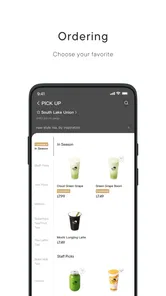
HEYTEA’s focused menu is the strongest part of the experience for a group that already knows what it wants. Instead of filtering through pizza, groceries, coffee, and snacks, the household can stay within one tea brand. That reduces decision fatigue when the goal is specifically a tea order, although it also means the app is not the right tool for a mixed meal.
I found that a coordinator should ask for choices in a fixed order: person, drink, quantity, and any customization shown in the app. This is more reliable than passing the phone around while everyone edits freely. It also helps when two people want similar drinks but different adjustments. The person placing the order can use the app as the source of truth while keeping the conversation short.
A useful trick is to take responsibility for the basket but not for everyone’s taste. I would show the available options, let each person decide, and then read back the final selection. That preserves individual choice without creating a confusing chain of last-minute changes. It is particularly helpful in a household where one person knows the menu well and everyone else is ordering occasionally.
Another trade-off appears when the app is compared with a general delivery platform. A marketplace may be better for comparing delivery fees, combining food from different restaurants, or using a familiar household account. heytea is better when the group wants a direct, brand-centered browsing experience and does not need a broader meal plan. Neither approach is universally superior; the right choice depends on whether the household is choosing a drink or organizing dinner.
I would also avoid opening the app with an unrealistic expectation that every person will find the same level of detail or choice useful. Regular customers may appreciate the focused catalog and recognize their preferred drinks quickly. Occasional users may prefer a general service that explains the broader ordering context or lets them compare alternatives. The dedicated format rewards familiarity, while the marketplace format rewards flexibility.
When the app is not the best household option
I would skip heytea when the group is undecided about the type of food or wants several brands in one order. It is also a poor fit if nobody in the household wants to be the responsible account holder. A shared device without a clear coordinator can turn a simple purchase into a series of duplicate baskets, forgotten requests, or arguments about payment.
I would be cautious if the main user needs highly detailed accessibility support, a very simple interface for an inexperienced phone user, or a single place to manage many kinds of food. I cannot treat a brand-specific tea app as a universal solution simply because it is convenient for one order. Its strength comes from being specialized, and specialization always leaves some needs outside its scope.
For a single adult ordering a familiar drink, the app may feel pleasantly direct. For a family with varied tastes, a general food platform may save time. For a group ordering only HEYTEA drinks, the dedicated app can reduce distractions. That is the clearest way I would decide: start with the group’s goal, then choose the app that matches it.
Age, trust, and responsible use
The app has an Everyone content rating, so its presentation is suitable for a broad audience. I would still separate age suitability from purchasing responsibility. A child may be perfectly capable of browsing a tea menu, but that does not mean the child should control the account or approve payment. In a shared household, trust should determine access to ordering actions, not only the age label.
This distinction is especially important because food apps can feel harmless. There is no dramatic content to worry about, but an accidental order can still create an unwanted charge or an incorrect delivery. I would let younger users participate as menu helpers: they can choose an option, compare names, and confirm whose drink is whose. The adult or account holder should then take the phone for the final review.
For teenagers, the right boundary may depend on the household’s agreement. A trusted teenager might coordinate an order for everyone, while the adult confirms the purchase. In another home, the teenager may be allowed to place an order independently. The app does not need to dictate that arrangement; what matters is that everyone knows who has permission to complete a transaction.
I also think trust includes accuracy. If one person is ordering for several others, they should not silently substitute a drink because it seems close enough. The app can display the available choices, but the household should agree before the basket is finalized. That is a small courtesy that prevents disappointment and makes shared ordering feel cooperative rather than controlled by whoever has the phone.
With 100K+ installs and an average rating of 4.3 from around 1.1K ratings, heytea has enough public use to show that it is not an obscure experiment. I would read that as a sign of an established audience, not as proof that every household will find the workflow perfect. Ratings summarize other people’s experiences; they do not replace checking whether a focused tea app suits the way your own household orders.
The app is also marked for Everyone, which makes it easier to introduce in a mixed-age home from a content perspective. My caution remains practical rather than alarmist: keep payment authority clear, avoid leaving an active account unattended on a shared device, and review the basket before confirming. Those habits matter more than simply knowing the age category.
My household verdict on heytea
After using it as a dedicated HEYTEA ordering companion, I see heytea as a focused tool with a clear audience. It is free, available for compatible Android devices, and built around the brand’s tea menu rather than a broad collection of restaurants. I would recommend it to a regular HEYTEA customer who wants a more direct way to browse and coordinate drinks, especially when one person in the household normally manages the order.
Its best household quality is not a flashy extra; it is the reduction of distractions. Everyone can discuss the same menu, the coordinator can assemble one basket, and the final choice can be checked in one place. That makes it useful for a couple, a family, or roommates who already agree on the brand. The workflow becomes even better when people use a simple name-and-drink note before the final review.
The weaknesses are equally clear. It is not a complete food marketplace, so it will not replace a service used for mixed restaurant orders. It also does not remove the need for account boundaries or careful payment habits. Shared-device use works best when one person owns the active session and everyone else contributes choices without casually taking control of the final purchase.
I would choose a general delivery app when comparison, mixed meals, or broader household flexibility matters most. I would choose heytea when the decision has already narrowed to HEYTEA drinks and I want the menu experience to stay focused. That is a practical distinction, and it prevents the app from being judged for tasks it was never meant to handle.
Overall, I think heytea is worth installing for a household that orders from HEYTEA regularly, particularly if the account holder wants a simple way to coordinate several drinks. Occasional customers may find a broader alternative more convenient, while families should establish who can browse, who can edit, and who can confirm. Used with those boundaries, the app feels purposeful rather than excessive: a specialized Food & Drink app that does one brand-centered job and can do it neatly.
heytea Frequently Asked Questions
Is the HEYTEA app free, and which devices can run it?
The HEYTEA app is free to download and is listed for everyone. It requires Android 7.0 or later, so check your device’s operating system before installing. The app is categorized under Food & Drink and is developed by 喜茶. As with any ordering app, features and availability can depend on the region where you use it.
What is HEYTEA, and what can I do with the app?
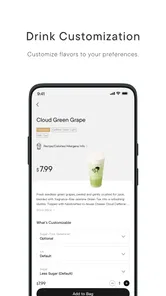
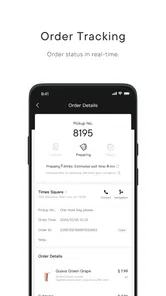
HEYTEA is the official mobile app for the popular tea and beverage brand, designed to make ordering drinks more convenient. Depending on your location, you can browse the menu, customize selected beverages, choose pickup or delivery, find nearby stores, view promotions, and manage orders. Available features may differ by country, city, store, and local service coverage.
Can I order HEYTEA drinks for pickup or delivery through the app?
The app may support both store pickup and delivery, but the available option depends on your location and participating branches. After entering your address or selecting a store, you can check whether delivery is offered and review the estimated preparation time, delivery fees, and order status. Some stores may only accept pickup orders during busy periods or outside delivery zones.
Does the HEYTEA app allow drink customization and show allergen information?
HEYTEA generally provides customization options for certain drinks, such as sweetness, ice level, toppings, or size, although the choices can vary by product and region. Before ordering, review the item details carefully and check any available ingredient or allergen information. Customers with serious allergies should confirm ingredients directly with the store, since preparation conditions may vary.
Do I need an account to use the HEYTEA app?
Some basic functions, such as browsing stores or viewing parts of the menu, may be available without signing in. However, placing orders, saving preferences, receiving promotions, tracking purchases, or using membership benefits may require an account. Registration requirements and supported login methods can differ between regional versions of the app, so check the sign-in screen before downloading.
Pros
- Creative tea and fruit drink combinations
- Fresh
- visually appealing presentation
- Frequent seasonal and limited-time menu items
- Convenient ordering and pickup options in supported areas
- Rewards can make repeat purchases more worthwhile
Cons
- Prices may be higher than those of local tea shops
- Menu availability varies by location
- Popular stores can have long waits during peak hours
- Some drinks contain considerable sugar and calories
- App features and delivery coverage differ by region











