

Heart Moments
- 288.00
- 4.7
- Installs
- 500.00K
- Price
- Free

Screenshots
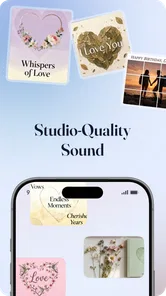
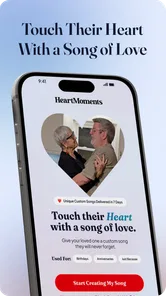
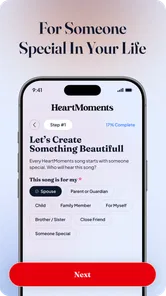
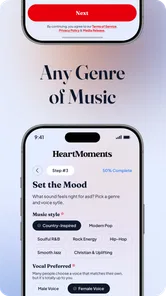
Analysis by Reviewed
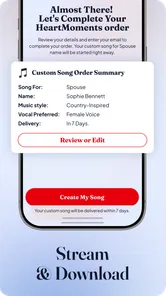
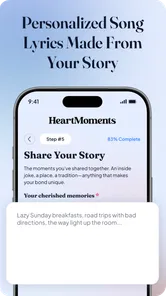
I approached Heart Moments as a music and audio app for people who want a personal feeling attached to a melody, rather than another general-purpose player or streaming service. Its idea is easy to understand: take a meaningful memory and give it a musical identity. That makes it interesting for birthdays, family moments, anniversaries, travel memories, or even a private reminder of a difficult period that you have moved through.
My first impression was that the concept is more intimate than the usual music app. A streaming service helps me find something that already exists; this app is aimed at making a memory feel more personal. That difference matters. I would not install it expecting a huge library, advanced audio editing, or the depth of a professional composition tool. I would choose it when the emotional connection is more important than technical control.
Creatunity presents the app as free to download, with optional in-app purchases ranging from $9.99 to $79.99 per item. It is listed for Everyone and works on Android 8.0 or later. The current version is 3.5, and the app has already passed 500K installs. Its average rating is 4.6 from around 3.6K ratings, which suggests that the central idea connects with many users, although a rating alone cannot tell me whether it will suit my particular workflow.
How Heart Moments feels to use in everyday situations
I find Heart Moments most useful when I treat it as a short, intentional activity rather than something to open whenever I have a spare minute. A quiet moment after an ordinary day can be enough to choose one memory and decide what feeling I want its melody to carry. That first, low-pressure session also gives me a better sense of whether its guided creative approach will remain enjoyable once the novelty wears off.
Readability and navigation should support the emotional purpose
The strongest part of this kind of app is its direct emotional focus. I do not want to spend a long time learning a complicated interface before I can turn a memory into something listenable. For a casual user, the important path should feel obvious: choose or describe the moment, shape the result enough to make it personal, and return to it later. That is a much friendlier starting point than opening a full digital audio workstation filled with tracks, menus, effects, and technical settings.
That simplicity is especially useful for someone who is not comfortable with music terminology. A person may know exactly how a memory feels without knowing the difference between a scale, a tempo, or an arrangement. An app built around memories has a chance to make the creative process understandable in ordinary language. In my view, this is where the product is more approachable than traditional composition software.
For readability, I would use it in a calm setting at first rather than while rushing through a busy day. Emotional apps often involve text entry, choices, and previews, so a user needs enough visual clarity to understand what has been selected before saving or sharing anything. Large, clearly separated controls would be particularly valuable here, not because every user needs the same layout, but because the purpose of the app is personal reflection rather than rapid navigation.
More From Our News Desk

 Gmail
GmailGmail in a Busy Inbox: Who Benefits Most?
From first account to crowded workday, Gmail earns its place through dependable search and flexible sorting—but its best fit depends on how much inbox maintenance you can tolerate.

 Prime Video
Switching to Prime Video: What Changes in Your Viewing Routine
Prime Video can make a compelling second home for streaming, but switching means learning a different catalog, rental layer, and route from browsing to playback.

 Universal TV Remote Control
Universal TV Remote Control Works Best as a Reliable Backup
A phone remote earns its place through quick setup and reliable habits. Here is how to get more from Universal TV Remote Control—and where its limits show.

 Weather - By Xiaomi
Weather by Xiaomi Review: Clear at a Glance, Less Clear Up Close
Xiaomi’s weather app makes everyday forecasts quick to scan, but its calm surface can leave useful details and recovery paths harder to find than they should be.

 X
XX Under Pressure: Can It Recover When Posting Goes Wrong?
A resilience-focused review of X, examining setup, mistaken posts, interruptions, weak connections, and the gaps that matter when recovery needs to be dependable.

 Clash of Clans
Clash of Clans Is Won Between the Battles
Its raids are quick; its community is a long-term project of coordination, teaching, rivalry, and shared responsibility—with all the friction that entails.
Latest News



I also think the app benefits from a short-session mindset. I can imagine opening it to create one melody for a specific memory, listening to the result, and closing it. That is different from a streaming service, where I might browse endlessly. A focused flow reduces cognitive load, but it also means that unclear wording or a crowded screen would be more noticeable. When an app promises an emotional result, the interface should stay out of the way.
One practical tip is to decide what I want the melody to communicate before beginning. Is the memory peaceful, playful, nostalgic, dramatic, or comforting? Having that answer ready gives the creative process direction and reduces random experimentation. It also helps users who find open-ended creative tools tiring. Instead of trying every possible option, I can judge each result against one simple question: does this sound like the feeling I wanted to preserve?
Motor and sensory considerations affect who gets the most from it
A memory-to-melody app can be more welcoming than a conventional music editor because it does not require precise instrument playing or rapid timing. Someone with limited dexterity may prefer describing a moment and making a few deliberate selections instead of tapping notes into a grid. That is a meaningful advantage in principle, although the exact comfort of the experience will still depend on the device, the screen layout, and how much manual adjustment the app expects.
Users with visual fatigue should approach it in the way that works best for their phone: a larger system text setting, a bright enough display, and a quiet environment can make a creative session easier. I would not assume that every screen will remain equally comfortable after changing system settings, so checking the important controls early is sensible. If labels become cramped or controls are difficult to distinguish, the app may become frustrating even when the musical idea itself is appealing.
For people who are sensitive to sound, previews deserve a little care. A melody that feels gentle to one person may feel repetitive, bright, or emotionally intense to another. I would begin at a low volume and use headphones only if they are comfortable. This is also useful when creating a melody for a child, an older relative, or someone who prefers quiet listening. The point is to preserve a memory, not to make the listening experience overwhelming.
Hearing differences also change the value proposition. If the main reward comes from listening to a melody, the app may be less satisfying for someone who cannot comfortably hear the result. On the other hand, the memory itself can still have value as a creative record if the app presents enough visual or written context around the creation. I would treat that as a personal suitability question rather than assuming that a music-focused app works equally well for every sensory profile.
Motor accessibility is not only about tapping accuracy. It is also about how much repetition the workflow demands. If I need to make many small adjustments to get a usable result, a user with hand fatigue may find the process tiring. A good strategy is to start with a simple emotional brief and accept the first result that captures the memory reasonably well. Perfection is not always the right goal for this product; a meaningful result made without strain is often better.
Situational access: when the app fits naturally into real life
The clearest everyday use case is a personal gift. I might create a melody for a partner after a shared trip, for a parent connected to a childhood memory, or for a friend who helped me through a difficult time. Unlike sending a familiar song, this approach can feel less generic. The recipient does not need to recognize the melody for it to matter; the significance comes from the memory behind it.
It could also work well for marking a private milestone. Someone beginning a new job, moving home, finishing a long course of treatment, or starting life in a new city may want a small audio reminder of that transition. I like this use because it does not depend on public sharing or musical skill. The melody can simply become a personal cue that brings the original feeling back when it is needed.
Families may find another useful angle. A relative can describe an old story, while a younger family member turns it into a melody. That creates a shared activity without requiring everyone to play an instrument. It may be especially engaging when the memory is more important than the technical quality of the final audio. The app becomes a conversation starter as much as a music tool.
There are also moments when it is not the right choice. If I want to edit recorded vocals, balance multiple instruments, remove noise, or produce a polished track for publication, I would use a dedicated audio editor instead. If I simply want unlimited listening, playlists, podcasts, or familiar artists, a streaming platform is the more sensible option. Heart Moments is narrower, and that narrowness is both its appeal and its main limitation.
Its situational value may also depend on privacy expectations. Memories can contain names, places, family details, or sensitive experiences. I would avoid entering anything that I would not want displayed on a device screen or included in a shared creation. A short, emotionally clear description is often enough; there is no need to record every private detail for the melody to feel personal.
Small workflow choices make the experience more useful
One non-obvious advantage of the concept is that it can help me separate the memory from the song I already associate with it. When I attach a familiar commercial track to an event, the song may eventually become more important than the memory itself. Creating a new melody gives the event its own audio marker. That makes the result feel less like borrowing someone else’s soundtrack and more like building a small personal archive.
I would create several memories with different levels of detail rather than writing the longest description possible. A concise account of the place, the people involved, and the dominant emotion may be easier to turn into a coherent musical idea than a full diary entry. This is a useful trade-off: more information can feel personal, but too much can make the creative direction less focused.
Another helpful approach is to listen after a short break. The first reaction can be influenced by the memory itself, especially if the event is emotional. Returning later lets me judge the melody on two levels: does it sound pleasant, and does it still remind me of the intended moment? Those questions are not always answered at the same time.
I would also keep expectations realistic when creating something for another person. A melody that feels deeply meaningful to me may not communicate the same emotion to the recipient without context. The best gift is likely to include a short explanation of the memory rather than relying on the audio alone. That turns the creation into a complete story instead of asking the listener to guess why it matters.
Remaining barriers and the cost of going deeper
The biggest barrier is the gap between emotional simplicity and creative control. People who want a fast, personal result may appreciate a guided approach. Musicians, producers, and users with a precise sound in mind may feel restricted if they cannot shape every musical detail. This is not necessarily a design failure; it is a reminder that a tool for capturing a feeling is not the same as a tool for composing professionally.
The free entry point makes it easier to try, but the optional purchase range means I would pay attention before committing to a long-term habit. A casual user may be happy with occasional creations, while someone planning a large collection of family memories should consider how the paid elements fit into that plan. I would start with one meaningful project and decide whether the result justifies spending more, rather than treating the highest-priced option as automatically necessary.
There is also a possible emotional barrier. Turning a painful memory into music can be comforting, but it can also bring the feeling back more strongly than expected. I would not use the app during a moment when I am already overwhelmed. A calmer time makes it easier to stop if the process becomes uncomfortable. This matters because the app’s value comes from personal memories, and personal memories are not always emotionally neutral.
People who need highly predictable navigation may want to test the complete creation flow before purchasing anything. The most important questions are practical: can I understand each step without assistance, can I review my choices before finalizing, and can I listen comfortably on my device? Those checks are more useful than relying only on the overall rating, because accessibility and ease of use vary from person to person.
The app’s age classification of Everyone makes it suitable for a broad audience in principle, but age suitability is not the same as equal usability. A child may enjoy turning a holiday or pet memory into a melody, while an older adult may need more time with the interface or help from a family member. For shared use, I would let the person who owns the memory make the creative decisions, even if someone else handles the technical steps.
Who should choose it, and who should skip it?
I would recommend Heart Moments to people who want a simple emotional keepsake, a thoughtful personalized gift, or a creative family activity that does not depend on musical training. It is particularly appealing if the phrase “I wish this memory had its own song” feels familiar. The concept gives that wish a practical direction without requiring me to become a composer first.
I would be more cautious about recommending it to someone who wants a complete music-production environment. If the goal is detailed arrangement, live recording, professional mixing, or exact control over notes and instruments, a conventional digital audio workstation will be a better match. Likewise, anyone who mainly wants to discover existing music should stay with a streaming or radio app rather than paying for a tool designed around personal creation.
For users with accessibility needs, my recommendation is conditional but positive: try the free experience with one low-pressure memory, adjust the phone’s display and audio settings to your comfort, and notice whether the controls require more precision or repetition than you can comfortably provide. If the app lets you focus on the memory instead of fighting the interface, it may be a genuinely enjoyable option. If navigation or listening becomes tiring, another format for preserving the memory may serve you better.
My inclusive verdict after looking beyond the novelty
Heart Moments succeeds because it gives music a personal job. It is not trying to replace a streaming catalog or a professional studio. Its appeal comes from making a memory feel distinct, and that makes the app easier to understand than many creative tools. I like the idea of using it for a private milestone, a family story, or a gift where the meaning matters more than technical perfection.
At the same time, I would not call it universally accessible simply because the concept is friendly. Screen readability, touch accuracy, sound sensitivity, emotional comfort, and the amount of control available can all affect the experience. The best results will come from users who are comfortable with a guided creative process and willing to judge the melody by its emotional fit rather than by studio-level production standards.
With a 4.6 average and more than 500K installs, it has clearly attracted a substantial audience since its release on January 28, 2026. The developer is Creatunity, and version 3.5 gives the app a defined current form rather than the feel of an abandoned experiment. I would still begin without spending money, especially because the in-app purchases can reach $79.99 per item, and I would only pay after confirming that the workflow feels comfortable and the results are meaningful to me.
My final view is that Heart Moments is best understood as a personal memory-making tool with a musical output. It is a good choice for reflective, non-technical creativity and a weaker choice for listeners seeking a catalog or musicians demanding detailed production controls. If you approach it with one clear memory, moderate expectations, and attention to your own visual, motor, and sensory comfort, it can turn an ordinary phone session into a surprisingly personal keepsake.
Heart Moments Frequently Asked Questions
What kind of audio experience does Heart Moments offer?
Heart Moments is a Music & Audio app centered on giving favorite memories their own unique melody. That makes it a distinctive option for people who want music to be part of how they remember important moments, rather than treating the app as a general-purpose music player. Its short description is simply “Heart Moments,” while its central idea is connecting memories with a personal musical touch.
Who develops Heart Moments, and what devices can run it?
Heart Moments is developed by Creatunity and is available for Android devices running Android 8.0 or later. The app is free to download, and it is rated for Everyone. Before installing, check that your device meets the minimum operating-system requirement and that you are downloading the app from the appropriate store for your device.
What is Heart Moments and what can I use it for?
Heart Moments is designed to help users capture, organize, and revisit meaningful memories through photos, personal notes, and special moments. After exploring the app, its main appeal is its focus on emotional memories rather than simple photo storage. It can be useful for recording anniversaries, family events, trips, milestones, or everyday experiences that you want to remember and share later.
Is Heart Moments free to download and use?
Heart Moments is free to download, though it also offers in-app purchases ranging from $9.99 to $79.99 per item. The free download makes it possible to try the app before deciding whether to spend money, but check the purchase options in your app store before buying anything. Consider whether any optional purchases suit the way you plan to use the app.
Does Heart Moments require an internet connection?
The need for an internet connection depends on the feature you are using. Creating notes or viewing content already saved on your device may work offline, while synchronization, cloud backup, account access, media sharing, and updates generally require internet access. If you plan to use Heart Moments while traveling, it is worth testing offline access and confirming whether your memories are stored locally or online.
Pros
- Simple interface makes daily mood tracking quick and approachable.
- Private journaling can help users reflect on personal feelings.
- Gentle prompts encourage regular emotional check-ins.
- Useful for recognizing mood patterns over time.
- Suitable for brief entries when you have limited time.
Cons
- Some features may require a subscription or in-app purchase.
- Mood insights depend on consistent and honest daily entries.
- Limited customization may not suit every journaling style.
- Users wanting advanced mental-health tools may find it basic.
- Storing sensitive thoughts digitally may raise privacy concerns.











