Headunit Reloaded Emulator HUR
- 544.00
- 2.3
- Installs
- 100.00K
- Price
- $4.99

Screenshots
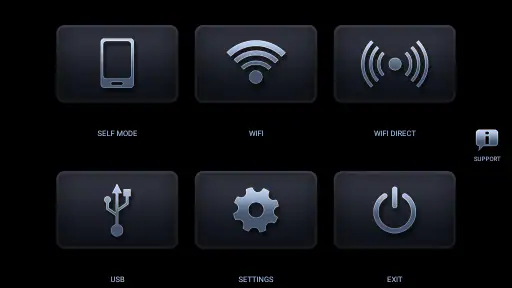
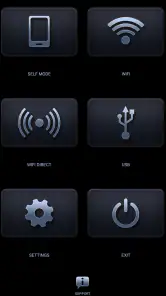
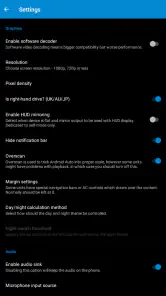
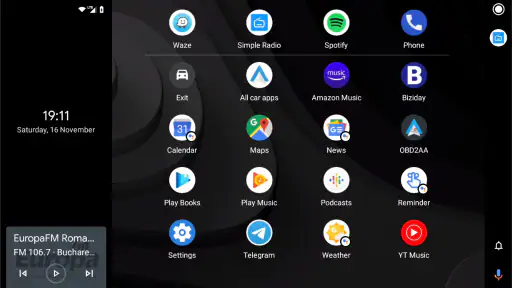
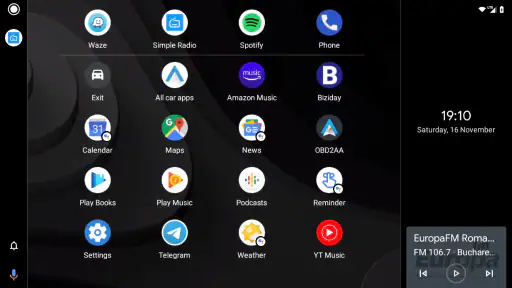
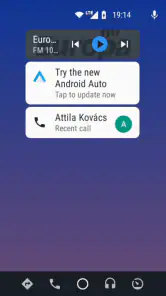
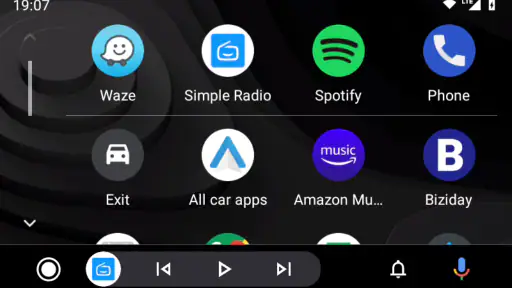

Analysis by Reviewed
I’d approach this app as a practical workaround rather than a guaranteed shortcut to Android Auto. The idea is to use an Android phone or tablet as the display in a car that lacks a compatible head unit, which can be useful if you already have a spare device and are comfortable sorting out the connection. My main advice is to check that your intended setup works before relying on it for a regular commute: an emulator adds a device and a setup step to a part of driving where reliability matters.
Who benefits from a second screen
A realistic use is mounting an older Android tablet in a car used for occasional trips, then using it as the Android Auto screen while keeping your everyday phone available for calls or other tasks. That can make sense for someone who wants a larger display without replacing the built-in stereo. It is less appealing if you expect a quick, polished, one-step installation or if you need a setup that another driver can use without learning how it is configured.
Compared with a built-in Android Auto head unit, this approach asks you to supply and position the Android device yourself. Compared with simply running navigation on a phone, the emulator aims to provide an Android Auto-style interface on another screen, but that extra flexibility also means more setup and another device to manage. I would choose the simplest option that fits the car: a compatible built-in unit for a permanent, shared installation; a phone for occasional navigation; and this app when reusing an Android device is part of the appeal.
Plan the connection before driving
The app is from AAWireless and costs $4.99. It is rated for Everyone, runs on Android 4.1 or later, and its current version is Headunit Reloaded V7.2.3. It has an average rating of 2.3 from around 4,100 ratings, so I would treat setup as something to test patiently rather than assume will be effortless. A useful approach is to work through the connection while parked, confirm that the display and the controls you expect are available, and only then decide whether the arrangement suits daily use.
The OTG cable mentioned in the original setup advice is a particular point to plan around, not a detail I would leave until the first trip. Check that your chosen Android device and cable can make the connection you intend, and arrange the screen so it does not obstruct your view or require awkward reaching. If the setup depends on unplugging and reconnecting devices, consider whether that routine will be manageable every time you get in the car.
Be thoughtful about data and controls
Android Auto can involve navigation, calls, messages, and audio, so the important trust question is not only whether the screen appears, but what information you choose to use while driving. I would test with non-sensitive tasks first, review the permissions and prompts Android presents during setup, and make deliberate choices about which phone functions to use. If you share the car or tablet, think about who can see notifications and whether you want personal messages appearing on a screen used by other people.
Voice commands may reduce the need to tap the display, but they are not a reason to assume every task is hands-free or appropriate on the road. Set a route and audio before moving, and leave anything that needs close attention until you are parked. Offline use can be helpful when a connection is unavailable, but it depends on what your chosen navigation and media apps can do without internet access; it should not be treated as a promise that every service will work offline.
More From Our News Desk

Clash of Clans Is Won Between the Battles

Android Auto Makes the Case for Quieter Car Software

MobiOffice: Transforming Mobile Productivity with Seamless Integration

EA SPORTS FC™ Mobile Soccer: Redefining Mobile Sports Gaming

How Microsoft OneDrive Became a Mobile Productivity Giant

How Google Translate Breaks Language Barriers Effortlessly
For a first test, I’d keep the workflow deliberately small: connect the devices while parked, open one navigation app, set a short familiar route, and check that the screen remains usable without repeated fiddling. Then try the audio you actually use and see whether switching between guidance and playback feels clear. This tells you more than a quick glance at the interface, because the practical question is whether the entire chain—from power and cable to the Android device and phone—behaves consistently in your car.
What the extra screen changes in daily use
A spare tablet can be useful beyond making maps larger. It can give the driver a dedicated display while a passenger keeps the phone available, and it can make a borrowed or older car feel less dependent on a small handset mount. The trade-off is that the tablet needs a secure place, suitable power, and a position that remains readable without pulling your attention away from the road. A loose device that slides or needs adjusting is not an upgrade.
Think about the whole trip rather than only the first connection. If you park briefly for errands, you may need to decide whether to take the tablet with you, leave it secured, or disconnect it. For a vehicle used by several people, a setup that works only after one person repeats a particular sequence can become a daily annoyance. I’d write down the working connection order during the first successful test, then see whether someone else can follow it without coaching.
Where the alternatives make more sense
In the Maps & Navigation category, many people only need a route on the phone they already carry. That is the more straightforward choice when trips are occasional, the car has no suitable screen, and a separate Android device would add clutter. A dedicated compatible head unit is usually the more natural fit when the car is shared or the display will be used every day, because it avoids bringing a tablet into the routine. This emulator sits between those options: it can suit someone who values reuse and experimentation, but it asks them to accept more setup responsibility.
I would also distinguish between wanting a larger map and wanting the full Android Auto-style experience. If the map alone is the goal, a properly mounted phone may solve the actual problem with fewer pieces to troubleshoot. If a second-screen interface is the point, this app is more relevant, provided your hardware and connection cooperate. Before paying, make sure the price is worth the chance that your preferred combination of devices may take patience to configure; the relatively low barrier does not remove the need to test it.
The app has an average rating of 2.3 across around 4,100 ratings, with over 100,000 installs and 544 reviews. I wouldn’t treat a rating as a verdict on every device combination, but it is a sensible reason to avoid assuming the experience will be effortless. If you are troubleshooting, change one part of the setup at a time—such as the cable, device, or connection order—and test again while parked. That makes it easier to identify what is actually causing a problem instead of rebuilding the whole setup at once.
Small choices that reduce friction
One useful tip is to decide in advance which device is responsible for which job. If the mounted Android device is the display, avoid also relying on it for unrelated tasks during the drive. Keep the phone’s role clear, and test whether the functions you need are reachable from the display you intend to use. This division can reduce fumbling, especially when the phone is tucked away or the tablet is mounted farther from the driver.
Another practical trade-off is screen orientation and placement. The original feature description points to both landscape and portrait use, but your preferred orientation is only helpful if the mount holds the device safely and the layout remains easy to glance at. Try the position in daylight and at night while stationary, and check for reflections, blocked vents, or controls that become hard to reach. A comfortable setup is not just a software preference; it affects whether you can use the screen without distracting movements.
Battery and charging deserve a test too. A long navigation session can make a tablet’s power needs more noticeable than a short trial, so check how the device behaves while connected and charging in the car. If cables cross the cabin or put strain on a port, rethink the mounting and routing before making the arrangement permanent. A setup that looks tidy in a photo may be awkward once the driver’s seat, passenger space, and everyday items are all in place.
Trust depends on deliberate choices
For me, the trust question is best handled through visible Android prompts and choices rather than assumptions about what an app does behind the scenes. During setup, pause to read permission requests and consider whether each requested access fits the function you plan to use. If you do not want a certain phone function available through the car display, leave it out of your workflow where Android and the connected apps allow that choice. These are sensible habits for any in-car system that can bring personal information onto a shared screen.
There is also a difference between using the app in your own car and leaving the arrangement available to other people. Before lending the car or tablet, check what remains visible and whether the next person can access your route history, notifications, or connected services through the devices and apps involved. I would disconnect accounts or remove personal access when appropriate, rather than assume that switching off the screen is the same as ending a session. The right level of caution depends on what you have connected and who uses the equipment.
Who should skip it? I’d point someone toward a simpler phone mount if they want navigation with almost no setup, and toward a compatible built-in system if they need dependable shared access as part of everyday driving. It is also a poor match for anyone unwilling to troubleshoot device compatibility or manage a second screen. By contrast, a technically curious driver with an available Android device, a clear mounting plan, and time for a careful parked test has a more convincing reason to try it.
Have you ever wished you could seamlessly integrate your smartphone with your car’s infotainment system? Well, let me introduce you to the Headunit Reloaded Emulator HUR. This nifty app is a game-changer for those who crave the convenience of Android Auto but don’t have a compatible car unit. Let’s dive into what makes this app a must-have for tech-savvy drivers.
The Magic of Connectivity
First things first, the Headunit Reloaded Emulator HUR does exactly what it says on the tin—it emulates a head unit on your Android device. Whether you’re using a smartphone or a tablet, you can transform it into a fully functional Android Auto display. How cool is that? Just think of it as having your own personal co-pilot, ready to guide you through traffic with GPS, play your favorite tunes, or even read out your messages. All you need is an OTG cable and a bit of patience to set it up.
Setting It Up
Speaking of setup, let me be real with you—it’s not exactly plug-and-play. The app requires a bit of technical tinkering, especially if you’re not familiar with OTG cables or Android Auto settings. But trust me, once you get the hang of it, it’s smooth sailing. The app’s interface is user-friendly, and there are plenty of online tutorials to help you along the way. So, don’t let the initial setup deter you. It’s definitely worth the effort.
Features That Stand Out
Now, let’s talk features. One of the standout aspects is its ability to function offline. Yes, you heard that right. Even if you’re in the middle of nowhere with no internet connection, the app can still work its magic. You can access maps, music, and more without a hitch. Plus, the app supports both landscape and portrait modes, so you can customize your view according to your preference.
Another feature I love is the voice command functionality. It’s like having Siri or Google Assistant riding shotgun with you. You can make calls, send messages, or ask for directions without ever taking your hands off the wheel. Safety first, right?
Final Thoughts
In a nutshell, the Headunit Reloaded Emulator HUR is a fantastic app for anyone who wants to bring the power of Android Auto to their fingertips. While the setup might require a bit of elbow grease, the payoff is undeniably worth it. The convenience and functionality it brings to your driving experience are second to none. So, if you're ready to take your car’s infotainment system to the next level, give this app a spin. You won’t regret it.
Headunit Reloaded Emulator HUR Frequently Asked Questions
Can Headunit Reloaded Emulator HUR replace the Android Auto system built into my car?
Headunit Reloaded is designed to turn an Android tablet or Android-powered unit into an Android Auto head unit, so it can provide an alternative display for Android Auto. It does not change or replace a car’s built-in system. Whether it suits your setup depends on the Android device you plan to use and how you connect your phone. Check that arrangement before downloading.
What is Headunit Reloaded Emulator HUR and how does it work?
Headunit Reloaded Emulator HUR is an app that allows users to turn their Android device into an Android Auto head unit. This means you can connect your smartphone to the emulator and enjoy the Android Auto experience on your phone or tablet screen. It works by simulating the Android Auto environment, and you can use it either via USB or wireless connection, giving flexibility depending on your setup.
Is Headunit Reloaded Emulator HUR compatible with my device?
Headunit Reloaded is compatible with most Android devices running Android 4.1 and above. However, for the best experience, it's recommended to use it on a device with at least Android 5.0. Ensure your device supports USB OTG if you plan to use a wired connection. Compatibility may vary based on the specific hardware and software configurations of your device.
Are there any special requirements to run Headunit Reloaded Emulator HUR?
To run Headunit Reloaded Emulator HUR smoothly, it's advised to have a device with a good processor and RAM for optimal performance. Additionally, a stable internet connection is necessary if you wish to use the wireless mode. Some users might need to enable developer options and USB debugging on their devices, especially for a wired connection.
What features does Headunit Reloaded Emulator HUR offer?
Headunit Reloaded offers a range of features including full Android Auto compatibility, wireless and USB connectivity options, and customizable settings to enhance user experience. The app supports voice commands, navigation, media playback, and notifications, allowing you to control your smartphone functions safely while driving. It also offers a customizable user interface and supports multiple languages.
Pros
- Easy to set up and use.
- Supports multiple car brands.
- Regular updates and bug fixes.
- Customizable interface.
- Works with both Android and iOS.
Cons
- May drain battery quickly.
- Some features require payment.
- Occasional connectivity issues.
- Limited offline functionality.
- Interface may lag on older devices.
- Category
- Maps & Navigation
- Version
- Headunit Reloaded V7.2.3












