Hair Color Changer: Change you
- 858.00
- 3.4
- Installs
- 5.00M
- Price
- Free
Screenshots
Analysis by Reviewed
When I consider a hair-color preview, I want help sorting through possibilities—not a guarantee of what dye will look like after a salon appointment. Hair Color Changer: Change you is a beauty app for trying a different look on a photo and seeing whether the idea appeals to me. Its value is in making an initial choice more concrete, before I invest time or money in changing my hair.
What the free price does—and does not—tell you
The app is free to download, so there is no upfront purchase just to try it. It is made by Face & Body Tune Photo Editor SRL, is rated for Everyone, and runs on Android 5.0 or later. Its current version is 1.0.7. That makes it easy to consider for a low-stakes experiment, but a free download is not the same thing as a promise that every option or later use has no cost. I would check any purchase prompt in the app before proceeding, rather than assume the download price settles the question.
For me, the sensible way to judge value is to ask whether a preview helps with a decision I already have in mind. If I am simply curious about a different shade, a free experiment can be worthwhile even if I never keep the edit. If I need dependable color advice before a costly or complicated service, the app cannot replace a stylist’s assessment. The free entry point is appealing, but it does not turn a visual mock-up into professional guidance.
When a preview is genuinely useful
A simulated shade can help answer a practical question: do I actually like the idea of warm copper, or am I drawn to it only in a reference photo? I would use the result to compare broad directions, such as a natural-looking change against a more vivid color, then take the preferred idea to a stylist for advice. That is a better use than treating a phone image as a precise forecast, since lighting, hair texture, and the starting color all affect how dye appears in person.
For a useful comparison, I recommend starting with a clear, evenly lit photo where your hair is visible against its background. A dramatic pose, strong shadows, or strands blending into dark clothing can make any hair-selection effect harder to judge. Keep the same photo while testing shades, too: switching pictures can make lighting differences look like color differences and muddy your decision.
A small practical trick is to decide what question you want the image to answer before you start editing. “Would I enjoy a warmer tone?” is easier to assess than trying a string of unrelated colors and picking whichever looks most striking. I would also look at the whole portrait, not just the hair patch: a shade can seem exciting in isolation but compete with the colors in your clothes or make the overall look feel unlike you. That still does not predict real dye, but it makes the preview more useful as a personal style check.
Where it fits among beauty tools
Compared with a general photo editor, a dedicated hair-color changer keeps the task focused: you are testing a hair look rather than searching through broad editing controls. A salon consultation is the stronger choice when you need advice about what is achievable on your current hair, while a general editor may suit you better if you mainly want detailed retouching or a complete portrait makeover. I see this app as the convenient middle step: useful for brainstorming, but not a substitute for professional color planning.
There is another useful distinction between this kind of preview and browsing photos of other people. Reference images show a finished look under someone else’s lighting, with someone else’s hair and features; editing your own portrait lets you judge the general direction against your face. Neither method can show exactly how dye will take, but your own image can make it easier to rule out an idea that simply does not feel right on you.
There are trade-offs. A convincing-looking overlay can still be misleading around flyaways, highlights, or hair that crosses the face, and a shade that looks flattering on one photo may feel different in daylight. I would also avoid using a single preview to decide on a major change; save a couple of sensible options and compare them later, rather than letting the brightest result win simply because it catches the eye. The app makes experimenting easy, but your photo remains the basis for the simulation.
For a real-life example, imagine I have a haircut appointment coming up and am unsure whether to stay close to my current color or try something more noticeable. I could use one well-lit portrait to explore those two directions, choose the version that feels most like me, and show it to the stylist as a conversation starter. I would still ask what the change involves and how it may work with my existing hair. That workflow gives the edit a practical purpose without asking it to answer questions a photo cannot settle.
Who is likely to get value from it
It is especially suited to someone who is curious, undecided, or preparing a few ideas before talking with a hair professional. It is less appropriate if you need an exact color match, realistic guidance about the dyeing process, or precise control over every strand. The app has an average rating of 3.4 from around 38,000 ratings, so I would approach it with practical expectations rather than assuming every result will satisfy every user. It has been installed over 5 million times, which shows that many people have tried it, but popularity does not guarantee that its edits will fit your photo.
I would skip it if the main goal is to preview a technically demanding change, such as judging exactly how a light shade will behave over much darker hair. That decision depends on the starting color and the work required to reach the result, not just on whether a digital version looks attractive. Someone who wants meticulous portrait retouching may also prefer a broader editor, while a person ready to commit to a color change will get more meaningful advice from a professional who can assess their hair in person.
For casual use, the best outcome may be a clearer preference rather than a saved image. If two options look nearly alike, that is still useful: it can tell me I am choosing between subtle variations rather than facing a dramatic makeover decision. If every test looks artificial, I would treat that as a limitation of the photo or preview process, not proof that the color itself would be wrong.
Trying colors and deciding what to keep
First things first, you'll want to dive into the app and get started. The interface is super user-friendly, which means even if you're not tech-savvy, you'll find it a breeze to navigate. After downloading and firing up the app, you're greeted with an option to either snap a new selfie or upload one from your gallery. I personally chose to upload a photo because, let's be honest, finding the right lighting is crucial when it comes to selfies.
That choice matters more than it might seem. A new selfie is convenient, but an existing portrait gives me a chance to pick a photo where the hair is unobstructed and the light is even. I would avoid changing the background, angle, and color all at once; keeping the image fixed makes it easier to tell whether a shade itself is appealing. If the photo is poorly lit, I would take another one before drawing conclusions rather than trying to compensate for it with increasingly bold edits.
Exploring the Color Options
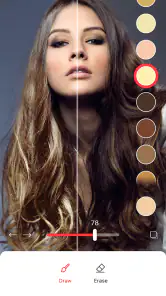
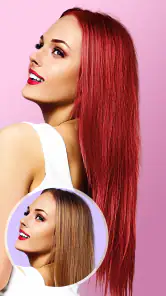
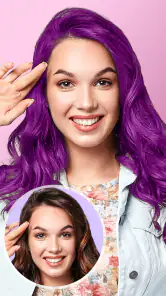
Once you’ve got your photo ready, it's time to play around with the plethora of color options available. Hair Color Changer: Change you boasts a wide variety of shades, from natural tones to more adventurous colors. I had a blast trying out a fiery red, a cool blue, and even a pastel pink. The app does a fantastic job of realistically applying the color, so you can get a pretty good idea of how you’d look.
I would treat those choices as a way to compare moods and broad color families, rather than as a precise menu for matching a salon formula. A vibrant shade can be fun to test, but it is also the easiest kind of preview to overvalue because a strong contrast draws the eye. To keep the comparison grounded, I would put a natural-looking option beside a bolder one and ask which still feels appealing after looking away for a moment.
What I found particularly impressive is how the app allows you to adjust the intensity and brightness of the color. This means you can go as subtle or as daring as you want. Want just a hint of purple? No problem! Feeling a full-on electric blue vibe? Go for it!
Those adjustments are most helpful when used to test a range rather than to chase a perfect-looking image. I would begin with a restrained setting, then move gradually toward a stronger effect and notice where the look stops feeling plausible or personally appealing. This gives me a better sense of whether I like the shade itself or only the impact of maximum intensity. Even then, the on-screen result should guide a conversation, not dictate a dye choice.
Features That Stand Out
One of the standout features of this app is its ability to recognize hair in photos, even if it’s not perfectly styled. The app smartly detects the hair area and applies the color with impressive precision. Plus, the ability to compare before and after shots is a nifty feature, allowing you to see just how transformative a color change can be.
Hair that overlaps the face or disappears into a dark background is a harder test for any automatic selection, so I would inspect the edges before trusting a preview. If the color spills onto skin or misses loose strands, I would try a simpler photo instead of judging the shade by that result. The before-and-after view is most informative when the original portrait stays unchanged; otherwise, differences in pose or lighting can distract from the color comparison.
Another cool feature is the ability to save your creations and share them directly on social media. It’s a great way to get feedback from friends on whether you should take the plunge and dye your hair for real!
Sharing can be useful when I want another person’s reaction, but I would frame the image as an idea, not a realistic preview of a finished salon result. A friend can tell me whether a look suits my style; they cannot infer how my hair will lift, take color, or behave from an edited portrait. If I am collecting opinions, I would ask about a specific choice—such as which of two broad directions feels more natural—rather than treating a stream of votes as a substitute for my own preference.
A practical way to decide
After trying a few looks, I would pause before saving a favorite. Looking at the image again later helps separate a passing reaction to a dramatic color from a choice I would genuinely want to wear. I would keep only a small set of options that answer different questions, such as subtle versus vivid, and bring those to a stylist if I am considering a real change. That is more useful than accumulating many nearly identical edits.
People often want to know whether a preview will tell them exactly what to ask for at a salon. I would not rely on it for that. It can help communicate a direction, but a stylist still needs to discuss the starting color and what is realistic for the hair. Likewise, if I only want to have fun with a portrait, there is no need to treat every result as a serious plan; experimenting is a perfectly reasonable use as long as I keep the distinction clear.
Final Thoughts
Overall, Hair Color Changer: Change you is a fantastic app for anyone looking to experiment with hair colors without the commitment. It's user-friendly, offers a wide range of color options, and provides a realistic preview of how you'd look with a new hue. So, if you're contemplating a hair makeover or just want to have some fun, definitely give this app a try. Who knows, you might just find your next hair color obsession!
My recommendation is more measured: try it if you want a free, low-pressure way to explore an idea, and keep your expectations tied to what a photo simulation can show. I would choose a different route for exact color planning, technical advice, or detailed editing beyond hair. For a curious user who wants to arrive at a salon with a clearer sense of direction—or simply test a playful look—the app is worth trying, provided the final decision stays grounded in real hair and professional advice when needed.
Hair Color Changer: Change you Frequently Asked Questions
Can I use Hair Color Changer: Change You without uploading a photo?
The app’s main purpose is to preview hair colors and hairstyles on an image, so you will need to take a photo or choose one from your device to see how a look might suit you. A clear, well-lit picture with your hair visible can make the virtual result easier to judge. You can then use the preview to compare ideas before deciding whether to make a real change.
Is Hair Color Changer: Change You useful for choosing a hairstyle as well as a hair color?
Yes. Hair Color Changer: Change You is described as a simulator for trying different hair colors and changing hairstyles, so it can help you explore more than one part of a new look. The preview is a convenient way to compare options on a photo, though it should be treated as inspiration rather than a precise prediction of how a cut or color will look in real life.
Is Hair Color Changer: Change You suitable for trying a new look before changing my hair?
Yes. Hair Color Changer: Change You is a beauty app for previewing different hair colors and hairstyles, so you can explore a possible look before making a real change. Its simulator lets you apply virtual colors to a photo and compare how they appear. Treat the result as a visual guide rather than a guarantee of how a color will look on your hair in person.
What is Hair Color Changer: Change You, and how does it work?
Hair Color Changer: Change You is an innovative app designed to let users experiment with different hair colors using augmented reality technology. By simply taking a photo or uploading an image, the app allows you to virtually try on various hair colors. The app employs advanced AI algorithms to ensure the colors blend naturally with your existing hair, providing a realistic preview of how a new hair color would look.
Is Hair Color Changer: Change You free to use?
Yes, Hair Color Changer: Change You is free to download and use. However, to access premium features such as a wider range of hair colors, advanced editing tools, and an ad-free experience, users may need to purchase a subscription or make in-app purchases. It's recommended to check the app's pricing details on the respective app store before downloading.
Pros
- Easy to use interface.
- Wide range of color options.
- Realistic color application.
- Fast processing time.
- No internet required for core features.
Cons
- Limited free features.
- Occasional app crashes.
- Ads can be intrusive.
- High-resolution images may lag.
- Limited customer support.

- Category
- Beauty
- Version
- 1.0.7


