

Guitar Tuner - LikeTones
- 3.95K
- 4.9
- Installs
- 1.00M
- Price
- Free

Screenshots
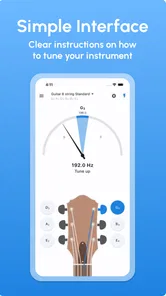
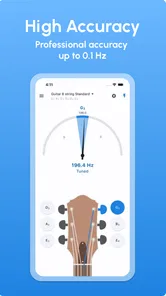
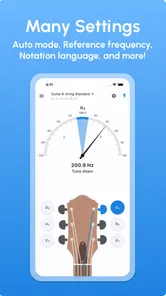
Analysis by Reviewed
My first useful test with Guitar Tuner - LikeTones would be at home, before a practice session: open the tuner, pluck one string at a time, and adjust until the note settles in tune. That simple routine is the point. I wouldn’t expect a phone app to replace careful listening or a dedicated tuner in every setting, but it can make the first step much less intimidating.
What to expect from a phone tuner
Like other microphone-based tuners, this app listens to the sound reaching your phone rather than measuring the string directly. That makes it convenient and portable, but the room matters: nearby conversation, a television, or another instrument can make a clear reading harder to get. For a clean result, tune somewhere reasonably quiet and let each note ring on its own.
That trade-off is worth knowing before you start. A clip-on tuner can be the better choice in a noisy rehearsal room because it reads vibration from the instrument, while an app is easier to keep at hand when you are travelling light. I’d choose based on where I usually play, rather than assuming one method is always superior.
Getting a reliable first reading
For a first attempt, place the phone close enough to hear the guitar clearly, but not so close that handling noise dominates. Pluck a string with a steady, moderate touch, then give the note time to ring before changing the tuning peg. If the display seems unsettled, mute the string and try again rather than turning the peg in a hurry. This small pause helps prevent overshooting the note.
Work through the strings one by one, checking each again after the others are adjusted. Changing tension on one string can slightly affect the rest, especially when the guitar has been sitting unused or has just been restrung. Rechecking is more dependable than treating a single pass as final, and it gives a beginner a useful habit for tuning without guesswork.
When it may not be the right fit
If you need silent tuning, a microphone-based approach is not ideal; a device must hear the instrument. Likewise, a crowded or loud space can make an app less convenient than a physical tuner. Players who already rely on a pedal tuner for live work may have little reason to switch their established setup. I see this app as a handy everyday option, not a universal replacement for every tuning tool.
It is also sensible to distinguish a tuning reading from a full setup check. A tuner can help you bring strings to the intended pitches, but it does not tell you whether the guitar’s action, intonation, or string condition needs attention. If notes still sound wrong higher up the neck after open strings are tuned, that points to a different issue than the basic tuning task.
More From Our News Desk

 Gmail
GmailGmail in a Busy Inbox: Who Benefits Most?
From first account to crowded workday, Gmail earns its place through dependable search and flexible sorting—but its best fit depends on how much inbox maintenance you can tolerate.

 Prime Video
Switching to Prime Video: What Changes in Your Viewing Routine
Prime Video can make a compelling second home for streaming, but switching means learning a different catalog, rental layer, and route from browsing to playback.

 Universal TV Remote Control
Universal TV Remote Control Works Best as a Reliable Backup
A phone remote earns its place through quick setup and reliable habits. Here is how to get more from Universal TV Remote Control—and where its limits show.

 Weather - By Xiaomi
Weather by Xiaomi Review: Clear at a Glance, Less Clear Up Close
Xiaomi’s weather app makes everyday forecasts quick to scan, but its calm surface can leave useful details and recovery paths harder to find than they should be.

 X
XX Under Pressure: Can It Recover When Posting Goes Wrong?
A resilience-focused review of X, examining setup, mistaken posts, interruptions, weak connections, and the gaps that matter when recovery needs to be dependable.

 Clash of Clans
Clash of Clans Is Won Between the Battles
Its raids are quick; its community is a long-term project of coordination, teaching, rivalry, and shared responsibility—with all the friction that entails.
Latest News



Have you ever picked up your guitar, ready to jam, only to find out that it sounds more like a screeching cat than a harmonious instrument? Trust me, I’ve been there, and that's when I stumbled upon Guitar Tuner - LikeTones, a savior for my musical endeavors. Let me walk you through my experience with it.
First Impressions
When I first opened Guitar Tuner - LikeTones, I was greeted with a sleek and user-friendly interface. It's not cluttered like many other apps, which is a blessing for those of us who are not tech-savvy. The app is available on both Android and iOS, making it accessible for everyone. The first thing I noticed was how intuitive the design is, allowing even the most technologically challenged among us to navigate with ease.
Features That Stand Out
Now, let’s talk features. This app doesn’t just help you tune your guitar; it’s packed with functionalities that cater to both beginners and seasoned players. The app supports a variety of tuning modes, from standard to open tunings, and even custom tunings for those who like to experiment. It’s like having a personal guitar tech in your pocket!
One feature that really impressed me is the accuracy of the tuner. It uses your device’s microphone to listen to the string’s pitch and provides precise feedback. I’ve tried other tuners before, and they often left me with strings that were slightly off. But with this app, my guitar has never sounded better.
Making the first session easier
For a beginner, the most useful thing is not rushing. The tuner displays whether a note is sharp or flat, but I still make small peg adjustments and listen to how the pitch changes. If you are new to tuning, start with one string, get comfortable reading the response, and then move on. That turns an unfamiliar screen into a repeatable routine instead of a guessing game.
A practical everyday use is keeping it ready for short practice sessions. If I have only a few minutes before a lesson or a quiet evening playing at home, I can check the guitar rather than spending that time trying to work out why a chord sounds off. I would still tune again after moving the instrument between rooms or after a long break, since temperature and handling can affect how stable the strings feel.
User Experience
Using the app is as simple as it gets. You pluck a string, and the app displays the note you’re playing, showing whether it's sharp, flat, or in tune. It’s incredibly responsive and doesn’t lag, which is crucial when you’re in the middle of a practice session or a live performance. Plus, the app doesn’t bombard you with ads every two seconds, which is a huge plus in my book.
For those who are just starting out, there’s a handy guide section that explains how to use the app and even provides some beginner tips on guitar maintenance and playing techniques. It’s like a mini guitar class right there on your phone.
Who will get the most from it
I’d recommend it most to a new guitarist who wants a straightforward way to check pitch, or to an experienced player who wants a backup tuner in their pocket. The developer, LikeTones, focuses this app on a clear everyday job rather than asking the user to learn a complicated workflow. It is free, rated for Everyone, and its current version, 9.10.0, runs on Android 6.0 or later. Its 4.9 average from around 88,000 ratings, roughly 2,900 written reviews, and more than a million installs suggest that many players have found it useful.
It may be less appealing if you want a hands-free stage setup, silent tuning, or a tool that diagnoses guitar problems beyond pitch. Those needs point toward dedicated hardware or a repair/setup check. For exploring alternate tunings, though, the app’s listed standard, open, and custom options give curious players a reason to keep it nearby; I’d change one string at a time and confirm the result by ear before launching into a song.
Choosing a tuning routine that works
For a first-time user, I would keep the process deliberately simple: make sure the guitar is stable, quiet the other strings, and tune just one at a time. If the app identifies an unexpected note, check that you have plucked the string you intended before turning the peg. That is especially helpful when learning the instrument, because the string order and note names can blur together at first. A little care here prevents a common mistake: correcting the wrong string because the room is noisy or the note has not fully settled.
There is also a useful trade-off between speed and confidence. A quick pass is enough before casual noodling, but before recording or playing with someone else I would make a second pass and listen to a chord. If one string keeps drifting, repeated adjustments may not solve the underlying cause; the string may need attention, or the instrument may need a setup check. The tuner can guide the pitch correction, but the player still has to decide whether the result is musically convincing.
Everyday situations where it earns a place
Picture getting home after carrying your guitar to a lesson. You have a short window before dinner, and the instrument has been moved around enough that you do not want to assume it stayed in tune. A phone tuner is convenient in that moment: set the guitar down, find a reasonably quiet corner, and check the strings before using your practice time. It is also handy when visiting a friend who owns a guitar but not a tuner, provided you can get close enough to the instrument for the microphone to hear each note clearly.
For shared spaces, I would make the routine considerate as well as accurate. Tune between songs or before other people begin playing, rather than trying to isolate a string over a full band. If a family member is watching television nearby, moving to another room can be more effective than plucking harder. Stronger playing does not necessarily create a clearer reading; it can introduce a sharper initial attack and make it harder to judge the note after it settles.
What to check before changing tunings
Alternate tunings can make the app more interesting than a basic pitch checker, but they also ask for a little more care. Before changing from standard tuning, I would note the tuning I started with and adjust strings gradually. A substantial change in string tension can affect how the guitar feels, and moving several strings rapidly can make it harder to tell which adjustment caused a problem. If you are only curious about a new sound, try the change when you have time to return to your usual setup rather than right before a lesson or performance.
Custom tuning is most useful when you already know the target notes you want. It is not a substitute for understanding what a tuning is called or how it changes familiar chord shapes. I would treat the app as a practical reference while experimenting, then play slowly and check whether the new arrangement suits the song. That approach keeps the creative freedom without assuming that changing pitches automatically makes every guitar or playing situation easier.
How it compares with other ways to tune
Compared with a clip-on tuner, a phone-based option wins on convenience if your phone is already nearby, but loses when the surroundings are loud or you need to keep both hands and attention on the instrument. A pedal tuner makes more sense for a player who tunes as part of a regular amplified stage setup. Tuning by ear is valuable for developing musical listening, yet it can be frustrating for a beginner who does not know whether a string is slightly sharp or flat. I like this app as a practical middle ground: it gives a visible reference while leaving room to listen and learn.
There is no need to turn that choice into a permanent commitment. A beginner can start with the app at home, then add a clip-on device if rehearsals become noisy. An experienced guitarist may keep both methods available for different settings. The right question is not which tuner is best in every case, but whether the tool fits the room, the instrument, and the amount of time you have before playing.
Questions a new user can answer through practice
If the reading jumps around, should you immediately adjust the peg? I would not. First mute the string, check for nearby sound, and pluck it again with a steady touch. If the note continues to wander, make a very small adjustment and allow it to ring before deciding whether to turn further. This is safer than chasing a changing display and helps you learn how much movement your guitar’s pegs need.
Can you rely on a phone tuner before playing with other people? For a quiet rehearsal or informal session, it can be a convenient check, but I would tune before the room fills with sound and verify with a chord. If the environment is loud, a clip-on or pedal tuner is likely to be less frustrating. And if the guitar still sounds out of tune after the open strings read correctly, check notes higher up the neck or ask a knowledgeable player or technician to look at the instrument rather than repeatedly retuning it.
Do you need to be an experienced guitarist to get started? No: the basic routine is approachable if you take one string at a time and make small corrections. The more advanced tuning options are there for players who have a reason to use them, but a new player can ignore them and begin with the familiar setup. That separation is one of the app’s practical strengths: it can support experimentation without making it necessary for the first successful tuning.
Next steps after tuning
Once the open strings read correctly, play a familiar chord and a few notes along the neck. That quick musical check helps you notice whether the guitar feels and sounds settled, while keeping expectations realistic: tuning the open strings does not guarantee perfect intonation everywhere. If you are learning, write down an unfamiliar tuning before changing strings so you can return to your starting point without relying on memory.
As a music and audio app, Guitar Tuner - LikeTones keeps its main task easy to approach, and I like that it can serve both as a first tuner and a convenient spare. I would start with standard tuning, use a quiet spot for the first reading, and only then experiment with other settings. With a 4.9 average and a free download, it is an easy option to try if a phone-based workflow suits how and where you play.
Final Thoughts
In conclusion, Guitar Tuner - LikeTones is more than just a tuner; it’s a comprehensive tool for guitarists of all levels. Its user-friendly interface, precise tuning capabilities, and additional features make it a must-have app for anyone serious about their guitar playing. Whether you're jamming at home or performing on stage, this app ensures your guitar always sounds its best.
If you’re tired of your guitar sounding like it’s come from an alternate universe, give this app a try. It’s been a game-changer for me, and I’m sure it will be for you too!
Guitar Tuner - LikeTones Frequently Asked Questions
Does Guitar Tuner - LikeTones need access to my phone’s microphone?
A guitar-tuning app needs to hear the instrument so it can help you tune it, so expect to use your device’s microphone while tuning. For the clearest reading, place the phone near the guitar and play one string at a time in a reasonably quiet space. The app’s main purpose is easy guitar tuning with a professional tuner.
Can I use Guitar Tuner - LikeTones during practice or a live performance?
Guitar Tuner - LikeTones is intended to help tune a guitar, so it can be useful before a practice session or performance when you have a compatible phone available. For a more reliable reading, tune in a quieter spot and play each string clearly. It is a tuning tool rather than a replacement for practicing or for other performance equipment.
Is Guitar Tuner - LikeTones free, and what devices can run it?
Guitar Tuner - LikeTones is a free app in the Music & Audio category, making it easy to try without an upfront purchase. It runs on Android devices with version 6.0 or later, and its age rating is Everyone. The app’s simple purpose—helping you tune a guitar—may suit players who want a dedicated tuning tool on a compatible phone or tablet.
What features does Guitar Tuner - LikeTones offer?
Guitar Tuner - LikeTones provides a variety of features designed to help both beginners and advanced guitarists. The app offers multiple tuning modes, including standard and alternative tunings. It also features a built-in metronome, chord library, and the ability to tune other string instruments such as the ukulele and bass. Additionally, its user-friendly interface makes it easy to navigate and use.
Is Guitar Tuner - LikeTones suitable for beginners?
Yes, Guitar Tuner - LikeTones is highly suitable for beginners. The app is designed with simplicity in mind, offering easy-to-follow instructions and a straightforward interface. Beginners can easily access video tutorials and step-by-step guides to learn how to tune their instruments accurately. The app also provides visual aids and sound guides to ensure precise tuning.
Pros
- Accurate tuning with minimal noise interference.
- Supports a wide range of musical instruments.
- User-friendly interface for beginners.
- Quick tuning response time.
- Offline mode available for remote tuning.
Cons
- Ads can be intrusive during usage.
- Limited free features without premium.
- Occasional bugs in the app.
- Requires microphone access to function.
- Interface can be cluttered for some users.











