Guitar Pro
- 886.00
- 2.3
- Installs
- 100.00K
- Price
- $5.49

Screenshots
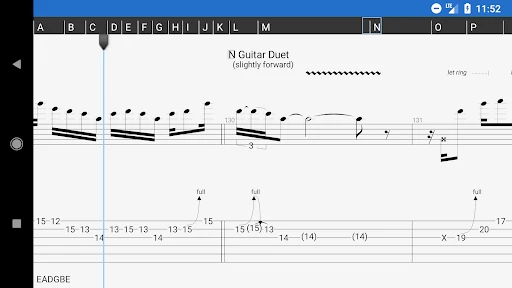
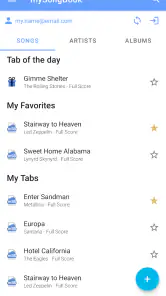
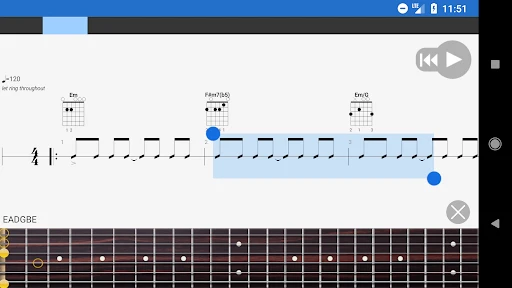
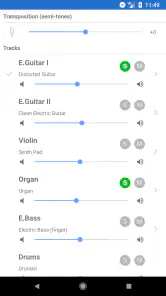
Analysis by Reviewed
Before paying for a guitar app, I’d ask how I actually learn: do I need to read a part, hear it, practise a difficult bar, or make changes to the arrangement? Guitar Pro is most compelling when I want those tasks to connect instead of jumping between a static tab viewer and separate practice tools. I’d look at it most closely if tablature is already part of how I learn or write music, and less so if I mainly play by ear.
Start with the job you need it to do
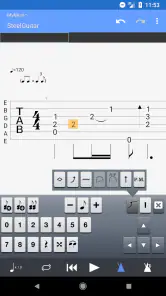
For a quick reference, almost any straightforward tab reader may be enough. The case for this app is stronger when a chart is a working document: I want to follow a part, hear how it moves, and perhaps adjust it to suit my playing. That difference matters because an editor can be useful even when I’m not composing a complete song. Correcting a small mistake or keeping a clearer version of an idea can make a familiar tab more practical.
I’d also consider where I practise. A phone is handy when I have a guitar beside me and only a short window to work, but it is not automatically the best screen for reading dense notation or making lots of edits. If I spend most of my time arranging, a larger display and a desktop workflow may feel more comfortable. If I’m learning a riff in a spare moment, having the chart and its playback close at hand is a more meaningful advantage.
Why the connected tab-and-playback workflow stands out
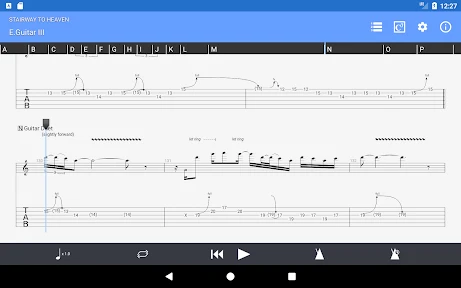
The useful distinction is that tablature here can be more than a picture to glance at. Listening to a passage and then trying it on the instrument gives me two ways to check what I’m doing. If a run feels confusing, I can work on a small section rather than restarting the whole piece each time. I find that approach especially helpful for rhythms that are hard to infer from fret numbers alone.
There is also a practical reason to keep the arrangement in view while learning a guitar part. Hearing other instrument lines can help me understand where the guitar enters and how its rhythm sits in the music. That does not replace careful listening, but it can make a passage easier to place than practising isolated notes with no musical context. The trade-off is that playback represents an arrangement, not the feel of a live band, so I would use it as a guide rather than a final judgement of tone.
Three small habits that make practice more useful
First, I’d test a tab I already know reasonably well. Familiar material makes it easier to notice whether the written part, playback, and my own playing line up, rather than spending the entire first session decoding an unfamiliar song. Second, I’d focus on a short phrase and bring it back into the larger passage once the timing feels steady. That keeps repetition purposeful instead of turning into an endless loop.
Third, I’d use the metronome as a check on consistency, not just as a device for pushing speed. If I can play the phrase evenly at a comfortable pace, I have a better starting point for building up. This is a small change in how I use a practice tool, but it helps distinguish “I can get through it once” from “I can play it reliably.” Keeping a few frequently used tabs available offline also makes short practice sessions less dependent on whether I happen to have a connection.
More From Our News Desk

Clash of Clans Is Won Between the Battles

Android Auto Makes the Case for Quieter Car Software

MobiOffice: Transforming Mobile Productivity with Seamless Integration

EA SPORTS FC™ Mobile Soccer: Redefining Mobile Sports Gaming

How Microsoft OneDrive Became a Mobile Productivity Giant

How Google Translate Breaks Language Barriers Effortlessly
Who benefits, and who may be happier elsewhere
I see the strongest fit for guitarists who regularly learn from tabs, want playback as a listening aid, or occasionally edit arrangements. A player who writes riffs can use an editor to preserve an idea in a form that is easier to revisit than a voice memo. Someone learning a song can use a prepared tab to focus on the tricky section instead of searching through unrelated material during practice.
On the other hand, if I only need to check a chord shape now and then, a dedicated chord reference or a simple tab reader may be less distracting. If I learn almost entirely by ear, a notation-centred workflow may not earn its place in my routine. And if my main goal is polished audio listening, a regular music player is the more direct tool. The best choice depends less on whether I play guitar and more on whether I will use the combination of reading, playback, and editing often enough.
A realistic use case is a short practice break before leaving home. I open a saved passage, listen once to confirm the rhythm, and work on the awkward transition at a measured pace. If the part still feels wrong, I can compare what I hear with the written notes instead of relying on memory alone. That is a modest but worthwhile workflow for someone who already practises with tabs; it is not a substitute for lessons, technique, or learning to keep time without visual help.
Unleashing Creativity with Guitar Pro
When I first launched Guitar Pro, I was immediately impressed by its sleek, user-friendly interface. The app is designed to cater to both beginners and seasoned players, making it an ideal choice no matter where you are on your musical journey. One of the standout features is the ability to access a vast library of tabs. I'm talking thousands of songs at your fingertips, all neatly organized and easy to navigate.
Making a Tab Useful in Practice
The main benefit of a tab app is not simply having notes on screen; it is being able to connect what I see with what I hear and play. The tab editor can also help when an arrangement needs correcting or a musical idea needs recording in a clearer form. For a guitarist who learns by taking a song apart, that is more useful than treating a tab as a static page.
A practical routine is to isolate a short passage, listen to its playback, and then work through it at a manageable pace before returning to the full section. I find this more dependable than repeatedly guessing at a fast run from notation alone. It also helps to keep the instrument part in context: a guitar line can sound different when heard alongside bass or drums, and that context can reveal where a note fits rhythmically.
Dive into the Features
The app is like a Swiss Army knife for guitarists. It offers a powerful tab editor, which is a dream come true for anyone who loves to compose or arrange music. The editor is intuitive, allowing you to effortlessly create and modify tabs. And if you're like me, always eager to learn new techniques, the app's playback feature is a game changer. You can slow down or loop difficult sections of a song, making practice sessions much more productive.
Another feature worth mentioning is the virtual instruments. It's not just about guitars; you can experiment with a variety of instruments, including bass, drums, and even piano. This opens up a world of possibilities for creating full arrangements and honing your skills as a multi-instrumentalist.
Where It Fits—and Where It Doesn’t
For example, I might have ten minutes before heading out and want to work on one awkward transition. I can open a saved tab, loop the bars that cause trouble, and use the metronome to keep each attempt honest rather than rushing through the passage. Offline access matters here too: it makes a prepared practice session possible when I don’t have a reliable connection.
This is a different proposition from a basic tab reader, which may be a better fit if all I need is a quick glance at finger positions. A general music player is more convenient for listening to finished tracks, while notation software on a larger screen may suit someone doing detailed composition. Guitar Pro’s appeal is the overlap between tablature, playback, and editing; that overlap is valuable only if I’ll actually use more than one of those jobs.
There is a learning trade-off. A beginner can use the app to follow a part, but the screen cannot replace knowing how to fret cleanly, keep time, or interpret a rhythm. Editing also takes more attention than simply opening a chart, so a player who never writes or adjusts tabs may not get much from that side of the app. I would start by using a familiar song and checking whether its tab and playback make practice clearer, rather than trying to learn every tool at once.
Practice Makes Perfect
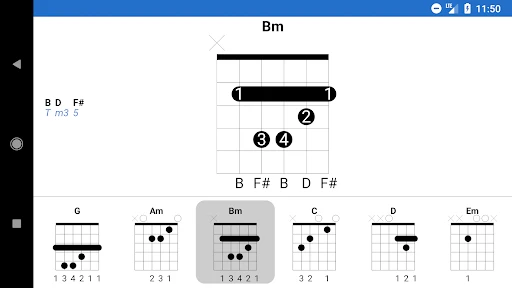
One of the things I love most about Guitar Pro is how it encourages effective practice. The app includes a metronome and a chord library, which are essential tools for any guitarist. The metronome helps keep my timing sharp, while the chord library is a fantastic resource for expanding my chord vocabulary. Plus, the ability to download tabs for offline use means I can practice anytime, anywhere.
And let's not forget about the realistic sound engine. The app uses RSE (Realistic Sound Engine) technology to deliver top-notch sound quality, making it feel like you're playing along with an actual band. It's these little details that make a huge difference when you're trying to improve your playing.
What to expect before committing
Guitar Pro is a paid music-and-audio app from Arobas Music, priced at $5.49, and rated Everyone. It has been available since Jan 30, 2012; its current version is 1.8.0 and it supports Android 5.0 and later. The reported average is 2.3 from 12K ratings, with 886 written reviews, so I would take a moment to consider how well its workflow suits my device and needs. Its 100K+ installs show that players have tried it, but popularity by itself cannot tell me whether I’ll enjoy using it.
The rating is a reason to be deliberate, not a verdict on whether the app can help with a specific practice routine. I would check that the device I plan to use meets the operating-system requirement and try the main tasks I care about early: opening a tab, following playback, and making a small edit if editing matters to me. That gives a more useful impression than judging it by the number alone. The price also makes sense only if I expect to return to the app; an occasional reference lookup is a weaker reason to buy a dedicated tool.
Moving an existing practice routine
If you already have a collection of tabs, I’d think about how you use them before moving everything into a new routine. Keep a small group of pieces you practise often and test the reading, playback, editing, and offline workflow with those first. That gives a more useful answer than judging the app from a single session, and it avoids turning a practice tool into a project of reorganizing files. If your priority is only to hear songs, or you prefer learning by ear without written parts, a simpler player or your existing method may be the better choice.
For someone changing from paper or a basic reader, the main adjustment is not simply learning where buttons are; it is deciding which parts of the richer workflow are worth keeping. I would move over a few active pieces rather than trying to recreate an entire archive at once. That makes it easier to spot whether playback genuinely answers questions I have while practising, or whether the extra editing options are just adding steps. If the app becomes the place where I revisit difficult passages and keep useful arrangements, the change has a purpose. If I keep opening it only to glance at a fret number, I would return to a simpler method without guilt.
A measured recommendation
In conclusion, Guitar Pro is more than just a tab reader; it's a comprehensive tool that caters to every aspect of guitar playing. Whether you're composing, practicing, or just jamming along to your favorite tracks, this app has got you covered. It's a must-have for anyone serious about playing guitar, and it has certainly earned a permanent spot on my device. So, if you're ready to take your guitar skills to the next level, give Guitar Pro a try. You won't be disappointed!
My recommendation is more measured: I’d choose it if tablature is central to my practice and I want to work with playback or make edits, not simply because I play guitar. The combination can make a short, focused session easier to organize, especially when I’m learning a part away from a computer. If I only need occasional chord reminders or a quick look at a tab, I’d choose a lighter alternative. For players who will use its editing and practice workflow regularly, though, it is a distinctive option worth considering.
Making the choice stick
Before deciding, I’d give myself a simple test: choose one familiar tab, one passage that regularly trips me up, and one small arrangement change I genuinely want to make. If the app makes those tasks clearer without making practice feel like file management, that is a good sign it belongs in my routine. If I prefer a plain chart or a dedicated audio player after trying the same material, that preference is useful information too. I would choose Guitar Pro for the work I actually do, not for the number of tools it contains.
Guitar Pro Frequently Asked Questions
What does Guitar Pro help you do on a phone or tablet?
Guitar Pro is a Music & Audio app for viewing, playing, and writing sheet music and tablature. It is designed for musicians who want to work with written music on a mobile device, whether they are following a score or creating one. The app is developed by Arobas Music and is suitable for users interested in guitar-focused music notation.
What is Guitar Pro and what platforms is it available on?
Guitar Pro is a comprehensive music software application designed for musicians, particularly guitarists, to create, edit, play, and share sheet music and tablature. It offers a wide array of tools and features for composing and practicing music. Guitar Pro is available on both Android and iOS platforms, making it accessible for mobile users who want to practice or compose music on the go.
Can I import and export sheet music with Guitar Pro?
Yes, Guitar Pro allows users to import and export sheet music in various formats. You can easily import files from other music software, making it convenient to continue your work without starting from scratch. Additionally, Guitar Pro supports exporting your compositions in multiple formats, including PDF, MIDI, and MusicXML, which can be shared with other musicians or used in other music editing software.
Does Guitar Pro have features for beginners and advanced users?
Guitar Pro caters to both beginners and advanced users. For beginners, the app provides a user-friendly interface with chord diagrams, scale libraries, and playback features to aid learning. Advanced users benefit from its extensive editing tools, including customizable instrument tracks, effects, and mixing options, allowing for intricate compositions. Whether you're just starting out or are an experienced musician, Guitar Pro offers features to enhance your musical journey.
Is there a cost to download and use Guitar Pro?
Guitar Pro is a premium application, meaning it requires a purchase to download and utilize its full features. The listed price is $5.49. This allows potential users to consider the cost before deciding whether the app meets their musical needs and expectations.
Pros
- Extensive chord library for all levels.
- High-quality sound engine for playback.
- Supports multiple file formats.
- User-friendly interface with tutorials.
- Regular updates with new features.
Cons
- Subscription required for full access.
- Limited free version features.
- Occasional bugs in mobile app.
- Resource-intensive on older devices.
- No real-time collaboration feature.
- Category
- Music & Audio
- Version
- 1.8.0











