Groove Masters - DJ Drum Pad
- 128.00
- 4.3
- Installs
- 1.00M
- Price
- Free
Screenshots
Analysis by Reviewed
Groove Masters - DJ Drum Pad is the kind of music app I open when I want to experiment rather than simply listen. It puts the focus on tapping, layering and shaping a beat, so the appeal is immediate: you can pick up the phone and start making rhythmic ideas without setting up instruments or learning a full desktop music program. I found it more approachable than a traditional digital audio workstation, although that simplicity also defines its limits.
Developed by Playcus Limited, this free Music & Audio app is aimed at anyone curious about DJ-style beat making. It is rated for Everyone, runs on devices using Android 8.1 or later, and has passed the million-install mark. The current version is 0.202.34, while its average score sits at 4.3 from roughly 6.4 thousand ratings. Those figures suggest a broad audience, but they do not change the main question: is a pad-based music toy useful for the way you actually want to create?
Getting past the first points of friction
My first recommendation is to treat the opening session as a setup check, not as a performance. Drum-pad apps can feel unresponsive when the phone is busy, the audio output is delayed or the user starts tapping before understanding the layout. Groove Masters is designed around quick interaction, so a small delay is especially noticeable. Before judging the sound, I would close demanding apps, set a comfortable volume and try a few deliberate taps instead of immediately attempting a complicated rhythm.
The most common beginner mistake is trying to play too much at once. A pad interface invites both hands to move quickly, but a crowded pattern can become difficult to hear and even harder to repeat. I get better results by finding one dependable beat first, then adding a second sound only after the timing feels natural. This approach also makes it easier to identify whether a problem comes from my timing, the arrangement or the phone's audio response.
Another useful check is to test the app with the phone held in the position I plan to use. A thumb can cover part of a pad layout, and changing grip halfway through a session can lead to accidental taps. For casual play this is not a serious issue, but anyone trying to create a repeatable rhythm should decide whether one-handed or two-handed control feels more reliable before building a longer idea.
The best early habit is to make the first session about control, not complexity. I would spend a few minutes learning where the main sounds sit, checking how firmly I need to tap and listening for the difference between a clean hit and an unintended one. That small investment makes the app feel much more responsive because I am working with its layout rather than fighting it.
Simple checks that prevent misleading results
Audio output deserves special attention. Phone speakers can make bass-heavy sounds feel thin, while some headphones introduce their own delay or emphasize certain frequencies. If a rhythm seems wrong on one device, I would test it briefly through another output before rebuilding the pattern. This is not a Groove Masters feature issue; it is a reminder that a pad app depends heavily on the phone's audio path.
More From Our News Desk

Weather by Xiaomi Review: Clear at a Glance, Less Clear Up Close

X Under Pressure: Can It Recover When Posting Goes Wrong?

Clash of Clans Is Won Between the Battles

Android Auto Makes the Case for Quieter Car Software

MobiOffice: Transforming Mobile Productivity with Seamless Integration

EA SPORTS FC™ Mobile Soccer: Redefining Mobile Sports Gaming
I also prefer testing at a moderate volume. Loud playback can make every hit seem exciting for the first minute, but it hides small timing problems and quickly becomes tiring. A quieter test makes it easier to notice whether the sounds are sitting together cleanly. If the app feels less satisfying at that level, that is useful information about the limitations of the phone speaker rather than a reason to tap harder.
Because the app is free to download, it is easy to begin without a financial commitment. There are in-app purchases ranging from $0.99 to $59.99 per item, so I would still review any purchase screen carefully before confirming anything. For a child using an adult's device, that check matters even though the content rating is Everyone. The free starting point is attractive, but the presence of optional purchases means I would not hand over the phone without basic purchase safeguards.
Groove Masters does not need to replace a full music workstation to be worthwhile. I see it as a quick sketchpad: something to use on a sofa, during a break or when an idea arrives before I have access to a keyboard and computer. If I approach it as a complete production studio, I am more likely to notice what it does not offer. If I approach it as a low-pressure way to explore beats, its purpose becomes clearer.
Recovering when a session goes wrong
When a pattern starts sounding messy, my first move is not to restart the whole app. I stop adding sounds and return to the simplest rhythm I can still recognize. Then I rebuild one layer at a time. This workflow is more useful than random tapping because it tells me exactly which addition caused the arrangement to lose focus. It also keeps a promising idea from being discarded just because the final few taps became chaotic.
A practical recovery method is to use short creative passes. I make one compact rhythm, listen to it, and decide whether it has a clear pulse. If it does, I add a contrasting sound rather than another similar hit. If it does not, I remove the newest layer and try again. This keeps the session manageable and is particularly helpful on a small screen, where visual separation between pads may not provide enough guidance during fast playing.
It is also worth distinguishing a bad performance from a bad sound idea. A pattern may seem unconvincing because I am tapping unevenly, not because the selected sounds are unsuitable. I test this by repeating the same sequence more slowly and with fewer movements. If the rhythm improves, the problem was technique. If it still feels crowded, I simplify the combination. That small diagnostic habit is one of the most transferable skills in a pad-based app.
When the interface appears to stop responding, I use ordinary, low-risk checks: pause for a moment, avoid repeatedly tapping the same area and reopen the app if the session has clearly stalled. I also make sure the device is not overloaded with other active applications. These steps will not solve every technical problem, but they are sensible before changing system settings or assuming the installation is damaged.
Keeping the app updated can be worthwhile when a problem appears repeatedly, especially because the installed version may differ from what another user has on a newer device. At the same time, an update is not a magic solution for poor timing caused by headphones, a busy phone or unfamiliarity with the pad arrangement. I separate those possibilities instead of treating every frustrating session as a software failure.
When the app is not the real problem
Timing complaints often come from the complete setup rather than the app alone. Wireless audio can feel less immediate than the phone speaker or a wired connection, and background activity can make a device less responsive. I would compare the same short rhythm using the phone's built-in speaker and then another listening method. If the response changes, the audio route is the first thing I would investigate.
Storage and device age can also affect the experience in indirect ways. A phone that is nearly full or struggling with several active processes may behave poorly with any interactive audio app. Closing unused applications, freeing a little space and restarting the device are reasonable general checks. They are especially important before deciding that Groove Masters is unsuitable, because the same symptoms may appear in other music apps.
My own playing style can create another false alarm. Fast, repeated taps are harder to control than they look, and a finger landing near the edge of a pad may not feel as consistent as a centered tap. I get a more dependable result by using a relaxed hand position and repeating a small phrase until it feels automatic. This is not as flashy as improvising immediately, but it produces a cleaner test of what the app can actually do.
There is also a difference between wanting to perform and wanting to compose. Groove Masters suits spontaneous interaction, but someone who needs detailed editing, a large instrument library, advanced recording control or precise arrangement tools will probably be happier with a dedicated music workstation. A conventional drum machine may be better for repeatable sequencing, while a full digital audio workstation is the stronger choice for a song that needs many tracks and careful mixing.
That comparison is not a criticism of this app. A simpler tool can be the better option when the goal is to remove barriers. I would choose Groove Masters for a quick beat sketch, a beginner's first contact with pad performance or a playful session with friends. I would skip it when my priority is professional control, exact note editing or a finished release-ready production.
How I would use it in everyday life
Imagine a short break after work. I have a rhythm in my head but no instrument nearby, so I open the app, find a basic pulse and tap until the idea becomes recognizable. Rather than chasing a complete track, I use the session to remember the character of the beat. Later, I can recreate the idea in a more capable music tool if it deserves further work. In that role, the app is valuable because it reduces the distance between hearing an idea and trying it.
For a beginner, I would suggest a three-stage routine. First, explore the pads without trying to keep time. Second, choose a small group of sounds and establish a steady pulse. Third, add variation only after the basic rhythm remains clear. This teaches listening as well as tapping. It also avoids the trap of believing that more sounds automatically produce a better beat.
For a more experienced hobbyist, the useful challenge is restraint. Instead of treating every pad as something that must be used, I would create several short patterns with different levels of density and compare how easy each one is to follow. The sparse version often has the strongest identity. This is a practical way to test arrangement instincts without opening a complex production environment.
Parents and younger users may appreciate the Everyone rating and the immediate, playful format, but I would still supervise the first session. The main reason is not musical difficulty; it is understanding the purchase flow and making sure the child knows which taps are creative controls rather than account actions. The app can be approachable without being completely self-explanatory to every age group.
One trade-off becomes clear after regular use: immediacy is the strength, while depth is the cost. The app makes it easy to begin, but users who want to preserve every experiment, fine-tune each part or build a structured composition may soon want another tool beside it. I would pair it with a notebook or voice memo for ideas rather than expecting it to become my entire music-making system.
Who should install it
I recommend Groove Masters - DJ Drum Pad to curious beginners, casual beat makers and anyone who enjoys tactile music experiments. It is particularly suitable for short sessions where starting quickly matters more than arranging a complete song. The free entry point also makes it a low-risk way to discover whether tapping pads feels more engaging than using a traditional music app.
I would be more cautious if you are shopping specifically for a serious recording environment. The familiar alternatives have advantages that this format is not meant to replace: sequencing is usually clearer in a drum machine, editing is more exact in a workstation and listening to finished music is better served by a streaming player. Choosing the right category matters more than choosing the most popular-looking app.
Playcus Limited has positioned this release as an accessible route into DJ-style creativity, and I think that description is fair when interpreted practically. It is not a substitute for musical training or studio software. It is a compact place to test rhythm, coordination and sound combinations, with enough immediacy to make experimentation feel inviting.
After using it with realistic expectations, I see its greatest value in the first five minutes of an idea. It helps me turn an imagined beat into something I can hear and judge. The friction comes when I expect that quick sketch to behave like a complete production system, or when I blame the app for delays caused by the device and audio setup.
My final view is positive but specific: install it if you want a friendly, free way to play with DJ-style pads and build rhythmic instincts. Start slowly, test your audio route, keep purchase screens in mind and recover messy sessions by stripping them back to one clear layer. If your ambition is a polished, precisely edited track, move to a dedicated music-making alternative once the idea has outgrown the pad screen.
Groove Masters - DJ Drum Pad Frequently Asked Questions
Who makes Groove Masters - DJ Drum Pad, and what devices can install it?
Groove Masters - DJ Drum Pad is a music and audio app from Playcus Limited. It is intended for mobile use, and its listed minimum operating-system requirement is version 8.1. Before downloading, check that your device meets this requirement and has enough available storage for installation. The app is rated for Everyone, making it suitable for a broad audience interested in trying mobile beat-making.
What is Groove Masters - DJ Drum Pad?
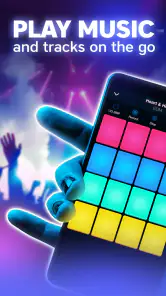
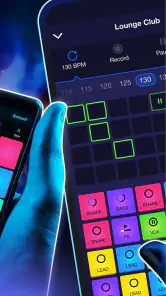
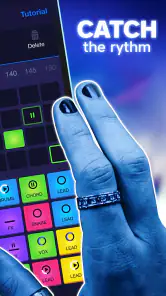
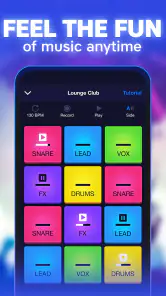
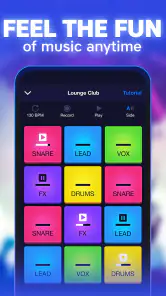
Groove Masters - DJ Drum Pad is a music-making app designed for users who want to create beats, rhythms, and DJ-style performances on a mobile device. It provides a virtual drum-pad interface where you can tap different sounds, combine loops, and experiment with timing. It is suitable for beginners, casual music fans, and anyone interested in making quick electronic grooves without professional equipment.
Is Groove Masters - DJ Drum Pad suitable for beginners?
Yes, the app is generally approachable for beginners because its main controls are based on tapping pads rather than using complicated production software. New users can start by triggering individual drum sounds and gradually combine patterns into fuller performances. However, creating consistently polished tracks may require practice, especially when learning timing, rhythm, sound layering, and how to avoid overcrowding a beat.
Can I create and save my own music with Groove Masters - DJ Drum Pad?
Groove Masters - DJ Drum Pad is primarily focused on live-style beat creation and experimenting with sounds directly on the screen. Depending on the version and device, available options may include recording, saving, or sharing performances, but these features can vary. Before downloading, users who need full song arrangements, detailed editing, or reliable audio export should check the current app listing and permissions.
Does Groove Masters - DJ Drum Pad work offline?
The basic pad interaction may work without a constant internet connection, which makes the app convenient for practicing beats while traveling or when mobile data is unavailable. Nevertheless, some functions may require internet access, including advertisements, optional content, updates, analytics, or sharing performances. It is best to launch the app once online after installation and test which features remain available offline.
Pros
- Beginner-friendly layout makes beat creation easy to start.
- Responsive pads help keep live performances feeling natural.
- Useful for experimenting with loops
- rhythms
- and quick song ideas.
- Portable setup lets you practice beat-making almost anywhere.
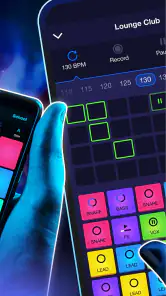
- Visual pad feedback makes timing and active sounds easy to follow.
Cons
- The free version may include ads or limit some sound content.
- Advanced producers may find the mixing and editing tools too basic.
- Small phone screens can make precise pad control more difficult.
- Sound quality depends heavily on your device speakers or headphones.
- Saved projects may offer fewer export and sharing options than full DAWs.
- Category
- Music & Audio
- Version
- 0.202.34













