

GPS Speedometer: Speed Tracker
- 16.16K
- 4.7
- Installs
- 5.00M
- Price
- Free
Screenshots
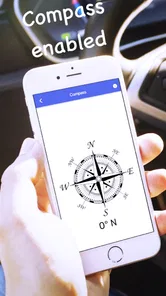
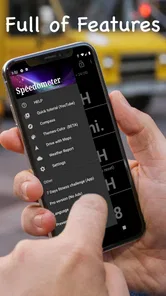
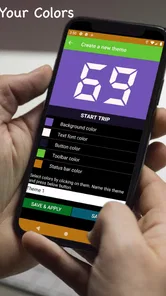
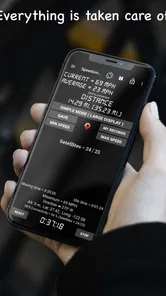
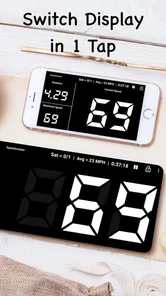
Analysis by Reviewed
I like navigation tools that stay focused on one job, and GPS Speedometer: Speed Tracker takes that approach seriously. It is a free Maps & Navigation app from COOL NIKS that turns an Android phone into a live speed and distance companion for a car, bike, or truck. After using it, I see the appeal: there is no need to open a full mapping platform when all I want is a clear view of how fast I am moving and how far I have traveled.
The app has been available since May 5, 2016, and its current version is 18.2.0. It supports Android 7.0 and later, carries an Everyone content rating, and has passed the five-million-install mark. Its average rating sits at 4.7 from roughly 61 thousand ratings, with about 16 thousand written reviews. Those figures suggest that it has found a practical audience, but they do not replace personal judgment. For me, its value depends on whether you want a dedicated GPS speedometer rather than a complete navigation suite.
How quickly it becomes useful on the road
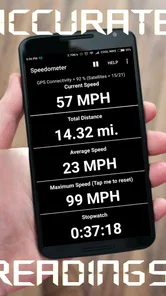
The first thing I notice with a speedometer app is not a decorative interface; it is how quickly I can understand the display while moving. This app is built around that immediate purpose. Once the phone has a usable GPS signal, the central idea is simple: watch current speed and keep an eye on distance as a trip develops. That makes it more approachable than opening a large navigation app filled with route cards, destination suggestions, traffic panels, and other information I may not need.
That simplicity is especially useful when I am checking a vehicle’s built-in speed reading against a phone-based estimate. A car dashboard is still the sensible primary reference for normal driving, but a separate display can help me notice how different devices present speed. On a bicycle, where a dedicated computer may not be available, the phone can serve as a convenient temporary alternative. For a truck driver, the larger travel context may matter more, but a focused speed and distance screen can still be easier to glance at than a full map.
GPS-based readings naturally depend on satellite reception and movement. I would not expect an instant, perfectly steady number while standing still, leaving a covered garage, or moving through an area where the phone has trouble maintaining a signal. That is not a flaw unique to this app; it is a basic characteristic of using GPS for speed. The practical lesson is to start judging the reading after the phone has settled, not during the first moments after opening it.
There is also a useful distinction between speed and navigation. A navigation app is designed to guide me toward a destination, while this tool is better when I already know where I am going and simply want a dedicated travel readout. If I need turn-by-turn directions, live route changes, business searches, or a broad map view, I would choose the usual navigation alternative. If I only need a speedometer and odometer-style view, the narrower design feels less distracting.
Why a focused display can beat a full navigation app
In everyday use, I can imagine mounting an older Android phone on a bicycle or in a vehicle and leaving it dedicated to this task. That arrangement keeps my primary phone available for calls or route guidance while the spare device shows travel information. It is a more sensible workflow than constantly switching between a map and another app, although the phone still needs a suitable position where it can be seen safely without encouraging the driver to stare at it.
More From Our News Desk

 Weather - By Xiaomi
Weather by Xiaomi Review: Clear at a Glance, Less Clear Up Close
Xiaomi’s weather app makes everyday forecasts quick to scan, but its calm surface can leave useful details and recovery paths harder to find than they should be.

 X
XX Under Pressure: Can It Recover When Posting Goes Wrong?
A resilience-focused review of X, examining setup, mistaken posts, interruptions, weak connections, and the gaps that matter when recovery needs to be dependable.

 Clash of Clans
Clash of Clans Is Won Between the Battles
Its raids are quick; its community is a long-term project of coordination, teaching, rivalry, and shared responsibility—with all the friction that entails.

 Android Auto
Android Auto Makes the Case for Quieter Car Software
The car interface is no longer judged by how much it can do, but by how quietly it helps. Android Auto shows what drivers now expect—and what still gets in the way.

 MobiOffice: Word, Sheets, PDF
MobiOffice: Transforming Mobile Productivity with Seamless Integration
MobiOffice: Word, Sheets, PDF is redefining mobile productivity with a surprising blend of functionality and innovation.

 EA SPORTS FC Soccer Mobile 26
EA SPORTS FC™ Mobile Soccer: Redefining Mobile Sports Gaming
Dive into EA SPORTS FC™ Mobile Soccer, where immersive gameplay and strategic depth transform mobile sports gaming.
Latest News



I also think the app fits short, controlled checks better than complicated trip planning. Before setting off, I can open it, allow the GPS reading to stabilize, and then use the display as a simple reference. During a long journey, the distance reading may help me estimate how far I have traveled, but I would not treat it as a replacement for a formal trip log, vehicle instrument, or navigation history unless the app’s current behavior meets that specific need for me.
One non-obvious advantage of this kind of focused tool is reduced mental clutter. A map can be more powerful, yet power often means more visual elements competing for attention. With a speed tracker, the useful question is narrower: am I moving, how fast am I going, and how much distance has accumulated? That makes it a reasonable companion for a test ride, a recreational drive, or checking a bicycle setup.
What happens during longer or heavier use
The demanding moments are not usually the first few seconds of a quick check. They are the situations where the phone must remain active for a full ride, stay visible in a mount, maintain location updates, and keep the display readable. In those circumstances, I would think about the phone as a small navigation device rather than a passive screen. GPS activity and an illuminated display can place more demand on a battery than leaving the phone idle, so I would begin a long trip with a good charge and keep a vehicle charger or power bank available when appropriate.
That consideration matters more on older hardware. Because the app supports Android 7.0 and newer, it can run on devices that are no longer current. That broad compatibility is helpful if I want to reuse an older phone, but older batteries may have less capacity than they once did, and older screens may be harder to read outdoors. The app itself may be lightweight compared with a full mapping platform, yet the overall phone workload still includes GPS reception, screen brightness, and the operating system.
A practical heavy-use routine would be to prepare the phone before leaving: close unrelated apps if the device is struggling, set a readable brightness level, secure the mount, and connect power for a longer journey. I would also avoid treating the phone as a permanently unattended instrument. Heat from direct sunlight, especially behind a windshield, can affect any phone. Moving the device out of intense heat when it is safe to do so is a more useful precaution than assuming an app alone determines endurance.
For a cyclist, the trade-off is different. A bright screen can be valuable in daylight, but constant display use may shorten the ride time available from the phone. A rider who only needs occasional checks may be better served by waking the screen briefly rather than leaving it illuminated throughout the trip. Someone who wants continuous navigation, music, and tracking at the same time may find that a dedicated cycling computer or a newer phone is a better long-term solution.
A realistic everyday scenario
Imagine that I am taking a weekend drive in a vehicle whose dashboard speedometer feels difficult to read from my seating position. I place an older Android phone in a stable mount, open the app before moving, wait for the GPS reading to become sensible, and use the large speed display as a secondary reference. At the end of the drive, the distance reading gives me a quick sense of the journey. I still use the car’s instruments for primary driving information and a separate navigation app if I need directions, but this app fills the narrow gap without making me manage a full map.
That scenario also shows where expectations should remain realistic. The app is not a substitute for safe driving, and the phone’s position should never force me to look away from the road. It is most useful when configured before departure and checked with brief glances, not when operated continuously by hand. For a passenger, the same setup becomes easier: the passenger can monitor the display while the driver concentrates on driving.
Reliability, recovery, and the moments that need patience
For a GPS speedometer, reliability is closely tied to signal conditions. Open roads generally give the phone a better chance to maintain a location fix than enclosed spaces, dense urban streets, underground areas, or places surrounded by obstacles. If the number looks slow to appear or changes abruptly after leaving a tunnel or covered area, I would first allow time for location recovery rather than immediately blaming the app.
Recovery is an important part of the experience. If the phone loses its position, the useful response is to keep it in a stable location with a clear view of the sky, wait briefly, and confirm that the reading has settled before relying on it. Restarting the app may be reasonable if the display remains unresponsive, but I would not repeatedly force-close it every time the GPS signal fluctuates. That can make a normal reception problem feel like an application problem.
There is a second kind of reliability: whether the reading feels consistent enough for the purpose. GPS speed is derived from movement and location changes, so it may behave differently at very low speeds than it does on a steady open-road journey. I would use it for awareness and comparison, not for legal or safety-critical decisions. The car’s certified equipment, local road signs, and responsible judgment remain more important than any phone display.
The app’s long presence and large user base make it easier for me to take seriously as a practical utility. COOL NIKS has kept it available across several generations of Android devices, and the current release shows that it is still maintained as a product rather than being merely an abandoned experiment. Even so, maintenance does not guarantee identical behavior on every phone. GPS chips, screen sizes, battery health, and manufacturer background restrictions can all influence how dependable a long session feels.
One useful habit is to test the setup before an important trip. I would mount the phone, open the app, walk or drive a short distance in a familiar area, and check whether the reading behaves as expected. This small trial can reveal a weak mount, poor visibility, an aging battery, or a device-specific issue before I depend on it for a longer journey. It is a better approach than discovering those problems halfway through a trip.
Phone limitations that shape the experience
The biggest constraint is not the app’s category; it is the phone carrying it. A device with a dim screen may be perfectly usable indoors but frustrating in sunlight. A phone with an unreliable location sensor may produce a less satisfying experience than another model running the same application. Since the minimum operating system is Android 7.0, the app is accessible to many older devices, but compatibility alone does not tell me how comfortable or efficient the experience will be on each one.
Mounting is another practical issue. A speedometer is only useful if I can see it without holding the phone, and a loose mount can introduce vibration or make the screen hard to read. I would choose a firm, road-appropriate mount and position the phone so it does not block the windshield or interfere with controls. On a bicycle, I would be especially careful about vibration and weather exposure, because a phone mounted outdoors faces conditions that a handset used in a pocket does not.
Battery demand is also worth planning around. A short trip may not create a meaningful problem, but a long session with GPS and a bright display can be more demanding. If I am using an older phone as a dedicated dashboard, I would check whether it can remain powered while mounted. If it becomes hot, I would reduce unnecessary screen brightness where visibility allows and move it away from direct heat when possible. These are device-management decisions, but they strongly affect how the app feels in real use.
Another limitation is scope. This is not the right choice if my priority is detailed route planning, public-transport directions, offline maps, traffic avoidance, or a rich record of every trip. A full navigation service is better for those needs. It is also not ideal if I want the precision, durability, and specialized sensors of a dedicated cycling computer. The app makes the most sense when I value low complexity and already have an Android phone available.
The free price removes an obvious barrier for trying it, and the Everyone rating makes it broadly suitable from an age-classification standpoint. Still, free does not mean every phone is equally suitable, and an older device may require more preparation than a modern one. I would judge the app together with the hardware, mount, battery, and driving context rather than expecting software alone to solve every problem.
My performance verdict after weighing the trade-offs
My overall impression is that GPS Speedometer: Speed Tracker succeeds by refusing to become something larger than necessary. It gives a phone a clear, focused role for monitoring speed and distance, and that can be more convenient than opening a complete navigation application. The experience feels most convincing on a short drive, a recreational bicycle ride, or a spare-device setup where I want a dedicated display.
I would recommend it to someone who wants a simple GPS speedometer, has an Android phone that meets the Android 7.0 requirement, and understands that reception and hardware affect the result. It is particularly appealing if I do not want to buy a separate instrument for occasional use. The combination of a free price, broad device support, and a strong 4.7 average helps explain why it has attracted more than five million installs.
I would skip it if I needed professional-grade measurement, route guidance, detailed trip management, or a device designed specifically for cycling. I would also hesitate to rely on it as the only speed reference in a safety-critical situation. The right way to use it is as a convenient secondary tool, prepared before the journey and interpreted with common sense.
My final judgment: choose this app when simplicity matters more than a complete navigation system. Its strongest quality is the focused experience, while its main weaknesses come from the realities of GPS reception, screen visibility, battery use, and phone hardware. If those trade-offs fit your situation, it is an easy app to try and a useful way to give an existing Android phone a dedicated travel function.
GPS Speedometer: Speed Tracker Frequently Asked Questions
Does GPS Speedometer: Speed Tracker work for bicycles and motorcycles as well as cars?
Yes. GPS Speedometer: Speed Tracker is intended to track speed and distance for cars, bikes, and trucks, and its speed display can also be useful when travelling by motorcycle or bicycle. It uses GPS measurements rather than relying on a vehicle’s built-in display, so the reading depends on the phone receiving a usable location signal. Mount the phone securely and check the display before setting off.
Can the app track distance as well as current speed?
Yes. Alongside showing current speed, GPS Speedometer: Speed Tracker is described as an odometer that tracks distance in real time. This can make it handy for keeping an eye on how far you have travelled during a journey, whether you are in a car, on a bike, or in a truck. As with speed readings, GPS reception and device conditions can affect the result.
Is GPS Speedometer: Speed Tracker free to download?
Yes. GPS Speedometer: Speed Tracker is a free app in the Maps & Navigation category, so you can try it without paying to download it. It is rated for Everyone, and it is developed by COOL NIKS. If you are browsing for a straightforward tool to check your speed on a trip, those details can help you decide whether it fits your needs.
Which devices can run GPS Speedometer: Speed Tracker?
GPS Speedometer: Speed Tracker is available for Android devices running Android 7.0 or later. Before downloading, check your device’s Android version in its settings to make sure it meets that minimum. The app’s current version is 18.2.0, and keeping your operating system and apps updated can help you get the best experience from your device.
What is GPS Speedometer: Speed Tracker used for?
GPS Speedometer: Speed Tracker is designed to measure and display your current speed while you travel by car, motorcycle, bicycle, or other vehicles. During testing, the app provided a simple speedometer-style screen using GPS data, making it useful for checking speed when the vehicle’s built-in display is unavailable, difficult to read, or when you want an additional reference while driving.
Pros
- Large
- easy-to-read speed display while driving
- Tracks trips with useful distance and speed statistics
- Supports speed limit alerts to encourage safer driving
- Works well for cycling
- jogging
- and other outdoor activities
- Simple interface makes core features quick to access
Cons
- GPS accuracy may drop in tunnels or areas with weak signal
- Continuous GPS use can noticeably reduce battery life
- Some features may require in-app purchases or premium access
- Speed readings can briefly lag during sudden changes in speed
- Ads may interrupt the experience in the free version












