GPS Speedometer Odometer (Pro)
- 862.00
- 4.9
- Installs
- 50.00K
- Price
- $7.49
Screenshots
Analysis by Reviewed
I judge a speed app by more than its display: I want to know when its readings are useful, where they may mislead me, and whether it suits the way I travel. GPS Speedometer Odometer (Pro) is a paid Maps & Navigation app from COOL NIKS, aimed at people who want speed and distance readings while driving, cycling, or walking. Its appeal is practical rather than complicated, though GPS readings still depend on the conditions around you and your phone.
Trust starts with realistic expectations
The app has a 4.9 average from around 3.3 thousand ratings, and more than 50 thousand installs. Those figures suggest that many people find it useful, but they are not a substitute for checking whether its approach fits your needs. I would treat it as a convenient companion for personal awareness, not as a certified instrument for official measurements or decisions where a small error matters.
One point worth keeping in mind is that a GPS speedometer is different from a vehicle’s built-in speed display: it relies on satellite positioning rather than the car’s own speed sensor. That can make it handy when you want a separate reading, but buildings, tunnels, poor reception, and the way you hold or place your phone can affect the result. If the number jumps or lags, I would first look at the surroundings and GPS reception instead of assuming the app has precisely measured a change.
Use it with attention to context
For an ordinary drive, I’d set up the screen before moving and glance at it only when safe. The HUD can be useful at night, but a reflected display is not a reason to divert attention from the road; reflections can also be hard to see in some lighting. On a bicycle or walk, the app’s speed and distance can help you compare outings, while a route through covered streets or dense buildings is a less reliable test of GPS accuracy.
If you mainly need turn-by-turn directions, traffic information, or route planning, a full navigation app is the better everyday choice. This app’s narrower job is to show speed and track distance, rather than replace a mapping tool. I’d also avoid relying on a phone display while driving if it would distract you; set it up while stopped, mount it securely, and follow local road-safety rules.
First Impressions and Interface
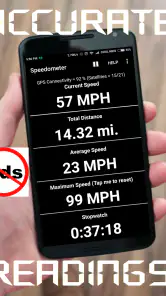
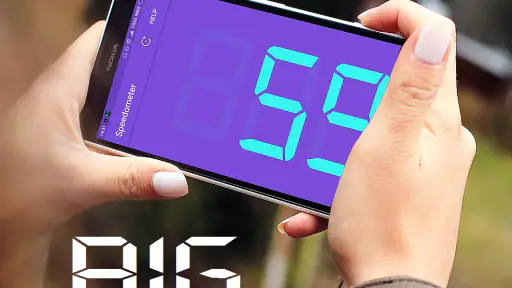
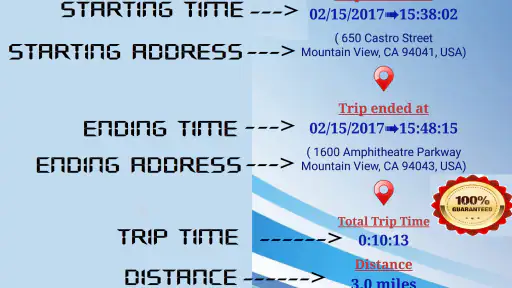
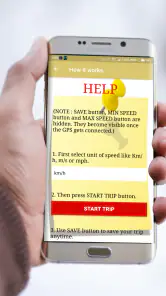
As soon as you fire up the GPS Speedometer Odometer (Pro), you’re greeted with a clean and intuitive interface. The app doesn’t bombard you with unnecessary clutter, which is a win for those of us who prefer simplicity. The main dashboard displays current speed, distance traveled, and even altitude. It's like having a mini cockpit right on your smartphone!
The Features That Stand Out
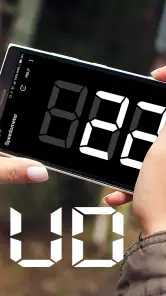
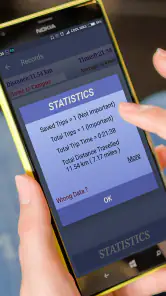
One of the neatest features I found is the ability to switch between digital and analog speed gauges. This little touch adds a bit of personalization, allowing users to choose what suits their style. On top of that, the app logs your speed over time and provides detailed statistics. For data geeks like me, this is a treasure trove of information!
You May Like

Clash of Clans Is Won Between the Battles

Android Auto Makes the Case for Quieter Car Software

MobiOffice: Transforming Mobile Productivity with Seamless Integration

EA SPORTS FC™ Mobile Soccer: Redefining Mobile Sports Gaming

How Microsoft OneDrive Became a Mobile Productivity Giant

How Google Translate Breaks Language Barriers Effortlessly
Another highlight is the app's ability to calibrate with high precision. Whether you're in a car or on a bike, the app adjusts accurately to ensure the speed readings are spot on. Plus, the heads-up display (HUD) mode is perfect for driving at night, reflecting your speed onto your windshield when placed on your dashboard.
Usability and Performance
The app is pretty smooth overall, but like all GPS-based applications, it does depend heavily on your device's GPS accuracy. I found that it performed excellently in open areas, while urban canyons with tall buildings could sometimes throw it off a bit. However, this is more of a GPS issue than the app itself.
Battery consumption is another area where the app shines. It’s optimized to ensure it doesn’t drain your phone’s battery, even on long trips. That said, keeping your charger handy is always a good idea on extended journeys, just in case.
Practical choices before a trip
For a useful comparison, I’d check the reading while stationary, then again on a clear stretch where GPS reception is less obstructed. I would not try to calibrate or troubleshoot while moving. A short test also helps you learn whether the gauge style you prefer is easy to read at a glance; on a bike or during a walk, the digital view may be quicker to interpret, while the analog dial may feel more familiar in a car.
The distance and speed history can be useful for reviewing a ride after the fact, but I would not treat it as a substitute for a dedicated cycling computer or a vehicle’s instruments when precise, continuous tracking is essential. A dedicated device may be easier to mount, leave in place, and use over long sessions. The phone app makes more sense if you want a flexible extra display for occasional trips and already carry your phone.
Price, fit, and user choice
The app costs $7.49, so I’d decide based on whether I expect to use its speed and distance tools regularly rather than install it for a one-off curiosity. It is rated for Everyone, runs on Android 4.4 or newer, and its current version is 16.0. The app first appeared on October 10, 2016, and has 862 written reviews. These details help frame the purchase, but they do not tell me how it will behave on every phone or in every location.
On privacy and control, I prefer to make decisions from the choices the app actually presents on my device rather than guess at its data practices. Before relying on it, I would review the permission prompts and the phone’s location controls, grant only what I’m comfortable with, and check those settings again if my use changes. Location access is central to GPS speed readings, so turning it off will undermine the app’s main purpose; that is a practical trade-off, not a reason to grant unrelated access automatically.
Choosing it for the right routine
A realistic use for me would be a weekend walk on a familiar route where I want a rough sense of pace and total distance, not turn-by-turn guidance. I’d start the app before setting off, keep the phone in a stable place, and compare the recorded result with another outing under similar conditions. That repeatable routine is more useful than treating one isolated reading as a verdict on fitness or performance. The speed history can add context to a trip, but it cannot explain why the pace changed; a stop, a signal interruption, or a change in the route may all affect what I see.
For cycling, I’d use it as a secondary display on a short, familiar ride rather than as the only instrument on a long training session. The phone’s screen and mounting position matter: if the gauge is difficult to glance at without turning my head, the information is not worth the distraction. Before leaving, I’d choose the display style, check that the phone is secure, and make sure I can keep my attention on traffic. Riders who need dependable continuous records, easy access to ride controls, or a purpose-built handlebar setup are better served by a dedicated cycling computer.
In a car, the clearest reason to open a separate speed display is curiosity or a second reference, not a replacement for the dashboard. I would compare it only when the road is open and conditions are steady, and I would not make decisions based on a small difference between the phone and the vehicle’s display. The car’s built-in instruments are easier to see in their intended position, while a phone can be affected by placement and GPS reception. The app is most useful when that trade-off is acceptable and the extra readout answers a question I actually have.
What the alternatives do better
Compared with a regular navigation app, this tool is more focused: it puts speed and distance at the center rather than directions, traffic, and route choices. That narrower purpose can be an advantage if I already know where I’m going and want a simple trip readout. If I need to find an unfamiliar address, avoid congestion, or plan a route, I would open a navigation app instead; a speedometer is not a practical substitute for those features.
Compared with a basic speed display built into a car, it is portable and can be used outside driving, but it depends on the phone’s location reception and needs a safe place to sit. Compared with a dedicated bike computer, it avoids carrying another device for an occasional ride, yet offers less purpose-built convenience for riders who track every workout. The right comparison is not which option has the most screens, but whether I value an extra phone-based reading enough to accept its setup and signal limitations.
There is also a simple trade-off between convenience and consistency. A phone is already with many people, so this can be an easy way to check speed during a one-off trip. But if I want to compare distances over time, I should keep the same device placement and use similar routes and conditions. Otherwise, a difference between outings may reflect reception or setup rather than a genuine change in pace. That small habit makes the app’s statistics easier to interpret without pretending they are laboratory-grade measurements.
When I would pass
I would skip this purchase if I only need speed occasionally and my vehicle already gives me a clear, trustworthy display. I’d also pass if I expect a GPS app to provide reliable navigation, work equally well in tunnels, or produce official-grade measurements. The $7.49 price makes more sense for someone who expects to use its separate speed and distance tools repeatedly; for a single experiment, the value is harder to justify.
People who are uncomfortable granting location access should weigh that choice before installing. Without location information, the app cannot do the job that makes it useful. I would inspect the permission prompt and the location settings on my phone, then decide whether the benefit is worth that access. This is a more grounded way to assess privacy than assuming either that the app collects nothing or that it uses information in a particular way.
One practical question is whether it can replace a car’s speedometer or a cycling computer. I would say no when accuracy, constant visibility, or dependable long-session use is essential. It can serve as an additional personal reference, but its readings depend on GPS conditions and the phone’s position. Another reasonable question is whether it is useful without navigation: yes, if the goal is simply to see speed or distance on a drive, ride, or walk; no, if the main need is route guidance.
The app is from COOL NIKS, has a 4.9 average from around 3.3 thousand ratings, and has passed 50 thousand installs. I take that as evidence of an established audience, not proof that it will suit every device or trip. It is a paid app rated for Everyone, with Android support starting at version 4.4 and a current version of 16.0. Those basics make it easier to judge fit, but the most important test is still whether the GPS reading behaves well on the routes where I plan to use it.
Final Thoughts
In a world full of apps, finding one that does its job without unnecessary bells and whistles is refreshing. The GPS Speedometer Odometer (Pro) is straightforward and effective, making it a reliable companion for anyone needing to track their speed and distance. Whether you're a casual driver, a cyclist, or just someone who loves to keep tabs on their speed, this app is worth a shot.
So, next time you’re curious about how fast you're going, remember that there’s an app for that, and it’s as easy to use as pie. Happy travels!
My cautious recommendation is to try it if you want a dedicated speed-and-distance display and are comfortable with the limits of phone-based GPS. I’d skip it if you need navigation first, depend on highly precise recorded measurements, or would rather not use location access for this purpose. Used with sensible expectations and attention to safety, it offers a focused tool for everyday trips without needing to turn your phone into a full navigation system.
GPS Speedometer Odometer (Pro) Frequently Asked Questions
Is GPS Speedometer Odometer (Pro) compatible with my phone?
GPS Speedometer Odometer (Pro) is an Android app that requires Android 4.4 or later, so check your device’s system version before downloading. It is listed for Everyone and is developed by COOL NIKS. If you are looking for an iOS version, make sure to check the app store for your device rather than assuming the Android release will work on an iPhone.
Is GPS Speedometer Odometer (Pro) free to download?
GPS Speedometer Odometer (Pro) is a paid app priced at $7.49. That makes it worth considering whether its speed, distance, trip-history, and display options fit the way you plan to travel before purchasing. It is intended for tracking movement by car, bike, or on foot, so its appeal is strongest if you expect to use those measurements regularly.
What features does the GPS Speedometer Odometer (Pro) offer?
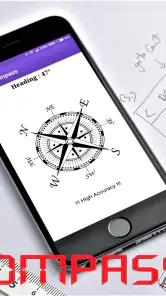
GPS Speedometer Odometer (Pro) provides a range of features, including real-time speed tracking, average speed calculation, trip distance measurement, and a built-in compass. It also includes customizable speed limit alerts and the ability to save trip history for future reference. The app is designed to be user-friendly, offering both digital and analog speedometer displays for convenience.
Is GPS Speedometer Odometer (Pro) accurate in measuring speed and distance?
Yes, GPS Speedometer Odometer (Pro) is designed to deliver precise speed and distance measurements by utilizing your device's GPS. While the accuracy is generally high, it's important to note that GPS accuracy can be influenced by environmental factors like tall buildings or dense forests that may interfere with satellite signals. Nonetheless, the app is reliable under most conditions.
Can I customize the interface of GPS Speedometer Odometer (Pro)?
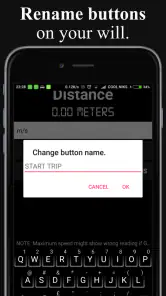
Absolutely, GPS Speedometer Odometer (Pro) allows users to customize the interface to suit their preferences. You can switch between digital and analog speedometer displays, adjust color themes, and set personal speed limits. This flexibility ensures that users can tailor the app's appearance and functionality to best meet their individual needs while driving or cycling.
Pros
- Accurate speed tracking
- User-friendly interface
- Customizable display options
- Works offline
- Battery efficient
Cons
- Limited free features
- Ads in free version
- No voice navigation
- Requires GPS access
- Occasional lag issues
- Category
- Maps & Navigation
- Version
- 16.0