GoPro Quik: Video Editor
- 27.11K
- 4.5
- Installs
- 10.00M
- Price
- Free

Screenshots
Analysis by Reviewed
I judge a video editor not only by what it can make, but by how comfortably I can use it when I’m tired, in a hurry, or working with a screen that doesn’t suit me perfectly. GoPro Quik: Video Editor is a mobile editing app from GoPro, and its appeal is the short route from scattered clips to a finished montage. It is free to download, though it offers in-app purchases, and it is rated for everyone. I see it as a convenient starting point rather than a replacement for a full desktop editing workflow.
Where a quick edit fits into an ordinary day
The value of a phone editor often shows up in small windows of time rather than in a dedicated editing session. I might be waiting for a ride after a family gathering, with a few clips already on my phone and just enough time to make a short recap. Quik’s guided approach suits that moment better than opening a detailed timeline editor and planning every cut. The result is not automatically a finished story, though: I still need to decide which clips belong and whether the sequence makes sense to someone who was not there.
For a practical workflow, I would first pick a handful of clips that show different parts of the event: an establishing view, a moment of action, a reaction, and a clear ending. That gives the automatic assembly more useful material to work with than a camera roll full of near-identical shots. If the video feels repetitive, I would remove the least distinctive clip before changing the whole style. This is a simple way to improve the story without turning a quick edit into a long session.
Who will appreciate the shortcut
I think Quik is best for people who regularly record moments but rarely make anything from them because editing feels like another chore. It can also suit someone who wants a compact recap to send to friends or family, rather than a carefully constructed piece intended for a larger project. The automatic route helps lower the effort needed to get started, while the app’s themes and filters give a user an easy way to alter the mood without learning a complicated editing vocabulary.
On the other hand, I would not make it my first choice for a project where exact timing is central. A recipe tutorial that needs each action to remain visible, a presentation with tightly controlled pacing, or a video built from many interdependent sections benefits from more hands-on editing. In those cases, a timeline-based app gives me a clearer view of how clips relate and where adjustments are needed. Quik’s convenience is real, but it is most useful when a fast, appealing summary matters more than detailed construction.
Choosing between automation and a timeline
Compared with the usual alternatives in mobile video editing, Quik leans toward helping me get a montage underway rather than giving me a workspace full of fine-grained controls. That distinction matters more than a long feature checklist. A manual editor may be slower to learn but better when I need to place a cut at a particular moment or keep a sequence under close control. Quik is the more appealing option when I want to make a first draft quickly and am willing to accept that an automated result may need a little selection and review.
I would treat the automatic edit as a starting point, not as a substitute for judgment. If a clip contains an important reaction, I would check that the final sequence gives it enough room rather than assuming the app will understand why it matters. If the music changes the mood in a way that feels wrong for the occasion, I would revisit the soundtrack choice or use a different editing approach. Those checks take only a little time, but they help avoid the common problem of a polished-looking video that does not quite represent the moment.
More From Our News Desk

Weather by Xiaomi Review: Clear at a Glance, Less Clear Up Close

X Under Pressure: Can It Recover When Posting Goes Wrong?

Clash of Clans Is Won Between the Battles

Android Auto Makes the Case for Quieter Car Software

MobiOffice: Transforming Mobile Productivity with Seamless Integration

EA SPORTS FC™ Mobile Soccer: Redefining Mobile Sports Gaming
Finding a comfortable way through the edit
For someone who is new to editing, a compact set of choices can be easier to approach than a timeline crowded with controls. Quik’s guided, automatic style can reduce the number of decisions needed to get a first result. That matters if detailed menus or unfamiliar editing terms make other video apps feel daunting. The trade-off is that a streamlined interface may offer less direct control over the edit than a more manual editor.
Readable navigation and a quicker first result
Have you ever found yourself scrolling through endless footage and wondering how to turn it into a share-worthy video? Well, that’s where the GoPro Quik: Video Editor comes into play. It's like having a mini production studio right in your pocket, promising to transform your raw clips into captivating stories with just a few taps.
First Impressions and Interface
When you first open the app, the sleek and intuitive design immediately catches your eye. It’s as if the developers knew exactly how to make everything feel accessible, even if you’re new to video editing. The layout is clean, with a straightforward navigation system that allows you to dive into editing without any fuss. The GoPro Quik doesn’t overwhelm you with a barrage of tools; instead, it offers a curated selection that’s perfect for quick edits.
Features that Stand Out
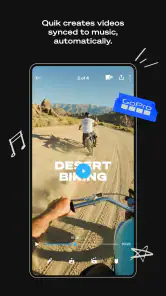
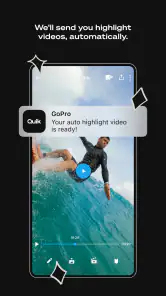
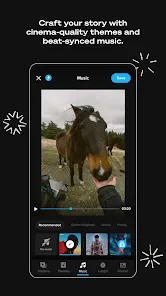
Now, let’s talk about what really sets this app apart. One of my favorite features is the automatic editing capability. You can select your favorite moments, and the app does the magic by syncing them with music, creating a seamless montage. It’s like having a professional editor who knows your style working alongside you.
The app also offers a variety of themes and filters that instantly enhance your footage. Whether you’re aiming for a cinematic look or something more playful, there’s something for everyone. And let’s not forget the music library! With a rich selection of tracks, finding the perfect soundtrack for your video is a breeze.
My practical tip is to choose the moments you want the edit to remember before leaning on automation. A montage can feel lively yet still miss the story if every clip is treated as equally important. I would shortlist a few clear beginnings, reactions, and endings, then preview the sequence and remove any shot that repeats the same beat. That small bit of selection is often more useful than adding another filter.
When the automatic style helps—and when it doesn’t
Quik makes the most sense when I want a polished recap without building every cut by hand: a family outing, a weekend ride, or a short set of clips from a trip. For example, after a day outdoors, I could pick a handful of moments, let the app assemble them with music, and make a quick shareable summary while the experience is still fresh. Compared with editors built around a detailed timeline, this approach saves effort but gives me fewer opportunities to shape every transition and beat. If precise pacing, layered edits, or fine control is the whole point, I’d choose a more manual video editor instead.
Usability and Performance
In terms of usability, the app is designed with the user in mind. Performance is smooth, and I didn’t experience any lag, even with longer video files. The rendering process is impressively fast, allowing you to share your creations almost immediately. Plus, the app supports various formats, so you won’t have to worry about compatibility issues when importing your clips.
For a more reliable everyday workflow, I’d make a rough selection before opening a large camera roll and keep the original clips until I’m happy with the finished video. That avoids turning the edit into a hunt through unrelated footage and gives me a fallback if I change my mind. I’d also preview the finished montage before sharing: automatic music and cuts can create a pleasing rhythm, but the result still depends on which moments I selected and how they sit together.
Using it in different situations
A phone editor is especially useful when I’m away from a desk and want to make something while waiting, travelling, or winding down after an event. Quik’s short, guided route can suit people who prefer a few clear choices over precise timeline work. It may be less comfortable for someone who needs extensive manual control, finds touch-based editing difficult, or prefers to do detailed review on a larger screen. In those cases, a desktop editor or a mobile app with a more adjustable editing workflow is likely a better fit.
Motor and sensory considerations
Automatic assembly can reduce repeated trimming and dragging, which may make a quick edit easier for someone who finds small touch controls tiring. But selecting clips, navigating screens, and checking a result still relies on using the phone interface. Music and filters can also change the feel of a video considerably, so I’d preview with sound at a comfortable level and check that the visual treatment suits the people who will watch it. I would not assume that a simple interface automatically meets every access need; whether it feels manageable depends on the person, the device, and the task.
There is also a useful distinction between making a video quickly and making it exactly as intended. If the app’s automated choices don’t match the order or emphasis I want, I may spend time correcting the result—or decide that starting in a manual editor is more efficient. People who rely on careful, frame-by-frame adjustments should consider that trade-off before making Quik their only editing tool.
Situational access and practical checks
Using a phone in a bright outdoor setting, on a moving ride, or in a noisy room can make any editing task harder. I would save the detailed review for a steadier moment, then check the finished video with the sound at a level that works for me and the people nearby. If music is not appropriate where I am, I can wait until I have a quieter place to listen, or review the visuals first and return to the soundtrack later. That small change in timing can make a phone-based workflow more comfortable without requiring a different app.
It is also worth thinking about the intended viewer. A fast montage may work well as a personal recap, but a video meant to explain an activity needs enough context for someone who was not present. I would avoid relying only on quick cuts if the viewer needs to follow a sequence of steps or understand what happened. In that situation, a slower, more deliberate edit is kinder to the audience and gives me more control over what each shot communicates.
A fair recommendation
GoPro is the developer, and the app sits in the mobile video player and editing space. It has a 4.5 average from around 1.1 million ratings, with over 10 million installs. Those figures suggest broad interest, but the right choice still comes down to whether its fast, guided approach suits the way you work. The app is free to start, with optional in-app purchases ranging from $1.99 to $99.99 per item; I’d check what a purchase includes before paying, especially if I only need occasional edits.
The Verdict
In a nutshell, the GoPro Quik is a must-have for anyone looking to effortlessly create stunning videos. It’s particularly great for adventurers and social media enthusiasts who want to share their experiences without spending hours in front of a computer. The app strikes the perfect balance between simplicity and functionality, making it suitable for both beginners and seasoned editors.
So, if you’re ready to transform your footage into cinematic gems, give this app a try. You might just find it becoming your go-to mobile video editor!
My recommendation is narrower: I’d try it first if quick recaps matter more to me than exact control, and if choosing clips and previewing on a phone feels comfortable. I’d skip it as my main tool when a project needs careful timing, many layers, or a workflow built around accessibility needs the interface may not suit. For short personal videos, though, its automated approach can make the distance between “I filmed this” and “I can share this” pleasantly small.
What to expect before making it your regular editor
Quik is free to download, which makes it easy to test with a low-stakes project before deciding whether its style suits you. The in-app purchase range runs from $1.99 to $99.99 per item, so I would look closely at the specific purchase prompt rather than assume every useful option is included at no cost. If I only make occasional personal montages, I would begin with the free experience and avoid paying until I know what I actually need from it.
The app was released on November 12, 2012, and its audience has grown to over 10 million installs. It has around 27,000 written reviews alongside its 4.5 average from around 1.1 million ratings. I take that popularity as a reason the app is worth considering, not as proof that it will suit every workflow. It is still the hands-on test—selecting a few clips, reviewing the result, and seeing how comfortable the controls feel—that will tell me whether it earns a place on my phone.
Final fit: convenience without assuming access
For readers weighing access and ease of use, I would describe Quik as a potentially helpful shortcut rather than an all-purpose solution. Its guided editing can reduce the amount of repeated manual work, but the phone interface, visual review, clip selection, and listening experience remain part of the task. Someone who benefits from simpler choices may find that balance welcome; someone who needs precise control, a different input method, or a larger workspace may be better served by another editor or a desktop workflow.
My inclusive verdict is that Quik is worth trying for short, personal videos when a quick result is the priority and its on-screen interaction feels manageable. I would use it to turn a few deliberately chosen moments into a recap, then check that the pacing, music, and visual style work for the intended audience. If those checks become a struggle, or if the project needs more exact editing than the automatic approach comfortably allows, choosing a more adjustable tool is not a failure—it is simply the better fit.
GoPro Quik: Video Editor Frequently Asked Questions
Can GoPro Quik automatically create videos from my clips?
Yes. GoPro Quik is promoted as an auto video maker, so it can help turn your photos and footage into a finished clip with music and filters. That can be useful when you want a quick result without arranging every edit yourself. You can also use its editing tools to make adjustments, so the automatic approach does not have to be your only option.
What kinds of editing tools and creative options does GoPro Quik offer?
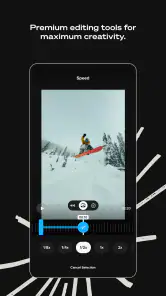
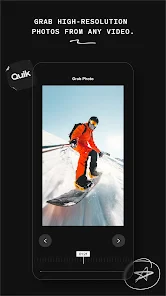
Quik focuses on making video editing simple, with automatic edits, music, and effects. Its tools also let you trim, rotate, and enhance videos, while exclusive filters and themes offer ways to change the look of a clip. This combination suits both quick edits and more hands-on adjustments, although the options available to you can depend on whether you use a free or premium feature.
Is GoPro Quik free to download, and are there extra costs?
GoPro Quik is free to download, so you can try its video-editing tools without paying upfront. The app also offers in-app purchases, with items ranging from $1.99 to $99.99, and some premium features may require a subscription. Check the purchase details in your app store before buying, especially if you are mainly interested in cloud backup or exclusive editing options.
Is GoPro Quik suitable for children?
GoPro Quik is rated Everyone, making it suitable for a general audience. Its main purpose is editing photos and videos, with tools for creating finished clips using music and filters. As with any app that can involve purchases or sharing personal media, parents may want to review the device’s purchase and privacy settings and help younger users choose what they save or share.
What is GoPro Quik: Video Editor used for?
GoPro Quik: Video Editor is designed to help users easily create and edit videos using footage from any device, especially GoPro cameras. The app simplifies the editing process with its intuitive interface, allowing users to quickly trim, rotate, and enhance videos with automatic edits, music, and effects. It's perfect for creating professional-looking videos effortlessly.
Pros
- Easy-to-use interface for quick edits.
- Wide range of editing tools available.
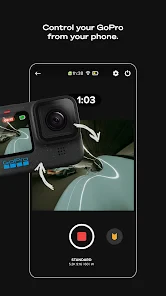
- Seamless integration with GoPro cameras.
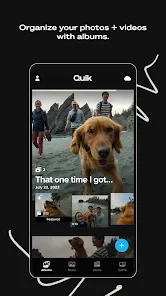
- Cloud backup for media storage.
- High-quality video output.
Cons
- Limited features in free version.
- Occasional app crashes reported.
- Requires subscription for full access.
- Large app size may affect storage.
- Limited non-GoPro camera support.
- Category
- Video Players & Editors
- Version
- Varies with device











