

GIPHY: GIFs, Stickers & Clips
- 13.17K
- 3.8
- Installs
- 50.00M
- Price
- Free

Screenshots




Analysis by Reviewed
I judge a GIF app less by how many animations it can show me and more by whether it helps me find the right one without turning a quick message into a long browsing session. GIPHY is at its best when I know the feeling I want to convey but not the exact image: a reaction, a bit of humor, or a sticker that makes a plain chat feel more personal. It is a free app from Giphy, Inc., built around searching, browsing, and making animated media. The trade-off is that a huge library can be entertaining and useful, but it can also invite more scrolling than the task needs.
What I look for before browsing
There is a trust question with any app centered on finding and sharing media: what choices can I see, and what information am I comfortable entering or sharing? I can describe how GIPHY works as a creative tool, but I would not treat its broad library or familiar name as proof of particular privacy practices. If data handling matters to you, review the app’s current permission prompts and privacy information on your device before deciding what to allow. I avoid granting a permission just because an app asks; I first consider whether it makes sense for the action I want to take.
Keep sharing deliberate
My practical habit is to separate looking from sending. I search or browse first, check that the animation says what I intend, and only then share it into a conversation. That small pause matters because GIFs can carry a different tone from plain text: a joke that seems obvious to me may read as sarcastic or out of place to someone else. For a work chat, a family group, or a sensitive exchange, I choose something unmistakable—or skip the animation altogether.
Who will get the most from it
GIPHY: GIFs, Stickers & Clips makes the most sense for people who regularly communicate through animated reactions, enjoy browsing internet humor, or want to experiment with making their own visual replies. If you only send a GIF once in a while, your messaging app’s built-in search may be quicker and keep the whole task in one place. I would also be cautious about using a shared or public device for personal searches, and I would not assume that creating or sharing something automatically makes it private.
Discover the World of Animation
The first thing you'll notice when you open GIPHY is the sheer volume of content available. It's like walking into a candy store with every flavor imaginable. From trending GIFs that capture the latest internet sensations to niche stickers that hit just the right spot, GIPHY has it all. The app’s interface is super user-friendly, allowing you to easily browse through categories or search for something specific. Whether you're in the mood for something funny, cute, or downright bizarre, GIPHY's got your back.
Seamless Sharing
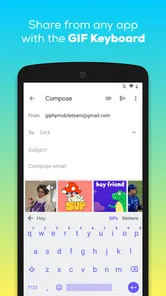
One of my favorite features of GIPHY is how effortlessly it integrates with other platforms. Want to spice up your group chat? Just tap and share any GIF directly to your messaging app. Need to add some flair to your Instagram story? GIPHY makes it a breeze. The seamless sharing options are a game changer, ensuring you can always find the right animated clip to express yourself in any situation.
Create and Customize
Feeling creative? GIPHY not only lets you browse but also create your own GIFs and stickers. The app offers a simple yet powerful creation tool where you can add text, adjust speed, and even incorporate effects. It's a playground for anyone looking to add a personal touch to their animations. Plus, the satisfaction of seeing your creation live among millions of others is truly rewarding.
More From Our News Desk

 Gmail
GmailGmail in a Busy Inbox: Who Benefits Most?
From first account to crowded workday, Gmail earns its place through dependable search and flexible sorting—but its best fit depends on how much inbox maintenance you can tolerate.

 Prime Video
Switching to Prime Video: What Changes in Your Viewing Routine
Prime Video can make a compelling second home for streaming, but switching means learning a different catalog, rental layer, and route from browsing to playback.

 Universal TV Remote Control
Universal TV Remote Control Works Best as a Reliable Backup
A phone remote earns its place through quick setup and reliable habits. Here is how to get more from Universal TV Remote Control—and where its limits show.

 Weather - By Xiaomi
Weather by Xiaomi Review: Clear at a Glance, Less Clear Up Close
Xiaomi’s weather app makes everyday forecasts quick to scan, but its calm surface can leave useful details and recovery paths harder to find than they should be.

 X
XX Under Pressure: Can It Recover When Posting Goes Wrong?
A resilience-focused review of X, examining setup, mistaken posts, interruptions, weak connections, and the gaps that matter when recovery needs to be dependable.

 Clash of Clans
Clash of Clans Is Won Between the Battles
Its raids are quick; its community is a long-term project of coordination, teaching, rivalry, and shared responsibility—with all the friction that entails.
Latest News



Stay in the Loop
GIPHY is constantly updated with new content, so you'll never run out of fresh animations to explore. From seasonal trends to pop culture phenomena, the app keeps you in the loop with what's hot and happening. It's like having your finger on the pulse of internet culture, all contained within a single app.
Finding a good match without getting lost
For me, a useful search starts with the reaction, not a vague topic. Instead of typing “funny,” I think about the situation—an awkward pause, a small win, or a friendly thank-you—and narrow the query from there. I also check the surrounding context before sharing: a popular result may be recognizable, but the joke or reference might not land with everyone in the chat. That makes browsing more intentional and saves me from sending the first animation that merely looks amusing.
A realistic example: if a friend sends good news while I am between errands, I can look for a celebratory reaction, choose one that feels warm rather than over-the-top, and send it alongside a short message. If the conversation is important or the right tone is uncertain, plain text is still clearer. GIFs work best as a little emphasis, not a substitute for explaining what I mean.
Making something of your own
The creation tools are more useful when I start with a clear purpose. A short caption can make a personal clip easier to understand, while changing its speed can shift the mood from energetic to playful. I would keep text brief and review the result before sharing, since captions can cover the visual point or become difficult to read when the animation moves quickly. Creating is a nice alternative to searching for a familiar reaction, but it takes more effort than choosing a ready-made image; for a quick reply, browsing will usually be faster.
One detail worth considering is where a creation will be used. A clip intended for a private message does not necessarily need to be presented as something for a wider audience. I treat sharing as a separate choice from making: I decide who needs to see it and whether the content is appropriate for that setting. That approach gives me more control over how personal or public a creative moment becomes.
How it fits beside other options
Compared with the GIF search built into a keyboard or messaging app, GIPHY is a more focused place to explore a broad range of animated material and create content. The built-in option has a practical advantage when speed matters: I can search without leaving the conversation. GIPHY is the better fit when I want to browse beyond a quick suggestion or spend time shaping a custom animation. Neither approach is automatically best; I choose based on whether the task is a fast reply or a more deliberate search.
The app has a 3.9 average from around 231,000 ratings, and it has been installed over 50 million times. Those figures suggest that it is widely used, but they do not tell me whether its content or choices suit a particular person. It is rated for teens, runs on Android 6.0 or later, and version 4.16.5 is its current version. I would still check compatibility on my own device and read the prompts as they appear, rather than assuming every setting will match my preferences.
When I would choose something else
If I need a carefully organized library of my own files, a dedicated media manager is a better tool than a discovery-focused GIF app. If I want the least interruption possible, the built-in search in my chat app may be enough. And if I am trying to reduce distractions, opening a large catalogue for one quick reaction can be an invitation to keep browsing. I find it helps to search with a specific phrase, pick a result, and leave rather than treating every spare minute as a reason to scroll.
GIPHY is a free app, and I see its value in the combination of animated discovery, sharing, and creation—not in any promise that every result will fit every moment. The useful question is whether I will use those tools often enough to justify keeping a separate app, and whether I am comfortable with the choices I make while browsing and sharing. I would recommend it to people who enjoy visual conversation and occasional creative projects. For someone who wants only a quick reaction now and then, an option already built into their messaging app may be simpler.
In conclusion, GIPHY: GIFs, Stickers & Clips is more than just an app; it's a gateway to a world of animated fun. Whether you're looking to liven up a conversation, express your creativity, or just kill some time with endless scrolling, GIPHY is the app you never knew you needed but won't be able to live without. So go ahead, download it, and let the animated adventures begin!
GIPHY: GIFs, Stickers & Clips Frequently Asked Questions
Is GIPHY suitable for quick searches, or is it mainly for creating content?
GIPHY supports both browsing and creation, so you can open it to look for a reaction or explore its library without making anything yourself. Searching for GIFs, stickers, and clips is central to the experience, while creation is an additional option for people who want something personal. Its focus is expressive visual content for messages and other sharing.
What kinds of content can I find in GIPHY?
GIPHY’s library includes animated GIFs, stickers, and clips, giving you several ways to add visual expression to conversations and posts. You can search for content that suits a mood, reaction, or occasion, then choose an item to share. The app also lets users create their own content, so it is not limited to browsing existing animations.
Can I browse GIPHY without creating an account?
GIPHY is built around exploring its library and finding GIFs, stickers, and clips to share. You can use the app to search for expressive content and browse what is available; creating an account is not necessary to understand its main purpose. If you plan to create content or share it regularly, check the options shown in the app when you open it.
What is GIPHY and what can I use it for?
GIPHY is a popular app that allows users to search for, create, and share animated GIFs, stickers, and short video clips. It's a versatile tool for enhancing your social media posts, messages, and emails with fun and expressive content. Whether you're looking to add humor or emotion to your communication, GIPHY provides a vast library of animated content to choose from.
Is GIPHY free to use, and does it contain ads?
Yes, GIPHY is free to download and use on both Android and iOS devices. The app is supported by ads, which means you may encounter occasional advertisements while browsing or searching for content. However, the ads are generally unobtrusive, ensuring a smooth and enjoyable user experience without significant interruptions.
Pros
- Instantly find trending GIFs and clips.
- Seamless sharing across social platforms.
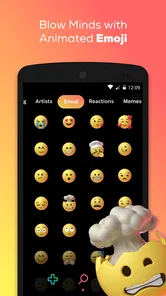
- Huge library of stickers and emojis.
- User-friendly interface and navigation.
- Regular updates with fresh content.
Cons
- Requires internet connection for use.
- Some GIFs may be inappropriate for kids.
- Ads can interrupt user experience.
- Consumes significant data bandwidth.
- Limited offline functionality.











