Fresha for business
- 345.00
- 4.6
- Installs
- 100.00K
- Price
- Free

Screenshots


Analysis by Reviewed
If you run a salon, spa, or independent beauty business, the real test of a management app is whether it makes the day feel less fragmented—not whether it promises to do everything. I see Fresha for Business as a practical hub for appointments and the work around them. Its appeal is strongest when bookings, client context, products, and promotions all matter to your routine; it is less compelling if you prefer a paper diary or need every process tailored to your own system.
Where it earns a place in the working day
I see the strongest fit for independent beauty professionals and small salon or spa teams that need to keep appointments, client details, stock, and promotions close together. Instead of switching between a calendar, a notebook, and separate marketing tools, you can use one place to handle several routine tasks. That is useful when a day is busy and small admin jobs tend to pile up between appointments.
For example, imagine a stylist finishing a morning appointment while a new booking request arrives and a regular client asks for the same treatment as last time. Having the schedule and client history together can make it easier to check availability and prepare without searching through old messages. I’d still treat the app as a work aid, not a substitute for confirming unusual requests directly with a client or checking that a service is booked for the right time and staff member.
A second useful scenario is the end-of-day reset. Rather than trying to remember which gaps might be worth filling or what needs attention before the next shift, I’d review the coming schedule and the relevant client or stock records while the details are still fresh. That small habit can make the following morning calmer, but it depends on keeping the records current. A shared tool only reduces confusion when the team agrees on how to use it.
For a small team, I’d also establish a simple handover routine: keep notes focused on what the next person genuinely needs to know, and check that schedule changes are reflected in the same place. This is not a substitute for clear communication, especially when a client has made a special request. It can, however, reduce the chance that useful context gets trapped in one person’s messages or memory.
Getting started and organizing the basics
First things first, downloading and setting up Fresha for Business was a breeze. It's available for both Android and iOS, so whether you're team Apple or team Android, you're covered. Once I got it running, I was welcomed with a clean and intuitive interface. It’s like the app already knew I’m not a fan of complicated setups.
Fresha.com develops the app, which is free and rated for Everyone. It has an average rating of 4.6 from around 7.6 thousand ratings, with over 100 thousand installs. It first appeared on July 26, 2019, and version 2.8.3380 is listed for devices running Android 8.0 or later. Those basics make it accessible to many salon owners, though Android users with older devices should check compatibility before planning a switch.
More From Our News Desk

Clash of Clans Is Won Between the Battles

Android Auto Makes the Case for Quieter Car Software

MobiOffice: Transforming Mobile Productivity with Seamless Integration

EA SPORTS FC™ Mobile Soccer: Redefining Mobile Sports Gaming

How Microsoft OneDrive Became a Mobile Productivity Giant

How Google Translate Breaks Language Barriers Effortlessly
Before moving a real business routine into any new system, I’d use a quiet period to test a representative week rather than trying to configure everything during a busy shift. Add the services and availability you actually use, then check the calendar from the point of view of both the person managing it and the client trying to book. This catches practical snags early: unclear service choices, availability that needs frequent adjustment, or a booking flow that does not suit appointments requiring a conversation first.
It is also worth deciding what belongs in a client record and what is better handled in a direct conversation. A concise note about a relevant preference can help with continuity; a long, unstructured record can be hard to scan when the next appointment is waiting. I’d keep information useful to the service and make the habit consistent across the team, rather than treating the app as a place to store every passing detail.
Appointments are strongest when the calendar stays accurate
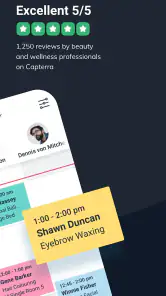
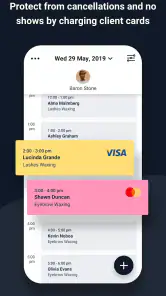
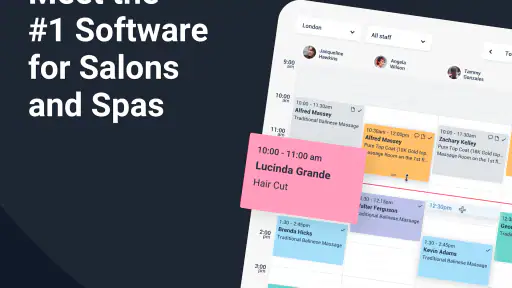
One of the standout features is the booking system. If you’ve ever struggled with scheduling, this app will feel like a revelation. You can easily manage appointments, and clients can book through the app or your custom link. It’s all about making life easier for both you and your clients. I loved how I could see my entire week at a glance, and rescheduling was as easy as dragging and dropping.
The practical advantage is not just seeing a calendar; it’s being able to think through the week before the rush begins. I’d use a quieter moment to scan for gaps, spot appointments that need a little more preparation, and decide whether a promotion could sensibly fill open time. For a solo professional, that can be more useful than maintaining a separate calendar and trying to keep it synchronized by hand.
There is a trade-off: online booking works best when the services and availability you offer are kept current. If your schedule changes constantly, or you accept lots of bespoke bookings that need a conversation first, a self-booking route may not suit every client or service. I would keep a direct contact option available for exceptions rather than expecting an online calendar to handle every nuance.
That distinction matters when deciding whether online booking should be the default or simply another route. For straightforward appointments, letting clients choose a time can reduce the back-and-forth. For a first visit, a complex service, or a request that needs a short consultation, a direct message or call may be the more considerate option. I’d make the choice service by service instead of assuming every booking can follow the same path.
Stock and sales records reward a steady habit
Now, let’s talk business. Keeping track of your inventory and sales can be a nightmare, but Fresha has got this covered too. The app offers detailed reports and analytics that let you know what’s flying off the shelves and what’s collecting dust. It’s like having a business analyst in your pocket. I found this feature particularly useful because it helped me make informed decisions about product orders and promotions.
A useful habit is to review those reports on a regular schedule instead of checking them only when something seems wrong. Looking at sales patterns alongside stock can help you avoid ordering on impulse and can give you a better sense of which products deserve attention. Still, reports are only as helpful as the records behind them, so consistent updates matter; if you prefer a very hands-off approach to tracking, this part may feel like another chore rather than a shortcut.
I would treat a report as a prompt for a decision, not a decision in itself. If a product appears to be moving slowly, there may be a reason beyond demand, and one quiet period should not dictate a large change in ordering. A cautious review—checking the stock on hand, considering the services it supports, and looking at the pattern over time—makes the reporting more useful than reacting to a single result.
Client history helps, but good notes stay selective
Building strong relationships with clients is crucial, and Fresha offers tools to enhance client management. You can keep track of client preferences and history, making it easy to personalize services and increase client satisfaction. I noticed how my clients appreciated the personalized touch, and it made me feel like I was offering a bespoke service without the extra effort.
For repeat visits, a quick look at someone’s history can help make a consultation feel more thoughtful and avoid relying on memory alone. I’d use that context to ask a better follow-up question, not assume a client wants exactly the same thing every time. Client notes are most valuable when they stay clear, relevant, and respectful; a crowded record can slow you down instead of helping.
This is particularly helpful when a client alternates between team members. A brief, readable note can give the next professional a starting point, while the consultation still leaves room for the client’s needs to have changed. I would avoid treating a past choice as a standing instruction: preferences can shift, and asking again is often better service than confidently repeating an old plan.
Promotions should solve a specific scheduling problem
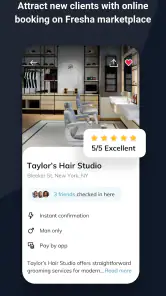
If you’re looking at expanding your client base, the marketing and promotion tools are your best friends. From sending out special offers to managing online reviews, Fresha helps keep your business in the limelight. I tried out a couple of promotions through the app, and the response was quite impressive. It’s a handy way to fill up those empty slots in your schedule.
I’d use offers with a specific purpose, such as drawing attention to a quieter time, rather than discounting broadly without a plan. That makes it easier to judge whether a promotion is helping the schedule or simply reducing the value of work that would have booked anyway. If you already have a marketing routine you like, Fresha may be more useful as a supporting tool than as a reason to abandon that routine.
Before sending an offer, I’d decide what success means: filling a particular quiet period, encouraging someone to try a service, or reminding existing clients to return. Without that goal, it is easy to focus on responses while overlooking whether the offer helped the business in the way intended. A targeted message is also easier to evaluate than a broad discount sent to everyone.
How it compares with a diary or specialist setup
Compared with the usual mix of a paper diary, messaging, and separate spreadsheets, Fresha’s appeal is having several business tasks together rather than relying on memory and manual updates. A paper calendar can still be preferable for someone who wants a simple offline routine, while a specialist tool may suit a business with unusual workflows or reporting needs. I’d choose Fresha when appointment coordination and client context are the daily pain points, and compare alternatives carefully if a particular process is essential to how the business operates.
The trade-off is that an all-in-one workspace is valuable only if its connected tasks match the way you work. A paper diary asks less of you if bookings are few and changes are handled face to face. Separate tools may offer a better fit when a business has a distinct process it cannot comfortably adapt. Fresha makes more sense when the benefit of keeping routine salon work together outweighs the effort of maintaining a digital system.
It is also not automatically the right choice for every beauty professional. If you take very few appointments, work mainly through referrals, or prefer to manage every booking through personal conversation, a dedicated business app could add more setup than value. Before relying on it day to day, I’d enter a typical week, test how the booking flow feels from the client’s perspective, and check that the records are easy for anyone on the team who needs them to understand.
For someone considering a change, I would not move every part of the operation at once. Start with the pain point that costs the most attention—often appointment coordination—and see whether the daily routine becomes clearer. Then consider whether client history, stock tracking, or promotions genuinely improve the workflow. If those areas remain easier in an existing system, there is no reason to force a full switch just because the app can bring several tasks together.
Who should choose it—and who may be happier elsewhere
I’d recommend giving it a serious look if you manage a salon or spa where repeat appointments, client preferences, and changing availability make the day hard to coordinate. It is especially appealing when several routine jobs are currently scattered across a calendar, messages, and handwritten notes. A solo professional can benefit too, provided the time saved by keeping records together is worth the initial effort of setting up and maintaining them.
I’d be more cautious if your work is mostly by appointment through personal conversation, if you have only occasional bookings, or if your services need a highly individual consultation before a time can be confirmed. In those cases, a simple diary and direct communication may be faster and more natural. A larger or unusually structured business should also check that its important processes fit before depending on any single platform.
In conclusion, Fresha for Business is a robust tool that brings a lot to the table for anyone in the beauty or wellness industry. It’s not just about managing appointments; it’s about running your business more efficiently and effectively. The app feels like it was designed by someone who truly understands the needs of the industry, and that’s probably because it was. So, if you’re looking to streamline your operations and focus more on what you love doing, give Fresha a whirl. You might just wonder how you ever managed without it!
My recommendation
My recommendation is to try it if you want bookings, client details, stock, and outreach to feel less scattered, especially if you work with returning clients and have gaps to manage. Go in with a clear idea of which tasks you want to simplify, then see whether the everyday workflow actually saves effort. For a business that needs highly customized processes, or for a professional who is happiest with a simple diary, a different setup may be a better fit. For the right salon or spa, though, the combination of practical tools is the reason I’d consider keeping it in the working routine.
Fresha for business Frequently Asked Questions
What devices can I use Fresha for Business on?
Fresha for Business is available for Android and iOS, so you can use it on a compatible phone or tablet. Before downloading, check that your device runs Android 8.0 or later if you are using Android. The app is free to download, and its Everyone content rating makes it suitable for a broad audience.
Who develops Fresha for Business, and what is the app designed for?
Fresha for Business is developed by Fresha.com and belongs to the beauty category. Its store summary describes it as “The world's best platform for salons and spas,” which gives a clear sense of its intended audience: beauty and wellness businesses. It is designed to help professionals organize day-to-day business activity through a mobile app.
What is Fresha for Business?
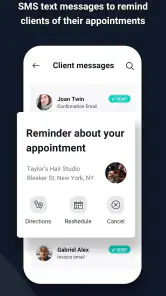
Fresha for Business is a comprehensive app designed for beauty and wellness professionals to manage their appointments, schedules, and client interactions effectively. It offers features like calendar management, online booking, and client notifications, making it easier for businesses to streamline their operations. The app is available on both Android and iOS, providing flexibility for various devices.
How does scheduling work in Fresha for Business?
Scheduling in Fresha for Business is seamless and intuitive. The app allows you to set up your calendar with available time slots, making it easy for clients to book appointments online. You can manage appointments directly from your mobile device, adjust availability, and even receive notifications to keep track of your schedule effectively.
Is Fresha for Business free to use?
Yes, Fresha for Business is free to use, with no subscription fees or hidden charges. It offers a range of features at no cost, including appointment scheduling, client management, and reporting tools. However, there may be optional in-app purchases or premium features available for businesses looking to enhance their capabilities further.
Pros
- User-friendly interface simplifies appointment scheduling
- Comprehensive analytics for business growth
- Seamless integration with existing systems
- Cost-effective pricing structure
- Efficient customer management tools
Cons
- Limited customization options for branding
- Occasional syncing issues with calendars
- Steep learning curve for new users
- Lack of offline functionality
- Customer support response can be slow
- Category
- Beauty
- Version
- 2.8.3380