Fred Meyer
- 7.66K
- 4.0
- Installs
- 1.00M
- Price
- Free

Screenshots
Analysis by Reviewed
I find Fred Meyer most useful when I treat it as a planning tool rather than a reason to browse. Before a grocery run, I can check current offers, build a shopping list, and keep the trip focused. That makes the app a practical fit for regular shoppers who already visit Fred Meyer; it is less compelling if you mainly want to compare prices across unrelated retailers.
Build a routine around the trip
My simplest workflow is to make the list before leaving home, check the available deals against items I genuinely need, and use the list as I shop. The useful habit is checking offers before adding extras: a discount only helps if the product belongs in your plan. For a household shop, I would also group items mentally by the parts of the store where I expect to find them. The app supports the planning, while a little preparation keeps the visit efficient.
A realistic example is a weekday stop after work. I can add dinner ingredients and household basics to the list earlier in the day, look for relevant coupons, then check the list while shopping instead of trying to remember everything. If I am only picking up one or two items, opening the list and heading straight for them is more useful than scrolling through promotions. That small distinction helps keep convenience from turning into unplanned spending.
For a larger shop, I would use the list as a check against what is already at home, not just as a place to collect ideas. A quick look in the fridge or pantry before adding items can prevent buying another of something I already have. If someone else in the household is shopping, agreeing on the list beforehand also reduces the chance of duplicate purchases. These are ordinary habits, but they make a retailer’s app more useful than simply opening it once the cart is already full.
Check offers and store details deliberately
Coupons and advertised deals are most helpful when I review their terms before relying on them. I would check that an offer matches the item I intend to buy and is available for the shopping trip I have planned. This is a better routine than assuming every displayed discount applies to every similar product. Keeping the list and offers together also makes it easier to notice when a deal is irrelevant, so I can skip it without slowing down the shop.
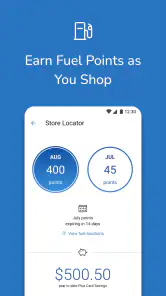
Store-finding is worth checking before an unfamiliar trip, especially if I am away from my usual neighborhood. I would confirm that the location makes sense for the route I plan to take rather than assuming the nearest result is automatically the most convenient. A stop that adds a long detour can erase the value of a modest promotion. For my normal shopping, I would use store information as a planning check, not as a reason to change a routine that already works.
The app is free, is published by The Kroger Co., and is rated for Everyone. Its current version is 88.1.1, and it requires iOS 7.1 or later. It has a 4.0 average from around 41,000 ratings, with more than a million installs. Those figures suggest an established shopping app, but they do not guarantee that every feature will suit every store visit or shopping style.
You May Like

Clash of Clans Is Won Between the Battles

Android Auto Makes the Case for Quieter Car Software

MobiOffice: Transforming Mobile Productivity with Seamless Integration

EA SPORTS FC™ Mobile Soccer: Redefining Mobile Sports Gaming

How Microsoft OneDrive Became a Mobile Productivity Giant

How Google Translate Breaks Language Barriers Effortlessly
Make repeated trips quicker without chasing every deal
For regular customers, the strongest pattern is to reuse a short routine: review the list, scan relevant offers, then check store information when planning a visit. That is more dependable than opening the app only at checkout and expecting to remember which coupons matter. Store-finding is also useful when I am away from my usual location, while the shopping list remains valuable even when I am not chasing a deal.
A practical shortcut is to prepare the list in small additions as needs come up, rather than trying to remember the whole household’s requirements just before leaving. I would still review it before shopping, because a running list can collect items that are no longer needed. The benefit is not that the app makes decisions for me; it is that a quick edit at home is easier than reconstructing the plan in a busy aisle.
Compared with a paper list, the app brings offers and store information into the same place, which can cut down on switching between tools. Compared with a general shopping or price-comparison app, its value is tied more closely to shopping at Fred Meyer than to surveying every retailer. I would choose a broader comparison tool if my main goal were to find the lowest price across several chains, and a simple notes app if I wanted nothing beyond a list.
There is a trade-off in keeping the whole plan on a phone: the screen can be less convenient to check while carrying bags, helping children, or moving through a crowded shop. I would organize the list before entering the store and avoid treating the app as something I need to inspect constantly. If a shopping trip is especially rushed, a short paper backup for the essential items can be more practical than stopping to unlock and navigate a device.
Know when a retailer-specific app is the wrong fit
The main trade-off is that a retailer-specific app works best when the retailer already fits your routine. If Fred Meyer is not a convenient place for you to shop, its coupons, ads, and store tools have limited practical value. Likewise, shoppers who dislike checking promotions may prefer to ignore that part and use the list alone. I would not let a deal dictate a purchase; the app can make offers easier to find, but it cannot decide whether an item is worth buying for your household.
It is also sensible to keep a fallback for the basics. If you are in a hurry or your phone is inconvenient to use in-store, a short written list can still do the job. I see the app as a helpful companion, not a requirement for completing a shop. Its appeal is strongest when you enjoy doing a little preparation and want store-related planning in one place.
I would skip it if I rarely shop at Fred Meyer, expect one app to compare every retailer, or simply do not want another place to review offers. A general list tool is a cleaner choice for someone who shops at several unrelated stores and wants the same workflow everywhere. On the other hand, a frequent Fred Meyer shopper may value having store-specific planning close to the list, even if they do not use every part of the app.
What the app feels like in everyday use
For me, the clearest way to judge Fred Meyer is to separate what I can reasonably rely on from what sounds appealing in a broad description. The confirmed basics point to a shopping app built around offers, store information, rewards, and lists. I find that combination most useful when it supports a planned visit; I would not assume that every retail feature is equally important to every shopper.
A focused shopping experience, not a reason to browse
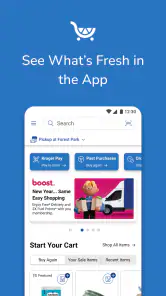
When I first stumbled upon the Fred Meyer app, I was a bit skeptical. Could one app really handle all my shopping needs? After a few weeks of use, I am convinced that it can. The app has a straightforward and user-friendly interface that makes browsing through categories and finding what you need a breeze. You can find everything from groceries to electronics, and even clothing. It’s like having a massive supermarket at your fingertips.
That range may appeal to someone planning a mixed shopping trip, but I would keep expectations grounded in the particular task at hand. If I am going in for groceries, the list and relevant offers matter more to me than browsing other departments. A wide selection can be convenient, yet it can also tempt me to wander beyond what I meant to buy. I get the best use from the app when I decide what I need first and treat browsing as optional.
Search works best with a clear target
One of the features I absolutely love is the search functionality. You know when you’re in a hurry and just need to find that one elusive item? This app’s search bar is remarkably efficient. Just type in what you need, and results pop up almost instantly. Plus, the categories are well-organized, so if you prefer browsing, you can do that too without feeling overwhelmed.
For a practical search, I would start with the name of the item I actually intend to buy, then use the result to refine the plan rather than assuming a broad search answers every question. Search is most useful when I already know what I am looking for; it is less helpful as a substitute for checking whether an offer matches the exact product I want. That distinction matters when similar items appear in more than one size or variety.
Promotions need a little judgment
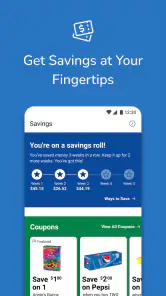
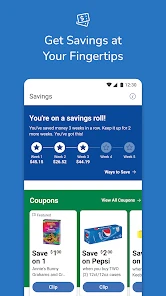
Who doesn’t love a good deal? I was pleasantly surprised by the number of discounts available through the app. Fred Meyer often has exclusive deals that you won’t find anywhere else. The app even lets you load digital coupons directly to your account, which are automatically applied at checkout. It’s like having your own personal discount fairy.
I would still make the shopping decision before getting carried away by a promotion. A coupon can be worthwhile when it fits a planned purchase, but a discount on an item I would not otherwise choose is not automatically a saving. I would check the offer before the trip and keep only the relevant ones in mind. That simple filter makes the promotional side more useful and helps prevent the app from turning a focused shop into impulse browsing.
Rewards can make the app more relevant for people who shop with the same retailer repeatedly, because a regular routine gives them more reason to keep store-related tools together. I would think of that as a reason to check the account and offer details as part of preparation, rather than assuming every benefit applies to every basket. For an occasional visitor, the list may be the part worth using even when rewards and promotions are not a priority.
Ordering and pickup should match your needs
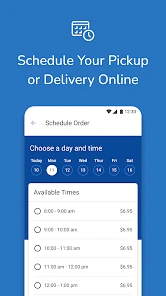
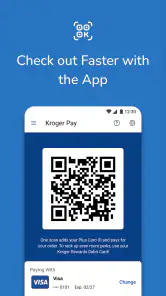
Another standout feature is the seamless online ordering system. Once you’ve filled your cart, checking out is as simple as a few taps. I’ve used the pickup service multiple times, and it’s always been a smooth experience. You choose your pickup time, and the app keeps you updated on the status of your order. No more waiting in long lines or dealing with crowded stores!
Pickup is most appealing when saving time inside the store matters more than choosing every item yourself. For a planned basket, I would prepare the order in advance and review it before checkout, especially if I am buying ingredients for a particular meal. Someone who prefers inspecting produce personally may be happier shopping in person instead. That is a matter of preference, not a reason to force every grocery trip into the same format.
If I were deciding between pickup and an in-store visit, I would ask whether the convenience is worth giving up the hands-on part of shopping that day. A busy evening can make collection attractive, while a small trip or a visit where I want to choose specific fresh items may favor going inside. The app can support either kind of plan, but the right choice depends on what I need from that particular shop.
Use recommendations as suggestions, not instructions
This app also gets to know your preferences. It gives personalized recommendations based on your shopping habits. I’ve discovered so many products this way that I wouldn’t have otherwise tried. It feels like the app is tailored just for me, and honestly, who wouldn’t want that?
I would treat recommendations as prompts to consider, not as a shopping list written on my behalf. They can be handy when I am open to trying something new, but they are easy to ignore when I am sticking to a budget or a specific meal plan. Keeping that boundary is especially useful in a grocery app, where attractive suggestions can quietly add items to a basket without solving a real need.
A sensible fit for the right kind of shopper
The app is free and has been available since December 19, 2012. Its 4.0 average from around 41,000 ratings gives a quick sense of its reception, while the 7,700 reviews offer written feedback from shoppers. I would read both as context rather than a guarantee: a retailer’s app can be useful for one person’s regular routine and still feel unnecessary to another.
In conclusion, the Fred Meyer app is a game-changer in the world of shopping. Whether you’re looking for convenience, variety, or savings, this app has it all. Give it a try, and you might find yourself wondering how you ever managed without it. Happy shopping!
My own recommendation is more specific: I would try it if Fred Meyer is already a regular stop and I want my list, offers, and store planning in one place. I would not install it just to chase discounts or expect it to replace a cross-store comparison tool. Used with a repeatable routine—plan first, check relevant offers, then shop—it can make an ordinary trip easier without asking me to reorganize the way I buy groceries.
Fred Meyer Frequently Asked Questions
Can I check whether my phone meets the Fred Meyer app’s basic requirements before downloading?
Yes. The main compatibility point to check is your device’s operating system. The Android version requires Android 7.1 or later, and the app is also available for iOS devices. Fred Meyer is a free shopping app from The Kroger Co., so once your device is compatible, you can download it and explore its shopping tools without paying for the app itself.
Who makes the Fred Meyer app, and what is its main purpose?
The app is developed by The Kroger Co. and is designed to bring Fred Meyer shopping tools together in one place. Its focus is practical: shoppers can look through ads, access coupons, create a shopping list, find stores, and use rewards features. It is intended for people who want to plan shopping and keep useful store-related tools close at hand.
Is the Fred Meyer app available for both Android and iOS?
Yes. Fred Meyer is a shopping app from The Kroger Co. that is available for Android and iOS devices. Before downloading, check that your device meets the platform’s requirements; the Android version requires Android 7.1 or later. The app is free to download, so you can install it and explore its shopping tools without paying for the app itself.
What is the Fred Meyer app used for?
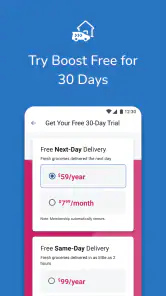
The Fred Meyer app is a convenient tool for shopping enthusiasts looking to streamline their grocery and general merchandise shopping experience. With this app, users can browse weekly ads, create shopping lists, and even order groceries online for pickup or delivery, making it a valuable asset for saving time and money on everyday shopping needs.
Is the Fred Meyer app free to download and use?
Yes, the Fred Meyer app is completely free to download and use. Users can enjoy a variety of features without any subscription costs. However, keep in mind that while the app itself is free, any purchases made through the app, such as grocery orders, will incur their respective costs. It's an excellent tool for enhancing your shopping experience at no extra charge.
Pros
- User-friendly interface for easy navigation.
- Wide range of products available.
- Efficient and quick checkout process.
- Loyalty program offers great rewards.
- Convenient curbside pickup option.
Cons
- Limited availability in certain regions.
- App occasionally crashes.
- Some features require high-speed internet.
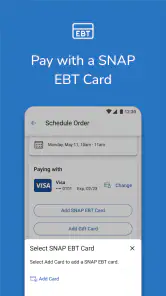
- Limited payment options available.
- Customer support response time can be slow.

- Category
- Shopping
- Version
- 88.1.1