Food 4 Less
- 1.33K
- 3.6
- Installs
- 1.00M
- Price
- Free
Screenshots
Analysis by Reviewed
When I’m planning a grocery trip, I want the useful details in one place without having to make the app my entire shopping routine. Food 4 Less is a free shopping app from The Kroger Co. that brings together store-related savings and list planning. I find it most appealing when I already intend to shop at Food 4 Less; its usefulness depends less on browsing for its own sake and more on whether I can prepare before I head out.
When a shopping plan depends on a connection
For me, the app is most useful when I can check offers and plan a trip before leaving home. Coupons, ads, rewards, store-finding tools, and a shopping list put the practical parts of a grocery run together. That can save time when I already know what I need, but it also means I would not treat the app as a substitute for a written backup if I expect to shop somewhere with an unreliable connection.
A useful habit is to prepare the list while connected and review it before heading out. I can then rely on the list as my plan rather than counting on every page or offer to load at the exact moment I reach an aisle. For a quick stop, checking the relevant deal in advance is more dependable than trying to compare offers while distracted in the store.
Using the app around a real grocery trip
The first thing that struck me about Food 4 Less was how user-friendly it is. Setting up an account was a breeze, and within minutes, I was scrolling through a plethora of grocery items. The app's interface is clean and intuitive, making it simple to find what you need without any hassle. It's like having a personal shopper who knows exactly what you need.
Features That Make Life Easier
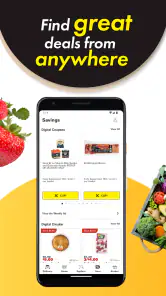
One of the standout features of the app is its robust search functionality. You can search for items by name, category, or even dietary restrictions. Whether you're vegan, gluten-free, or just looking for some fresh produce, Food 4 Less has got you covered. Plus, the app notifies you of current discounts and deals, which is a great way to save some bucks!
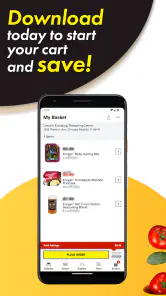
Another cool feature is the shopping list option. You can create your list, and the app will organize it by department, making your shopping trip efficient and stress-free. Oh, and did I mention the app also offers recipes? Yes! You can find inspiration for your next meal and add all the necessary ingredients to your cart with just a tap.
Using it on a real grocery run
Imagine getting home after work, noticing that dinner is missing two ingredients, and checking the app before making a short trip. I would use the list to keep those items together with anything else I need, then look at available offers before deciding whether to add an extra item. That order matters: a discount is only helpful if it fits the meal or household budget, and browsing deals first can turn a focused trip into impulse shopping.
You May Like

Clash of Clans Is Won Between the Battles

Android Auto Makes the Case for Quieter Car Software

MobiOffice: Transforming Mobile Productivity with Seamless Integration

EA SPORTS FC™ Mobile Soccer: Redefining Mobile Sports Gaming

How Microsoft OneDrive Became a Mobile Productivity Giant

How Google Translate Breaks Language Barriers Effortlessly
The department-organized list is especially handy when several people are contributing items. I would agree on one shared plan before anyone shops, rather than keeping separate mental lists and risking duplicates. For a single shopper with only a few items, a basic notes app may be quicker; the Food 4 Less list becomes more valuable when its grocery organization and store-related tools are part of the same routine.
Making the most of mobile use
On a phone, the biggest practical benefit is having the plan close at hand while moving between home, the store, and other errands. I would add items as soon as I notice they are running low, rather than trying to remember everything at the end of the week. Before leaving, I’d scan the list once and remove anything that no longer belongs. That small check helps keep a shopping list useful instead of letting it become a backlog of old intentions.
There is a trade-off to using a phone in the aisle: it can help me check a planned item or offer, but it can also turn a quick shop into a lot of screen time. I’d use the list as the main task and open other sections only when they answer a specific question. If I’m shopping with someone else, agreeing on who is checking the app and who is gathering items can reduce duplicated effort and keep the trip moving.
The Shopping Experience
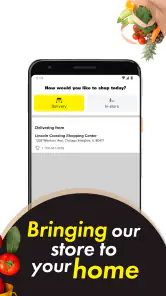
Once I had my virtual cart filled, checking out was a seamless experience. The app provides multiple payment options, and I appreciated the security features in place. Delivery options are flexible too. You can choose to have your groceries delivered to your doorstep or opt for curbside pickup if you prefer to grab them yourself.
The delivery was prompt, and everything arrived fresh and in perfect condition. The app even provides updates on your order status, so you know exactly when to expect your delivery. It's the kind of service that makes you wonder why you ever bothered going to a physical store in the first place.
Network hiccups, recovery, and data-conscious habits
Shopping apps are most frustrating when a connection drops midway through a task. I would avoid assuming a coupon, item detail, or order update will remain available without a working connection. If something fails to load, I’d pause rather than repeatedly tapping through screens; returning to the relevant page once the connection is stable is a calmer way to check the information and continue. For an urgent shop, keeping essential items on a separate note is a simple safeguard.
If I am trying to limit mobile data, I would do the browsing and meal planning on Wi-Fi where convenient, then open the app on the go only for the task I need. That is a practical trade-off rather than a promise that every feature uses little data. The app’s value is in bringing Food 4 Less shopping tools into one place, but anyone who prefers not to use a phone while shopping can still make a paper list and visit a store directly.
Choosing between the app and other shopping tools
Compared with a general grocery checklist, this app has a clear advantage when I want a Food 4 Less-oriented plan that includes offers and store information alongside my list. A notes app is often faster for a short, one-off list, and it avoids mixing shopping with deal browsing. A retailer-neutral list may suit a household that shops at several chains and wants one shared checklist without switching between store apps.
For price comparisons across retailers, I would not rely on a single store’s app as my whole research process. I’d use Food 4 Less for the trip I’m considering there, then compare alternatives separately if the choice of store matters. This distinction helps avoid treating a visible coupon as proof that an entire basket is the best value. The app is strongest as a planning companion for a store-specific visit, not as an impartial guide to every grocery option.
Who will get the most from it?
I’d recommend it most to people who regularly shop at Food 4 Less and want store-specific savings and planning tools together. It is also a sensible fit for households that like to organize a grocery list before a trip or check deals while deciding what to cook. Someone comparing several grocery chains may prefer each retailer’s own app for its local offers, while a shopper who only needs a generic checklist may find a standard notes app less involved.
The Kroger Co. developed this free shopping app, which is rated for Everyone and has reached over one million installs. Its average rating is 3.6 from around 3,800 ratings, a useful reminder that experiences can vary. I would judge it by whether its store-focused tools fit my routine, not by expecting every shopping task or connection to feel effortless.
Practical limits before you rely on it
The main limitation is that a store-focused app is only useful when that store is part of your regular routine. If I move between retailers based on convenience, location, or whichever has the best fit for a particular trip, I may end up maintaining several apps and lists. In that case, a neutral checklist can be a cleaner starting point, with Food 4 Less opened when I have a specific reason to shop there.
I’d also separate the planning value from the convenience of completing an order. A list and offers can help me prepare, but a shopper who wants to avoid managing details on a phone may be happier writing items down and deciding in person. Before depending on a digital offer during a time-sensitive shop, I’d check it in advance and keep the key item on my list. That way, a loading delay is an inconvenience rather than a reason to forget what I came for.
Version, compatibility, and everyday fit
The app’s current version is 1.1.31, and it requires Android 6.0 or later. It has been available since December 19, 2012, and its 1.3K reviews offer a broader sense of user experiences than a handful of comments alone. I’d still make my decision based on my own shopping habits: a long-running app can be useful, but what matters day to day is whether its tools match the way I plan a Food 4 Less visit.
For someone setting it up for the first time, I’d start with one ordinary grocery run rather than moving every household routine into it immediately. Try a short list, check an offer that genuinely applies to something you intended to buy, and see whether the store-finding or rewards tools belong in your routine. That low-commitment trial makes it easier to tell whether the app saves effort or simply adds another place to check.
Final Thoughts
In conclusion, Food 4 Less is a game-changer for anyone who wants to simplify their grocery shopping experience. It's convenient, efficient, and offers a wide range of products to cater to different dietary needs. Whether you're a busy parent, a college student, or someone who just hates long lines at the grocery store, this app is definitely worth a try. It's like having a grocery genie in your pocket, ready to fulfill your culinary wishes at a moment's notice. So go ahead, give it a whirl, and enjoy the ease of modern-day grocery shopping!
My connectivity verdict is practical rather than absolute: I’d use it to prepare and manage a Food 4 Less trip, while keeping a fallback list for moments when service is spotty. The app is less compelling if you rarely shop there or want one neutral tool for every retailer. For regular customers, though, combining offers, store information, and list-making can make a planned shop feel more organized.
Food 4 Less Frequently Asked Questions
Is the Food 4 Less app free, and what devices can install it?
The Food 4 Less app is free to download and is listed for Android and iOS devices. Its Android requirements include version 6.0 or later, so it is worth checking your device’s operating system before installing. The app is a shopping tool from The Kroger Co., intended for customers who want to access Food 4 Less features from their phone.
Who makes the Food 4 Less app, and is it suitable for all ages?
The Food 4 Less app is developed by The Kroger Co. and is rated Everyone, making it suitable for a general audience. It is a shopping app rather than a game, with tools aimed at helping customers plan purchases and find savings. If you are choosing an app for a family device, its age rating and practical shopping focus make it straightforward to assess.
What features does the Food 4 Less app offer?
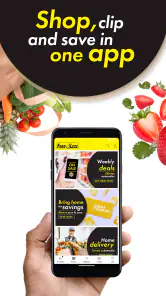
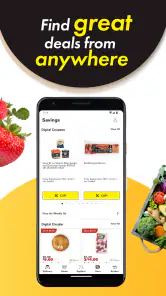
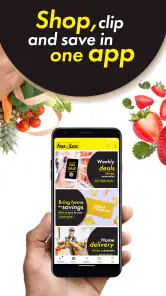
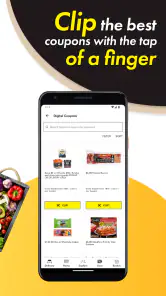
The Food 4 Less app provides a range of features designed to enhance your shopping experience. Users can access digital coupons, view weekly ads, and create shopping lists within the app. Additionally, it offers a store locator and allows users to track their Fuel Points. The app also supports online ordering for groceries, making shopping more convenient.
How do I use digital coupons on the Food 4 Less app?
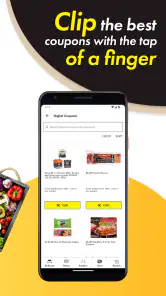
To use digital coupons on the Food 4 Less app, first ensure you have an account. Browse the available coupons in the app and "clip" the ones you wish to use. When you're ready to purchase, enter your registered phone number at checkout or scan the barcode from the app to apply your savings. This seamless process ensures you never miss a discount.
Is the Food 4 Less app available for both Android and iOS devices?
Yes, the Food 4 Less app is available for download on both Android and iOS devices. You can find it on the Google Play Store for Android users and the Apple App Store for iOS users. The app is designed to work smoothly across both platforms, ensuring that users have a consistent experience regardless of their device.
Pros
- Affordable grocery prices
- Wide variety of products
- Convenient store locations
- Frequent promotions and discounts
- Helpful and friendly staff
Cons
- Limited organic options
- Outdated store interiors
- Crowded during peak hours
- Inconsistent product availability
- Limited online shopping features
- Category
- Shopping
- Version
- 1.1.31