

Frameit Video Editor
- 26.00
- 4.3
- Installs
- 50.00K
- Price
- Free

Screenshots
Analysis by Reviewed
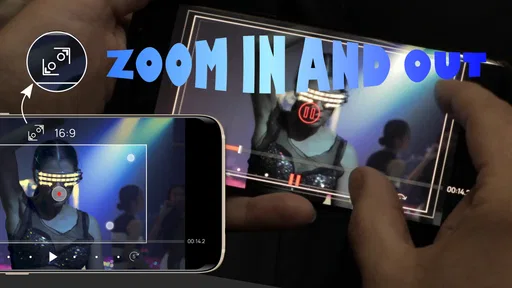
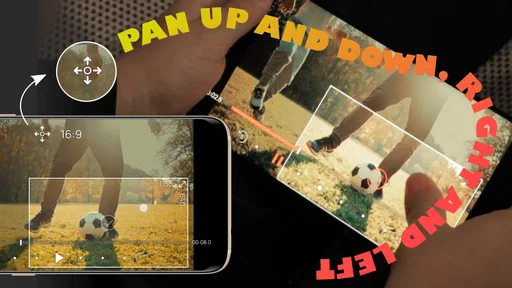
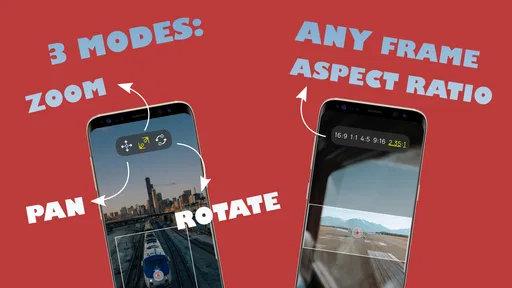
Frameit Video Editor is the kind of mobile editing app I would open when an ordinary clip needs movement rather than a complicated production workflow. Its focus is clear: adding controlled pan, zoom, and rotation effects to video through a frame-based editing approach. After spending time with it, I found that its appeal comes from doing one visual job in a more direct way than a full desktop-style editor.
That narrow purpose is important. This is not an app I would choose when I need a complete timeline, advanced audio mixing, elaborate transitions, or a large effects library. Instead, it suits short clips where the framing itself needs to change: a product shot that should slowly move toward a detail, a landscape that benefits from a gentle sweep, or a still-looking section that needs a little energy. The best results come from treating it as a focused motion tool rather than expecting an entire editing studio.
How Frameit Video Editor works in real editing situations
The app sits in the video players and editors category and is developed by FIGABYTE SOLUTIONS d.o.o. Its main idea is easy to understand even before trying more ambitious edits: place points along a clip, adjust the view at those points, and let the app create the movement between them. That approach makes the editor useful for people who think visually but do not want to learn a dense professional interface.
I especially like this method for clips where the original camera movement is too static. Imagine recording a handmade item on a table for a small online listing. Rather than reshooting with a moving camera, I can begin with a wider view, move toward the important detail, and finish with a slight turn. The source video remains simple, but the changing frame gives it a more deliberate presentation.
The same workflow can help with travel footage. A broad view of a building or a scenic overlook may contain more space than the viewer needs. A gradual pan can guide attention across the scene, while a restrained zoom can emphasize a doorway, sign, or architectural feature. The useful part is not merely that the app can enlarge an image; it is that the movement can be planned instead of left to chance.
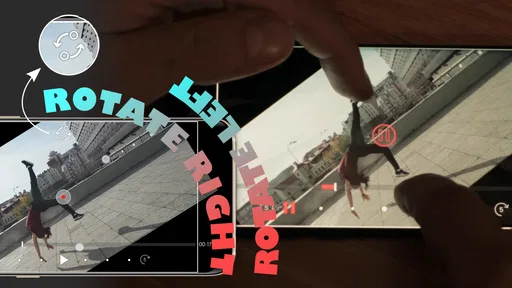
Rotation has a different character and needs more care. A subtle turn can make a graphic or object feel dynamic, but too much rotation quickly becomes distracting. I would use it as an accent between calmer movements, not as a default effect for every clip. The editor’s focused controls make experimentation approachable, although getting a polished result still depends on restraint and repeated previews.
Why the frame-based approach matters
Many casual editors offer automatic effects that look attractive in a preview but do not give much control over where the viewer’s attention goes. Frameit Video Editor is more useful when I already know the visual path I want. I can decide where the movement begins, where it changes direction, and where it settles. That makes it better suited to intentional presentations than to one-tap social templates.
More From Our News Desk

 Gmail
GmailGmail in a Busy Inbox: Who Benefits Most?
From first account to crowded workday, Gmail earns its place through dependable search and flexible sorting—but its best fit depends on how much inbox maintenance you can tolerate.

 Prime Video
Switching to Prime Video: What Changes in Your Viewing Routine
Prime Video can make a compelling second home for streaming, but switching means learning a different catalog, rental layer, and route from browsing to playback.

 Universal TV Remote Control
Universal TV Remote Control Works Best as a Reliable Backup
A phone remote earns its place through quick setup and reliable habits. Here is how to get more from Universal TV Remote Control—and where its limits show.

 Weather - By Xiaomi
Weather by Xiaomi Review: Clear at a Glance, Less Clear Up Close
Xiaomi’s weather app makes everyday forecasts quick to scan, but its calm surface can leave useful details and recovery paths harder to find than they should be.

 X
XX Under Pressure: Can It Recover When Posting Goes Wrong?
A resilience-focused review of X, examining setup, mistaken posts, interruptions, weak connections, and the gaps that matter when recovery needs to be dependable.

 Clash of Clans
Clash of Clans Is Won Between the Battles
Its raids are quick; its community is a long-term project of coordination, teaching, rivalry, and shared responsibility—with all the friction that entails.
Latest News



A practical technique is to keep the first and last framing noticeably different, but not dramatically so. If the opening view is wide and the ending view is only slightly closer, the motion feels natural. If the difference is extreme, the result can look like an accidental digital zoom. I also found that placing a pause in the visual plan is valuable: not every part of a clip needs to move continuously.
Another useful workflow is to edit around the subject rather than around the entire image. Before applying movement, I would identify the one detail that should remain meaningful throughout the shot. If the subject drifts toward the edge, the effect may technically work while the video feels poorly composed. Thinking about that anchor point first saves time and avoids repeatedly adjusting the same sequence.
Everyday uses beyond social posts
The app can be helpful for more than entertainment clips. I could see it working for a quick family slideshow, where still-feeling footage benefits from gentle motion without turning into a loud montage. It may also suit a teacher or hobbyist who wants to draw attention to a particular part of a demonstration. A slow move toward a tool, component, or written detail can make an otherwise flat recording easier to follow.
Small businesses may find a practical use in preparing short product previews. A seller can show the overall shape first, then move toward texture, controls, or a distinctive feature. This does not replace a proper product video, but it can make basic source material feel more considered. The trade-off is that the app’s value depends on having suitable footage already; it is not a substitute for lighting, clean framing, or a steady recording.
I would also consider it for a simple announcement where text or a visual object needs a little emphasis. The motion should support the message, not compete with it. A slow approach to the relevant area can be more effective than adding several unrelated effects. This is one of the app’s less obvious strengths: it encourages editing through composition and timing rather than through a long list of decorative filters.
What the free access means
Frameit Video Editor is free to install, so I can test the core experience without committing money first. That matters for this kind of focused utility because its usefulness depends heavily on personal editing habits. Someone who rarely needs pan, zoom, or rotation may discover that the app solves a real problem; someone who already owns a broad editor may find the separate installation unnecessary.
The app also includes in-app purchases ranging from $1.49 to $21.99 per item. I would treat that range as a reason to explore the free experience carefully before paying. The important distinction is that free access lets me judge whether the workflow feels natural, while paid value only makes sense if the available purchase adds something I will use repeatedly. I would not buy simply because the app is inexpensive at the lower end of the range.
For occasional personal edits, free access may be enough to justify keeping it available. For frequent work, the decision depends on whether its focused controls save time compared with a larger editor already on the phone. A dedicated tool can be valuable even when it has fewer features, but only if the focused task is one I perform often. That is the central value question here.
Where it stands beside usual alternatives
Compared with a general mobile video editor, this app feels more specialized. A full editor is usually the stronger choice when I need multiple clips, captions, music, sound adjustments, color work, and layered effects in one project. Those tools may take longer to learn, but they reduce the need to move between apps.
Compared with automatic social-video editors, Frameit Video Editor offers a more deliberate kind of control. Template-driven apps are faster when I want a finished style immediately, especially for a casual post. They are less helpful when the movement must follow a particular object or match a specific visual rhythm. Here, the focused frame controls are the reason to choose it, not a large collection of ready-made designs.
It also occupies a different space from a basic camera editor that only trims and crops. Trimming is useful for removing unwanted moments, but it does not create a changing viewpoint inside the remaining footage. If the problem is that a clip feels visually flat, a pan or zoom workflow can address that more directly than another crop.
My practical advice is to use Frameit Video Editor as a companion when its motion tools are the missing piece. If I am already doing a larger edit elsewhere, I would only bring a clip here when the framing effect is easier to create in this app. If the project is small and motion is the main requirement, staying inside this editor may be simpler than opening a much heavier alternative.
Trade-offs that affect the final result
The first limitation is scope. A focused motion editor cannot replace a complete production environment, and I would not want to build a complicated project around it. Its strength is also its boundary: the fewer unrelated tools involved, the easier it is to concentrate on framing, but the more likely I am to need another app for everything else.
The second trade-off is precision versus speed. Automatic movement can produce an acceptable result quickly, while manually shaping the path takes more attention. The extra control is worthwhile when the subject matters, but it can feel like unnecessary work for a throwaway clip. I would reserve detailed adjustments for moments where the viewer’s eye genuinely needs guidance.
The third issue is visual quality. Digital zoom and rotation cannot recover detail that was never captured. Starting with a low-quality, heavily compressed, or poorly framed video may make the effect look soft or awkward. The best workflow is to record with some space around the subject, keep the important area clear, and use movement to refine the shot rather than rescue a bad one.
There is also a creative risk: motion can become repetitive. If every clip slowly zooms inward, the finished sequence loses contrast. I get better results by alternating a moving shot with a stable one, or by using different movement speeds for different purposes. A gentle pan can establish a scene, while a short zoom can mark the detail that deserves attention.
Device and version considerations
The app supports Android devices running version 7.0 or later, which makes it accessible to a broad range of phones and tablets. The current version is 1.07.2. In practical terms, I would still judge the experience on the device I plan to use, because editing comfort depends on screen size, touch accuracy, and how easily I can inspect the movement.
A larger display is helpful when placing or adjusting frames. On a small phone, broad movements are easy to understand, but fine positioning near the edge of the image can require more patience. I would preview the entire clip after every meaningful change instead of trusting a single frame. That catches sudden jumps, awkward rotations, and moments where the subject leaves the intended area.
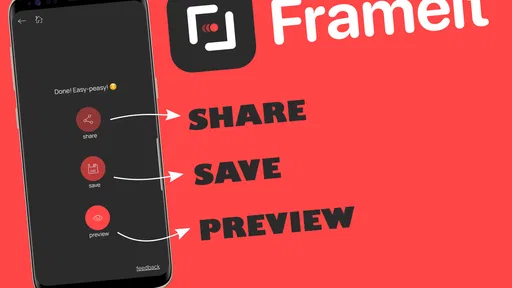
Storage and export habits also matter in any video workflow. I would keep the original clip untouched, create an edited copy, and review the finished file outside the editor before sharing it. That simple routine protects the source and makes it easier to compare a restrained version with a more dramatic one. It is especially useful when experimenting with rotation, where small changes can alter the feel of the whole shot.
Who will get the most value
I think the strongest audience is made up of casual creators who want more control than a one-tap effect but less complexity than a professional editor. If you regularly make short clips of objects, places, crafts, food, or personal projects, the focused workflow can help you create movement without learning a large production system.
It is also a sensible option for someone who edits on an older compatible device and wants a straightforward tool rather than a feature-heavy suite. The free installation makes testing low-risk, while the specialized design makes the purpose easy to understand. I would recommend trying it with a short clip that has one obvious subject, because that reveals its value faster than a crowded multi-scene project.
I would skip it if my main goal were music-driven edits, elaborate captions, advanced audio, or a complete social publishing workflow. I would also skip it if I prefer automatic templates and do not enjoy adjusting movement by hand. In those cases, a broader editor or a template-based alternative is likely to feel faster and more satisfying.
The app is rated Everyone, which fits its approachable purpose. Its audience is not limited to experienced editors; however, an age rating does not remove the need for creative judgement. Young or first-time users may still need to learn why slow, purposeful movement usually looks better than applying every available effect at once.
My buy-or-skip verdict
My recommendation is to try the free version first, then pay only if this specific motion workflow becomes part of your regular editing routine. The app earns its place when I need controlled pans, zooms, or rotations and do not want to wrestle with a much larger editor. It is less convincing as an all-purpose video solution, because its focused design leaves other editing jobs outside the experience.
The public response is encouraging without being a reason to buy by itself: Frameit Video Editor holds a 4.3 average from around 385 ratings, with roughly 26 written reviews and more than 50 thousand installs. I read those figures as evidence that the app has found a real audience, not as proof that it will fit every workflow. My own decision would still come down to whether I can make a useful edit quickly and repeat the process without frustration.
For a friend who wants to turn static-looking footage into something more intentional, I would recommend giving it a chance. I would explain that the best results come from modest movement, a clear subject, and careful previews. For a friend searching for a complete mobile editing suite, I would point elsewhere. Frameit Video Editor is valuable precisely because it concentrates on one visual problem, and that makes it a practical choice when that problem is the one slowing down your edits.
Overall, Frameit Video Editor feels like a purposeful utility rather than a universal editor. FIGABYTE SOLUTIONS d.o.o. has presented a tool with a clear creative role: helping ordinary footage gain direction through changing framing. If that is the effect you need, the free starting point makes exploration sensible. If you need a full production toolkit, its limitations will appear quickly, and another editor will offer better value for the same project.
Frameit Video Editor Frequently Asked Questions
What devices can run Frameit Video Editor?
Frameit Video Editor is an app in the Video Players & Editors category, and its minimum operating-system requirement is version 7.0. Before downloading, check that your device meets this requirement and has enough available space for the app and your video projects. Compatibility and performance can vary between devices, particularly when editing larger or more complex videos.
Who develops Frameit Video Editor, and is it suitable for all ages?
Frameit Video Editor is developed by FIGABYTE SOLUTIONS d.o.o. Its content rating is Everyone, making it suitable for a general audience. The app focuses on video editing, so users can consider whether its editing tools and purchase options fit their needs before installing. As with any app, parents may wish to supervise younger users’ access to device content and in-app purchases.
What is Frameit Video Editor used for?
Frameit Video Editor is designed for creating and polishing short videos for social media, presentations, and personal projects. During testing, its main appeal was the ability to combine clips, photos, music, text, transitions, and visual effects in one mobile workspace. It is suitable for quick edits, although users looking for advanced professional tools may find its controls less extensive than those in desktop editing software.
Is Frameit Video Editor free to download and use?
Frameit Video Editor is free to download, with in-app purchases priced from $1.49 to $21.99 per item. Some features, templates, effects, export options, or other editing resources may require a purchase, so review the purchase screen before starting a project. Free access may also include limitations such as advertisements, watermarks, or restricted premium content.
Does Frameit Video Editor add a watermark to exported videos?
Whether an exported video includes a Frameit watermark can depend on the selected editing tools, purchase status, or the version installed on your device. It is worth checking the export preview before saving or sharing a finished project. If watermark-free output is important for business, branding, or professional publishing, review the available export settings and purchase conditions first.
Pros
- Intuitive timeline makes trimming and arranging clips quick to learn.
- Includes ready-made templates for creating social media videos faster.
- Supports adding text
- music
- stickers
- and transitions in one project.
- Useful preview tools help check edits before exporting the final video.
- Suitable for casual creators who want quick results without complex controls.
Cons
- Some advanced editing features may require a premium subscription.
- Export options and video quality can vary depending on the device.
- Large projects may cause slower performance on older phones.
- The template selection may feel limited for highly specific video styles.
- Some effects or assets can make the final video look less original.











