

Forum, a Facebook app
- 257.00
- 4.5
- Installs
- 100.00K
- Price
- Free

Screenshots


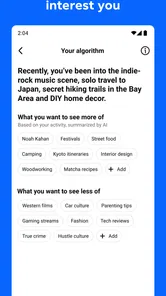
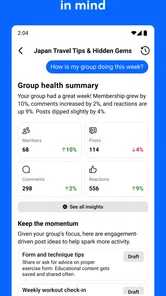
Analysis by Reviewed
Forum is a social app from Meta Platforms, Inc. built around a simple idea: give groups their own dedicated space instead of making every conversation compete with the rest of Facebook. I approached it as a first-time user would, looking for the quickest way to understand what belongs there, how to join a useful discussion, and whether it feels different enough from the usual Facebook experience to justify another app on my phone.
My first impression is that Forum makes the most sense when you already have a group, community, club, class, or shared interest that needs a focused place to talk. It is not trying to replace every social activity. Its value comes from reducing the noise around a particular conversation. If your online life is built around several active communities, that focus can feel refreshing. If you mainly want a broad feed of friends, pages, and entertainment, the narrower purpose may seem unnecessary.
Getting from installation to a useful conversation
I’d use the first session to make one group discussion useful rather than trying to explore every corner at once. Start by finding a current topic, then check whether its replies keep the question and answers together; that gives you a practical feel for the space before you post. From there, the next step is deciding what information belongs in a shared conversation and what is better kept private.
What to expect before you begin
The app is listed in the Social category, with a store summary describing a dedicated space for groups and a short description that simply calls it a forum. That wording is important because it sets a better expectation than treating Forum as another general-purpose social network. I would think of it as a room for organized discussion, not as a replacement for every part of Facebook.
Forum is free, carries a Teen content rating, and has reached over one hundred thousand installs. Its average sits at 4.7 from around one thousand ratings, with a little over two hundred written reviews. Those figures suggest that the app has found an audience, but they do not change the practical question I would ask before installing: do I belong to a group that would genuinely benefit from a more concentrated conversation?
The app was released on May 20, 2026, and the current version is 22.0.0.2.108. It requires Android 10 or later, so I would check the operating system before planning to use it on an older phone. That requirement is easy to overlook when an app appears lightweight, but compatibility is part of the first-time experience. On a supported device, the sensible approach is to install it, sign in through the available Facebook connection, and immediately look for the group or community that matters most to you.
I would not begin by browsing aimlessly. A focused first visit works better: choose one group, identify one current discussion, and decide what you want to accomplish. That could be asking a practical question, finding an announcement, or responding to someone who needs help. Forum becomes easier to judge when you use it for a real task rather than treating the opening screen as something to explore indefinitely.
More From Our News Desk

 Instagram
Instagram’s Power Comes From Its Place in Your Phone
A close look at how Instagram turns Meta’s reach, recommendation systems and everyday camera habits into durable platform power—and what that costs users.

 Gmail
GmailGmail in a Busy Inbox: Who Benefits Most?
From first account to crowded workday, Gmail earns its place through dependable search and flexible sorting—but its best fit depends on how much inbox maintenance you can tolerate.

 Prime Video
Switching to Prime Video: What Changes in Your Viewing Routine
Prime Video can make a compelling second home for streaming, but switching means learning a different catalog, rental layer, and route from browsing to playback.

 Universal TV Remote Control
Universal TV Remote Control Works Best as a Reliable Backup
A phone remote earns its place through quick setup and reliable habits. Here is how to get more from Universal TV Remote Control—and where its limits show.

 Weather - By Xiaomi
Weather by Xiaomi Review: Clear at a Glance, Less Clear Up Close
Xiaomi’s weather app makes everyday forecasts quick to scan, but its calm surface can leave useful details and recovery paths harder to find than they should be.

 X
XX Under Pressure: Can It Recover When Posting Goes Wrong?
A resilience-focused review of X, examining setup, mistaken posts, interruptions, weak connections, and the gaps that matter when recovery needs to be dependable.
Latest News



Setting up a useful starting point
My advice for setup is to keep the first session deliberately small. Start with the community you already understand, rather than joining several unrelated spaces at once. This gives you a clear reference point for judging whether the layout helps. If you immediately add too many groups, the app can become another stream to manage, and it becomes harder to tell whether the problem is the design or simply too much activity.
For a neighborhood group, I would first look for current notices and recurring questions. For a hobby community, I would scan for conversations where members are sharing advice rather than only posting updates. For a study or work-related group, I would identify the discussions that contain decisions, deadlines, or useful explanations. This approach turns setup into a small information-management exercise: find the place where a focused discussion can save you time.
One useful habit is to separate reading from participation. On the first pass, I would observe how members phrase questions, whether conversations stay on topic, and which posts receive helpful replies. On the second pass, I would contribute. This prevents the common first-time mistake of posting too quickly without understanding the group’s rhythm. The dedicated setting is most useful when you respect the context already established by the people using it.
I also recommend deciding what “success” means before you start. If you need an answer, success is not collecting reactions; it is finding a reliable response. If you are organizing a shared activity, success may be getting everyone to see the same update. If you are learning, success may be locating a thread you can return to later. This small distinction helps you judge Forum by usefulness rather than by the amount of activity on screen.
Your first meaningful action
The clearest first action is to open one active discussion and add a reply that moves it forward. I would avoid a vague “Does anyone know?” message and include the detail another member would need to answer. For example, instead of asking for general advice about a device, mention the model, the problem, and what you have already tried. In a local group, include the relevant date or area. In a hobby group, explain your experience level. Specific posts create better conversations and reveal the app’s real value quickly.
After posting, I would return to the discussion later rather than assuming the first response is the final answer. A forum-style space is often more useful as a developing record than as an instant chat. Different members can add corrections, alternatives, and context. That makes it better suited to questions that benefit from several viewpoints than to urgent matters where you need an immediate reply.
A second strong first action is to find an existing thread and add a concise clarification instead of starting a new one. This keeps related information together and makes the group easier for the next person to search or browse. It is a small workflow choice, but it can make a noticeable difference in communities that repeatedly discuss the same subjects. I found that the app’s dedicated purpose is most convincing when it helps a group build continuity rather than scatter answers across disconnected posts.
For someone managing a community, the first meaningful test is different. I would publish one clearly labeled update, then watch how members respond to it. Keep the message limited to one subject, place the key information near the beginning, and use replies for follow-up questions. This creates a natural separation between the main announcement and the discussion beneath it. It also makes it easier to notice whether the group needs a separate conversation for a different issue.
Where new users can become confused
The biggest possible confusion is assuming that a dedicated group space automatically means every conversation will be organized. It will not. Organization still depends on how members write posts, respond to older discussions, and keep different topics apart. Forum can provide a more focused environment, but it cannot replace good group habits. If a community posts every subject in one running stream, finding information may remain difficult even inside a specialized app.
Another point to understand is the difference between a forum-like discussion and private messaging. I would use Forum when the answer could help several members or when a topic deserves a visible record. I would choose a private conversation for personal details, sensitive arrangements, or anything that does not belong in a shared group. Mixing those purposes creates unnecessary exposure and makes the group harder to follow.
There is also a difference between a discussion space and a live chat. Forum is a better fit when people may respond at different times and when the conversation benefits from being revisited. It is less convincing for fast coordination where everyone needs to react at once. If your group is trying to handle an immediate change of plans, a real-time messaging option may be more efficient. If the group is collecting advice, explanations, or decisions that should remain visible, Forum has the stronger case.
Notifications and activity can create another kind of friction. A focused group may still produce more updates than you want, especially when several members are active. I would avoid joining every discussion simply because it appears in front of me. Follow the threads that connect to your goal, and leave the rest alone when they add noise. The app works best when you treat it as a tool for choosing relevant conversations, not as a demand to read everything.
New users may also wonder whether an app from Meta will feel exactly like the main Facebook experience. The connection to Facebook is part of its identity, but the purpose is narrower. The comparison is useful: Facebook’s broader environment is better when you want a mixture of friends, public pages, media, and group activity. Forum is more appealing when the group itself is the destination. The choice is less about which app is universally better and more about whether you want a general feed or a dedicated discussion space.
Practical scenarios where it earns its place
Imagine a residents’ group preparing for a building maintenance visit. In a general social feed, updates can be mixed with unrelated posts, and a useful answer may be difficult to find later. In Forum, I would create or use one focused discussion for the schedule, let residents ask questions below it, and keep corrections in the same place. The benefit is not dramatic technology; it is the simple reduction of scattered information.
For a hobby community, I would use it to compare approaches to a project. One member can describe the problem, others can suggest solutions, and later readers can learn from the exchange. This is where a forum format has an advantage over a short-lived chat: the reasoning matters as much as the final recommendation. The trade-off is that a good result depends on members explaining themselves clearly instead of dropping one-line opinions.
A parent or student group could use the same structure for recurring questions, but I would be careful with personal information. Shared spaces are suitable for general schedules, resources, and broad advice. They are not the right place for private family details or identifying information about children. The Teen rating is a reminder that the app is intended for a broad social audience, not that every conversation is automatically appropriate for every situation.
For a volunteer team, Forum could help keep an ongoing topic visible between meetings. I would separate planning, updates, and questions into distinct discussions rather than putting everything under one post. That gives members a better chance of finding the information they need without reading an entire history. The non-obvious advantage here is continuity: a well-maintained thread can become a lightweight reference point for people who join the conversation later.
Small workflows that improve the experience
My first practical tip is to write the conclusion or request near the top of a post. Members often scan before deciding whether to open a discussion, so a clear opening improves the chance of receiving a relevant answer. Put background information afterward. This is especially helpful in busy groups where several topics compete for attention.
My second tip is to use replies as a record of reasoning, not just as a reaction button. If someone offers a solution, explain whether it worked or what changed. That follow-up helps future readers distinguish a suggestion from a tested answer. It also prevents the same question from returning every few days. Forum’s value grows when members close the loop.
My third tip is to create a personal routine for revisiting useful discussions. I would save the names or subjects of threads that contain guidance, then return when the issue comes up again instead of starting from zero. Even without treating the app as a formal knowledge base, this habit turns group conversation into something more durable. The trade-off is that it requires discipline from the user; the app cannot decide which information will remain useful to you.
A fourth insight concerns moderation and tone. In a focused space, a disagreement can dominate the entire group more easily than it would in a broad feed. I would respond to the subject, not the person, and move sensitive disagreements away from public discussion when appropriate. Clear titles, calm replies, and separate threads are not cosmetic choices here; they determine whether the space feels like a useful forum or an exhausting argument.
Who should use it and who should skip it
I would recommend Forum to people who already participate in one or more groups and feel that important discussions are being buried. It is particularly suitable for communities where members ask repeat questions, share practical knowledge, coordinate activities, or need a conversation to remain visible over time. It also makes sense for someone who wants a more intentional group experience than endlessly scrolling through a mixed social feed.
I would be less enthusiastic for someone who rarely joins groups or only wants quick personal messages. The app’s focused structure will not add much if your main contacts are individual friends and your conversations are private. I would also skip it as a primary tool for urgent coordination, highly sensitive topics, or communities that refuse to keep discussions organized. In those cases, private messaging, a real-time chat service, or a more formal collaboration tool may be a better match.
It is worth remembering that Forum is free, but free access does not remove the cost of attention. Every additional social space can create another place to check. Before installing, I would identify the specific group problem you want to solve. If you cannot name one, the app may simply divide your routine rather than improve it.
My final take after using it as a newcomer
Forum is easiest to appreciate when you stop expecting a complete social network and use it as a focused home for group discussion. The path to a good first experience is straightforward: choose one relevant community, observe its existing conversations, reply to a specific thread, and return to close the loop. That process shows its strengths more clearly than casual browsing does.
Meta Platforms, Inc. has positioned the app around groups rather than around a broad collection of social features, and that narrow purpose is both its appeal and its limitation. I like the idea of giving useful discussions room to develop, especially for communities that need continuity. I am less convinced when the need is instant messaging, private communication, or a general-purpose feed.
My recommendation is therefore conditional but positive. If you have a group that regularly loses useful information in a busy Facebook environment, Forum is worth trying as a dedicated discussion space. Keep your first setup focused, write posts that make their purpose obvious, and treat replies as part of a shared record. If your social life does not revolve around groups, the app may feel like an extra destination rather than a meaningful improvement.
Forum is at its best when the group conversation itself is the product. Used that way, it offers a calmer and more deliberate alternative to a mixed social feed, while still demanding the same thing from its members: clear posts, sensible boundaries, and a willingness to keep the discussion useful.
Forum, a Facebook app Frequently Asked Questions
What devices and operating systems can run Forum?
Forum is a social app for mobile devices, and its current version is 22.0.0.2.108. It requires Android 10 or later, so check your device’s software version before downloading. If your phone or tablet meets that requirement, you can install the app and explore its dedicated space for groups. Keeping your operating system and app updated can also help with compatibility.
Who makes Forum, and is it intended for younger users?
Forum is developed by Meta Platforms, Inc. and is intended for a teen audience. As with any social app, it is worth thinking about how group discussions, comments, and shared posts fit your needs before installing it. Users should be thoughtful about the information they share and make use of available privacy and safety controls when participating in conversations.
What is Forum, the Facebook app, and what can I use it for?
Forum is a Facebook-connected social discussion app designed to help users discover conversations, share opinions, ask questions, and interact with communities around common interests. Depending on the available features and your account settings, you may be able to browse topics, publish posts, comment, react to content, and follow discussions. It is best suited to people who enjoy organized group conversations rather than only one-to-one messaging.
Do I need a Facebook account to use Forum?
Forum is designed to work with Facebook, so a Facebook account may be required for registration, login, or access to certain social features. During setup, the app can request permission to use basic profile information and connect your Facebook identity with your Forum account. Before accepting, review the permissions carefully and check whether you can limit access or remove the connection later through Facebook’s account settings.
Is Forum free to download and use?
Forum is free to download. Before installing, check the current app-store page for the terms and features available on your device, since app details can vary by platform or region. The main appeal is a dedicated space for groups and social discussions, so consider whether that experience suits what you want from a Facebook-connected app before adding it to your device.
Pros
- Easy access to Facebook communities and group discussions in one place.
- Supports sharing posts
- photos
- videos
- links
- and event updates.
- Notifications help users stay informed about new replies and activity.
- Useful search tools make it easier to find relevant conversations.
- Available on both Android and iOS devices.
Cons
- Frequent notifications can become distracting without careful settings.
- Content quality varies widely between communities and discussion threads.
- Privacy depends heavily on each group’s rules and Facebook settings.
- Some features may require a stable internet connection to work properly.
- Advertising and suggested content can make discussions harder to follow.













