

Flat Earth Sun & Moon Clock
- 1.82K
- 4.4
- Installs
- 50.00K
- Price
- $2.99
Screenshots
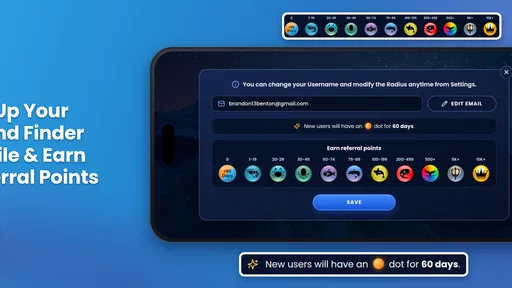
Analysis by Reviewed
I’d treat the Flat Earth Sun & Moon Clock as a visual model to explore, not as a replacement for a conventional clock or astronomy reference. Its central appeal is seeing the sun and moon placed around a flat-earth diagram, which gives curious users something concrete to examine. That makes it an unusual education app, though its specific perspective is also its biggest limitation: it is not the right tool if you need a scientifically grounded account of how daylight and the sky work.
Who will get the most from it
I can see this being useful for someone comparing different world models, preparing a discussion, or simply wanting an interactive visual prompt rather than another page of text. It can also give a teacher or parent a starting point for asking questions: what does the diagram claim, what observations would support it, and how does it compare with other explanations? I’d make that distinction explicit, especially with younger users. The content rating is Everyone, but an all-ages rating does not make the model a substitute for balanced science materials.
It suits curious adults as well as families who are comfortable treating the display as a claim to examine. I would not hand it to a child as a stand-alone astronomy lesson. A useful approach is to ask the child to describe what the moving sun and moon appear to do, then compare that description with a globe-based explanation and observations from outside. The app can prompt a good question, but the discussion and comparison are what make the activity educational.
For everyday planning, I’d be more cautious. A sunrise or sunset countdown may look practical, but the app frames those events through its own model. If I were deciding when to leave for a walk, checking a familiar local weather or astronomy resource would be the safer choice. The clock is more compelling as an object to inspect than as a source to rely on for real-world decisions.
How I’d use the time controls
The ability to move time forward is more useful as a comparison exercise than as a simple prediction button. I’d pick a date or time, note where the sun and moon appear on the display, then return later and compare the model’s picture with what I can observe. That turns a quick glance into a small investigation. It also helps expose a trade-off: an animated or projected path can feel convincing on screen, but visual clarity alone does not establish that the explanation is accurate.
A practical tip is to write down the exact time and what the diagram seems to predict before looking up another explanation. That keeps the comparison honest: instead of remembering the app’s picture loosely, I can check the same moment against a conventional astronomy resource. For a classroom discussion, each student could describe the representation first, then identify which parts are observations and which are assumptions built into the model. The distinction is more useful than simply deciding whether the animation looks plausible.
A realistic use might be a cloudy afternoon when I’m indoors and curious about how the app represents the changing day-night pattern. I could advance the clock, watch the displayed positions shift, and use that as a prompt to look up how standard astronomy explains the same pattern. I wouldn’t treat the app’s output as an observation of the sky itself; it is a representation inside a particular framework.
More From Our News Desk

 Gmail
GmailGmail in a Busy Inbox: Who Benefits Most?
From first account to crowded workday, Gmail earns its place through dependable search and flexible sorting—but its best fit depends on how much inbox maintenance you can tolerate.

 Prime Video
Switching to Prime Video: What Changes in Your Viewing Routine
Prime Video can make a compelling second home for streaming, but switching means learning a different catalog, rental layer, and route from browsing to playback.

 Universal TV Remote Control
Universal TV Remote Control Works Best as a Reliable Backup
A phone remote earns its place through quick setup and reliable habits. Here is how to get more from Universal TV Remote Control—and where its limits show.

 Weather - By Xiaomi
Weather by Xiaomi Review: Clear at a Glance, Less Clear Up Close
Xiaomi’s weather app makes everyday forecasts quick to scan, but its calm surface can leave useful details and recovery paths harder to find than they should be.

 X
XX Under Pressure: Can It Recover When Posting Goes Wrong?
A resilience-focused review of X, examining setup, mistaken posts, interruptions, weak connections, and the gaps that matter when recovery needs to be dependable.

 Clash of Clans
Clash of Clans Is Won Between the Battles
Its raids are quick; its community is a long-term project of coordination, teaching, rivalry, and shared responsibility—with all the friction that entails.
Latest News



A Unique Perspective on Time
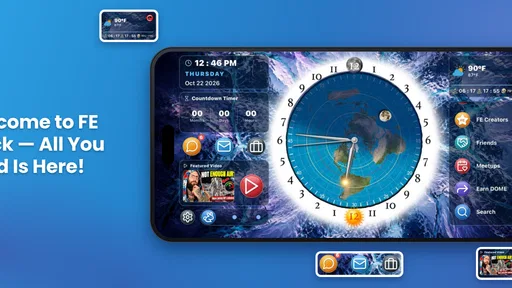
So, what exactly does the Flat Earth Sun & Moon Clock offer? At its core, the app serves as a clock, but not just any clock. It visually represents the position of the sun and the moon over a flat earth. Imagine a traditional clock face, but instead of numbers, you have geographical markers. This app shows you where the sun and moon are in real-time, which is kind of cool if you're into that sort of thing.
Features That Stand Out
Let's talk about some of the features that really make this app pop. For one, it provides a day-night cycle representation which is visually appealing and educational. You can actually see where daylight and nightfall occur across the flat earth model. It's like having a mini-world atlas on your phone. Also, the app offers a unique countdown timer for sunrise and sunset, which is a neat feature for planning your day around the flat earth sun.
I find the map-like layout more suited to tracing a broad pattern than checking a precise local condition. It gives the eye a single picture to follow: where daylight is shown, where darkness appears, and how the displayed lights move. That can make it easier to talk through the model than a written explanation alone. But it also means the display’s simplicity is a trade-off. It does not make the underlying assumptions disappear, and I would not confuse a clear visual with a measured account of the sky.
If I were using the countdown as a prompt for a casual observation, I’d note the place and time I care about, then check an independent local source before making plans. That is a small extra step, but it prevents the app’s distinctive framing from becoming the only reference. For a pure curiosity session, there is no need to turn every glance into a test; for a decision involving travel, outdoor work, or photography, independent verification matters much more.
Another interesting feature is the ability to fast forward time. This means you can see the movement of the sun and moon over days, weeks, or even months. It's a fun way to predict where the sun or moon will be in the future, according to the flat earth model.
Ease of Use and Accessibility
Now, let's chat about usability. The interface is quite user-friendly, even for those who might not be tech-savvy. The graphics are vibrant and clear, making it easy to see the visual representation of the earth, sun, and moon. Moreover, the app doesn't bombard you with ads, which is a huge relief in an age where intrusive ads seem to be the norm.
The simple visual approach is likely to appeal to someone who wants to inspect the model without first learning a complicated set of controls. At the same time, I would not choose it as my everyday timekeeping tool: a conventional clock is quicker when I only need the time, and a standard world clock is a better fit when I need to compare time zones. This app earns its place when the flat-earth diagram is the subject, rather than when I need a general-purpose utility.
In terms of accessibility, the app is available on both Android and iOS, which is great because everyone deserves a chance to explore these intriguing theories, right?
What to expect from its current state
Blue Water Bay’s education app has been available since December 27, 2018, and its current version is 5.11.95. That continuing version history gives existing users a reason to check which build they have before troubleshooting or comparing notes with someone else. The app has a 4.3 average from around 4,900 ratings, with about 1,800 written reviews and over 50,000 installs. Those figures suggest an established niche audience, not a guarantee that its model or predictions will suit every user.
The current version number is useful context, but I would not read it as proof of any particular new feature or scientific improvement. For an existing user, the practical question is whether the installed build behaves as expected on their device and whether the display still serves the purpose they downloaded it for. If a friend sees a different screen or describes a different result, checking that both people are using the same version is a sensible first step before drawing conclusions from the comparison.
The price is $2.99, and in-app purchases range from $0.99 to $10.99 per item. I’d check the purchase screen carefully before buying anything extra, particularly if I only want to explore the clock’s core display. It requires OS version 9 or later, so an older device may be the first practical hurdle. For someone choosing between this and a standard world clock, the deciding question is whether the flat-earth presentation itself is the point; ordinary clock apps are simpler for checking local time, while this one is built around a distinctive visual interpretation.
That pricing makes the decision less about replacing a free clock and more about whether this particular model is worth exploring to you. If you only want sunrise reminders or a quick glance at the time, the usual clock and weather tools are more direct choices. If you expect to use the diagram repeatedly for discussion or personal curiosity, the purchase may make more sense. I would still avoid assuming that optional purchases are necessary for the basic experience; I’d inspect what is offered and decide based on the functions I actually want.
Where I’d draw the line
There are a few things I would keep in mind before relying on it. A map-like display can make relative positions easy to grasp, but it can also hide the assumptions that shape the picture. If you want to learn astronomy, check seasonal daylight, or make plans based on accurate local sunrise and sunset times, use a conventional astronomy or weather source alongside it. If you want to inspect how this particular model depicts the sky, the clock has a clearer purpose.
The same limit applies when comparing it with other education resources. A textbook, planetarium-style reference, or astronomy app is better when the aim is to learn the accepted physical explanation and connect it with observation. A general map or world clock is better for straightforward geography and time-zone questions. This clock occupies a narrower lane: it lets me see one model presented visually. That focus is valuable for comparison, but it is also why I would not recommend it as someone’s only reference.
I’d also separate the app’s presentation from evidence. The time controls can help you explore what the model predicts, but they do not independently verify those predictions. That distinction is useful when discussing the app with children or sharing it in a classroom: invite questions and compare explanations rather than presenting a single diagram as settled fact. This makes the app more valuable as a conversation starter, while keeping its limits visible.
One reasonable routine is to use the app for the model’s picture, then switch to a trusted astronomy source for any factual question that affects a lesson or a plan. If the two accounts differ, treat that as the subject of inquiry rather than trying to make the first display answer everything. That approach preserves the app’s usefulness as a visual prompt without giving it authority it does not earn simply by being interactive.
What to watch as you use it
For newcomers, I would start by deciding what question the app is meant to help explore. “How does this diagram portray the movement of the sun?” is a good fit. “What time should I expect daylight at my location?” calls for an independent source. Keeping those questions separate prevents disappointment and makes the app easier to judge on its own terms.
Existing users may also want to notice whether they are using the clock as a learning prompt or gradually treating it as a dependable planner. That shift can happen because a countdown looks precise, even when the larger model is contested. I would keep a second reference handy whenever exact local timing matters, and I would be especially careful before using the display to guide travel, outdoor work, or a scheduled activity.
As the app continues to have a current version, I would watch for clearly described changes that affect the display, controls, compatibility, or purchase options rather than assuming a higher version number means the model has changed. For anyone considering a download, the most useful test is simple: does a visual presentation of this particular perspective match your reason for installing it? If not, a conventional astronomy reference or basic clock will be less distracting and more appropriate.
Final Thoughts
In conclusion, the Flat Earth Sun & Moon Clock app is a quirky and fascinating tool for anyone interested in the flat earth theory. It combines a stunning visual display with practical features, making it more than just a novelty item. Whether you're a flat earth enthusiast or simply curious, this app provides a unique perspective on time and geography. So, why not give it a spin? You might just find a new way to look at the world—or at least your clock.
Flat Earth Sun & Moon Clock Frequently Asked Questions
Who develops Flat Earth Sun & Moon Clock, and what does it cost to download?
Flat Earth Sun & Moon Clock is an Education app developed by Blue Water Bay. It costs $2.99, with in-app purchases also available for additional items. The app is rated for Everyone, so its stated age classification is suitable for a broad audience. Consider the purchase price and any optional in-app spending when deciding whether it fits your needs.
Which devices can run Flat Earth Sun & Moon Clock, and what is its current version?
The current version is 5.11.95, and the app requires operating system version 9 or later. Before downloading, check that your Android or iOS device meets that minimum requirement and has enough available space for the installation. Keeping your device’s software compatible can help you use the app as intended and avoid problems during installation or while opening it.
What is the main purpose of the Flat Earth Sun & Moon Clock app?
The Flat Earth Sun & Moon Clock app is designed to provide users with a unique perspective on how the sun and moon move across a flat earth model. It aims to offer an alternative view of our planet, challenging the conventional spherical earth theory through visual representation and educational content.
How does the app visually represent the flat earth model?
The app uses an animated clock face to depict the movement of the sun and moon around a flat earth map. This visual representation allows users to explore the flat earth theory by observing how daylight, moon phases, and time zones are illustrated in this model, providing a different understanding of our world's geography.
What educational content does the Flat Earth Sun & Moon Clock app offer?
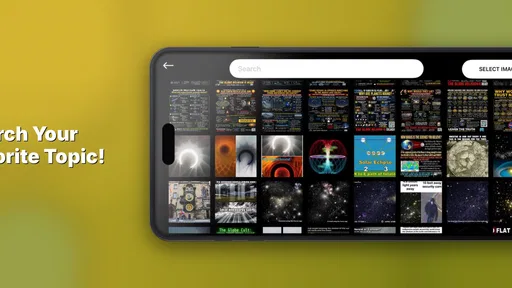
Beyond visual animations, the app includes a variety of resources aimed at educating users about flat earth theories. This includes articles, videos, and podcasts featuring experts and proponents of flat earth beliefs. The app encourages users to explore and examine these ideas critically, fostering a deeper understanding of the flat earth perspective.
Pros
- Intuitive user interface design.
- Provides daily local weather updates.
- Customizable clock themes.
- Offline functionality available.
- Accurate sunrise and sunset times.
Cons
- Limited educational content.
- Paid features restrict usage.
- Outdated graphics design.
- Ads can be disruptive.
- Not available on all devices.











