Flash Clean: Storage & Memory
- 36.00
- 4.5
- Installs
- 100.00K
- Price
- Free

Screenshots


Analysis by Reviewed
When phone storage starts filling up, the problem is rarely one dramatic file. It is usually a mixture of temporary leftovers, forgotten downloads, and small pieces of clutter that are difficult to find manually. Flash Clean: Storage & Memory takes a very focused approach to that problem: it is a free Android tools app built around clearing unwanted files and making room with a single cleanup action. After trying it, I found its appeal less about advanced customization and more about reducing the effort between noticing a full phone and doing something about it.
The app is developed by FRODO VENTURES LIMITED and is aimed at a broad audience, with an Everyone content rating. Its current version is 1.0.1, and it supports Android 8.0 or later. That makes it relevant for people using both older and newer Android phones, especially those who do not want to spend time digging through several system menus to understand why available space keeps shrinking.
One-tap cleanup is the whole point
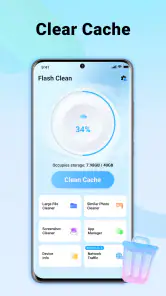
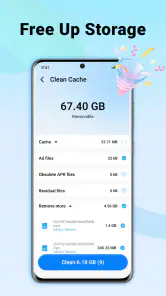
The central capability is simple but useful: Flash Clean scans for junk and lets me start the cleanup from one place. That matters because Android’s built-in storage tools can be perfectly adequate, yet they often require me to move through settings, open separate categories, and decide what is safe to remove. A dedicated cleaner changes the experience from investigation to a quick maintenance routine.
The strongest part of Flash Clean is the short path from low storage to a cleaner phone. I do not need to remember where Android places temporary files or repeatedly inspect folders that I rarely open. For someone who wants a quick first step, this is more approachable than a file manager full of unfamiliar directories.
There is also a practical distinction between freeing space and managing personal files. A cleanup tool is most useful when I want to deal with disposable clutter, not when I am trying to reorganize photographs, move videos to another device, or decide which large applications deserve to stay. Flash Clean fits the first task. It should be viewed as a maintenance shortcut rather than a complete replacement for Android’s storage settings.
The app’s store short description is “Flash Clean,” while its longer positioning makes the purpose clearer: clear junk files and free storage quickly. I think that narrow identity works in its favor. Many utility apps try to combine cleaning, battery management, security scanning, file browsing, and device optimization into one crowded package. This app is easier to understand because its main promise is tied to storage cleanup.
What the one-tap approach changes
In everyday use, the benefit is not necessarily that a cleaner discovers magical amounts of space. The benefit is that it lowers the friction of doing routine housekeeping. If I postpone manual cleanup because it feels tedious, a focused app can make the task more likely to happen before the phone becomes inconvenient to use.
That is particularly helpful on phones with modest internal storage. When there is little spare room, downloading an offline map, installing an update, or recording a longer video can become unexpectedly difficult. A quick cleanup can create breathing room at the right moment, even if it does not solve the underlying habit of keeping too many large files.
I would not treat the button as permission to remove everything without looking. The sensible workflow is to review what the scan identifies, pay attention to anything recognizable, and then approve the cleanup. Junk is a useful label, but personal downloads and media can be more important than they first appear. The app is most effective when it shortens the process without replacing judgment entirely.
How it fits into a normal Android routine
A realistic example is a phone used throughout a busy week for messaging, photos, short videos, and work attachments. By Friday, the device may feel slower to manage simply because storage is crowded, and an attempt to save a new file may trigger a warning. Instead of opening several settings screens, I can use Flash Clean as a first response, remove the clutter it presents, and then return to the task that was blocked.
Another useful routine is a cleanup before travel. I might want enough free space for photographs, downloaded entertainment, or navigation data. Running the tool before leaving is more practical than waiting until the phone refuses a download. The important insight is that the app works best as preventive maintenance: a short check before a storage-heavy activity is less stressful than emergency deletion after the phone is already full.
For families sharing advice with less technical Android users, the focused design may also be easier to explain than a file-management system. “Open the cleaner, inspect the suggested clutter, and confirm what you are comfortable removing” is a manageable routine. That simplicity is valuable, although I would still encourage new users to learn where their important photos and documents are stored.
One less obvious use is troubleshooting a failed download or update. If an installation repeatedly stops because there is not enough space, a cleanup pass can be a sensible first move before uninstalling an application that is still needed. It will not fix every installation problem, but it can separate a storage shortage from other causes without forcing a major change to the phone.
What I would check before confirming a cleanup
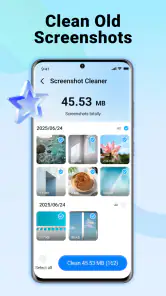
I pay special attention to files created by apps I still use. Temporary material is often safe to remove, but an item that looks unimportant may be an offline resource, a draft, or a downloaded attachment that I planned to keep. A cleaner is convenient precisely because it groups potential clutter, and grouping is also why a quick glance matters.
I also avoid using a cleanup tool as a substitute for backups. If a photograph, document, or recording matters, I make sure it exists somewhere I trust before deleting anything associated with it. Flash Clean is designed for freeing space, not for preserving memories or organizing a personal archive. That distinction is important for anyone who tends to tap through maintenance prompts quickly.
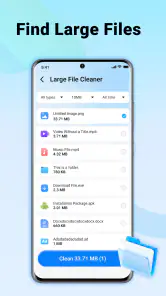
After cleaning, I would look at the phone’s storage again rather than assuming every problem has disappeared. If the space remains tight, the real cause may be a large video folder, an oversized game, offline music, or a messaging app that has accumulated media. This is where Android’s own storage view or a full file manager can be better than a one-tap utility, because those tools help identify the largest individual items.
The trade-off between speed and control
Flash Clean’s focused experience has a clear trade-off. The less time I spend navigating categories, the less detailed control I may have over every file. People who want a complete visual map of storage, folder-by-folder selection, duplicate detection, or a long-term archiving workflow may find a dedicated file manager more suitable.
That does not make the app weak; it defines its proper role. I see it as the quick-clean option for the moment when I want to remove likely clutter without becoming a storage administrator. If I am preparing to delete a large collection of videos or migrate data to a new phone, I would choose a more deliberate tool. If I simply need a convenient maintenance pass, the focused approach is more comfortable.
There is another trade-off in relying on any automated cleanup suggestion: convenience can encourage careless habits. I would not run it immediately before an important trip or work deadline without reviewing the results. A few extra seconds of attention are worth it when the alternative is losing a file that was only temporarily out of sight.
The app also should not be judged by the expectation that cleaning automatically transforms every aspect of performance. Freeing storage can make a phone easier to use when it was genuinely cramped, but it does not upgrade old hardware, repair a failing battery, or guarantee that every application will open faster. Its verified capability is storage cleanup, and that is the result I would use to evaluate it.
How it compares with Android’s built-in tools
Android already offers storage controls, and those controls remain the better choice when I want maximum visibility into what occupies the device. They are integrated into the operating system and are useful for examining large applications, media, and downloads individually. Flash Clean’s advantage is convenience: it gives the cleanup task a more direct starting point for people who do not want to search through settings.
A file manager is better when I need to move, rename, copy, or preserve files. It gives me a clearer sense of ownership and location, which is valuable before a major deletion. Flash Clean is better suited to a quick pass over disposable clutter. The choice depends on whether my priority is speed or detailed control.
I would also be cautious about comparing it with broad “phone booster” applications. A storage cleaner can address one concrete problem, while claims about overall acceleration can be much harder to evaluate. Flash Clean is easier to understand because its purpose is narrower. For me, that makes it preferable to an app that presents a long list of unrelated optimization promises.
Who gets the most value from it
The best audience is someone who regularly runs out of room but does not want to learn the entire Android file system. It is also a good fit for people who prefer a small, repeatable maintenance habit: scan, review, clean, and continue using the phone. The fact that it is free removes the need to make a financial commitment before trying that routine.
Its availability for Android 8.0 and later makes it relevant to users who are not carrying the newest handset. That matters because older devices often have less comfortable storage margins, and their owners may be more interested in a straightforward utility than a complicated dashboard. The app has reached over one hundred thousand installs and holds a 4.5 average from more than five hundred ratings, which suggests that its simple purpose is resonating with a meaningful group of Android users.
I would skip it if my main need is photo backup, detailed file organization, duplicate-image review, application auditing, or a precise explanation of every byte on the phone. In those situations, Android’s storage settings, a capable file manager, or a dedicated backup service will offer more appropriate control. I would also skip any cleanup process if I am unwilling to inspect suggested items before confirming deletion.
For someone who wants a single tool to solve every device-maintenance problem, this is not the right expectation. Its strength comes from staying close to one task. That focus is helpful for a quick storage reset, but it means I would pair it with the phone’s own tools rather than treating it as the only utility installed.
My recommendation after using it
Flash Clean: Storage & Memory is a sensible choice for Android users who want a less intimidating way to deal with junk files. I like that its value is immediately understandable and that the one-tap idea addresses a real everyday annoyance: storage cleanup is important, but most people do not want to spend a long time doing it.
My recommendation is to use it as a convenient first pass, not as an automatic deletion button. Review the suggested clutter, protect anything personal, and use Android’s deeper storage controls when the phone still feels full afterward. With that approach, the app’s simplicity becomes a strength rather than a risk.
At no cost and with an Everyone rating, it is easy to try for users on compatible Android phones. The developer, FRODO VENTURES LIMITED, has kept the product’s purpose clear in its current 1.0.1 release. If your actual problem is forgotten junk rather than poor file organization, Flash Clean is a practical shortcut worth keeping available.
Pros
- Quickly identifies large
- duplicate
- and unnecessary files.
- Simple interface makes storage cleanup easy for most users.
- Useful battery and memory tools provide extra device insights.
- Helps organize cluttered photos
- videos
- and downloaded files.
- Can free space without requiring advanced technical knowledge.
Cons
- Some cleanup recommendations may require manual review before deletion.
- Aggressive cleaning can remove files you intended to keep.
- Extra features or a no-ads experience may require payment.
- Performance depends on device storage size and Android version.
- Frequent notifications may feel intrusive during everyday use.

- Category
- Tools
- Version
- 1.0.1











