FL STUDIO MOBILE
- 6.41K
- 4.0
- Installs
- 1.00M
- Price
- $14.99

Screenshots
Analysis by Reviewed
I reach for FL Studio Mobile when a musical idea arrives at an inconvenient moment: a bass line while I’m out, or a rhythm I want to test before I forget it. It gives me a way to turn that spark into an editable project on a phone or tablet, rather than settling for a quick voice memo. It’s a paid music-making app from Image-Line, and its appeal is clearest when you want to compose and shape sounds yourself, not simply listen to music.
What the purchase means
The app costs $14.99, with optional in-app purchases ranging from $0.99 to $13.99 per item. That makes it different from trying a free audio app first: you’re paying upfront for a mobile production workspace, while add-ons can bring extra costs. I’d decide whether the core workflow suits you before spending on extras. It’s rated for Everyone, and the current version is 4.9.0.
What you are paying to do
The purchase is easiest to judge by the work you expect to do. If you regularly think in patterns, chords, bass lines, or short musical phrases, paying for an app that keeps those pieces editable can make more sense than collecting recordings of half-remembered ideas. If you only need an occasional timer, player, or voice memo, that value is much harder to justify. I would treat the optional purchases as a separate decision, not as a reason to assume the core app will automatically suit every style of music-making.
There is also a useful distinction between access and commitment. A free app can be a comfortable place to experiment, but it may not offer the kind of hands-on arrangement and editing I want when an idea starts to take shape. Here, the upfront cost asks me to be intentional: I should have at least a few concrete reasons to make music on a phone, whether that means sketching on a commute or learning how parts fit together. The price is a poor bargain for someone who is merely curious about music software and unlikely to return after opening it once.
Making a track in small pockets of time
Have you ever found yourself humming a tune and wishing you could just capture it right then and there? Well, let me introduce you to FL Studio Mobile. As someone who's always on the go, this app has turned my phone into a mini music studio. It’s like carrying a pocket-sized orchestra wherever I go. Now, let me spill the beans on why this app is a must-have for any music enthusiast.
Unleashing Your Inner Mozart
First things first, FL Studio Mobile is all about unleashing your creativity. The app is packed with features that cater to both beginners and seasoned producers. From a wide range of instruments to high-quality synthesizers, it’s got everything you need to compose a masterpiece. And the best part? You don’t need to be a musical genius to get started. The user-friendly interface makes it easy to navigate, even if you’re just getting your feet wet in the world of music production.
Features That Hit the Right Note
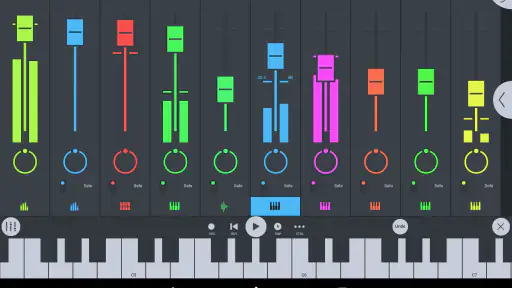
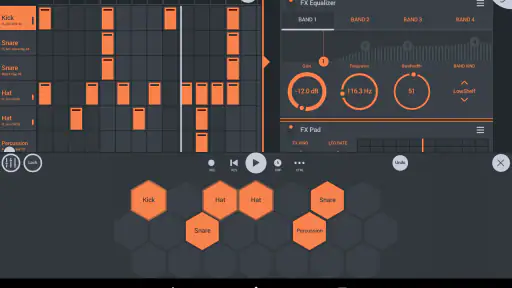
Let’s talk features, shall we? One of the things I love about this app is the mixer. It allows you to adjust the volume, panning, and effect busses with just a few taps. It’s like having a professional mixing console right at your fingertips. Plus, the real-time effects like reverb and delay add a whole new dimension to your tracks.
More From Our News Desk

Clash of Clans Is Won Between the Battles

Android Auto Makes the Case for Quieter Car Software

MobiOffice: Transforming Mobile Productivity with Seamless Integration

EA SPORTS FC™ Mobile Soccer: Redefining Mobile Sports Gaming

How Microsoft OneDrive Became a Mobile Productivity Giant

How Google Translate Breaks Language Barriers Effortlessly
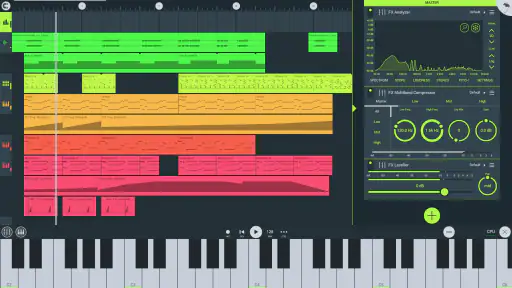
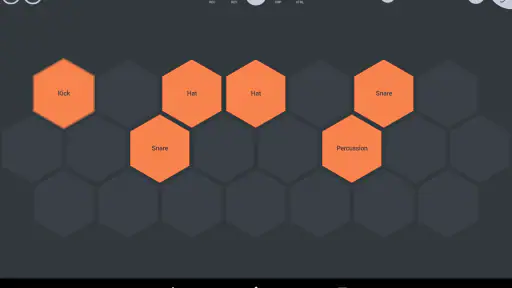
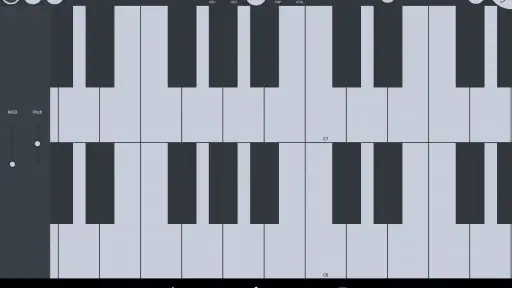
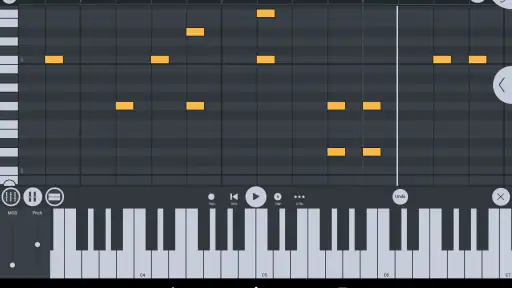
Then there’s the piano roll. Oh, the piano roll! It’s where the magic happens. You can compose, edit, and tweak your melodies with precision. And for those who love a good beat, the drum sequencer will have you creating catchy rhythms in no time.
Making touchscreen work for you
Small-screen production rewards a slightly different approach from working at a desk. I find it helps to zoom in on one task at a time: place notes in the piano roll, listen back, then make a few deliberate edits instead of trying to perfect every note in one pass. On a phone, tapping a note into place is convenient, but fine timing and tiny controls can take patience. A tablet gives more room for those gestures, though the basic advantage—being able to edit an idea away from a computer—remains the same.
One non-obvious benefit of keeping the first draft lean is that it makes later decisions easier. If the rhythm feels wrong, I can adjust the drum pattern without having to untangle a complicated arrangement. If the bass and melody compete, I can change their parts or levels before decorating the track with effects. I would save a version when the core loop starts to work, then experiment on a separate pass; that way, a risky change doesn’t erase the simple idea that made me want to open the app.
From quick idea to workable draft
A useful habit is to start with a simple loop rather than trying to arrange a complete song on a small screen. I’ll sketch a drum pattern, add a bass part, then use the piano roll to test a melody against it. Once the groove works, I can adjust levels and panning in the mixer and try reverb or delay sparingly. This order keeps the session focused; piling on effects before the basic parts fit can make a rough idea harder to judge.
That workflow is especially handy in short gaps during the day. For instance, I might build an eight-bar idea while waiting for a train, save it, and return later to refine the arrangement when I have more time. The app suits this kind of gradual drafting better than a phone recorder, because the notes and parts remain editable. The trade-off is that detailed edits can feel fiddly on a touchscreen, particularly if you’re used to a large monitor, keyboard shortcuts, or hardware controls.
A realistic day with a mobile session
Imagine I have ten minutes before meeting a friend and a rhythm stuck in my head. I can put down a basic drum groove, add a bass line, and try a melody in the piano roll. I don’t need to decide whether the sketch is a full song; the goal is simply to preserve the musical relationship between those parts. Later, at home, I can listen again, change notes that don’t sit well, and adjust the mix rather than trying to reconstruct the idea from memory.
This is where a sequencer-style tool earns its keep over a voice memo. A recording captures what I sang or tapped at that moment, but it can be awkward to change just the bass or move one note. Here, the parts are separate, so the draft can develop. The practical limit is that a phone session is not automatically faster for every task: if I already have a computer open and want to make detailed changes across a dense arrangement, switching to a small touchscreen may slow me down.
How it fits beside other music apps
Compared with a basic loop-making app, this is a more hands-on place to compose: the piano roll, drum sequencer, mixer, and effects let me work on separate musical parts instead of only assembling a preset loop. Compared with desktop production software, though, the phone interface is necessarily more compact. I’d use the mobile version to capture ideas, build a draft, or make a track when I’m away from my main setup; if my priority were long sessions with precise editing and a larger workspace, I’d rather work on a computer.
One practical tip is to keep early projects deliberately simple. A few well-chosen parts are easier to balance on a small screen than a crowded arrangement, and they leave room to hear whether the melody and rhythm actually work. Exporting as WAV or MP3 is useful when I want to share a finished sketch, while keeping the project editable makes more sense if I expect to revisit the mix or change notes later.
Where it fits in a creative routine
I see it as a companion to a larger music-making routine, not a magic replacement for every tool. A loop app can be quicker when I only want to arrange ready-made patterns, while a basic recorder is enough for preserving a sung melody without editing it. A computer-based studio is the better choice when I need a broad workspace for sustained, precise work. The mobile app sits between those options: it gives me more control than a memo and more room to shape parts than a simple loop sketch, while accepting the limits of phone-sized editing.
For a beginner, that middle ground can be useful because it encourages learning by doing. I can hear how changing a bass note affects a melody, or how a small adjustment to panning changes the balance, without first setting up a full desktop session. But there is a learning curve in deciding what to touch and in keeping a project organized. I would approach it as a music-making instrument that takes practice, rather than expecting every feature to feel obvious on the first day.
Collaborate and Share
Music is meant to be shared, and FL Studio Mobile makes it super easy to collaborate with friends or share your tracks with the world. You can export your projects in various formats, including WAV and MP3, making it a breeze to share your latest hit on social media or with fellow musicians.
Whether you’re commuting to work, chilling at home, or catching a flight, making music has never been this accessible. The app’s cloud sync feature ensures that your projects are always up to date across all devices. This is a game-changer for those who work on multiple devices.
Sharing without losing the working idea
When I want another person to hear a draft, an audio export is the straightforward route: WAV or MP3 lets them listen without needing to inspect my project. But a rendered track and an editable project serve different purposes. I would keep the working version if I expect to change the melody, balance, or arrangement after getting feedback; sending audio is better when the other person only needs to react to the sound. That distinction saves a common frustration: a shareable file is not the same thing as a session someone else can continue editing.
Cloud syncing can also suit a routine that moves between devices, but I would still make a habit of saving and checking that the project I want is the one I reopen. Sync is most useful when I have a clear handoff in mind—for example, sketching on a phone and continuing elsewhere—not as a substitute for keeping track of which draft contains my latest changes. For someone who works on only one device, it may matter less than the piano roll or mixer.
Who gets the most from it
I think it’s a good fit for beginners who want to learn how beats, melodies, levels, and effects relate, as well as experienced musicians who need a sketchpad that can do more than record a hum. It has a 4.0 average from around 41,000 ratings, and more than a million installs, so it has a substantial audience, though popularity alone can’t tell you whether the workflow suits your hands and habits. It runs on Android 6.0 or later.
I’d skip it if you mainly want to play along with songs, stream audio, or make a quick voice note; those jobs don’t need a production app. I’d also think twice if you strongly dislike editing on touchscreens or want every part of a desktop-style session visible at once. For a first mobile studio, the upfront price makes sense only if you expect to spend time composing, not just open it once to experiment.
Who should wait before buying
I would be cautious if my music-making is mostly about recording a performance in one take, because this app’s strongest appeal is arranging and editing musical parts. I would also wait if I have not yet decided whether I enjoy building patterns and working in a piano roll. Watching a few minutes of my own practice—do I keep wanting to change notes and layers, or do I only want to capture a sound?—is a better guide than buying on the assumption that a mobile studio will make me productive by itself.
It is also not the best fit for someone who expects a phone to behave exactly like a desktop workstation. Small controls and a limited view are real compromises, especially when a project becomes busy. If I already rely on precise mouse work, shortcuts, or hardware controls, I would keep the computer as my main production space and use the mobile app only if portability solves a problem I actually have. That is a more realistic reason to pay than hoping the smaller screen will somehow make complex work effortless.
Final Thoughts
So, is FL Studio Mobile worth it? Absolutely! It’s an all-in-one mobile studio that has transformed the way I make music. The convenience and power it offers are unmatched, making it a fantastic tool for anyone looking to dive into music production. So go ahead, give it a try, and who knows? You might just create the next big hit right from your smartphone!
My more measured verdict is that it earns its place when portability and editable musical parts matter more than a roomy interface. I’d buy it to develop ideas on the move, then use WAV or MP3 exports to share a draft; I wouldn’t buy it as a substitute for a full computer setup if detailed production is my main goal. With its $14.99 purchase price and optional paid add-ons, it’s a considered creative tool rather than a no-cost dabble. Image-Line has kept the focus on making music, and the app’s strongest value is giving me a practical way to turn spare minutes into material I can actually work on.
FL STUDIO MOBILE Frequently Asked Questions
Can I try FL Studio Mobile before buying it?
FL Studio Mobile is a paid app, so you should expect to purchase it before using its music-making tools. Optional in-app purchases are available separately, but they are not required to get started. If you are unsure whether its workflow suits you, consider what you want to create and how comfortable you are learning a mobile digital audio workstation before making the purchase.
Can FL Studio Mobile help me work on musical ideas while I’m away from my studio?
Yes. FL Studio Mobile is designed for creating and editing music directly on a mobile device, making it useful when you want to capture or develop an idea away from a larger studio setup. You can work with sounds, instruments, and tracks on a phone or tablet, then use the app’s editing tools to shape those ideas into a more complete musical project.
Is FL Studio Mobile suitable for beginners who have never made music before?
FL Studio Mobile is a music-making app, and its range of production tools can appeal to both hobbyists and more experienced musicians. Beginners can use it to explore sounds, build musical ideas, and edit tracks directly on a mobile device. As with any digital audio workstation, getting comfortable with the controls may take practice, but it provides a way to start creating without setting up a full studio.
What is FL Studio Mobile used for?
FL Studio Mobile is a digital audio workstation (DAW) designed for creating and editing music directly on your mobile device. It offers a variety of features such as a high-quality synthesizer, drum kits, and a collection of loop beats. Whether you are a professional musician or a hobbyist, it allows you to produce music on-the-go, ensuring flexibility and creativity without the need for extensive studio equipment.
Does FL Studio Mobile support multi-track editing?
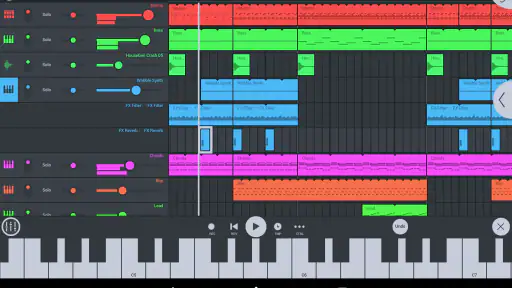
Yes, FL Studio Mobile supports multi-track editing, which enables users to layer different sounds and instruments across several tracks. This allows for comprehensive song creation and meticulous editing, offering a professional-grade music production experience. Users can add effects, adjust volumes, and fine-tune each track to create a polished final product.
Pros
- Intuitive interface for seamless music production.
- High-quality sound output for professional results.
- Extensive library of loops and samples available.
- Cross-platform support for Android
- iOS
- and Windows.
- Regular updates with new features and improvements.
Cons
- Limited free version with essential features locked.
- Learning curve for beginners in music production.
- In-app purchases required for additional content.
- Some features require powerful hardware to run.
- Occasional bugs and crashes reported by users.
- Category
- Music & Audio
- Version
- 4.9.0











