Financial Calculators Pro
- 75.00
- 4.7
- Installs
- 10.00K
- Price
- $6.99

Screenshots

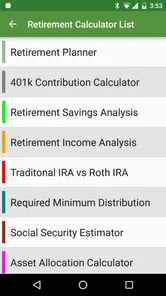
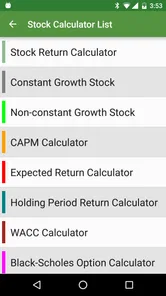
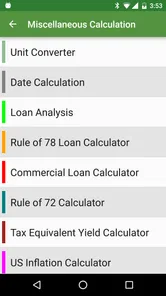
Analysis by Reviewed
My first piece of advice for a new user is to arrive with one real question, not a goal of mastering every calculator in one sitting. You might want to compare a loan term, check a tax amount or see how long savings could last. Choosing a specific question makes the app feel less like a catalogue of financial tools and more like a practical way to get unstuck.
Start with a question you can verify
Before entering anything, gather the figures you already know from a bill, offer or personal plan. For a loan, that could be the amount, interest rate and repayment period; for a tax calculation, it could be the price and applicable rate. Keeping the source figures in front of you reduces the chance of entering a plausible-looking but incorrect number. I also recommend checking whether a rate is written as a percentage and whether the period is monthly or yearly before comparing results.
A useful first success is not simply seeing an answer appear. It is understanding what that answer represents and being able to explain which inputs produced it. Once I can do that, I can change one assumption and see what actually moves. That habit is more valuable than tapping through a long list of calculators without a decision in mind.
A household example: comparing a financed purchase
Imagine you are considering a purchase and have been offered a way to pay over time. I would enter the amount, rate and proposed term, then look at the payment schedule rather than focusing only on the monthly figure. Next, I would test a shorter term while leaving the other inputs unchanged. The comparison helps show whether the smaller monthly payment comes with a longer commitment, and it gives me a clearer question to take back to the seller or lender.
This is a good use of a financial calculator because the inputs can be tied to a real offer and the output can be checked against another source. It is less suited to deciding whether the purchase itself fits your household budget. For that, you need to account for other bills and priorities, which a single calculation cannot represent on its own.
How it compares with everyday alternatives
A phone’s standard calculator is quicker for arithmetic, but it does not give the same focused structure for a loan schedule or retirement estimate. A spreadsheet gives you more freedom to combine figures, add categories and preserve a personal record, though it asks you to build and maintain that structure yourself. A dedicated financial calculator sits between those choices: it is more guided than a blank spreadsheet and more purpose-built than basic arithmetic.
That middle ground is the main reason I would consider paying for it. If you regularly move between different financial questions, having several types of calculation together can save the hassle of finding a separate tool for each one. If your needs are narrow, such as tracking every household purchase or making a one-off percentage calculation, a spreadsheet or the calculator already on your phone may be a better fit.
More From Our News Desk

 Gmail
Gmail in a Busy Inbox: Who Benefits Most?
From first account to crowded workday, Gmail earns its place through dependable search and flexible sorting—but its best fit depends on how much inbox maintenance you can tolerate.

 Prime Video
Switching to Prime Video: What Changes in Your Viewing Routine
Prime Video can make a compelling second home for streaming, but switching means learning a different catalog, rental layer, and route from browsing to playback.

 Universal TV Remote Control
 Works Best as a Reliable Backup
A phone remote earns its place through quick setup and reliable habits. Here is how to get more from Universal TV Remote Control—and where its limits show.

 Weather - By Xiaomi
Weather by Xiaomi Review: Clear at a Glance, Less Clear Up Close
Xiaomi’s weather app makes everyday forecasts quick to scan, but its calm surface can leave useful details and recovery paths harder to find than they should be.

 X
X Under Pressure: Can It Recover When Posting Goes Wrong?
A resilience-focused review of X, examining setup, mistaken posts, interruptions, weak connections, and the gaps that matter when recovery needs to be dependable.

 Clash of Clans
 Is Won Between the Battles
Its raids are quick; its community is a long-term project of coordination, teaching, rivalry, and shared responsibility—with all the friction that entails.
Latest News



The app is made by Bishinews and costs $5.99. I would think of that as a purchase for repeated use, not something to buy just because one calculation seems intimidating. It has a 4.6 average from 272 ratings and 10K+ installs, but those figures do not tell me whether its particular calculators match my own needs. I would decide based on the kinds of questions I expect to revisit.
Small checks that prevent misleading answers
One easy-to-miss source of confusion is mixing time bases. If one figure is monthly and another is yearly, comparing them directly can make a result look surprising when the inputs are simply expressed differently. Before drawing a conclusion, I check the period attached to each number and make sure I have not changed it between scenarios.
I also avoid changing several inputs at once. If I alter the rate, amount and term together, I cannot tell which change caused the new result. Changing a single value at a time turns the app into a simple scenario-testing tool: it shows which assumptions matter most and which ones barely affect the outcome. For any decision with lasting consequences, I keep the original figures nearby so I can retrace my steps.
Who will get the most from it
I think it is best suited to people who often need to estimate or compare financial outcomes: someone reviewing borrowing options, a household planning savings, or a student learning how rates and repayment periods affect a result. It can also be useful when preparing for a conversation with a lender or adviser, because you can arrive with a clearer sense of the figures and the questions you want answered.
On the other hand, I would not choose it as a complete money-management system. If your main need is a running budget, expense categorisation or a detailed record of transactions, a tool designed around tracking may serve you better. And if you want personalised investment guidance, a calculator can help explore assumptions but cannot replace advice that takes your circumstances into account.
For a first-time user, the reassuring part is that you do not need to understand every financial term before starting. Pick a calculator connected to a decision you recognise, enter figures you can verify, and treat the result as an estimate to investigate. If the answer looks odd, check the rate, currency and period before assuming the calculation is wrong. That gives you a sensible route from opening the app to getting a result you can actually use.
Ever found yourself in a situation where you’re scratching your head trying to figure out your loan payments or maybe how long it’ll take to grow your savings? Well, let me introduce you to an app that feels like having a financial advisor right in your pocket: Financial Calculators Pro. It's like that trusty calculator we all have, but on steroids. Let me walk you through my experience with it.
What to expect from a finance calculator
Despite its confident tone, I treat Financial Calculators Pro as a set of tools for exploring possible outcomes, not as a substitute for personal financial advice. It is a paid finance app from Bishinews, priced at $5.99, and its Everyone age rating makes its intended audience broad. Its average rating is 4.6 from 272 ratings, with 10K+ installs. The app was released on Apr 4, 2011; version 3.5.1 requires Android 6.0 or later.
The important first step is choosing the calculator that matches the question you actually have. A loan estimate, a sales-tax calculation and a retirement projection are different kinds of decisions, so I would not treat their results as equally certain. The app can help you compare scenarios, but your result is only as useful as the assumptions you enter.
Unpacking the Features
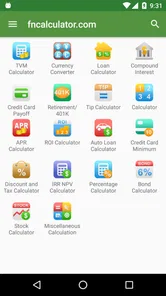
When I first opened Financial Calculators Pro, I was greeted with a sleek interface that doesn’t intimidate, which is a big plus because, let’s be real, financial stuff can be mind-boggling. The app offers a comprehensive range of calculators, from basic ones like tips and VAT/GST to more complex ones covering loans, investments, and even retirement planning. It’s basically a one-stop-shop for all your financial needs.
Ease of Use
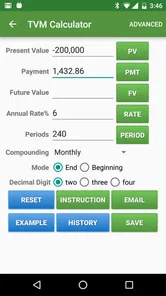
One thing that really stood out to me is how user-friendly the app is. You don’t need to be a financial guru to navigate it. Each calculator has a simple layout and comes with explanations, which makes it perfect for someone like me who sometimes needs a little extra help understanding all those financial terms.
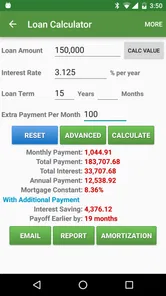
For instance, I was playing around with the loan calculator, and it effortlessly broke down my loan amortization schedule. Just pop in your loan amount, interest rate, and how long you plan to pay it off, and voilà, it does the heavy lifting for you. The information is presented in a clean, easy-to-understand format, which is super helpful for making informed decisions.
Getting to a useful first result
For a first run, I’d start with a decision that has clear inputs rather than jumping straight to long-term forecasting. If you are weighing a loan, enter the amount, rate and repayment period from the offer you have, then compare the resulting schedule with the lender’s figures. A mismatch is a reason to check whether the rate, timing or repayment assumptions differ; it is not a reason to assume either estimate is automatically wrong.
A practical everyday use is checking the cost of a purchase that may be financed. I would calculate the payment, then change one input at a time—such as the term—to see how a lower monthly figure affects the overall plan. That makes the app more useful than a quick payment estimate, because it helps expose the trade-off between near-term affordability and a longer commitment.
Customization and Flexibility
Another cool feature of the app is its flexibility. You can tweak the settings to fit your specific needs, whether you’re calculating in monthly or yearly terms, or if you prefer to view your data in different currencies. It’s like having a personal financial planner who speaks your language, literally.
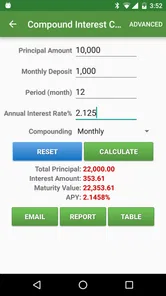
Also, for those who are into planning for the long haul, the retirement calculator is a gem. It not only helps you figure out how much you need to save but also gives you insights on how long your savings will last. This kind of foresight is invaluable, especially in today’s fast-paced world.
Making projections more useful
For retirement planning, I would use the calculator to test a few plausible versions of the future rather than trust a single answer. Try changing one assumption at a time, such as the amount saved or the period you want savings to cover, and note how sensitive the result is. This is a better way to identify which assumptions deserve attention than treating a projection as a promise.
The same habit helps with currency and time settings. Before comparing two calculations, check that both use the same currency and monthly or yearly basis. Otherwise, numbers that look comparable may describe different situations. I would also keep a brief note of the inputs for any important estimate, so I can recreate it later instead of relying on memory.
Where it fits—and where it doesn’t
The strength here is breadth: rather than opening a basic calculator for a tip, a spreadsheet for a loan schedule and a separate tool for a savings projection, I can explore several kinds of financial questions in one place. That makes it especially handy for someone who likes to check options before talking with a lender or adjusting a household plan. A spreadsheet may still be better if you need to combine many personal expenses, build a custom budget or keep a detailed record over time.
I would skip this app if all you need is occasional arithmetic, since paying for a dedicated finance tool may be more than that simple task calls for. It is also not the right choice if you expect a calculator to tell you which investment to choose or to account automatically for every detail of your circumstances. Its results help with calculations; deciding whether the assumptions are realistic remains your job.
Final Thoughts
To wrap things up, Financial Calculators Pro is a must-have for anyone wanting to take control of their financial future. It’s comprehensive, easy to use, and incredibly versatile. Whether you’re a student trying to budget your expenses or a professional planning for retirement, this app has got you covered.
So, if you’re looking to demystify your finances without needing a degree in economics, give it a shot. It’s like having a financial advisor right in your pocket, minus the hefty fees. Trust me, your future self will thank you!
Financial Calculators Pro Frequently Asked Questions
How much does Financial Calculators Pro cost, and what should I know before buying it?
Financial Calculators Pro is a paid finance app priced at $5.99. Before downloading, consider whether you expect to use its financial calculation tools regularly and whether they suit your planning needs. The app is developed by Bishinews, has an Everyone content rating, and is intended for users looking for financial calculators rather than a general banking service.
Is Financial Calculators Pro compatible with my Android device?
The listed minimum operating-system requirement is Android 6.0, so check your device’s software version before downloading. Financial Calculators Pro is an app in the Finance category, designed for financial calculations and planning. Compatibility can also depend on the device and operating system you use, so reviewing the app’s store page on your own device is a sensible final check before purchasing.
What features does Financial Calculators Pro offer?
Financial Calculators Pro provides a comprehensive suite of tools for financial planning and analysis. It includes mortgage calculators, retirement planners, loan estimators, and investment growth predictors. Users can also track their savings goals and analyze interest rates effectively, making it an essential tool for both personal and professional financial management.
Is Financial Calculators Pro user-friendly for beginners?
Yes, Financial Calculators Pro is designed with a user-friendly interface that caters to both beginners and experienced users. It offers step-by-step guidance, clear instructions, and intuitive navigation, ensuring that users can easily utilize its wide array of financial tools without any prior experience in finance or accounting.
Can Financial Calculators Pro be used offline?
Financial Calculators Pro is primarily an online application, requiring an internet connection for full functionality. However, it does offer some offline capabilities, allowing users to perform basic calculations without an internet connection. For the best experience and access to advanced features, a stable internet connection is recommended.
Pros
- Comprehensive calculation tools
- User-friendly interface
- Detailed financial analysis
- Customizable settings
- Regular updates
Cons
- Ads in free version
- Steep learning curve
- Limited offline access
- Requires internet connection
- Not all features free