

FEIS
- 23.00
- 4.1
- Installs
- 10.00K
- Price
- Free

Screenshots
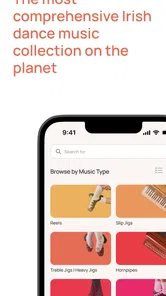
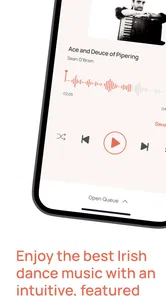
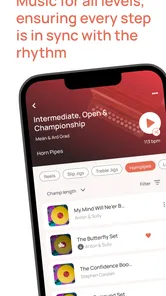
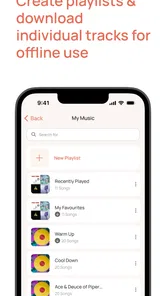

Analysis by Reviewed
I tried FEIS as a music and audio app with one very specific setting in mind: a household where Irish dance music needs to be available quickly, sometimes for practice, sometimes for a class, and sometimes simply because someone wants to listen. That focus matters because this is not a general streaming replacement. It is a specialist tool built around Irish dance, developed by FEIS LIFE APP LTD, and its value depends on whether that musical world is part of your routine.
My first impression was that FEIS makes the most sense when several people share access to the same device or when one person is helping a dancer prepare. A parent might keep a phone near the practice space while a child works through steps, or an instructor might use a tablet during a session and pass it between dancers. In those situations, the app’s narrow purpose is a strength: you are not digging through a huge general music library trying to find suitable material.
At the same time, I would not recommend installing it just because you want another everyday music player. If your listening is mostly pop, podcasts, radio, or broad playlists, FEIS will feel too focused. I see it as a practical companion for Irish dance rather than a replacement for the music services most people already use.
How FEIS fits into a shared household routine
The most useful household scenario is a shared practice setup. Imagine a dancer returning from school, placing a phone on a stand, and opening FEIS while a parent handles other tasks nearby. The app can serve as the dedicated musical workspace, keeping practice separate from personal playlists, social notifications, and unrelated entertainment. That separation is small, but it can make the start of a session less distracting.
It is also helpful when more than one dancer in the home needs the same resource. One person may be rehearsing while another is waiting for a turn, or a parent may need to check the music before a class. Because the app is aimed at Irish dance, the household does not have to explain its purpose every time someone opens it. The context is already clear.
My advice is to decide in advance which device will be the main practice device. A shared tablet can be easier to see from across a room, while a phone is more convenient when travelling to lessons. I would avoid treating the app as something every family member needs separately unless each person has a genuinely different routine. For many homes, one carefully placed device is enough.
That shared-device approach also exposes a limitation: the app is not a substitute for household organization. It does not remove the need to agree on who uses the device, where it is kept, or what happens when somebody needs it for another task. If a child is practicing while another family member is watching video or making a call, the value of the app still depends on ordinary coordination around the device.
More From Our News Desk

 Gmail
GmailGmail in a Busy Inbox: Who Benefits Most?
From first account to crowded workday, Gmail earns its place through dependable search and flexible sorting—but its best fit depends on how much inbox maintenance you can tolerate.

 Prime Video
Switching to Prime Video: What Changes in Your Viewing Routine
Prime Video can make a compelling second home for streaming, but switching means learning a different catalog, rental layer, and route from browsing to playback.

 Universal TV Remote Control
Universal TV Remote Control Works Best as a Reliable Backup
A phone remote earns its place through quick setup and reliable habits. Here is how to get more from Universal TV Remote Control—and where its limits show.

 Weather - By Xiaomi
Weather by Xiaomi Review: Clear at a Glance, Less Clear Up Close
Xiaomi’s weather app makes everyday forecasts quick to scan, but its calm surface can leave useful details and recovery paths harder to find than they should be.

 X
XX Under Pressure: Can It Recover When Posting Goes Wrong?
A resilience-focused review of X, examining setup, mistaken posts, interruptions, weak connections, and the gaps that matter when recovery needs to be dependable.

 Clash of Clans
Clash of Clans Is Won Between the Battles
Its raids are quick; its community is a long-term project of coordination, teaching, rivalry, and shared responsibility—with all the friction that entails.
Latest News



What I noticed during the first setup
FEIS is free to install, which makes it easy to test before committing to a regular practice routine. The app is listed for Everyone, so its basic audience is broad enough for a household environment. Still, an age label should not be confused with supervision advice. A parent should remain the person deciding whether a child is ready to use any app independently and whether the device itself is appropriate to share.
The current version is 3.8.5, and the minimum operating-system requirement is Android 8.0. That is useful for homes with an older spare phone or tablet, although compatibility is only one part of the decision. Before building a practice routine around an old device, I would check that it remains responsive, that the speaker is clear, and that the battery can handle a full session.
One practical tip is to complete the initial setup before a lesson or rehearsal rather than in the middle of one. Shared devices often have several people waiting, and even a simple sign-in or configuration step can become annoying when everyone is in a hurry. I prefer to open the app, test the sound, and leave the device in the place where practice normally happens.
Another useful boundary is to distinguish the app from the account used to access it. If a household shares one login, everyone should know whose account it is and who is responsible for any optional purchase. FEIS includes in-app purchases ranging from $1.49 to $12.99 per item, so I would not hand over a shared device without discussing that clearly. The free starting point is welcome, but the possibility of paid items deserves a simple household rule.
Keeping accounts and purchases understandable
Account boundaries are especially important when a parent’s phone, a child’s practice tablet, and a teacher’s device are all involved. I would choose one primary account for the person or household that actually manages the music, then avoid casually switching between accounts just to solve a short-term problem. That reduces confusion later, particularly when someone is trying to remember where a purchase or saved material belongs.
I also recommend explaining the difference between using the app and buying something inside it. A young dancer may understand how to start music without understanding that a tap could lead to a charge. Since FEIS is free to begin with, it is easy for a child to assume that everything encountered in the app is included. A quick conversation before sharing the device is more useful than discovering an unexpected purchase afterward.
This is not a criticism unique to FEIS; it is simply more noticeable in a shared-device setting. The app works best when one adult takes responsibility for setup and payments, while dancers concentrate on practice. If your household needs completely separate profiles, private histories, or tightly separated purchasing arrangements, I would investigate whether your preferred general music service handles those boundaries better before making FEIS the central family audio app.
For a solo adult dancer, the process is simpler. One person can decide which device to use, whether optional content is worthwhile, and how the app fits alongside other music tools. The household question still matters if the device is shared, but it becomes less of a barrier when the user and purchaser are the same person.
Using the app to coordinate practice
The strongest benefit I see is coordination. Irish dance practice often involves more than pressing play: a dancer, parent, instructor, and sometimes several classmates need to be working from the same musical reference. A dedicated app can give everyone a common starting point, which is more reliable than one person searching a broad catalog while another waits.
In a real household routine, I would use FEIS at the beginning of practice to establish what the dancer is working on, then keep the phone or tablet in a fixed position. That avoids a surprisingly common problem: the device moving around the room while somebody searches for the next track. A stand, a stable surface, and a pre-agreed volume make the session smoother than repeatedly passing the device back and forth.
For parents, the app can also make participation less technical. You do not need to know every detail of Irish dance to help with the basic routine of opening the music, checking that the sound is audible, and handing control back to the dancer. That is a modest advantage, but it matters when a child needs support and the adult is not familiar with the repertoire.
For instructors, I would treat FEIS as one part of coordination rather than the entire system. The app may help provide the audio environment, but a teacher still needs to communicate which material to use and how it relates to the lesson. I would not assume that installing the same app automatically gives every participant the same setup. Before a group session, it is sensible to agree on the device, account, and exact material in advance.
A less obvious tip is to keep a short written practice plan beside the shared device. Instead of asking, “What should we play now?” every few minutes, note the order of warm-up, technique, and rehearsal work. FEIS can then support the session without becoming the session planner. This is particularly helpful when a child is tired or when a parent is supervising while also managing dinner, homework, or another sibling.
Where a specialist app beats ordinary music services
Compared with a general streaming service, FEIS has a clearer identity. Broad platforms are excellent when you want variety, algorithmic discovery, artist pages, or a single subscription covering many genres. They can also be convenient for a family that already uses them for car trips and everyday listening. Their weakness is that Irish dance practice can get buried among unrelated results and playlists.
FEIS is better when the household wants a focused destination. The app’s store summary presents it as a premier Irish dance music app, and that specialization is the reason to choose it. I found the concept more useful for rehearsal than opening a general service and hoping search results match the needs of a particular dance routine.
There is a trade-off, though. A specialist app may not satisfy listeners who want a broad music collection, casual background listening, or seamless movement between Irish dance and unrelated genres. If your family wants one app for every person and every occasion, a conventional music service is probably the more efficient choice. FEIS earns its place when Irish dance is important enough to justify a dedicated tool.
I would also avoid comparing it directly with a video platform as if they served the same purpose. Video can be valuable for watching demonstrations, but it introduces visual distraction and depends heavily on the quality and relevance of individual uploads. FEIS is more naturally suited to a music-led practice environment. In my view, the best combination may be to use a video source for learning a movement and FEIS for repeating the musical work, provided the household is comfortable managing both.
Age, trust, and the limits of shared access
The Everyone age rating makes FEIS approachable for a wide range of users, including families introducing a young dancer to a dedicated music app. I appreciate that this lowers the initial barrier, but I would still keep the first few sessions supervised. The reason is not necessarily the music itself; it is that children may use a shared device differently from adults, especially when accounts, purchases, and other installed apps are present.
Trust works best when expectations are specific. I would tell a child which device to use, whether they may change settings, whether they may make purchases, and who to ask if something looks unfamiliar. Those rules are more useful than simply saying, “Be careful.” They also make it easier for the child to become independent over time without giving them responsibility for account decisions they do not understand.
For teenagers and adult dancers, the main concern is usually privacy and ownership rather than basic access. If several people use one account, agree on who can change anything important. If the app is installed on a personal phone, decide whether it is being used as a private practice tool or as the household’s shared music resource. That distinction prevents small disagreements about control of the device.
I would skip FEIS as a household centerpiece if your family is looking for robust separation between users, extensive parental management, or a fully unified entertainment library. The app’s appeal is its dance focus, not its ability to organize every aspect of family technology. In that situation, a broader platform with stronger household account tools may fit better, with FEIS reserved for the dancer who specifically needs it.
Performance, value, and everyday friction
FEIS has reached more than ten thousand installs and holds an average rating of 4.1 from around one hundred thirty ratings, with a couple dozen written reviews. Those figures suggest that it has found a real audience, while also reminding me that it is a niche product rather than a mass-market audio platform. I would read the rating as encouraging but not decisive; the important question is whether your use case matches the app’s narrow purpose.
The free price is a meaningful advantage for trying it in a household. You can see whether the app fits your dancer’s routine before deciding whether optional items are worth considering. I would judge value by frequency of use rather than by the number of features visible at first glance. If the app is opened several times each week for serious practice, a paid item may feel more reasonable than it would for occasional curiosity.
The main friction is specialization. A person who wants a complete music library may find FEIS too limited in scope, while a family expecting separate profiles may need to create its own rules around one shared setup. There is also a practical dependence on the device’s speaker, battery, and position in the room. Even a well-targeted audio app cannot compensate for weak hardware or a noisy practice space.
My workaround is simple: test FEIS during the exact kind of session in which you expect to use it. Do not judge it only while sitting quietly with headphones. Try the shared tablet, the normal room, the expected volume, and the handoff between parent and dancer. That reveals whether the app is genuinely convenient for your household rather than merely appealing in theory.
Who should install it, and who should pass
I would recommend FEIS to Irish dancers, parents supporting regular practice, and instructors who want a focused audio option for their work. It is especially suitable when a household has one shared device that can stay near the practice area and one adult willing to manage account and purchase boundaries.
I would be more cautious for casual listeners who only want Irish music generally. The app’s Irish dance emphasis is a benefit for dancers, but it may be unnecessarily narrow for someone looking for a wider cultural or folk-music collection. A general streaming service will usually be more flexible for that purpose.
I would also pass if your priority is a fully managed family platform with clearly separated personal spaces. FEIS can still be useful on an individual dancer’s device, but I would not force it into the role of household media hub. Its best role is more focused: a dedicated place for Irish dance music that supports practice and coordination.
My household verdict
After using FEIS with shared-device habits in mind, I see it as a practical specialist app rather than an all-purpose music recommendation. Its free entry point, Everyone rating, and support for devices running Android 8.0 or later make it approachable, while the $1.49 to $12.99 in-app purchase range means a responsible adult should remain aware of how the account is used.
The app works best when the household sets clear boundaries: one main device, one person responsible for purchases, a known practice location, and an agreed routine for choosing music. Those small decisions turn a potentially messy shared setup into something predictable. They also answer the questions I would have before installing it: who should manage access, how can a parent help, and when is another app better?
My honest recommendation is to try FEIS if Irish dance is a regular part of your home life. Give it a real practice session rather than a quick glance, and judge whether its focused purpose saves time. If your needs extend beyond Irish dance music or require sophisticated household separation, keep your usual broader music service as the main platform. For the right family, though, FEIS fills a clear gap: it gives dancers and the people supporting them a shared, purpose-built audio space without asking them to search through an unrelated catalog every time practice begins.
FEIS Frequently Asked Questions
Who develops FEIS, and is it a well-established app?
FEIS is developed by FEIS LIFE APP LTD and is presented as the premier Irish dance music app. It has been available since April 9, 2019, and has passed 10,000 installs. Those details offer a quick sense of its background and reach; you can also look at its store page for recent user feedback before deciding whether it suits you.
What is FEIS and what can I use it for?
FEIS is an app designed to provide access to information and services related to its platform or organization. It is categorized under Music & Audio and is described as the premier Irish dance music app. Depending on the version available in your region, it may let you browse content, check updates, manage account details, view announcements, or access useful resources from a mobile device. Before downloading, review the store description to confirm that its current features match your needs.
Is FEIS free to download and use?
FEIS is free to download, but it includes in-app purchases priced from $1.49 to $12.99 per item. You can install it without paying an upfront price, while selected content or features may involve additional purchases. Check the purchase details in the official store before confirming a transaction, especially if someone else may use your device or payment account.
What information or permissions does FEIS require?
During installation or first use, FEIS may request permissions such as internet access, notifications, storage, camera, or location, depending on the features included in your version. Some permissions may be optional, while others could be needed for specific tools. We recommend reviewing the privacy policy and denying permissions that are unrelated to the way you intend to use the application.
Does FEIS work on both Android and iPhone?
Availability can vary according to the country, operating system, and version of the service. FEIS may be offered for Android, iOS, or only through a particular official platform. The Android version requires Android 8.0 or later. Before downloading, confirm that your device meets the minimum operating-system requirements and that you are using the official store page. Older phones may experience limited compatibility, slower performance, or missing features.
Pros
- Simple interface makes browsing and messaging easy for new users.
- Supports sharing photos and updates with contacts in one place.
- Notifications help users keep up with new activity quickly.
- Lightweight design can work well on phones with limited storage.
- Useful for maintaining connections with friends and family remotely.
Cons
- Privacy settings may require careful review before sharing personal content.
- Frequent notifications can become distracting without customization.
- Some features may feel limited compared with larger social networks.
- Performance can vary on older devices or slower internet connections.
- The app may collect usage data depending on its privacy policy.











