

ezCater - Food for Workplaces
- 39.00
- 4.6
- Installs
- 100.00K
- Price
- Free

Screenshots
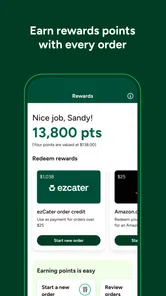
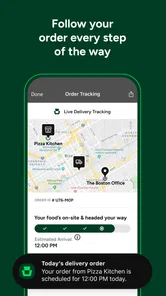
Analysis by Reviewed
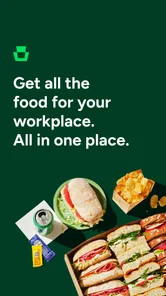
Ordering food for a workplace sounds simple until the order involves several people, different diets, a delivery window, and a budget that cannot be guessed at the last minute. ezCater is built around that specific problem: bringing familiar restaurant meals into a work setting rather than helping one person decide what to eat at home. I found it most useful when the meal had to be coordinated for a group and the person placing the order needed a clearer process than a series of phone calls.
This is a free Food & Drink app from ezCater, with a store rating of 4.6 from around 292 ratings and more than 100K installs. It is available to Everyone, which fits its practical audience: office managers, team leads, assistants, event organizers, and employees arranging a shared meal. The developer’s focus is clear from the experience, but the app is still better understood as a workplace ordering tool than as a general restaurant-discovery app.
What using ezCater feels like in a real workday
My first impression is that the app makes more sense when I begin with an occasion instead of a craving. If I am simply hungry and want dinner for myself, a standard restaurant delivery app is usually the more natural choice. ezCater becomes more relevant when I need to feed a team, plan around a meeting, or arrange food for people who will not all be in the same place when the order is being discussed.
A realistic example would be a morning planning session with a lunch break scheduled around noon. Rather than asking everyone to message their preferred restaurant, I would use the app to think through the meal as a group order: how many people need food, which menu style will work for the room, and whether the timing leaves enough margin for a busy workplace. That change in mindset is important. The app is not merely a menu browser; it is part of the preparation for a shared event.
The store summary, “Favorite restaurants at work,” captures the intended setting, although it does not explain the practical decisions that make workplace ordering different. A restaurant that is perfect for one person may be awkward for a conference room. Individual meals may be easier to distribute than shared trays, while shared food may be more economical or sociable. I had to think about those trade-offs myself, and the app is most valuable when I use it as an organizing aid rather than expecting it to make every decision for me.
The current version is 1.10.5-140, and the app requires Android 8.0 or newer. That makes checking device compatibility worthwhile before planning an important office meal. I would not wait until the morning of an event to discover that an older work phone cannot run it. For a routine personal order, that would be a minor inconvenience; for a scheduled team meal, it can create unnecessary pressure.
Trust starts with knowing what the app is for
I tend to trust a specialized app more when its purpose is easy to understand. ezCater has a narrower identity than a broad delivery marketplace, and that is helpful. I am not opening it to scroll endlessly through unrelated food content or to turn lunch into an impulse purchase. I am opening it because a workplace meal needs planning, coordination, and a reasonable way to compare restaurant choices.
More From Our News Desk

 Instagram
Instagram’s Power Comes From Its Place in Your Phone
A close look at how Instagram turns Meta’s reach, recommendation systems and everyday camera habits into durable platform power—and what that costs users.

 Gmail
GmailGmail in a Busy Inbox: Who Benefits Most?
From first account to crowded workday, Gmail earns its place through dependable search and flexible sorting—but its best fit depends on how much inbox maintenance you can tolerate.

 Prime Video
Switching to Prime Video: What Changes in Your Viewing Routine
Prime Video can make a compelling second home for streaming, but switching means learning a different catalog, rental layer, and route from browsing to playback.

 Universal TV Remote Control
Universal TV Remote Control Works Best as a Reliable Backup
A phone remote earns its place through quick setup and reliable habits. Here is how to get more from Universal TV Remote Control—and where its limits show.

 Weather - By Xiaomi
Weather by Xiaomi Review: Clear at a Glance, Less Clear Up Close
Xiaomi’s weather app makes everyday forecasts quick to scan, but its calm surface can leave useful details and recovery paths harder to find than they should be.

 X
XX Under Pressure: Can It Recover When Posting Goes Wrong?
A resilience-focused review of X, examining setup, mistaken posts, interruptions, weak connections, and the gaps that matter when recovery needs to be dependable.
Latest News



That focus also sets a boundary. I would not choose it automatically for a quick solo snack, a late-night personal order, or a situation where I already know exactly which restaurant I want and can order directly. In those cases, the restaurant’s own app or a familiar delivery service may involve fewer steps. A specialized workplace tool earns its place when the group context creates complexity.
The rating is encouraging, but I would treat it as a signal rather than a guarantee. A workplace order has more points where expectations can differ: menu suitability, timing, quantity, instructions, and the experience of the people receiving the food. A strong average rating tells me that many users find the app useful, but it does not remove the need to review the order carefully before committing to it.
Account choices and the importance of deliberate ordering
When I use any app that helps arrange food for other people, I prefer to separate browsing from commitment. I can compare possible meals first, then pause before entering or confirming details that belong to the event. This is a small habit, but it gives me more control over what I am sharing and reduces the chance of placing an order while I am still exploring.
I also recommend deciding who should control the order before opening the app. If one person is responsible for payment and another is responsible for dietary information, confusion can appear quickly. The safest workflow is to assign one coordinator, keep the order details in one place, and use the app only after the group has agreed on the basics. That is not a glamorous feature, but it is the difference between a smooth lunch and several people making overlapping changes.
For a shared workplace meal, I would prepare a short internal checklist: delivery location, arrival window, headcount, dietary needs, and the person who will receive the food. I would not assume that an app can understand the room layout or the office’s access rules without clear instructions. If the building has a reception desk, restricted entrance, or a delivery handoff point, that information should be handled deliberately rather than left to chance.
The most useful control is often the pause before confirmation. Workplace orders affect people who may not be holding the phone, so I would review every visible choice with the group’s needs in mind. The app can support the process, but I remain responsible for checking that the meal, timing, and destination make sense together.
Data-sensitive moments during a group meal
Food orders can involve more personal information than people first expect. Dietary preferences may reveal allergies, religious practices, medical concerns, or simple personal choices. A workplace order can also expose a delivery location and connect a meal with a particular meeting or team. For that reason, I would avoid entering more personal detail than is necessary to make the order understandable.
My practical approach is to describe food requirements in the clearest useful way without adding private background. For example, the relevant information is usually the ingredient or preparation concern, not the reason someone has it. I would also avoid placing sensitive notes in a field that could be visible to a wider group unless the note is genuinely needed for the restaurant or delivery handoff.
The same caution applies to office addresses and event details. A workplace location may be routine, but it is still worth checking who can see it during the ordering process and whether an old address has been carried over from a previous occasion. Before confirming, I would look at the destination as carefully as I look at the menu. A correct restaurant with an incorrect workplace location is still a failed order.
I do not treat a food-ordering app as a private diary for team information. If a meeting is confidential, I would keep its subject and attendee list out of food notes unless there is a clear operational reason to include them. The meal only needs enough context to arrive at the right place and be distributed correctly.
Where ezCater can save time, and where it cannot
The strongest use case I see is repeatable workplace planning. If a team often orders lunch, a focused service can reduce the mental load of starting from scratch each time. It gives the coordinator a dedicated place to think about restaurant options and the needs of a group instead of forcing a personal delivery app to handle a workplace problem.
Another useful scenario is a meeting with mixed preferences. A single cuisine may not satisfy everyone, and a menu that looks attractive at first can become difficult when several people need different portions or ingredients. I would compare the practical flexibility of the available restaurant choices, not just their names. The best option is the one that can be understood and shared easily by the people eating it.
However, the app cannot solve unclear internal communication. If nobody knows the headcount, if the delivery point changes, or if employees submit contradictory requests, the ordering experience will still be messy. I would use a simple deadline for collecting preferences and then place one carefully reviewed order. Without that discipline, the convenience of a specialized app can be cancelled out by last-minute changes.
There is also a trade-off between convenience and direct contact. Ordering directly from a restaurant may be better when I need to ask a detailed question about preparation, confirm a special arrangement, or establish a relationship with a local provider. A general delivery marketplace may be faster for a single person. ezCater is most convincing in the middle ground: a planned workplace order where coordination matters more than instant personal convenience.
How I would use it for a first office order
I would begin by defining the event in plain terms: a small team lunch, a larger meeting, or a recurring workplace meal. Then I would estimate the number of diners and identify requirements that could affect the menu. I would not begin with the most attractive restaurant listing and try to force the group into it afterward. Starting with the practical constraints produces a more reliable choice.
Next, I would compare options by distribution as well as food. Meals that are easy to label, hand out, and identify can be more useful than a menu that is exciting but confusing. For a meeting where people have little time to eat, individually identifiable portions may be preferable. For a social gathering, shared food may fit better. This is one of the less obvious decisions that can make a bigger difference than the restaurant name.
Before confirmation, I would check the workplace address, the intended delivery timing, the order contents, and any notes. I would also make sure another person knows who is receiving the food. A delivery that arrives at an unattended entrance can create more trouble than a slightly less ambitious menu. The handoff plan deserves as much attention as the selection itself.
Afterward, I would keep a brief internal record of what worked: whether portions were easy to distribute, whether the menu created confusion, and whether the timing fit the meeting. I would not rely on memory alone for recurring orders. That small review helps the next choice become more informed without requiring the app to remember every workplace preference.
Who should choose it, and who should skip it
I think ezCater is a good fit for people who regularly arrange food for colleagues and want a service centered on workplace occasions. It is especially suitable when the order involves several diners, a fixed schedule, or a coordinator who needs to make the decision on behalf of others. The free price also makes it easy to try without adding an app purchase to the planning process.
I would be more cautious about recommending it to someone who only wants a personal takeaway or who prefers to communicate directly with one restaurant. The extra workplace focus may feel unnecessary for a simple order. It may also be the wrong choice for a highly sensitive meal arrangement where direct confirmation with the restaurant is more important than a streamlined ordering workflow.
People who dislike creating accounts or managing shared order details should think about the role they are taking. The app can make coordination clearer, but it does not eliminate responsibility. Someone still needs to verify the information, communicate with the group, and handle changes. If that work is not assigned, the app will not magically provide accountability.
My cautious verdict after weighing the trade-offs
ezCater is a focused Food & Drink app rather than an all-purpose food companion. I like it most for the moment when a meal becomes a small logistics project: several people, one workplace, a schedule, and enough dietary or distribution concerns that casual ordering starts to feel unreliable. Its value comes from matching the tool to that situation.
I would use it when I wanted a dedicated starting point for workplace food and when the group had agreed on the basic requirements. I would still review the destination, timing, menu, and notes myself, and I would avoid placing unnecessary personal or meeting information into the order. Those habits protect user control better than simply assuming that convenience equals safety.
The app’s 4.6 average and its presence on more than 100K devices suggest that it has found a real audience, but my recommendation remains conditional. Choose it for organized team meals and workplace planning; choose a direct restaurant channel for detailed special arrangements; choose a conventional delivery app for a quick personal order. My final view is cautiously positive: ezCater is worth trying when the workplace is the reason you are ordering, not merely the place where you happen to be eating.
ezCater - Food for Workplaces Frequently Asked Questions
Is ezCater free to download, and what devices can run it?
ezCater is a free Food & Drink app from ezCater, so you can install it without paying for the download. It requires Android 8.0 or later, which is worth checking before you install. The app is intended to help people arrange food for workplaces, and its store summary describes it as a way to find favorite restaurants at work.
Who is ezCater intended for?
ezCater is aimed at people arranging food for workplaces, including office administrators, meeting organizers, and teams planning a shared meal. It can be useful when you need to coordinate catering rather than choose food for only yourself. The app is rated for Everyone, and its focus is workplace meals, meetings, events, and employee lunches.
What is ezCater, and how does it work?
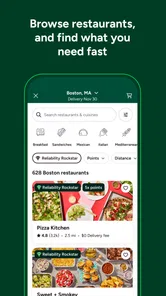
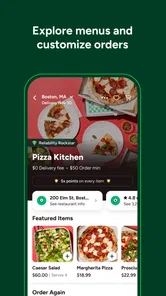
ezCater is a workplace catering platform that helps you find restaurants and food providers for office meals, meetings, events, and employee lunches. After entering your delivery location and date, you can browse menus, compare prices, select quantities, and place an order through the app or website. Available restaurants and services vary by city, so the selection depends on your location.
Can I use ezCater for both small office meals and large events?
Yes. ezCater is designed for a wide range of workplace food orders, from individual boxed lunches and team meals to larger meetings, conferences, and company events. Menus often include options such as platters, buffet packages, beverages, desserts, and individually packaged meals. Before ordering, check the provider’s minimum order, serving estimates, delivery requirements, and available setup services.
How far in advance should I place an ezCater order?
The required notice depends on the restaurant, menu, order size, and delivery location. Some providers accept same-day orders, while larger or more specialized catering requests may require advance planning. During checkout, ezCater displays the available delivery dates and times. For important meetings or large events, placing the order several days ahead is recommended to allow time for confirmation and possible menu adjustments.
Pros
- Wide selection of workplace catering options in many locations.
- Easy scheduling for one-time orders or recurring office meals.
- Menus often include dietary and allergen-friendly choices.
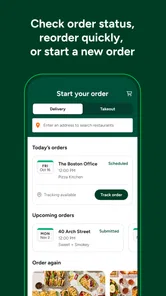
- Order tracking helps monitor delivery progress and timing.
- Receipts and order history simplify workplace expense management.
Cons
- Availability and restaurant choices vary significantly by city.
- Delivery and service fees can increase the total order cost.
- Minimum order requirements may not suit small teams.
- Menu details and allergen information depend on each caterer.
- Late changes or cancellations may have limited flexibility.











