

EZArrival: K12 Transportation
- 5.00
- 4.8
- Installs
- 10.00K
- Price
- Free
Screenshots
Analysis by Reviewed
Managing school transportation can become surprisingly stressful when the information is spread across messages, school notices, and last-minute conversations at home. EZArrival: K12 Transportation takes a focused approach to that problem: it is an education app from Pathwise designed to help families manage a child’s school transportation in one place. I found the idea useful because transportation is not usually something parents want to “explore”; they want it to be clear, dependable, and quick to check.
The app is free, rated for Everyone, and currently sits at a 4.9 average from over 200 ratings. It has passed 10,000 installs, which gives it a modest but meaningful user base for a specialized school-transport tool. My overall impression is that its value depends less on entertainment or a long list of extras and more on whether your child’s school or transportation arrangement is supported properly. When that connection is in place, a dedicated app can be easier than searching through old emails. When it is not, even a well-designed app cannot replace the school’s own transportation office.
Where families are most likely to get stuck
The first source of friction is usually not the screen itself. It is the relationship between the family, the school, and the transportation information behind the app. A parent may install EZArrival expecting to see everything immediately, but school transportation details often depend on an account, a child profile, or information already associated with the school’s system. If the expected information does not appear, repeatedly closing and reopening the app is unlikely to solve the real issue.
I would begin by treating the first launch as a setup task rather than a quick browse. Have the child’s school information available, use the same contact details that the school has on file, and read each prompt carefully instead of rushing through it. Small differences in spelling, an old email address, or using a personal account when the school expects another one can create confusion that looks like an app failure.
Another common sticking point is assuming that the app controls the transportation service. It does not make a bus appear, alter a school’s assignment, or independently correct a schedule. Its role is to help manage the information supplied through the school transportation arrangement. That distinction matters when a route, pickup detail, or student record looks wrong. The right next step may be contacting the school rather than trying more settings inside the app.
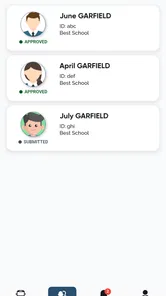
I also recommend checking whether you are looking at the correct child if your household has more than one student. A transportation app can feel unreliable when the underlying profile is simply not the one you intended to view. Before reporting a missing detail, confirm the selected student and review the basic account context. This is a small habit, but it prevents a lot of unnecessary troubleshooting.
There is a practical emotional issue here too. Parents often open a transportation app when they are already late, trying to get a child ready, or responding to a change in plans. In that situation, a vague message or an empty-looking page feels much worse than it would during a calm setup session. I suggest installing and checking the app before the first urgent morning. That gives you time to understand where the relevant transportation information appears and whether the account is ready.
More From Our News Desk

 Gmail
GmailGmail in a Busy Inbox: Who Benefits Most?
From first account to crowded workday, Gmail earns its place through dependable search and flexible sorting—but its best fit depends on how much inbox maintenance you can tolerate.

 Prime Video
Switching to Prime Video: What Changes in Your Viewing Routine
Prime Video can make a compelling second home for streaming, but switching means learning a different catalog, rental layer, and route from browsing to playback.

 Universal TV Remote Control
Universal TV Remote Control Works Best as a Reliable Backup
A phone remote earns its place through quick setup and reliable habits. Here is how to get more from Universal TV Remote Control—and where its limits show.

 Weather - By Xiaomi
Weather by Xiaomi Review: Clear at a Glance, Less Clear Up Close
Xiaomi’s weather app makes everyday forecasts quick to scan, but its calm surface can leave useful details and recovery paths harder to find than they should be.

 X
XX Under Pressure: Can It Recover When Posting Goes Wrong?
A resilience-focused review of X, examining setup, mistaken posts, interruptions, weak connections, and the gaps that matter when recovery needs to be dependable.

 Clash of Clans
Clash of Clans Is Won Between the Battles
Its raids are quick; its community is a long-term project of coordination, teaching, rivalry, and shared responsibility—with all the friction that entails.
Latest News



What to check before blaming the app
My first check would be the basics: confirm that the device is running a compatible version of the operating system, make sure the app is updated, and verify that the phone has a stable connection. EZArrival is currently at version 1.1.1 and supports Android 7.0 or later, so an older device may need attention before anything else. A poor connection can also make an account appear incomplete when the issue is simply that information has not loaded properly.
Next, I would close the app completely and open it again, then sign in carefully if the app asks for account access. This is ordinary troubleshooting, but it is worthwhile when a page has stopped responding or appears to show outdated information. I would avoid repeatedly creating new accounts. Multiple attempts can make it harder to tell which login contains the correct student information.
Notifications deserve a deliberate check as well. If you expect an important transportation update, do not assume that installing the app automatically means every alert will be visible. Review the device’s notification settings and the app’s own available settings, then consider whether the school’s system has your current contact information. The app can only present the information that reaches the account connected to your child’s transportation record.
Privacy is another reason to slow down during setup. School transportation involves a child’s routine, so I would use the official app source and avoid entering student information into lookalike applications. I would also keep the phone’s lock protection enabled and avoid sharing account credentials casually. These are sensible precautions for any education app, but they are especially important when the app relates to where a child travels.
A useful setup habit is to compare the app with the latest school communication once, rather than assuming one source is automatically correct. If the school recently changed a pickup arrangement, the app and a message from the school may not update at exactly the same time. That does not necessarily mean either source is broken. It means the family should confirm which information is current before making a time-sensitive decision.
Because the product is aimed at K-12 transportation, I see it as a family tool rather than something to hand over entirely to a young child. A parent or guardian should complete the initial checks, explain what the information means, and decide who in the household needs access. Older students may benefit from knowing where to look, but the adult should remain the person who verifies important changes.
Recovering when the normal workflow breaks
When the app does not show what I expect, I would use a simple recovery sequence. First, I would note exactly what is wrong: is the app unable to open, is the account inaccessible, is a student missing, or is transportation information outdated? Describing the problem precisely is more useful than reporting that “the app does not work.” Each situation points to a different source.
If the app will not open or keeps behaving strangely, I would restart the device, confirm the connection, and check for an available app update. I would be cautious about uninstalling immediately, especially if I had not confirmed that the account details were saved or understood how the app handles sign-in. Reinstalling can be a reasonable later step, but it should not be the first response to every loading problem.
If the account opens but the child’s transportation information is missing, I would check the selected profile and the account details used during setup. Then I would contact the school or transportation administrator with the child’s name, school, and a short description of what is missing. I would not send a long explanation or repeatedly submit the same request. A concise report makes it easier for the person responsible for the record to investigate.
If information looks old, I would compare it with the most recent school notice and record the difference. For example, note the date of the notice and the detail that does not match, rather than relying on memory during a rushed phone call. This turns the app into part of a clear checking process instead of the only source of truth.
One of the more useful habits is keeping a temporary backup routine during the first days of use. That could mean saving the school’s official contact information somewhere accessible and knowing the usual pickup plan without depending exclusively on the phone. I do not see that as a criticism of EZArrival; it is sensible preparation for any digital system connected to a child’s schedule. A transportation app should reduce uncertainty, but families still need a fallback when a device is unavailable or a record needs correction.
For households with several adults, agree on who will make changes or contact the school. Otherwise, one person may be waiting for an update while another has already called about the same issue. The app is more useful when it supports a shared routine: one adult checks the transportation information, another knows where to find it, and everyone understands that official changes may still come from the school.
There is also a difference between a temporary display problem and a genuine transportation change. A blank or delayed screen should not be treated as proof that a route has been canceled. Until the situation is confirmed, follow the school’s established communication process. This is one of the most important trade-offs with any digital convenience: quick access is helpful, but speed should not replace verification when a child’s travel plan is involved.
When the problem is outside EZArrival
It is easy to blame the app when a bus is late, a pickup point changes, or a child’s assignment is incorrect. In practice, those details may originate in the school or transportation provider’s records. EZArrival can be the place where a family notices the problem without being the place where the problem was created.
That is why I would separate three questions. Can the app open? Can I access the correct family or student information? Is the transportation information itself accurate and current? The first two are more likely to involve the device or account. The third may require the school to correct its records. Asking these questions in order avoids wasting time on phone settings when the real issue is an administrative update.
The same applies to a child who is not listed. Before assuming the app has lost the student, check whether the school has completed the transportation registration and whether the family used the correct details during setup. If the school has confirmed that everything is active, then the missing profile becomes a useful, specific support issue to report to Pathwise or the relevant school contact.
Families should also be realistic about what a specialized transportation app can replace. It may be more convenient than searching through paper notices, but it is not automatically a replacement for direct communication with the school. A school office may know about a sudden operational change before it appears in a digital account. For urgent situations, I would use the fastest official channel available and treat the app as a helpful reference rather than the sole authority.
This is where EZArrival compares favorably with scattered alternatives but not universally. A shared family calendar can remind everyone of a regular routine, yet it usually depends on someone entering and maintaining the information. Messages and email can preserve context, but important details become difficult to find. A dedicated education app is more focused, which is its main strength. The trade-off is that its usefulness depends on the school’s connection to the service and the accuracy of the underlying record.
I would skip it as a primary solution if your child’s school does not use it for transportation or if your household needs a broad school-management platform covering grades, homework, meals, attendance, and messaging. EZArrival is narrower by design. That focus is valuable for families who need transportation information, but it will feel limited to anyone expecting a complete school portal.
Who will get the most from this focused tool
I think EZArrival is best suited to parents who regularly need to check school transportation and want a dedicated place for that information. It can be particularly practical for households where several adults share morning responsibilities. Instead of relying on one person’s memory or searching old conversations, the family has a specific app to consult before leaving home.
Consider a realistic weekday scenario: one parent leaves early for work, another adult handles the school run, and a grandparent helps on certain days. A transportation-focused app can make the handoff clearer because the adults know where to check the child’s transportation details. The important benefit is not that the app eliminates every conversation; it is that the conversation can begin with the same reference point.
It may also help families who are new to a school district or adjusting to a changed routine. During that period, a parent is more likely to forget which notice contains the latest information. Having a dedicated tool can reduce the mental load, provided the account has been set up correctly and the school’s record is current.
Families who prefer paper, phone calls, or a single all-purpose school portal may not find enough reason to add another app. The free price removes a financial barrier, but it does not remove the cost of another login, another place to check, and another system to understand. I would install it when transportation is a recurring source of uncertainty, not simply because it is available.
The Everyone age rating makes it suitable for a broad household audience, but suitability is not the same as independence. Younger children should not be expected to manage transportation information on their own. An adult should interpret changes and confirm anything that affects where or when the child travels.
My practical verdict after looking at the whole experience
EZArrival: K12 Transportation is most convincing when used as a focused family checkpoint, not as a substitute for the school’s transportation office. I like that its purpose is clear and that it addresses a real daily problem rather than trying to become an oversized school platform. The free access also makes it easy for families to try without committing money, while Pathwise has kept the product centered on K-12 transportation.
My recommendation is to set it up during a calm moment, confirm the correct student information, review notification behavior, and test your family’s routine before relying on it during a rushed morning. Keep the school’s official contact path available, especially during the initial period or whenever transportation changes are expected. Those steps do more to create a dependable experience than repeatedly reinstalling the app.
The rating of 4.9 from over 200 ratings suggests that the app is landing well with the users who have chosen to rate it, and the install count shows that it is already being used beyond a tiny test group. Still, I would judge it by fit rather than popularity. If your school’s transportation workflow is connected and your main need is quick access to child travel information, it is an appealing choice. If you need a complete school-management system or your school does not rely on this service, another channel will serve you better.
With its current version, 1.1.1, EZArrival feels like a practical app to keep available for families who need it, especially when several adults share responsibility for getting a child to school. I would recommend it to a friend with one condition: install it early, verify the account before an urgent day, and remember that accurate transportation information begins with the school record. Used that way, it can remove a layer of everyday searching without promising more than a transportation app can realistically deliver.
EZArrival: K12 Transportation Frequently Asked Questions
Who can use EZArrival: K12 Transportation?
EZArrival: K12 Transportation is an education app for families managing K–12 school transportation. It is developed by Pathwise and is rated for Everyone. Whether a parent or guardian can use its transportation tools depends on the school or district’s setup, so it is worth checking that your child’s school supports the app before downloading it.
What is EZArrival: K12 Transportation used for?
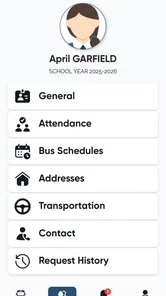
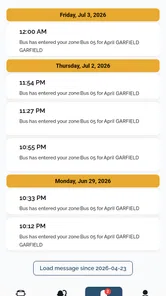
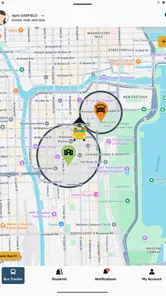
EZArrival: K12 Transportation is designed to help schools, districts, parents, and guardians manage student transportation information. Depending on the school’s setup, families may be able to view bus routes, assigned stops, pickup and drop-off details, arrival updates, and transportation notifications. The exact features can vary by district, so access may depend on whether the student’s school or transportation provider supports the app.
How do I sign in to EZArrival: K12 Transportation?
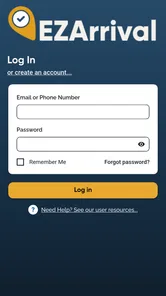
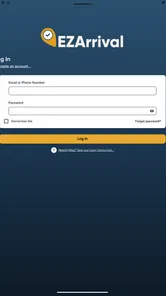
To use the app, you generally need an account or access credentials provided through your child’s school district or transportation department. After installing EZArrival, enter the requested login information and follow any verification instructions. If you cannot sign in, your details are rejected, or your student is not listed, contact the school or district transportation office rather than creating multiple accounts or entering inaccurate information.
Can parents track a school bus in real time with EZArrival?
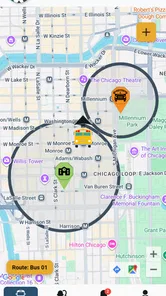
EZArrival may provide transportation status, bus location, or arrival information when those services are enabled by the participating school district. However, real-time tracking is not guaranteed for every user, route, or school. Updates can be affected by GPS availability, network connectivity, driver equipment, route changes, and district policies. Always treat the app as a helpful notification tool, not a replacement for normal school transportation procedures.
Why can’t I see my child’s route or transportation information?
Missing route details can happen if the district has not finished assigning transportation, the student’s information does not match school records, the account is linked to the wrong guardian profile, or the school has not activated the relevant feature. First, check that the app is updated and that you are using the correct credentials. If the problem continues, contact the school transportation office because support may need to correct the student’s records.
Pros
- Real-time bus tracking helps families plan pickups and drop-offs.
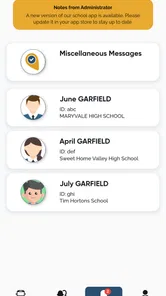
- Push notifications can alert parents about delays or route changes.
- Supports safer student handoffs with approved pickup information.
- Useful for checking transportation details from a mobile device.
- Simple interface makes essential route information easy to find.
Cons
- Availability depends on the school district supporting EZArrival.
- Location updates may be delayed by weak signal or GPS issues.
- Parents may need school-provided login credentials to access features.
- Notification settings can require manual adjustment on each device.
- Some features may vary depending on district configuration and policies.











