ETM: AI Art Generator
- 814.00
- 4.0
- Installs
- 1.00M
- Price
- Free

Screenshots
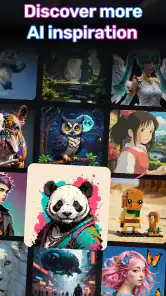
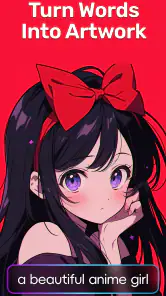
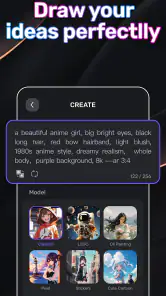
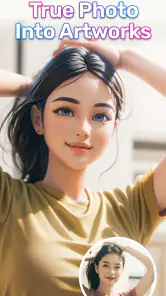
Analysis by Reviewed
When I want a quick visual for a group chat, a personal project, or a post that needs a little personality, I don’t always want to open a full photo editor and build everything by hand. That’s the kind of starting point where ETM: AI Art Generator makes sense: it turns a written idea into an image, and it also includes face-swap tools. I’d treat it as a playful creative app, not a replacement for a camera or a professional editing workflow.
Choosing the right starting point
The app is most useful when I have a visual idea but no photograph that fits it. A friend’s birthday, a themed group-chat image, or a quick illustration for a personal project are all good starting points. Before opening the generator, I decide what the image needs to do: make someone laugh, set a mood, or provide a rough visual direction. That small decision makes the prompt easier to write and helps me judge the result on the right terms.
I would not begin with a request that depends on exact wording inside the image, a carefully arranged product shot, or a recognizable likeness. Those jobs reward control and consistency, while generation is better approached as a source of possibilities. If the goal is simply to capture a real moment, my phone camera is the more direct choice; if I already have a photo and want to adjust it, a conventional editor is usually the better starting place.
From a rough idea to a first image
My most useful approach is to begin with one clear subject and one setting rather than a long paragraph of instructions. For example, for a birthday message I might picture a friend’s favorite animal in a fanciful scene, then add a mood or visual direction. Keeping the request focused makes it easier to judge whether the result is close and decide what to change next.
That simple workflow suits people who want to explore visual ideas without learning layers, brushes, or complicated editing controls. I’d use it to make a playful invitation image, test a mood for a small personal project, or create a conversation starter for friends. If I needed exact brand colors, a precise layout, or a faithful product image, I’d choose a conventional design or photo-editing app instead; generated imagery is better for imagination than strict accuracy.
ETM is a free photography app from ArtVibe Lab, with optional in-app purchases ranging from $2.99 to $79.99 per item. It has a 4.0 average from around 14,000 ratings, and more than a million installs. It is rated Mature 17+, so I’d check that age guidance before recommending it to a younger user. The current version is 1.06.52, and it supports Android 6.0 and later.
A Brush of Innovation
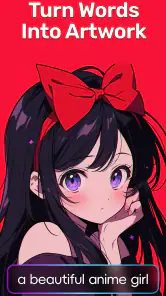
When I first downloaded ETM: AI Art Generator, I was curious but skeptical. Could an app really create art that resonates on an emotional level? The answer, my friends, is a resounding yes! This app uses cutting-edge AI technology to transform simple concepts into breathtaking visuals. All you need to do is input a few keywords or a brief description, and voila, the magic happens!
More From Our News Desk

Weather by Xiaomi Review: Clear at a Glance, Less Clear Up Close

X Under Pressure: Can It Recover When Posting Goes Wrong?

Clash of Clans Is Won Between the Battles

Android Auto Makes the Case for Quieter Car Software

MobiOffice: Transforming Mobile Productivity with Seamless Integration

EA SPORTS FC™ Mobile Soccer: Redefining Mobile Sports Gaming
Getting Started
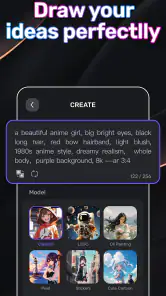
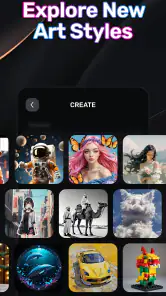
Diving into the app is as easy as pie. Once you open it, you’re greeted with a sleek and intuitive interface that guides you through the process effortlessly. I was particularly impressed with the variety of styles available. Whether you’re into abstract, surreal, or realistic art, there’s something here to tickle your fancy.
To get started, you simply type in your idea. Maybe you want a portrait of a cat riding a bicycle, or a serene landscape with rolling hills and a vibrant sunset. Whatever your heart desires, just type it, and watch the app do its thing. The AI processes your input and, within moments, presents you with a digital masterpiece.
Making prompts easier to judge
For a more useful first pass, I think in layers: subject first, setting second, and mood last. “A small dog” gives the generator room to interpret; adding “in a rainy city street, playful mood” gives me a clearer direction without burying the central idea. If the result is nearly right, I change just one layer on the next attempt. That makes the outcome easier to compare and prevents a prompt from becoming a jumble of competing instructions.
I also decide what I am willing to accept before generating. For a joke image, a surprising detail can be part of the charm. For an invitation, I may want the subject and atmosphere to feel consistent across several tries. The more a project depends on a repeatable look, the more time I would allow for selection and finishing in another tool instead of expecting each generated result to match perfectly.
The Art of Customization
One of the standout features of ETM: AI Art Generator is the level of customization it offers. Not satisfied with the initial output? No worries! The app lets you tweak various elements like color schemes, textures, and even artistic style. This means you can play around until the art perfectly matches your vision.
I spent hours experimenting with different combinations, and it was genuinely amazing to see how each subtle change could alter the overall feel of the artwork. It's like you’re collaborating with the AI, and together, you're crafting something uniquely yours.
Knowing when to stop refining
A useful trade-off is deciding whether another adjustment is likely to improve the image or simply produce a different one. If the subject reads clearly and the mood is right, I would save a version before experimenting further. Keeping that preferred result aside gives me a fallback if later variations drift away from the original idea. It is a simple way to avoid losing the option that already works while still exploring.
For a casual image, I would not chase tiny details indefinitely. Generated art can feel polished at a glance while still handling a small element differently from what I imagined. If that detail is essential—for example, a particular object must be unmistakable—I would either make the prompt simpler or move to a manual editor where I can place and adjust it directly. The app is more rewarding when I treat each pass as a creative interpretation, not a precise command.
Sharing Your Creations
Once you’ve crafted your masterpiece, the app makes it a breeze to share your art with the world. Whether you want to post it on social media, send it to friends, or even print it for your living room wall, the options are endless. The high-resolution outputs ensure that your art looks professional, no matter the medium.
As someone who loves sharing creative works, I found this feature incredibly rewarding. Seeing friends and family marvel at what I "created" was a joy and a testament to the app’s capabilities.
Making the handoff useful
For a practical result, I’d generate the image first, then decide where it will go before spending time refining it. A square crop for a profile post, for instance, has different needs from an image meant to sit inside a printed card. I would check the saved result at its intended size and, if text or a precise border matters, finish that part in a dedicated editor. This split keeps ETM focused on the imaginative image while leaving exact typography and layout to tools designed for them.
A realistic everyday workflow might be making a birthday image during a lunch break: I’d choose a simple visual joke, generate a few directions, and send the strongest candidate to the group chat. If the image needs the person’s name or a clear date, I’d add that afterward in a layout app rather than trying to make the generator handle the lettering. That extra handoff is not a failure; it is often the fastest route to something that is both fun and usable.
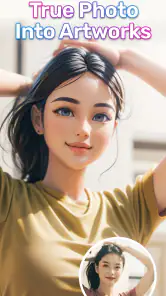
The face-swap side suggests a different kind of use: a lighthearted edit to share privately with friends. I’d get consent before using another person’s face, and I’d make the result clearly playful if it could be mistaken for a real photograph. That small bit of judgment matters more than the novelty of the effect, especially when an image may travel beyond the original chat.
Where expectations need adjusting
AI artwork is an interpretation, not a promise that every requested detail will appear exactly as imagined. When a result misses the point, I’d simplify the prompt and change one element at a time rather than rewriting everything at once. That makes it easier to tell whether the subject, setting, or mood caused the mismatch, and it avoids treating every imperfect first image as a reason to give up.
Compared with ordinary filters, which mainly alter a photo already in hand, this app is more suited to inventing a scene from words and trying different creative directions. Compared with a full editing suite, it asks less of the user at the start but gives less control over precise composition. I’d pick it for an idea-led image; I’d pick a standard camera app for capturing a real moment and a manual editor when careful retouching or exact placement is the priority.
When another tool is the better choice
For a small business post that has to follow strict brand rules, I would build the design in a template or graphics editor and use generated art only as a rough source of inspiration. The same goes for a product listing, where shape, color, and details need to represent the real item. A generated image can suggest a background or visual theme, but relying on it for factual accuracy risks giving viewers the wrong impression.
I would also skip this style of app if I mainly want to organize and improve my own camera photos. A photo editor starts with the image I actually took and lets me work on that material; ETM’s appeal is the leap from a written concept to an imagined scene, plus its face-swap option. Those are different jobs, so the better choice depends less on which app has more tools and more on whether I am creating from scratch or revising something real.
Who will enjoy the workflow
I think it’s a good fit for curious beginners, casual creators, and anyone who wants to turn a passing idea into something visual without first learning traditional art software. A realistic everyday use would be making a whimsical image for a friend’s birthday, sharing a few versions in a group chat, then choosing the one that best suits the joke or the person. It’s less suitable for people who need predictable, repeatable commercial assets, or who would rather edit their own photographs than generate new scenes.
The Mature 17+ age guidance is also worth taking seriously when deciding who should use it. I would not hand it to a younger family member without checking that rating and considering whether the app is appropriate for them. For adults who enjoy playful visual experiments, the low barrier to trying an idea is the main draw; for someone who wants a carefully guided drawing lesson or a dependable work tool, I would look elsewhere.
Because the app is free to start while offering paid items, I’d explore the basic experience before deciding whether any purchase is worthwhile. If a payment prompt appears during a session, I’d pause to check what it covers rather than assume every tool or output is included at no cost. That is a sensible habit for any app with optional purchases, and it helps keep an enjoyable experiment within the budget I intended.
What I would check before committing to a project
A practical question is whether the image will remain a casual share or become part of something people rely on. For a private joke or mood board, a result that is charming but imperfect may be more than enough. For a poster, a client deliverable, or a repeated campaign visual, I would first test whether the style and composition can be made consistent enough for the job, then finish the layout in a tool built for that purpose.
I would also consider the handoff before spending time generating variations. If the destination is a social post, I can keep the image simple and add any caption in the social app. If it is a card or invitation, I would leave room for readable text and check the finished design on the screen where it will be viewed. Thinking about the end format early helps me avoid polishing an image that later needs a different crop or a more suitable composition.
A playful tool with a clear lane
In conclusion, if you're looking for a way to unleash your inner artist without the mess and stress of traditional methods, ETM: AI Art Generator is your go-to app. It's fun, easy to use, and above all, it brings art to everyone, regardless of skill level. So go ahead, give it a try, and let your imagination run wild!
My recommendation is more measured: I’d try it when I want an invented image, a quick creative detour, or a lighthearted face-swap experiment, while keeping expectations realistic about exact details and finishing work. Its free entry point makes it easy to explore, but optional purchases mean I would check any prompt before spending. If that balance suits you, it can be a pleasant way to turn a passing thought into something shareable; if precision is the whole point, a conventional editor will save frustration.
ETM: AI Art Generator Frequently Asked Questions
Is ETM: AI Art Generator free to download?
ETM: AI Art Generator is free to download, so you can try its AI image-generation and face-swap focus without paying upfront. It also offers in-app purchases, with listed prices ranging from $2.99 to $79.99 per item. Check the purchase options in the app before confirming a transaction, especially if you plan to let someone else use it.
Who develops ETM: AI Art Generator?
ETM: AI Art Generator is developed by ArtVibe Lab and is listed in the photography category. That context may help if you are comparing creative apps before installing. Its stated focus is AI image generation and face swapping, so it is best suited to people interested in experimenting with or transforming images rather than using a general-purpose photo library or camera app.
Is ETM: AI Art Generator suitable for all ages?
ETM: AI Art Generator is intended for mature users aged 17 and older. Its age rating is an important consideration for families deciding whether it is appropriate for a particular user. Before installing, check that the rating aligns with the intended user and any household rules around apps that generate images.
What can I create with ETM: AI Art Generator?
ETM: AI Art Generator is a photography app described as an AI image generator and face swap tool. It is aimed at people interested in creating or transforming images with AI. If you are looking for a creative app to experiment with visual ideas, those core functions give you a sense of the experience to expect.
What is ETM: AI Art Generator and how does it work?
ETM: AI Art Generator is an innovative application that uses artificial intelligence to create unique pieces of art. The app allows users to input their own ideas or themes, which the AI then processes to generate original artworks. It leverages advanced machine learning algorithms to understand styles and artistic elements, delivering results that are both surprising and inspiring.
Pros
- High-quality AI-generated images
- User-friendly interface design
- Wide range of art styles
- Fast image rendering process
- No technical skills required
Cons
- Limited free features available
- Requires constant internet connection
- Occasional app crashes reported
- Premium subscription can be costly
- Limited editing options for images
- Category
- Photography
- Version
- 1.06.52











