ESV Bible
- 4.06K
- 4.7
- Installs
- 1.00M
- Price
- Free

Screenshots


Analysis by Reviewed
I reach for the ESV Bible when I want to keep Bible reading close to ordinary parts of the day, rather than treating it as something that only happens at a desk. Its most useful idea is the combination of the English Standard Version text with ways to listen, follow a plan, and return to passages I have marked. That makes it more than a screen full of chapters: it can support a short daily habit, a longer study session, or a quick reference when a conversation turns to a particular verse.
Why listening changes the routine
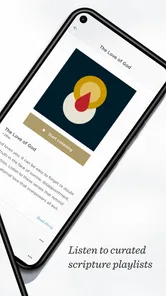
Audio is the capability I find most consequential here. Reading requires both hands and sustained visual attention; listening can fit around a walk, a commute, or a quiet household task. I would not use it as a substitute for looking closely at a difficult passage, but it is a practical way to stay with a reading plan when sitting down with a phone is inconvenient. Switching between listening and reading also gives me a useful rhythm: hear a passage first, then look at a few lines that deserve more attention.
The app is free to download, with in-app purchases listed from $3.99 to $39.99 per item. That distinction matters if you are comparing it with a basic Bible reader: you can begin without paying, but some available content may involve a purchase. I would check what an item includes before buying, especially if all I want is the scripture text and a simple reading routine.
Reading, listening, and studying in practice
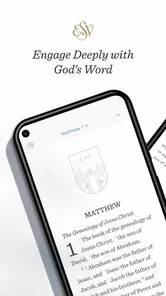
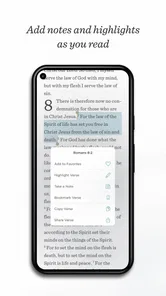
When I open the app, I can move between books and chapters without much fuss. That is handy during a Bible study or sermon, when the useful thing is reaching a passage quickly rather than managing a complicated interface. I also like that I can mark verses as I go. A highlight is a small tool, but it turns a later return visit into a search through my own reading rather than a fresh hunt through the whole book.
A manageable everyday workflow
A realistic routine might be to choose a reading plan for a regular morning slot, listen while getting ready, and then read a short section on screen when a phrase catches my attention. I would highlight only verses I have a reason to revisit, such as a passage connected to a question or a theme I am following. That restraint makes saved marks more useful over time; highlighting nearly everything quickly removes the distinction between an important note and a passing impression.
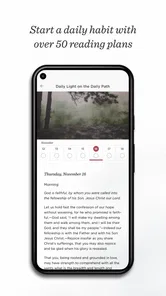
Plans and devotionals give readers a starting structure, which can help when deciding what to read feels harder than reading itself. They suit someone who wants a sequence to follow, though a plan is not automatically the best choice for every study goal. If I am preparing for a specific discussion, I would rather go directly to the relevant book and passage than force that task into a daily-plan format.
Where it fits among Bible apps
Compared with a minimal reader that focuses on displaying text, this app puts more emphasis on listening and guided reading. That makes it a stronger fit for someone who wants a routine with audio and plans built into the same place. On the other hand, readers who mainly want a different Bible translation, extensive reference material, or a highly customized study setup may prefer an alternative designed around those needs. The choice is not simply “more features” versus “fewer”: it is whether the ESV text and this combination of tools match how you actually read.
More From Our News Desk

Weather by Xiaomi Review: Clear at a Glance, Less Clear Up Close

X Under Pressure: Can It Recover When Posting Goes Wrong?

Clash of Clans Is Won Between the Battles

Android Auto Makes the Case for Quieter Car Software

MobiOffice: Transforming Mobile Productivity with Seamless Integration

EA SPORTS FC™ Mobile Soccer: Redefining Mobile Sports Gaming
Sharing a verse can make it easier to bring a passage into a message or group conversation. I would still add context when sharing a line on its own, since a short excerpt can be misunderstood without the surrounding passage. Font adjustments are another practical benefit, particularly for longer reading sessions; I would set a comfortable size before starting a plan instead of repeatedly changing it mid-session.
Who will get the most from it
This is a good choice for readers who already like the English Standard Version, want audio as part of their routine, or benefit from a plan that gives each day a clear next step. Crossway develops the app, and its focus on the ESV makes the experience more specific than a general-purpose library of translations. It is also approachable for a newcomer who wants to start with one translation and a few simple ways to keep reading.
I would be less likely to recommend it to someone who needs a particular translation that is not the ESV, or who expects a specialist study environment with tools beyond reading, listening, highlights, and plans. It is also worth deciding whether listening genuinely suits your setting: in a noisy commute, audio may be less useful than a quiet screen, while reading may not be convenient when you are driving or occupied. In those cases, the app’s flexibility helps, but it cannot remove the limits of the environment.
First impressions and usability
Upon launching the ESV Bible app, the first thing that caught my attention was its clean and intuitive interface. It's designed with simplicity in mind, making it accessible for users of all ages. The navigation is straightforward, allowing you to easily jump from one book or chapter to another. This is particularly handy when you're in the middle of a sermon or a Bible study group and need to reference different passages quickly.
Features that enhance your reading experience
One of the standout features of this app is the ability to listen to audio versions of the Bible. This is perfect for those who prefer to absorb the scriptures through listening, whether during a morning commute or while relaxing at home. Another feature worth mentioning is the highlighting tool. It's incredibly useful for marking significant verses, making it easier to revisit them later.
Additionally, the app offers a variety of reading plans and devotionals. These are great for users who want to incorporate a structured reading habit into their daily routine. The plans range from thematic studies to chronological readings, catering to different preferences and study goals.
Integration and accessibility
The ESV Bible app integrates seamlessly with other tools and platforms. You can easily share verses with friends via social media or messaging apps, which facilitates community discussions and spiritual growth. The app also allows you to sync your progress across multiple devices, ensuring that your notes and highlights are always up-to-date, no matter where you are accessing the app.
For those concerned about accessibility, the app provides options to adjust font size and style, which is a thoughtful addition for users with visual impairments. This ensures that everyone can enjoy the scriptures comfortably, without straining their eyes.
What to know before settling into a routine
The practical question is not just whether audio is available, but whether it will help you pay attention. I find listening most useful for familiar passages or for hearing the shape of a chapter before reading it closely. When a passage contains names, a complex argument, or details I want to compare, I pause the audio and use the text instead. Treating listening as an entry point, rather than expecting it to replace close reading, makes the feature more valuable and avoids the feeling that a chapter has simply played in the background.
For an ordinary weekday, I might listen to a planned section while making breakfast, then return to one verse during a quiet break and mark it with the question I want to consider later. That workflow gives the app a role at two different levels: audio helps me keep moving through a reading sequence, while the text and highlights support slower attention. It is a better fit for interrupted schedules than a routine that depends on finding one uninterrupted block of time.
There is also a useful distinction between following a plan and using a plan as a prompt. If a day gets busy, I would rather resume with the next reading than spend time trying to catch up on every missed section. A plan can make the next step obvious, but it should not turn reading into a backlog. For someone who prefers to choose a passage based on a current question, browsing directly to a book may feel more natural than following a prescribed sequence.
Choosing it over a general Bible library
Many Bible apps try to serve as broad libraries, with multiple translations and layers of reference material. This one makes more sense if the English Standard Version is already the text you want and you value a fairly direct route from reading to listening. That focus can be a benefit: there is less need to decide among translations every time you open it. It can also be a constraint for a household or study group that regularly compares wording across several versions. In that situation, a multi-translation app may be the more practical companion, even if its reading experience feels less centered on one text.
Likewise, someone doing detailed word study or building a heavily cross-referenced lesson should compare the available tools with the requirements of that work before relying on this as a sole study resource. The app is useful for reading, listening, and keeping track of selected verses, but those jobs are not the same as a specialist research workflow. I would use it for regular reading and bring in a reference work when the question calls for deeper comparison, rather than expecting one phone app to handle every kind of study equally well.
Small choices that make saved passages useful
One low-effort habit is to keep highlights selective and consistent. I might mark a verse because it raises a question, offers a theme to revisit, or connects with a group discussion, rather than using the same mark for every line I enjoy. When I return later, that gives each saved passage a reason to be there. If I am reading with a group, I can also note the surrounding chapter before sharing a verse, so the conversation starts with context instead of treating a single sentence as the whole point.
Before starting a longer session, I would set the text to a comfortable size and choose a quiet place for reading or a suitable moment for audio. These small preparations matter more than they sound: changing settings repeatedly can interrupt concentration, and playing audio in a distracting environment may leave me with little more than a vague memory of the chapter. The app offers flexibility, but the quality of the session still depends on matching the format to the moment.
A straightforward starting point for new readers
For a newcomer, the hardest part may be deciding where to begin rather than learning how to navigate. A reading plan can reduce that uncertainty by offering a next step, while audio provides another way to approach the text when a long reading session feels daunting. I would start with a pace that fits the week and use the app’s chapter navigation whenever a reading raises a question. There is no need to turn the first week into a test of discipline; a small repeatable routine is more useful than an ambitious plan that quickly becomes a chore.
The app is rated for Everyone, and it is free to download, so it is easy to try as a general reading tool. Its average rating is 4.5 from around 19,000 ratings, with roughly 4,000 written reviews, and it has passed one million installs. Those figures suggest a well-established audience, but they are not a substitute for checking whether the translation and audio-centered approach suit you. It was released in late 2010, and version 5.2.8 requires Android 8.0 or later; I would check compatibility before setting up a new routine on an older device.
Final thoughts
In conclusion, the ESV Bible app is more than just a digital version of the holy book. It's a comprehensive tool that enriches the spiritual journey of its users. Whether you're a seasoned Bible reader or a newcomer, this app offers features that cater to a wide range of needs. From its user-friendly design to its robust audio and reading plan options, the ESV Bible app is a must-have for anyone looking to deepen their understanding of the scriptures.
So, if you're on the lookout for a reliable, feature-rich Bible app, why not give the ESV Bible a try? It's available for both Android and iOS, ready to accompany you on your spiritual journey.
ESV Bible Frequently Asked Questions
Is the ESV Bible app suitable for someone who wants a guided daily reading routine?
Yes. The app includes reading plans, which can help turn Bible reading into a more structured routine rather than leaving you to choose passages each time. You can use those plans for personal reading or reflection, and the app also offers study tools and streaming audio for a different way to engage with the text. The ESV Bible app is free to download, with optional in-app purchases.
Can I listen to the Bible in the ESV Bible app, and does audio work offline?
The app offers streaming audio, so you can listen to scripture as an alternative to reading on screen. Streaming audio requires an internet connection while it plays. The app also provides offline access to the scriptures for reading, but audio availability and connectivity needs may differ from text access. If you expect to listen while away from an internet connection, plan ahead and check what audio options are available in the app.
Who publishes the ESV Bible app, and what kind of app is it?
The ESV Bible app is published by Crossway and belongs to the Books & Reference category. It is designed for people who want to read the English Standard Version on a mobile device, with tools for exploring scripture beyond simply opening a digital text. Its reading plans, audio, and study features make it suitable for personal reading, reflection, or a more structured routine.
What devices can run the ESV Bible app?
The ESV Bible app supports devices running Android 8.0 or later. Before downloading, check your device’s operating system version to make sure it meets that requirement. If it does, you can use the app for reading and exploring the Bible on your phone or tablet, with access to features such as reading plans, streaming audio, and study tools.
What is the ESV Bible app and what features does it offer?
The ESV Bible app is a digital version of the English Standard Version Bible, providing users with a seamless experience of reading, studying, and understanding scripture. The app contains features like offline access, audio Bible support, cross-references, and personal note-taking. Additionally, users can access daily reading plans, share verses on social media, and utilize a built-in search function to find specific passages quickly.
Pros
- Comprehensive Bible translation.
- Easy navigation between verses.
- Offline access available.
- Customizable reading plans.
- Audio versions included.
Cons
- Limited language options.
- Occasional app crashes.
- Ads in free version.
- Requires internet for updates.
- Some features are paid.











