

English to Spanish Translator
- 42.00
- 4.3
- Installs
- 50.00K
- Price
- Free
Screenshots
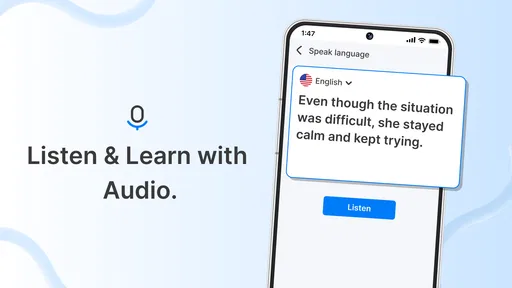
Analysis by Reviewed
I would also decide what I need before opening a translator. If I only want to check a familiar phrase, a quick text lookup is often enough; if I need to write something personal, I should slow down and consider how much context the translation actually needs. That distinction helps me keep a handy tool from becoming an automatic place to paste every message.
For a learner, there is a useful middle ground between copying a result and rejecting it outright: compare the translated sentence with the original, identify the words that carry the main meaning, and then try to say the idea another way. That small exercise can expose where I am relying on the app rather than understanding the Spanish. It is a practical habit, not a feature I assume the app itself provides.
English to Spanish Translator is a straightforward name for a focused job: helping me move between English and Spanish when a phrase or sentence is easier to translate than to work out from memory. I see its value in quick, ordinary moments—checking how to phrase a message, making sense of a short note, or finding a starting point before speaking. It is an education app from Let’s Roll Apps, and its appeal is practical rather than ambitious: it is meant to sit close at hand when language gets in the way.
My cautious view starts with an important distinction: a translation result can be useful without being authoritative. I would treat this app as a convenient aid for everyday comprehension and drafting, not as a substitute for a fluent speaker, a qualified interpreter, or careful review of anything consequential. That approach makes the tool more trustworthy in practice, because it keeps the decision about when to rely on a translation with me.
What I would trust it with—and what I would check
I would judge this translator by the choices it lets me make, not by assumptions about how it handles information behind the scenes. In this section, I’d focus on what to check on your own device before using it, then consider how to keep translation useful without making it a default destination for private text. A little care before typing can make an everyday tool easier to use with confidence.
A handy bridge for everyday Spanish
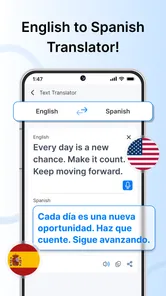
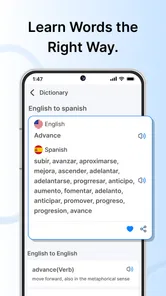
The app’s central purpose is clear: it supports translation in both directions, English to Spanish and Spanish to English. That two-way focus is useful when I am not only composing a phrase but also trying to understand a reply. Instead of treating translation as a one-off lookup, I can use the same tool to check both sides of a short exchange and notice whether the meaning still makes sense.
For a realistic everyday example, imagine I am arranging a meeting with a Spanish-speaking neighbor. I can draft a short message in English, get a Spanish version, then translate the reply back to English to understand the basic plan. I would still double-check names, times, addresses, and anything that could cause a real mix-up. The useful workflow is not “translate and trust blindly”; it is “translate, compare, and ask when the stakes matter.”
More From Our News Desk

 Gmail
GmailGmail in a Busy Inbox: Who Benefits Most?
From first account to crowded workday, Gmail earns its place through dependable search and flexible sorting—but its best fit depends on how much inbox maintenance you can tolerate.

 Prime Video
Switching to Prime Video: What Changes in Your Viewing Routine
Prime Video can make a compelling second home for streaming, but switching means learning a different catalog, rental layer, and route from browsing to playback.

 Universal TV Remote Control
Universal TV Remote Control Works Best as a Reliable Backup
A phone remote earns its place through quick setup and reliable habits. Here is how to get more from Universal TV Remote Control—and where its limits show.

 Weather - By Xiaomi
Weather by Xiaomi Review: Clear at a Glance, Less Clear Up Close
Xiaomi’s weather app makes everyday forecasts quick to scan, but its calm surface can leave useful details and recovery paths harder to find than they should be.

 X
XX Under Pressure: Can It Recover When Posting Goes Wrong?
A resilience-focused review of X, examining setup, mistaken posts, interruptions, weak connections, and the gaps that matter when recovery needs to be dependable.

 Clash of Clans
Clash of Clans Is Won Between the Battles
Its raids are quick; its community is a long-term project of coordination, teaching, rivalry, and shared responsibility—with all the friction that entails.
Latest News



That makes English to Spanish Translator most appealing to casual learners, travelers dealing with simple exchanges, and people who occasionally need to understand or compose a short phrase. It is less suited to someone who needs nuanced editing, a structured language course, or dependable interpretation for legal, medical, financial, or emergency situations. A general translator can help with the first draft, but context and consequences still matter.
The app is free to install, with in-app purchases listed from $10.99 to $54.99 per item. I would check the purchase screen carefully before confirming anything, especially if I only want occasional translations. The free starting point lowers the barrier to trying it, while the range of paid items means it is sensible to understand what an optional purchase offers before spending money.
Trust begins with what I can actually see
Translation often involves personal text. Even a simple sentence can include a private appointment, a family detail, or a work conversation. I would therefore be deliberate about what I type into any translation app, including this one. For casual, non-sensitive wording, the convenience may be worth it; for private or identifying material, I would pause and consider whether I need to enter the full message at all.
I would also look at the choices the app presents during setup and use: permissions, any account prompts, and the available privacy or data controls. Those are the places where a person can make an informed decision about access and use. I would not assume that a translator needs access to contacts, location, or other personal information just because it translates text; if a permission appears, I would ask whether it is necessary for the task I am doing before allowing it.
That is a practical trust check rather than an accusation. I cannot responsibly infer the app’s data handling from its translation purpose alone, and I would not treat a smooth result as proof of any particular privacy practice. My advice is simple: review the choices shown on your own device, grant only what you understand and want to grant, and avoid entering sensitive details unless you have checked the relevant privacy information.
One useful habit is to translate only the phrase needed. If I am asking where a station is, I do not need to paste an entire travel itinerary containing my hotel and dates. Keeping the input narrow reduces accidental exposure and also makes the output easier to inspect. This is a small workflow change, but it is more reliable than sending a long block of text and hoping the app preserves every detail correctly.
How to get more dependable results
Short, complete sentences are usually a better starting point than fragments packed with slang, jokes, or several ideas at once. I would translate one thought at a time, then read the result as if I were the recipient. If the Spanish version sounds unusually formal, vague, or confusing for the situation, I would simplify the English and try again rather than assume that a direct word-for-word rendering captures my intent.
A second useful check is to translate the result back into English. This does not prove that the original meaning is perfect, because a phrase can survive a round trip while still sounding unnatural. But it can reveal an obvious change in meaning—such as a request becoming a statement—or show that an important detail has disappeared. For a message that matters, I would use this as a warning check, then ask a bilingual person to review it.
Be especially careful with pronouns, politeness, and local expressions. Spanish varies across regions, and the right wording can depend on who is speaking, who is listening, and how formal the relationship is. I would not rely on a quick translator to settle those choices for a delicate apology, a workplace disagreement, or a message where tone carries as much weight as the literal meaning. In those cases, a tutor or fluent speaker is the better option.
For learning, I would use each translation as a prompt to investigate rather than an answer to memorize. I might note a useful phrase, compare the English and Spanish sentence order, and later try to produce the phrase without looking. That turns a quick lookup into a modest study moment. Still, anyone looking for lessons, grammar explanations, pronunciation practice, or a planned progression should choose a dedicated course or language-learning app instead; a translator’s core job is different.
Choices, audience, and practical limits
At the time of writing, the app is on version 1.23 and requires Android 6.0 or later. It is rated for Teen audiences. I would take that age label as a useful signal for families choosing apps, while still checking the content and purchase controls on the device used by a younger person. A free download can still include paid items, so it is worth discussing purchases before handing over a phone or tablet.
Its audience is established but not enormous: it has over 50,000 installs, an average rating of 4.3 from 126 ratings, and 42 written reviews. Those figures offer some context, but they are not a guarantee that a particular translation will be accurate or that the app fits a specific user’s privacy expectations. I would weigh them alongside the actual interface, the choices presented on my device, and whether the translations work for the phrases I need.
Compared with a built-in phone translation option, a focused translator app may feel convenient if I want a dedicated place to handle English and Spanish. Compared with a full language course, it is more immediate but teaches less by itself. And compared with a human translator, it is a lightweight helper, not a dependable solution for subtle or high-stakes communication. Those differences matter more than a broad claim that one tool is best for everyone.
If I were trying it for travel, I would prepare a few simple phrases in advance and keep the app for unexpected questions, rather than depending on it as my only communication plan. If I were using it for work, I would reserve it for low-risk drafts and ask a fluent colleague to review important wording. If I were learning Spanish, I would pair it with structured practice and treat each result as material to question, not a lesson that explains itself.
My measured recommendation
I would recommend English to Spanish Translator to someone who wants a focused, free-to-start way to check everyday wording in both languages and is comfortable reviewing the result. The developer is Let’s Roll Apps, and the app’s education angle fits best when quick translation supports a learner or helps with a simple real-world exchange. Its usefulness depends on the user staying involved: choosing what to enter, checking what comes back, and deciding when a human review is worth the effort.
I would skip it as a sole solution for confidential material, important agreements, medical instructions, or any conversation where a subtle mistake could have serious consequences. I would also choose a course app if my main goal were systematic progress, or a human translator when accuracy and tone are essential. Used with those boundaries, this is a practical option for small language hurdles—not a reason to hand over judgment or personal information without thought.
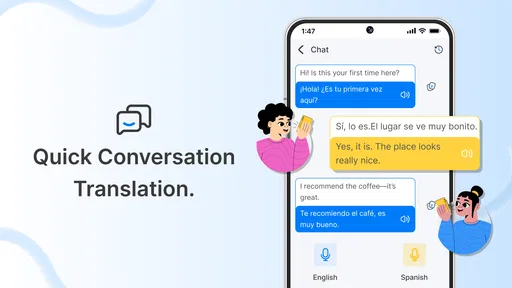
One question I would answer before relying on it is whether it suits the way I communicate. For a short typed question or a message draft, the two-way English–Spanish focus is a sensible fit. For a conversation that depends on quick back-and-forth, or for material that needs careful formatting and review, I would first check whether the app’s available workflow matches that task rather than assume every translator handles it equally well.
I would also keep a simple fallback ready when travelling: save essential addresses and key details somewhere accessible, and use plain wording when asking for help. A translation can bridge a language gap, but it should not be the only copy of information I need to get somewhere or explain an urgent need. That is less about distrust of this particular app than about having a sensible backup whenever communication matters.
For someone deciding whether to try it, my practical test would be a handful of low-stakes phrases they already understand. I would check whether the output preserves the intended meaning, whether the purchase prompts feel clear, and whether the permissions or account choices suit my comfort level. If those checks leave me uneasy, I would stop there; if they feel reasonable, it can earn a place as a modest everyday aid.
English to Spanish Translator Frequently Asked Questions
What can English to Spanish Translator do?
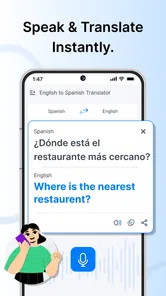
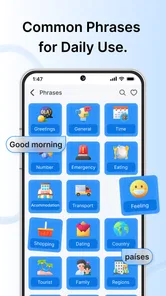
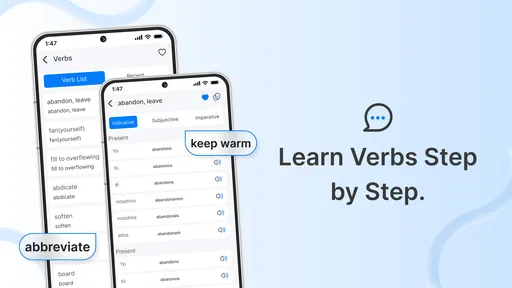
English to Spanish Translator is designed to help you translate words and phrases between English and Spanish. Depending on the version, it may also offer features such as voice input, spoken translations, text-to-speech, or saved translation history. Check the app listing for the exact tools included, since features can differ by developer, platform, and version. For important or nuanced writing, review the result carefully rather than relying on an automatic translation alone.
Can I use English to Spanish Translator without an internet connection?
Offline access depends on the specific app and whether it provides downloadable language packs. Some translator apps require an internet connection for every translation, while others support a limited set of offline features after languages are downloaded. Before traveling or using the app somewhere with poor connectivity, check its description and settings, and test offline mode in advance. Online translation may provide broader language coverage or more context-aware results.
Is English to Spanish Translator accurate enough for conversations and important documents?
The app can be useful for understanding everyday vocabulary, drafting simple messages, or getting the general meaning of a sentence. However, automatic translations may miss regional expressions, tone, context, or grammatical nuances, and Spanish usage varies across countries. For medical, legal, business, or other consequential documents, have a qualified person check the translation. If the app offers voice translation, speak clearly and verify that names and unfamiliar terms were recognized correctly.
Does English to Spanish Translator support voice translation and pronunciation?
Some versions of English-to-Spanish translator apps include speech recognition, audio playback, or both, but these options are not guaranteed in every app bearing a similar name. If voice features matter to you, confirm that they are listed for your device and language pair before installing. Microphone access may be required for speech input, and audio quality, background noise, accent, and network conditions can affect recognition and pronunciation results.
Is English to Spanish Translator free, and what permissions or privacy considerations should I check?
Pricing varies by app: a download may be free while some features are supported by ads, subscriptions, or in-app purchases. Read the store listing to see current costs and whether payment is needed for voice, offline use, or an ad-free experience. Also review the requested permissions and the developer’s privacy information. Translation text or voice recordings may be processed to provide results, so avoid entering sensitive personal information unless you understand how it is handled.
Pros
- Quick translations are useful for everyday words and short phrases.
- A simple interface makes the main translation tools easy to find.
- Spanish results can help with travel
- shopping
- and basic conversations.
- Useful for checking the meaning of unfamiliar English or Spanish text.
- Can support language practice by showing translations in both languages.
Cons
- Translations may miss context
- tone
- or regional Spanish usage.
- Long or complex sentences can produce awkward or inaccurate results.
- It should not be relied on for legal
- medical
- or other critical translations.
- Some features may require an internet connection.
- Pronunciation and speech recognition can struggle with accents or background noise.











