

Edulog Parent Portal
- 930.00
- 4.1
- Installs
- 100.00K
- Price
- Free

Screenshots
Analysis by Reviewed
Getting a child to school is one of those daily routines that feels simple until a bus is late, a pickup point changes, or you are trying to work out whether your child has actually started the journey home. Edulog Parent Portal is built for that narrow but important problem. I see it as an education app with a practical focus: it puts a family’s school transportation information in one place instead of leaving parents to rely on paper notices, scattered messages, or repeated calls.
After spending time with it, my impression is that the app is most useful when transportation is already organized through a participating school or district. It is not a general school-management platform, and it is not a replacement for speaking with the transportation office when something unusual happens. Its value comes from making the everyday bus routine easier to follow. The developer is Edulog, the app is free, and it is rated for Everyone, which makes its intended audience clear: parents and guardians who need a straightforward view of their child’s school transportation.
How Edulog Parent Portal feels during everyday use
The first thing I would tell a new user is to judge this app by the amount of uncertainty it removes, rather than by how many tools it appears to offer. The store summary describes having a child’s transportation at your fingertips, and that is the right way to understand the product. This is a focused companion for school bus information, not an app that tries to cover grades, assignments, attendance, messaging, and transport all at once.
That focused approach can make the experience feel lighter than using a full school portal. If your main question is whether the transportation details for the morning or afternoon are available, you do not have to navigate through unrelated academic sections. In my experience, that kind of narrow purpose is valuable for busy households. A parent checking information while preparing breakfast wants a quick answer, not another complicated dashboard.
At the same time, the app’s usefulness depends heavily on the information connected to the child’s school transportation service. The app cannot make an unavailable route appear, correct a school record by itself, or settle a last-minute dispute between a family and a transportation provider. I would treat it as a window into the transport arrangement, not as the authority that creates or changes that arrangement.
A realistic morning and afternoon routine
Imagine a parent who normally leaves home before the school bus arrives. In the morning, that parent can check the transportation information before getting ready, then look again before the child leaves. In the afternoon, the same app becomes a way to orient the pickup routine: the parent can review what is shown, decide whether to wait at the usual place, and avoid relying entirely on memory from an earlier school notice.
The important benefit is not that this eliminates every delay. It is that it gives the family a shared reference point. A second caregiver can check the same portal instead of asking the first caregiver to forward a screenshot or repeat details. That is one of the less obvious strengths of a dedicated transport app: it can reduce small communication gaps between adults who are both responsible for the same child.
More From Our News Desk

 Gmail
GmailGmail in a Busy Inbox: Who Benefits Most?
From first account to crowded workday, Gmail earns its place through dependable search and flexible sorting—but its best fit depends on how much inbox maintenance you can tolerate.

 Prime Video
Switching to Prime Video: What Changes in Your Viewing Routine
Prime Video can make a compelling second home for streaming, but switching means learning a different catalog, rental layer, and route from browsing to playback.

 Universal TV Remote Control
Universal TV Remote Control Works Best as a Reliable Backup
A phone remote earns its place through quick setup and reliable habits. Here is how to get more from Universal TV Remote Control—and where its limits show.

 Weather - By Xiaomi
Weather by Xiaomi Review: Clear at a Glance, Less Clear Up Close
Xiaomi’s weather app makes everyday forecasts quick to scan, but its calm surface can leave useful details and recovery paths harder to find than they should be.

 X
XX Under Pressure: Can It Recover When Posting Goes Wrong?
A resilience-focused review of X, examining setup, mistaken posts, interruptions, weak connections, and the gaps that matter when recovery needs to be dependable.

 Clash of Clans
Clash of Clans Is Won Between the Battles
Its raids are quick; its community is a long-term project of coordination, teaching, rivalry, and shared responsibility—with all the friction that entails.
Latest News



I also found that the app makes more sense when used as part of a routine rather than opened only during a crisis. Checking it once before the school day and once before afternoon pickup is more practical than waiting until a bus is already late. If the displayed information is not what you expect, you have a better chance of noticing the issue early enough to contact the appropriate school or transportation office.
What happens when the app is busy or the day becomes complicated
The heaviest-use moments are likely to be the ones that matter most to families: the start of a school day, the end of classes, bad-weather disruptions, or a sudden change in a child’s pickup plan. I would not assume that an app showing transportation information removes the need for a backup plan. A phone with limited connectivity, an overwhelmed service, or a change that has not yet been reflected can still leave a parent needing to make a direct call.
My practical advice is to open the portal before the rush, while you still have time to interpret what you see. If a child is being collected by someone else, share the relevant plan verbally as well rather than assuming that every adult will check the app. This is especially important for grandparents, babysitters, or older siblings who may not have access to the same account.
Another useful habit is to compare the app’s information with the child’s normal routine without treating the routine as proof. If the displayed details differ from what your family expects, do not simply send the child to the usual place and hope the discrepancy resolves itself. Pause and verify through the school’s established communication channel. The portal can highlight a problem, but it may not explain why the problem exists.
For families with more than one child, the real test is organization. A transport app becomes harder to use when several children have different schools, routes, or schedules. I would carefully review each child’s entry after setup and avoid assuming that one child’s information applies to another. That small check can prevent the very mistake the app is meant to prevent: sending a child according to an outdated or mismatched plan.
Speed, stability, and what I would expect from the experience
Edulog Parent Portal is the kind of app where perceived speed matters more than flashy animation. I do not need elaborate visual effects from it; I need the relevant transportation information to be easy to reach and understandable when I am in a hurry. The focused education purpose works in its favor because there is less reason for the interface to feel overloaded with unrelated content.
Still, speed should be considered in two parts. The first is how quickly the app opens and responds to taps on the device. The second is how quickly current transportation information becomes available from the service behind the app. A responsive screen cannot compensate for information that has not been updated by the school or transportation provider. Parents should keep that distinction in mind before blaming the phone for every delay.
The app has a 3.9 average from around 3.9 thousand ratings, with over 900 written reviews. That suggests a mixed but usable experience rather than universal satisfaction. I read that kind of rating as a reminder to keep expectations realistic: the app may be valuable when its connection to a local transportation system works well, but individual experiences can vary according to school setup, account details, and the quality of the underlying information.
Stability is particularly important here because a transport app is often opened under time pressure. A minor inconvenience that would be harmless in a casual app can feel serious when a child is waiting for a ride. If the app stops responding, my preferred recovery approach would be simple: close and reopen it, check the device connection, and try again before relying on the displayed information. If the issue continues, use the school or transportation office as the fallback rather than repeatedly refreshing without knowing whether anything has changed.
Device limits, operating-system support, and resource expectations
The listed minimum operating system is Android 9, so owners of older Android devices should check compatibility before planning around the app. For supported phones, I would expect the main resource demand to be modest because this is an information-focused education app rather than a game or media-heavy service. Even so, a low battery, weak connection, or an older device can make a time-sensitive check less comfortable.
I would keep the phone’s operating system and the app itself reasonably current. The current version is 1.18.4, and updating is sensible when an app is used for a recurring family responsibility. That does not guarantee that every problem disappears, but it reduces the chance that an avoidable compatibility issue is mistaken for a transportation problem.
Families using older phones should also think about practical access. If the device is shared, a parent may not be able to check the portal while another family member is using it. If storage is nearly full, normal app behavior can become less predictable. These are not reasons to reject the app, but they are reasons to keep a second way of contacting the school available.
On iOS, I would verify the current device requirements in the relevant app marketplace before installing. The Android minimum is clear, but device support is not something I would generalize across platforms. In either case, the best experience will come from using a device that can connect reliably and from keeping account information accessible to the adults who actually handle school transportation.
Where it is stronger than ordinary alternatives
The usual alternative is a mixture of paper schedules, school emails, text messages, and memory. That approach can work when the route never changes, but it becomes fragile when several adults share pickup duties. A dedicated portal gives the family one place to check instead of asking which message is the latest or searching through an inbox while standing outside.
Compared with a broad school portal, Edulog Parent Portal’s advantage is concentration. A large academic platform may be better if you need grades, assignments, attendance, and teacher communication in the same session. But if transportation is your immediate concern, a broader platform can create extra navigation and make the relevant detail less visible. I prefer the dedicated approach for quick transport checks.
A general map app is not a true substitute. Mapping software can show roads and estimate travel, but it does not represent a child’s school transportation arrangement. It cannot replace the route information associated with the school service. Likewise, a family group chat can spread updates quickly, but it depends on someone noticing and forwarding the right message. The portal is more structured for the specific responsibility of getting a child to and from school.
There is a trade-off, though. A narrow app may feel unnecessary to families whose school already provides accurate, timely notices through another system. If your transportation details never change and your school’s existing communication is excellent, adding another account and another app may not be worth the effort. I would choose this portal when transport information is difficult to track, not simply because it is available.
Small workflow choices that make it more useful
One of my strongest recommendations is to set up the app when you are calm, not five minutes before departure. Confirm that the child profile or transportation information looks right, and make sure the adults who need it know where to find it. This turns the first urgent check into a routine check rather than a troubleshooting session.
A second tip is to use the app to identify questions, not only answers. If a pickup detail appears unfamiliar, note exactly what seems different before contacting the school. Saying that the route information does not match the family’s expectation is more useful than simply reporting that the app is wrong. This makes the follow-up conversation clearer and can save time for both the parent and the transportation office.
A third insight is that the portal should be part of a layered plan. Keep the school’s phone number or official contact method available, especially for a child who cannot safely wait alone if transportation fails. The app is strongest for routine visibility; direct contact is stronger for exceptions, urgent changes, and questions about records.
Finally, do not assume that seeing information on your phone means every caregiver has seen the same thing. If a child is going home with another adult, tell that person the plan directly. This simple step prevents a common digital mistake: confusing access to information with successful communication.
Who should use it and who may prefer something else
I would recommend Edulog Parent Portal to parents whose school or district uses Edulog for transportation and who want a dedicated place to review their child’s bus arrangements. It is especially suitable for families with changing schedules, multiple caregivers, or a history of losing paper notices. The free price also makes it easy to try without turning the decision into a financial commitment.
I would be more cautious if your school does not use the relevant transportation service, if you expect the app to manage every part of school life, or if you need a full two-way support channel for urgent incidents. In those cases, the school’s main portal or direct transportation contact may be more appropriate. Families who need detailed academic tools will also find that this app serves a much narrower purpose.
The Everyone age rating is reassuring for a family-oriented utility, but adults should still handle account setup and decide which information is shared with other caregivers. The app is designed around a child’s transportation, so the quality of the experience depends not only on the phone but also on how carefully the family manages access and communication around it.
My performance verdict after weighing the trade-offs
My final view is that Edulog Parent Portal succeeds when it stays in its lane. It gives parents a focused way to follow school transportation, and that can be more useful than a general school platform when the only question is how a child is getting to or from school. Its free access, Everyone rating, and dedicated purpose make it approachable for the households it serves.
I would not describe it as a complete solution to transportation uncertainty. The app cannot control a bus, correct every record, or guarantee that a last-minute change will be reflected immediately. Its reliability is therefore partly technical and partly dependent on the school transportation system behind it. That is the most important limitation to understand before making it the only source of information.
With sensible habits—checking before the rush, verifying unusual details, keeping a direct contact method nearby, and making sure every caregiver understands the plan—I think it can reduce daily friction. The 100K-plus install level shows that it has reached a substantial audience, while the mixed rating tells me to recommend it with realistic expectations rather than blind confidence.
My recommendation is simple: use Edulog Parent Portal if your child’s transportation service is connected to it and you want a dedicated routine for checking bus information. I would skip it in favor of an existing school system when that system already handles transportation clearly and reliably. For the right family, this is not an app you open for entertainment or exploration; it is a small practical tool that earns its place by making one stressful part of the school day easier to manage.
Edulog Parent Portal Frequently Asked Questions
Is Edulog Parent Portal available for my phone?
Edulog Parent Portal is an education app for Android and iOS. Before downloading, check that your device meets the app’s operating-system requirement; the current version requires Android 9 or later. The app is free to download and is rated for Everyone. Whether you can use its transportation features also depends on your school district’s participation and configuration.
Do I need my school district to use Edulog Parent Portal?
Yes, the app is intended to connect families with school transportation information managed by participating districts. Your district needs to support the portal and provide the access details needed to link your child’s information. It is worth checking with your school or transportation department before downloading, since installing the app alone does not create access to a student’s route or account.
What is Edulog Parent Portal used for?
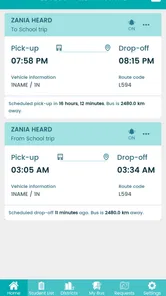
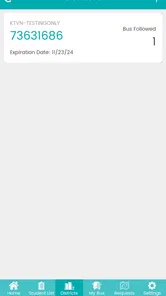
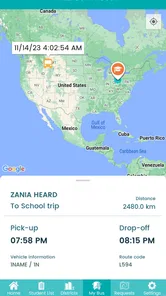
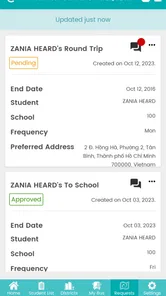
Edulog Parent Portal is designed to help families access school transportation information in one place. Depending on the school district’s setup, parents or guardians may be able to view a student’s assigned bus, route details, pickup and drop-off locations, estimated schedules, and transportation notices. The exact features can vary, so availability depends on whether the local district supports and has enabled them.
How do I log in to Edulog Parent Portal?
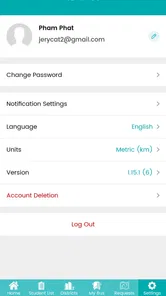
To use Edulog Parent Portal, you generally need an account or access details provided by your child’s school district or transportation department. After installing the app, select the appropriate district if required and enter the requested credentials. If you cannot sign in, your school—not the app store—usually handles account activation, password assistance, student records, and changes to transportation information.
Can I track my child’s school bus in real time?
Edulog Parent Portal may provide bus location, arrival estimates, or transportation status updates when the school district has enabled compatible tracking services. However, real-time tracking is not guaranteed for every user, route, or vehicle. Information can be delayed or unavailable because of GPS issues, poor connectivity, route changes, driver procedures, or temporary district system outages.
Pros
- Quick access to grades
- attendance
- schedules
- and school notices.
- Keeps parents informed without relying on paper announcements.
- Useful messaging tools can simplify contact with teachers and staff.
- Supports better tracking of academic progress over time.
- A centralized portal reduces the need for multiple school-related apps.
Cons
- Features and available information depend heavily on the school’s setup.
- Some updates may appear late if staff do not refresh records promptly.
- Parents may need separate login details for different children or schools.
- The interface can feel less intuitive for first-time users.
- Notifications may require manual configuration to avoid missing updates.











