EasyCut - Video Editor & Maker
- 2.94K
- 4.5
- Installs
- 50.00M
- Price
- Free

Screenshots

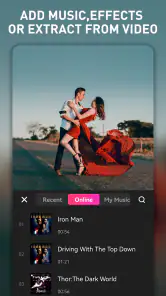
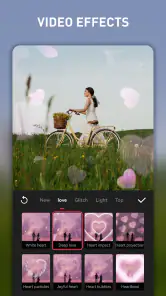
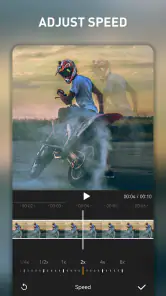
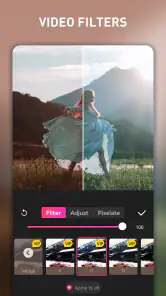
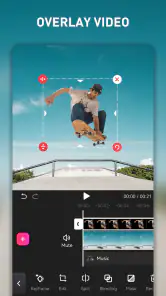

Analysis by Reviewed
When I edit a video on my phone, I want to get from a handful of clips to something worth sharing without turning the job into a long lesson in editing. That is the kind of task EasyCut - Video Editor & Maker is built for: quick, personal videos shaped with familiar tools, music, text and templates. My first impression is that it makes sense for someone who wants a guided starting point, though it is not a substitute for a carefully controlled desktop editing setup.
Making the editing path easier to follow
In my experience, a clear interface matters most when I am editing between other tasks rather than sitting down for a long creative session. The uncluttered layout described in the workflow makes basic actions—trimming, cutting, and merging—feel approachable for a first project. I would still take a moment to explore before starting an important edit: a calm first impression does not mean every choice will be obvious when several clips, text and music need to fit together.
EasyCut is a video editor from Great Talent Video Inc. Video Editor App, and its focus suits people who want to shape short phone videos without beginning with a desktop-style editing setup. It is free to install, with in-app purchases ranging from $0.99 to $23.99 per item. That makes it reasonable to try the workflow before deciding whether any paid option is useful to you; I would check the purchase prompt carefully rather than assume every template or tool is included at no cost.
The User-Friendly Experience
One of the things I absolutely love about EasyCut is its intuitive interface. You don’t need to be a tech wizard to navigate through its features. From the moment you open the app, it feels like everything just falls into place. The layout is clean, which means you won’t be overwhelmed with a million buttons and options at once. Instead, the app guides you gently through the process of trimming, cutting, and merging clips.
Readability, controls, and sensory comfort
A simple layout can reduce the effort of learning where basic editing actions live, particularly if you are new to making videos. I find that distinction important: a screen can look approachable at first and still become demanding once I am lining up several clips or revising text. I would start with a short project and check whether the labels, previews and touch targets remain comfortable to follow on my particular screen.
There is also a difference between a workflow that is easy to understand and one that works equally well for every ability. Video editing is visual by nature, and selecting a precise moment or judging a transition may take patience. If visual fatigue is an issue, I would work in brief sessions, pause between detailed changes, and preview the result at a comfortable pace rather than trying to finish everything in one sitting.
For someone with limited dexterity, the key question is whether the touch controls feel forgiving enough during ordinary trimming and rearranging. I would test those actions before investing time in a larger project. A keyboard-and-mouse editor may be more suitable when fine positioning or repeated precise adjustments are essential; EasyCut’s appeal is the convenience of editing on a phone, not a claim that touch editing fits every motor need.
More From Our News Desk

Weather by Xiaomi Review: Clear at a Glance, Less Clear Up Close

X Under Pressure: Can It Recover When Posting Goes Wrong?

Clash of Clans Is Won Between the Battles

Android Auto Makes the Case for Quieter Car Software

MobiOffice: Transforming Mobile Productivity with Seamless Integration

EA SPORTS FC™ Mobile Soccer: Redefining Mobile Sports Gaming
Features that Make You Go "Wow!"
Let’s talk features. This app is packed with them. Whether you’re looking to add a simple transition between clips or aiming to create something more cinematic, EasyCut has got you covered. You can add music, apply filters, and even incorporate text overlays to personalize your videos. The audio beats sync feature is particularly handy for those upbeat travel montages or dance clips we all love to watch.
Another standout feature is the pre-designed templates. If you’re in a rush or just out of ideas, these templates are a lifesaver. They’re professionally crafted and can transform your raw clips into a polished video in no time. Plus, the app supports 4K video exports, which means your videos will look crisp and professional on any screen.
Choosing a workflow that fits the moment
Here is a practical way I would use the templates: after a family outing, I would pick a small group of clips, settle on a template first, then replace its suggested moments with the shots I actually want to keep. That order can save time compared with polishing every clip before choosing a style. For a more personal result, I would use a template as a starting point, then adjust the music and text instead of letting its preset rhythm decide the whole story.
That also points to a useful trade-off. Templates help when I need a quick, coherent montage, while a more hands-on editor is a better fit if I want exact control over timing, layers, or a carefully paced long-form project. EasyCut’s described mix of templates and everyday editing tools seems aimed at quick social clips, travel recaps, and small celebrations—not replacing a full desktop timeline for detailed production.
If I were making a video for someone who watches with the sound off, I would treat text as part of the story rather than decoration: keep each overlay brief and place it where it does not compete with the subject. Music can add energy, but it should not be the only way a viewer understands what is happening. These are editing choices, not a promise that the app includes dedicated accessibility controls.
For a short birthday recap, I would first choose the moments that carry the story, then decide whether a template’s pace suits them. If the clips do not match its rhythm, I would trim the selection or move to a simpler edit rather than forcing every shot into the preset. That small decision can prevent a common phone-editing problem: a video that looks busy because every available effect has been used.
Another useful trade-off is how music and captions serve different viewers. A beat-synced montage can give a sequence energy, but it may make important moments harder to follow if every cut lands on the music. I would keep the visual sequence understandable on its own and use music as support. When a clip contains speech or an important sound, I would listen to the complete preview before deciding that a music bed improves it.
The app’s format is especially convenient for a quick social post or a message to family, where a polished short result matters more than extensive control. If I were preparing a longer presentation, a project with many layers, or work that needs exact timing across a long timeline, I would look at a more advanced mobile editor or desktop software instead. Templates are a useful shortcut, but they are not a replacement for detailed timeline work.
Situational access: where phone editing helps
The phone-based workflow is useful when the footage is already on the device and I want to make a small edit without moving everything to a computer. I can imagine filming a few moments at a weekend gathering, selecting the clearest clips later, and making a short recap while the details are still fresh. That convenience is practical for casual sharing, but it does not mean every place or moment is a good time to edit.
On a commute or in a noisy room, I would keep the task to selecting and trimming clips, then review sound and pacing somewhere quieter. Audio decisions are easier when I can actually hear what I am changing. In bright sunlight, on a small screen, or when I am tired, a detailed visual edit can also become frustrating; saving the fine adjustments for a more comfortable setting is a sensible way to avoid mistakes.
For someone who wants to make videos with a friend or family member, a short, shared plan can make the process easier: agree on the clips first, then choose the template and text. That avoids repeatedly passing the phone back and forth while the edit is already underway. If the video is meant for a particular person, I would also preview it with that viewer in mind—especially whether captions are readable and whether the story still works with sound muted.
Performance and Reliability
Performance-wise, the app doesn’t disappoint. I’ve used it on both Android and iOS devices, and it runs smoothly without any hiccups. Video rendering is fast, and I didn’t experience any crashes, which is a huge plus in my book. It's clear that the developers have put a lot of effort into ensuring that EasyCut runs efficiently across platforms.
Everyday access and practical limits
For a casual creator, the convenience is easy to picture: I might film a few moments during a weekend walk, trim away the shaky starts, add a short caption and music, then share a compact recap. The appeal is that these small jobs can happen on the same device where the footage lives. On Android, the listed minimum operating system is version 6.0, so I would check my device’s software before planning a project around the app.
Some people may find a visual editing workflow tiring, especially when working on a small screen or switching between clips, controls and text. I would make edits in short passes, preview the result, and take a break before fine adjustments. If touch precision, visual contrast, or sensory load is a major concern, it is worth trying a small, low-stakes project first and seeing whether the controls feel comfortable. For a precise keyboard-and-mouse workflow, or extensive accessibility customization, I would compare desktop editors and alternatives with controls that better match those needs.
There are a few practical questions I would answer before committing to a bigger project. The app is rated Mature 17+, so it may not be suitable for younger users even though editing itself can be a family activity. It has a 4.5 average from around 412,000 ratings, with over 50 million installs, which suggests it has reached a broad audience but does not guarantee it will suit every device or editing style. I would also make sure the original clips are safely kept until I have checked the finished export, and preview the whole video before sharing to catch awkward cuts or text that disappears too quickly.
The free starting point makes it possible to explore the basic workflow without paying upfront, but I would treat optional purchases as a decision to make only after I know what I need. Before beginning a time-sensitive edit, I would check whether the exact template or tool I want is available in the version I am using, and read any purchase prompt rather than tapping through it automatically. That is particularly useful if I am editing casually and do not yet know whether I will use the app often.
Age suitability deserves a separate thought from the content of an individual video. Although a parent might want to help a child make a family montage, the app’s Mature 17+ rating means I would not assume it is intended for younger users. For adult beginners, meanwhile, the rating does not make the editing process advanced by itself; the better question is whether the interface and purchase choices feel clear enough for the person using it.
EasyCut has a 4.5 average from around 412,000 ratings and more than 50 million installs, so it is clearly a familiar choice for many people. I would use that reach as a reason to consider it, not as a guarantee of accessibility or compatibility on every phone. The current version is 1.7.5.2144, and I would still try the actual controls with a small clip before planning a project that matters.
Who will get the most from it
I would recommend EasyCut most readily to people who edit short personal videos, like the idea of starting from a template, and want to finish without learning a large desktop-style tool. It is a particularly sensible fit for a travel recap, a quick celebration montage, or a social clip where a handful of shots, a caption and music are enough. The main benefit is not that it removes every editing decision; it gives me a starting structure when a blank project would slow me down.
I would be more cautious if I needed detailed control over a long project, rely on alternative input methods, or find visually dense editing tiring. In those situations, I would compare an editor designed around a larger screen, a more detailed timeline, or controls that better suit my needs. A short trial can answer a practical question that ratings cannot: do I feel comfortable making and reviewing edits in this particular touch workflow?
Final Thoughts
In conclusion, if you’re searching for a video editing app that’s easy to use yet packed with powerful features, EasyCut - Video Editor & Maker is definitely worth trying out. It simplifies the video editing process while still offering a wide range of tools to unleash your creativity. Whether you’re a beginner or a seasoned editor, this app can help you create videos that captivate and inspire. So go ahead, give it a whirl, and let your creativity shine!
My recommendation is strongest for someone who wants quick, attractive edits from phone footage and likes having templates as a way past a blank timeline. I would skip it if you need a highly controlled professional workflow, or if the touch-based process does not feel comfortable after a short trial. With a current version of 1.7.5.2144 and a free starting point, it is an approachable option to explore; just choose a modest first project and decide from the actual editing experience whether it fits the way you create.
For inclusive use, I see its strongest point as lowering the barrier to making a simple video, rather than promising a particular accessibility experience. Templates can reduce the number of choices at the beginning, and familiar phone editing can be convenient when moving footage to another device is an obstacle. The limits matter just as much: fine visual adjustments, touch interaction and sound-dependent decisions may not suit everyone. I would start small, keep the original footage, and judge the app by whether its real workflow is comfortable for me.
EasyCut - Video Editor & Maker Frequently Asked Questions
Can EasyCut help me make a video from photos and music?
Yes. EasyCut is presented as a photo, music, and video editor and maker, so it may suit projects built from still images as well as video clips. Its templates can provide a starting point for arranging creative content. If you want to make a particular style of video, consider whether the available editing options and templates fit the result you have in mind.
Does EasyCut include templates for video projects?
Yes, EasyCut is described as offering a variety of templates, which can give you ready-made starting points when making videos. These may be useful if you would rather adapt an existing layout than build a project entirely from scratch. You can also use the app’s editing tools to shape your content, so templates are one part of the creative workflow rather than the only way to make a video.
Is EasyCut free to download, and what should I know about its age rating?
EasyCut is free to download, so you can try its video-editing tools without paying upfront. It is rated Mature 17+, which is important to consider before installing it, particularly if the device will be used by a younger person. In-app purchases are available, with items priced from $0.99 to $23.99, so review purchase options before confirming any transaction.
Who develops EasyCut, and is it a widely used video editor?
EasyCut is developed by Great Talent Video Inc. Video Editor App and is listed in the Video Players & Editors category. It has an average rating of 4.5 from around 412,000 ratings, with about 2,900 written reviews and over 50 million installs. Those figures suggest it has attracted a broad audience, though your own experience will depend on the tools and workflow you need.
What are the main features of EasyCut - Video Editor & Maker?
EasyCut offers a comprehensive suite of video editing tools including trimming, cutting, and merging videos. Users can add music, text, and filters to enhance their videos, and create professional-looking content with ease. The app supports various video formats and resolutions, making it versatile for any project needs. Its store summary also presents it as a photo, music, and video editor and maker with a variety of templates, which may suit users looking for ready-made creative starting points.
Pros
- User-friendly interface for easy editing
- Wide variety of editing tools available
- Supports high-quality video exports
- Regular updates with new features
- Free version offers many features
Cons
- Contains in-app purchases for premium tools
- Occasional ads in the free version
- Requires internet for some features
- Can be resource-intensive on older devices
- Limited music library in free version
- Category
- Video Players & Editors
- Version
- 1.7.5.2144











