

Easy Downloader - Video Hub
- 613.00
- 4.4
- Installs
- 10.00M
- Price
- Free

Screenshots
Analysis by Reviewed
Have you ever come across a video online that you just wished you could save for later? I mean, we’ve all been there, right? Enter Easy Downloader - Video Hub, a nifty app that promises to make saving videos a breeze. I took it for a spin, and here's what I found!
Where it fits today
Easy Downloader - Video Hub is a free video-downloading app from Dhvankit, aimed at people who want to keep online clips handy for offline viewing. It sits in the video players and editors category, though its main appeal is less about editing and more about bringing a saving workflow into one place. It’s rated for Everyone, and its 4.5 average across around 141,000 ratings suggests that many users find the straightforward approach useful.
The app has reached over 10 million installs, so it is not an obscure tool, but popularity alone doesn’t tell me whether it suits a particular routine. I’d consider it most useful when I regularly save material I’m allowed to keep, rather than when I only need to watch one clip once. If a platform already offers dependable offline viewing, that built-in option may be simpler and more respectful of the creator’s settings.
Discovering Easy Downloader - Video Hub
First off, let’s talk about what this app is all about. Easy Downloader - Video Hub is designed to help users download videos from various social media platforms and websites. The interface is quite intuitive, which is always a plus in my book. You don’t need a Ph.D. in tech to figure it out, and that’s something I appreciate.
One of the first things I noticed was the simplicity of its design. It’s not cluttered or overwhelming, which is a breath of fresh air compared to some other apps out there. Just a clean interface that gets straight to the point. You can easily copy a link, paste it into the app, and voilà, your video starts downloading. It’s as simple as pie.
Choosing the right clips to keep
This works best for a person with a specific reason to save something, not for someone who wants an automatic copy of every clip that crosses their feed. A small, purposeful collection is easier to maintain and more useful when you need to find a recipe, a demonstration, or a reference later. Before saving, I’d ask myself whether I’ll actually return to the video and whether I’m entitled to keep a copy. That quick check prevents a convenient tool from turning into a pile of files with no clear purpose.
There is also a difference between wanting a clip offline and needing a permanent archive. If I’m saving a short reference for an upcoming task, a local file can be handy. If I’m preserving material for a project over a long period, I’d keep track of its source and creator separately and use storage I already manage carefully. A download by itself doesn’t preserve context, captions, comments, or the original page, so it shouldn’t be treated as a complete record of online material.
More From Our News Desk

 Gmail
GmailGmail in a Busy Inbox: Who Benefits Most?
From first account to crowded workday, Gmail earns its place through dependable search and flexible sorting—but its best fit depends on how much inbox maintenance you can tolerate.

 Prime Video
Switching to Prime Video: What Changes in Your Viewing Routine
Prime Video can make a compelling second home for streaming, but switching means learning a different catalog, rental layer, and route from browsing to playback.

 Universal TV Remote Control
Universal TV Remote Control Works Best as a Reliable Backup
A phone remote earns its place through quick setup and reliable habits. Here is how to get more from Universal TV Remote Control—and where its limits show.

 Weather - By Xiaomi
Weather by Xiaomi Review: Clear at a Glance, Less Clear Up Close
Xiaomi’s weather app makes everyday forecasts quick to scan, but its calm surface can leave useful details and recovery paths harder to find than they should be.

 X
XX Under Pressure: Can It Recover When Posting Goes Wrong?
A resilience-focused review of X, examining setup, mistaken posts, interruptions, weak connections, and the gaps that matter when recovery needs to be dependable.

 Clash of Clans
Clash of Clans Is Won Between the Battles
Its raids are quick; its community is a long-term project of coordination, teaching, rivalry, and shared responsibility—with all the friction that entails.
Latest News



A practical saving routine
For example, imagine finding a cooking demonstration while scrolling during a commute. Rather than trying to remember the creator’s name later, I can copy the clip’s link, bring it into the downloader, and keep it ready to revisit when I’m planning dinner. That workflow is particularly handy for people who collect tutorials, exercise references, or travel ideas. I’d still check that saving and later use are permitted by the source; having a download tool doesn’t automatically grant permission to redistribute someone else’s work.
A useful habit is to decide what you want to keep before starting a batch. Saving only the clips that have a clear purpose makes an offline library easier to browse and avoids filling a device with videos I’ll never reopen. When I’m collecting several related clips, I’d also note their subject or creator somewhere familiar, since a saved file is less useful if I can’t remember why I kept it.
A Dive Into Features
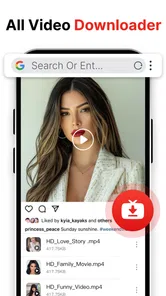
Now, let’s get into the nitty-gritty. What features does this app bring to the table? For starters, it supports a wide range of formats. Whether you’re downloading a video for offline viewing or just saving it for later, you have options. The app also boasts a built-in browser, which is super handy for those times you want to search for videos without hopping between apps.
That browser can make discovery and saving feel like one continuous task instead of a repeated switch between a social app and a downloader. Still, I’d use the copy-and-paste route when I already know which clip I want: it keeps the process deliberate and makes it easier to confirm I’m working with the right link. If a site changes how it serves videos, a previously familiar workflow may also behave differently, so I wouldn’t treat any downloader as a guarantee that every page will work forever.
For a smoother routine, I’d separate finding a video from deciding to save it. I can browse first, check that I’ve landed on the intended clip, and then start the download rather than tapping through quickly and later sorting out several similar files. That matters most when a page contains a series of videos or when a link opens a feed rather than a single item. Slowing down for that one confirmation step can save time later, because replacing an incorrectly saved clip is more annoying than taking a moment to check.
One practical question is whether this is the right tool for every video I encounter. I wouldn’t assume so. Pages can differ, and platform rules or delivery methods can affect whether a link is usable. When a download does not start as expected, I’d first make sure the link points to the actual video rather than a profile, a post with several items, or a redirect. If the same source is consistently troublesome, the platform’s own viewing or offline option is the more dependable choice for that material.
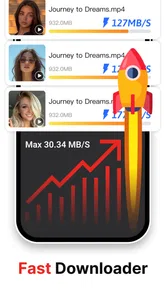
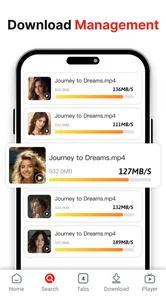
Another standout feature is the download speed. I’m talking lightning-fast. I tried downloading a lengthy video, and it was done before I even had a chance to make a cup of coffee. No exaggeration! And let’s not forget the ability to download multiple videos simultaneously. That’s a game-changer if you’re like me and love binge-watching offline.
Parallel downloads are most useful when I have a few clips queued and a stable connection; they can save time compared with handling each file one by one. The trade-off is that several large videos can consume storage quickly, so I’d review what I’ve saved before starting a big batch, especially on a device that is already short on space. For a single video on a slow or unstable connection, downloading one at a time may be easier to monitor and retry if needed.
Who benefits most from a phone-first downloader
I can see this fitting people who collect a modest number of useful clips for situations where a connection may be inconvenient: a commute, a trip, or a place where they want to check a reference without relying on a mobile signal. It also suits someone who prefers doing the whole task on a phone instead of sending links to a computer. The appeal is less about building a sophisticated media library and more about making a few chosen videos accessible when they are needed.
On the other hand, I’d skip it if my main goal were to edit footage, catalog a large collection, or guarantee long-term access to material from a particular platform. A dedicated editor is the better fit when the work begins after recording, while a desktop utility can offer a more deliberate way to handle many files. And if I only want to watch a show or creator’s video offline once, the platform’s own save feature is usually the cleaner route because it keeps playback within the service’s intended setup.
How it compares, and what to expect
Compared with a platform’s own save button, a downloader can be more convenient when I want files gathered in one place, while official offline features are often the better choice for content that is protected or tied to a subscription. Compared with a desktop downloader, this app is better suited to quick phone-first tasks; someone managing a large media archive or needing detailed file controls may prefer a computer-based tool. Its strength is convenience, not a promise to replace every media workflow.
The choice also depends on how often I repeat the task. If I save only one clip now and then, copying a link into a separate app may be extra effort rather than a shortcut. If I often gather a handful of tutorials from different places, having a dedicated place to handle that task can feel more orderly. I’d test the routine with one permitted, nonessential video first; that gives me a realistic sense of how the app fits my preferred sources before I rely on it for a trip or a time-sensitive reference.
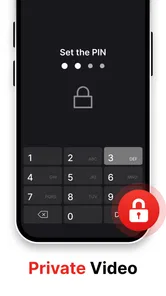
Privacy is another reason to be thoughtful rather than automatic. The app’s appeal includes private saving, but I’d still use ordinary care with sensitive material: avoid downloading content I would not want stored on my device, keep the phone secured, and remove files when I no longer need them. A file kept locally can be easier to access, but that convenience also means I’m responsible for the copy and for not sharing it improperly.
The current version is 1.9.7, and the app was released on December 3, 2024. Those details establish its present point in time, but they don’t tell me which features changed between releases, so I wouldn’t infer a particular improvement from the version number alone. For existing users, the practical test is whether the current link, browser, and saving flow still match the sites they use. I’d watch future releases for clearer handling of failed links, more predictable organization, and changes that keep the app working as platforms evolve; those are useful things to look for, not confirmed additions.
For someone already using it, I’d judge a new version by ordinary tasks rather than the version label: does a familiar source still open, can I identify the right clip, and can I locate the saved file afterward? That is a more useful standard than expecting an update to mean a specific new capability. If a routine stops working after a platform changes, checking the link and trying the source’s official option is sensible before repeatedly retrying the same failed download.
My Personal Take
So, what’s my verdict on Easy Downloader - Video Hub? Honestly, it’s a solid app that delivers on its promises. The speed and simplicity are what make it stand out. It’s perfect for anyone who wants an effortless way to save videos without the hassle.
However, as with all things, there's a catch. The app does have ads, which can be a bit of a nuisance. But hey, nothing’s perfect, right? Plus, there’s an option to go ad-free for a small fee, which is something to consider if you find the ads too intrusive.
For me, the ads are a real consideration if I’m trying to save something quickly, and whether they feel tolerable will depend on how often I use the app. I’d also avoid relying on it for content that must remain available indefinitely: a saved copy is useful, but keeping personal files organized and checking that they still play is part of the job. People who rarely save videos, want a completely distraction-free experience, or prefer official platform controls may be happier with a built-in option instead.
There are a couple of practical questions I’d settle early. First, will it handle the particular sources I actually use? I’d try a link from one of those sources before planning a whole offline collection around it. Second, where will I keep the files and how will I find them again? Establishing a simple naming or note-taking habit is more reliable than expecting the downloader to serve as a detailed archive. And if I’m saving clips for a shared project, I’d confirm permission and use a method that preserves the source information my collaborators need.
For Android users, the listed minimum operating-system requirement is version 8.0, which makes device compatibility a straightforward check before installing. The app is free, so trying its basic workflow does not require an upfront purchase, but I’d still weigh the interruptions from ads against how often I expect to use it. If I’m a frequent saver, a few minutes spent testing the browser and link workflow can tell me more than a long list of promised conveniences.
Overall, if you’re in the market for a reliable video downloader, give it a try. It’s user-friendly, fast, and just gets the job done. Happy downloading!
Easy Downloader - Video Hub Frequently Asked Questions
Is Easy Downloader - Video Hub suitable for saving videos to watch later?
Easy Downloader - Video Hub is presented as a video-saving and downloading app, which makes it relevant if you want to keep videos for later viewing. The store summary also highlights social media, so its focus is on saving video content in that context. Before downloading anything, remember to respect creators’ rights and the rules of the service where the video appears.
Is Easy Downloader - Video Hub intended for beginners?
The app’s short description is “Easy Downloader,” and its summary emphasizes fast, private downloading and video saving. Those points suggest a straightforward purpose for people looking for a downloader. As with any app, it is sensible to review the available options when you open it and make sure its workflow suits the way you want to save and manage videos.
Does Easy Downloader - Video Hub work on my device?
Easy Downloader - Video Hub is a video downloading app for Android with a minimum operating system requirement of Android 8.0. It is listed in the Video Players & Editors category and has an Everyone content rating. Check your device’s operating system before downloading to make sure it meets that requirement.
Who develops Easy Downloader - Video Hub, and is it popular?
Easy Downloader - Video Hub is developed by Dhvankit. It has over 10 million installs and an average rating of 4.5 from around 141,000 ratings, giving prospective users a useful sense of its reach and reception. Its short description is simply “Easy Downloader,” while its summary highlights fast, private downloading, video saving, and social media.
What is Easy Downloader - Video Hub?
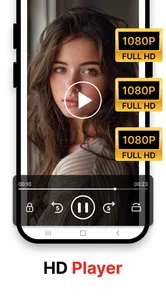
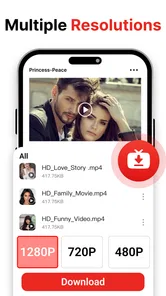
Easy Downloader - Video Hub is a versatile application designed for Android and iOS devices that allows users to download videos from various platforms seamlessly. With an easy-to-use interface, it supports a wide range of video formats and resolutions, making it a convenient tool for users who want to save videos for offline viewing.
Pros
- Supports multiple video formats.
- Fast download speeds.
- User-friendly interface.
- Allows background downloading.
- No registration required.
Cons
- Contains ads.
- Limited features in free version.
- May not support all websites.
- Occasional download errors.
- No HD download option.












