

DLOOK: AI Outfit Stylist
- 344.00
- 4.7
- Installs
- 100.00K
- Price
- Free

Screenshots


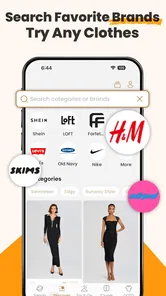
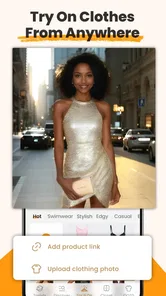
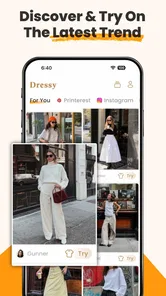
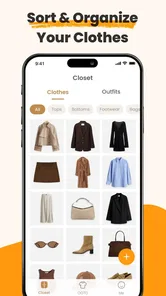
Analysis by Reviewed
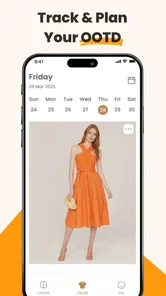
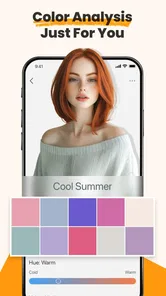
I’m drawn to wardrobe apps when they help me make a decision I would otherwise put off: what to wear, what already works together, or whether a new look suits my usual style. DLOOK: AI Outfit Stylist is aimed at that everyday problem, using a digital fashion-styling approach rather than simply giving me another place to browse clothes. It may be especially useful when I want ideas from my own wardrobe, though it works best as a source of suggestions—not as a substitute for personal taste or a perfect preview of how an outfit will look in real life.
The most useful way to judge a styling app is to give it a real decision, not an imaginary makeover. I would use it when I have clothes I like but cannot quickly combine, or when I want to break a familiar outfit loop without buying something new. That makes the experience less about chasing a perfect look and more about reducing the small daily friction of getting dressed.
Where outfit planning can get stuck
Styling apps sound effortless until the first useful result depends on information I have not added yet. With a wardrobe-focused tool such as DLOOK, the practical question is whether I have given it enough context to make suggestions relevant. If I open it expecting a complete outfit plan immediately, I may find the initial experience less satisfying than the idea promises. I would approach it as a tool to build into a routine, not a magic button that knows what is in my closet without input.
That distinction matters because outfit advice is personal. A jacket might be technically compatible with a pair of trousers but still feel wrong for my workplace, the weather, or how formal I want to look. AI styling can help me explore combinations I had not considered, but I still need to judge comfort, fit, dress codes, and the occasion. The strongest use is narrowing choices, not handing over the final decision.
The app is in the beauty and personal-style space, and BlazeTech LTD is its developer. It is free to start, with optional in-app purchases listed from $1.99 to $99.99 per item. That makes it sensible to try the basic experience before spending anything. I would first check whether the suggestions fit my real routine; paying only makes sense if I am returning often and the paid options address a need I actually have.
Start with a small, useful wardrobe
A common source of disappointing recommendations in any digital wardrobe is trying to represent everything at once. I would begin with a few dependable pieces I wear regularly: one everyday top, a layer, a pair of trousers or a skirt, and shoes that suit the combinations I want to explore. This creates a manageable test. If the suggestions already feel disconnected from my style, adding the rest of the closet is unlikely to fix the underlying mismatch.
There is also a useful trade-off between completeness and effort. A carefully represented wardrobe can make outfit planning more personal, but cataloguing every item can turn a quick styling experiment into a chore. I would add clothes in stages, starting with pieces that are hard to combine or that I often forget I own. That gives the app a practical job: helping me use overlooked items rather than asking me to maintain an immaculate inventory.
More From Our News Desk

 Gmail
GmailGmail in a Busy Inbox: Who Benefits Most?
From first account to crowded workday, Gmail earns its place through dependable search and flexible sorting—but its best fit depends on how much inbox maintenance you can tolerate.

 Prime Video
Switching to Prime Video: What Changes in Your Viewing Routine
Prime Video can make a compelling second home for streaming, but switching means learning a different catalog, rental layer, and route from browsing to playback.

 Universal TV Remote Control
Universal TV Remote Control Works Best as a Reliable Backup
A phone remote earns its place through quick setup and reliable habits. Here is how to get more from Universal TV Remote Control—and where its limits show.

 Weather - By Xiaomi
Weather by Xiaomi Review: Clear at a Glance, Less Clear Up Close
Xiaomi’s weather app makes everyday forecasts quick to scan, but its calm surface can leave useful details and recovery paths harder to find than they should be.

 X
XX Under Pressure: Can It Recover When Posting Goes Wrong?
A resilience-focused review of X, examining setup, mistaken posts, interruptions, weak connections, and the gaps that matter when recovery needs to be dependable.

 Clash of Clans
Clash of Clans Is Won Between the Battles
Its raids are quick; its community is a long-term project of coordination, teaching, rivalry, and shared responsibility—with all the friction that entails.
Latest News



For a busy weekday, for example, I might use it the night before to think through a work outfit around a shirt I have not worn recently. I would compare a few combinations, then check the actual clothes for weather and comfort. If one suggestion works, I can remember that pairing for a rushed morning. If none does, I have still learned which item is difficult to style and can choose something else without losing time before leaving.
A useful variation is to plan around one anchor item rather than asking for a whole look from scratch. I might choose the shoes I need to wear for a long day, then consider which clothes make sense with them. This narrows the decision in a practical way and exposes a trade-off that a purely visual match can miss: a coordinated outfit is not automatically comfortable for hours of walking or sitting.
Setup checks that save time
When an app’s first recommendations feel generic, I would not immediately assume the styling idea is useless. I would check whether the items I have entered are described or represented clearly enough for me to recognize them, and whether the pieces reflect what I actually wear. A wardrobe made mostly of aspirational purchases tells a different story from one built around everyday clothes. Matching the setup to real habits is a simple way to make any styling tool more relevant.
I would also keep the first trial focused. Rather than asking for inspiration for every possible occasion, I would choose one specific need: a casual dinner, a workday, or a weekend outfit using a particular item. Narrowing the question gives me a fairer test of whether the recommendations are useful. It also makes it easier to spot a mismatch—for instance, if I wanted relaxed clothes but the result feels too formal.
If the app feels slow or a screen does not respond, I would start with ordinary checks instead of changing several things at once. Confirm that the device has a stable connection if the task depends on one, close and reopen the app, and make sure the device’s software meets the stated minimum of version 7.0. If the problem persists, noting which step fails is more helpful than repeatedly restarting without a clear test.
DLOOK is rated for Everyone, so its audience is broad, but that does not mean every styling suggestion will suit every age, body, culture, or dress code. I would treat it as a personal organizer and idea generator, then make the judgment myself. That is especially important for uniforms, formal events, religious or cultural clothing, and situations where practical requirements matter more than visual coordination.
One small habit can make setup less wasteful: enter items that solve a current wardrobe problem before adding clothes that already have obvious pairings. If a cardigan is easy to wear with everything, it may tell me little about the quality of the suggestions. A coat I struggle to style is a more revealing test. I would also avoid treating the digital wardrobe as a record that must be complete; its usefulness depends on whether it helps with the next decision, not on how many items it contains.
Recovering a stalled styling workflow
If I have started setting things up and then lose momentum, I would avoid trying to rebuild a perfect closet in one sitting. I would return with a single goal and add only the missing pieces needed for it. For instance, if I want help combining a coat with existing outfits, I can focus on that coat and a few likely layers rather than entering every accessory I own. This keeps the effort tied to an immediate payoff.
When a recommendation seems wrong, I would diagnose the mismatch before discarding the whole workflow. Is the item itself represented inaccurately? Is the occasion unclear? Does the outfit clash with a preference I did not account for? Those are different problems, and each suggests a different next step: correct the item, make the request more specific, or simply reject that combination. AI suggestions are most useful when I treat them as drafts that I can edit mentally.
A second practical technique is to use the app at two different moments: once when planning and again when getting dressed. During planning, I can explore combinations without pressure. At the closet, I can check whether the suggested pieces are clean, comfortable, and suitable for the day. That final reality check matters because a digital plan cannot account for every last-minute change, such as rain, a cold office, or a garment that does not fit the way I expected.
There is a limit to how much recovery advice can solve. If the app repeatedly fails to open or a function stops working, basic troubleshooting may not be enough. I would note the device, the step I was taking, and whether the issue happens consistently, then use the app’s available support route. I would not keep reinstalling or altering device settings without a reason, especially if I have not checked whether my work is backed up or retained.
For someone sharing a wardrobe decision with a partner or getting dressed for a group event, I would use the app to prepare options rather than settle a disagreement. A shortlist gives people something concrete to react to, but personal comfort and the event’s expectations still decide the outcome. This is also where the app’s limits become clear: it can support a conversation about combinations, but it cannot know which outfit makes each person feel most like themselves.
When the app may not be the problem
Some frustrating results come from the difference between a digital suggestion and a real outfit. Two colors can appear harmonious on a screen but look different under indoor lighting. A combination can be visually balanced yet uncomfortable for a long commute. The app can help me see possibilities, but the mirror, the weather, and the demands of the day remain better judges of whether I should wear them.
Other times, the issue is simply that I want a different kind of tool. If I mainly need visual inspiration from current trends or help shopping for new clothes, a browsing-focused fashion service may suit me better. If I want a highly structured record of every garment, a dedicated inventory tool could be a better match. DLOOK’s appeal is the styling decision itself: making combinations feel easier to consider, especially when I want to work with what I already have.
Likewise, someone who dislikes entering wardrobe details may find the setup more effort than the benefit. I would skip it if I am happy choosing outfits intuitively and rarely get stuck. It is a better fit for people who repeat the same few combinations, forget useful pieces, or want a gentle prompt to experiment. The time saved depends on whether I keep the wardrobe information useful enough to support those decisions.
The app’s current version is 3.4.0, and its average rating is 4.7 from around four thousand ratings, with roughly 344 written reviews. It has over 100,000 installs and was released on April 30, 2025. Those figures suggest that people are finding it, but I would not use popularity as proof that its suggestions will match my own taste. My best test would still be a small, realistic styling task before committing to a bigger wardrobe setup.
It is also worth separating a styling tool from a shopping assistant. If my goal is to find a specific item to buy, ordinary retail search is more direct. If I want a record of what I own, an inventory-first app may be more satisfying. I would choose DLOOK when the actual question is, “How could I wear this differently?” That distinction helps set expectations and avoids judging it by features that belong to a different kind of fashion app.
My practical verdict
I see DLOOK: AI Outfit Stylist as a promising companion for the moments when getting dressed turns into unnecessary indecision. Its value is not that it can make every choice for me; it is that a focused styling prompt may help me notice combinations and reuse clothes I already own. I would start with a handful of familiar items, test one real occasion, and expand only if the process feels worthwhile.
The main friction is the work of making the digital wardrobe useful, followed by the need to filter suggestions through real-life constraints. That is a fair exchange for people who enjoy experimenting or want help escaping repetitive outfits, but it will not suit anyone looking for instant, hands-off advice. Since the app is free with optional purchases, I would try the unpaid experience first and decide based on whether it genuinely shortens my planning.
For me, the sensible recommendation is conditional: try it if outfit planning regularly eats into your morning or if you want fresh ways to wear existing pieces. Keep expectations grounded, treat each suggestion as a starting point, and stop adding wardrobe details if setup becomes its own project. Used that way, DLOOK can be a practical styling aid; if your needs are mainly shopping, exhaustive cataloguing, or guaranteed outfit accuracy, another kind of fashion app—or your own closet and mirror—may serve you better.
DLOOK: AI Outfit Stylist Frequently Asked Questions
What is DLOOK: AI Outfit Stylist, and how does it work?
DLOOK: AI Outfit Stylist is an AI-powered fashion app designed to help you explore outfit ideas and make styling decisions. Depending on the features available in your version, you may be able to share clothing or outfit details and receive suggestions based on your preferences. Treat its recommendations as inspiration rather than professional fashion advice: results can vary, and the best choices still depend on your taste, occasion, comfort, and wardrobe.
Is DLOOK: AI Outfit Stylist free to download and use?
The app may be free to download while some features, styling tools, or usage limits require a subscription or in-app purchase. Check the current Google Play or App Store listing for the latest pricing, trial terms, and included features before signing up. If you start a free trial, review its renewal date and cancellation instructions carefully, since trials can convert to paid subscriptions under the store’s stated terms.
Does DLOOK require photos or personal information to provide outfit suggestions?
Some styling features may work best when you provide outfit images, clothing details, or preferences, but the exact information requested can depend on the app version and the feature you use. Before uploading photos or creating an account, review the app’s privacy policy and permission prompts. Avoid sharing images that reveal sensitive personal details, and check how the service says it stores, processes, and handles submitted content.
Can DLOOK: AI Outfit Stylist replace a personal stylist or guarantee that an outfit will suit me?
No. DLOOK can offer ideas and help you consider combinations, colors, or styling directions, but AI suggestions are not guaranteed to match your body, budget, local weather, dress code, or personal preferences. Use the recommendations as a starting point and make your own judgment about fit, comfort, and appropriateness. If you need tailored advice for a special event or specific requirements, a human stylist may be more suitable.
Which devices can run DLOOK, and what should I check before downloading it?
Availability and compatibility can vary by country, device, and app version, so check the current listing in Google Play or the Apple App Store for supported operating systems and any stated requirements. Also review recent update information, user feedback, requested permissions, and whether key tools require an account or paid plan. Download through an official store, and ensure your device has enough storage and a reliable internet connection for online AI features.
Pros
- AI outfit suggestions can make it easier to decide what to wear.
- Useful for exploring combinations from clothes you already own.
- Can offer style inspiration for different occasions.
- Personalized recommendations may help refine your fashion preferences.
- A convenient way to get outfit ideas without browsing fashion sites.
Cons
- Suggestions may not match your personal taste or local trends.
- Recommendations depend on the accuracy of the details you provide.
- AI styling may overlook fit
- fabric
- weather
- or comfort.
- Some features or recommendations may require a paid plan.
- Uploading outfit photos may raise privacy concerns for some users.












