DIKIDI Online
- 3.00
- 4.9
- Installs
- 1.00M
- Price
- Free

Screenshots

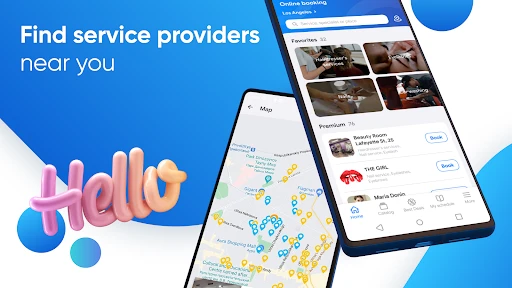
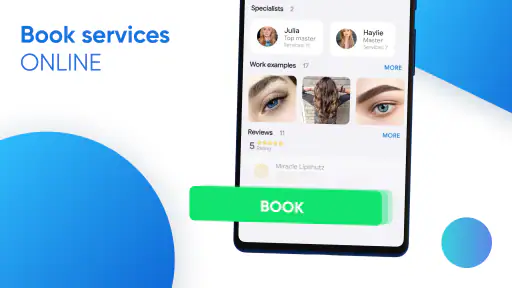
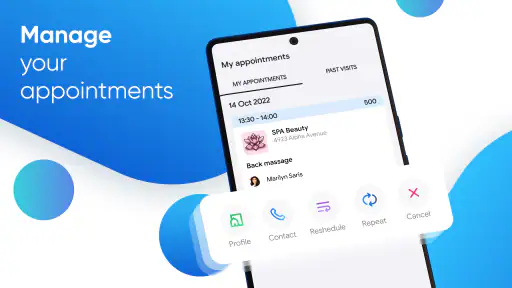




Analysis by Reviewed
In a shared household, booking a beauty appointment can become a small coordination puzzle: one person needs a haircut, another wants to see a specialist, and nobody remembers which message contains the time. DIKIDI Online is aimed at finding and booking appointments with businesses and independent specialists, so I can see its appeal when several people in a home are arranging personal-care visits around work, school, and errands.
When one phone helps with several schedules
Picture a weekday evening when I’m sorting out my own appointment while a relative asks me to check a suitable time for theirs. Keeping the booking details in one place can be easier than searching through separate chats or trying to remember a paper note. The useful household habit is to treat each booking as belonging to the person who will attend it: confirm whose name is attached, check the time together, and avoid assuming that one person’s appointment automatically covers everyone.
This is a practical fit for people who already help coordinate appointments for a partner, teenager, or older relative. It is less compelling if everyone prefers to book independently and already has a reliable system. I would also avoid using a shared phone as though it were a shared identity: before entering personal details or confirming a booking, make sure the right person is represented and that they agree to the arrangement.
Keep the household roles clear
A booking app can reduce the back-and-forth, but it cannot decide who is allowed to make choices for someone else. I’d use it to help compare available appointment plans and coordinate timing, while keeping the person receiving the service involved in decisions about the specialist and the booking. For a family with different routines, a quick message outside the app can still be the clearest way to agree who is handling each appointment.
That boundary matters especially on a device used by more than one person. Make a simple habit of checking which account is active before changing or cancelling anything, and review the details before you finish a booking. If someone else needs access, use an arrangement they understand and approve rather than passing around sign-in details casually. These are sensible precautions, not special family controls I would expect the app to provide.
Deciding whether it fits a shared phone
Before making a household routine around any booking service, I’d ask a practical question: who will actually be responsible for following each appointment through? One person can help search and coordinate, but the attendee should know where the booking stands and how to respond if plans change. That division is especially useful when a parent helps a teenager, or when an adult relative asks someone else to handle the phone. It keeps assistance from turning into an unnoticed commitment.
I’d also separate “helping someone book” from “booking for someone.” The first might mean looking at options together and letting the attendee make the choice; the second can involve entering details or confirming a time on their behalf. If the person is not nearby, I’d pause before confirming anything that depends on their preferences or availability. A quick check by message or call is less convenient than tapping through immediately, but it can prevent a booking that suits the organizer rather than the person who will attend.
More From Our News Desk

Clash of Clans Is Won Between the Battles

Android Auto Makes the Case for Quieter Car Software

MobiOffice: Transforming Mobile Productivity with Seamless Integration

EA SPORTS FC™ Mobile Soccer: Redefining Mobile Sports Gaming

How Microsoft OneDrive Became a Mobile Productivity Giant

How Google Translate Breaks Language Barriers Effortlessly
Small checks that prevent booking mix-ups
One useful habit is to repeat the appointment details in plain language after booking: who is going, where they need to be, and when. This is not extra app functionality; it is a lightweight household check that catches misunderstandings before the appointment day. I’d be particularly careful when two people are arranging similar services close together, since a time shown on a screen can be easy to associate with the wrong person.
For a busy day, I’d also leave room to think about the journey and other commitments rather than treating an available slot as automatically workable. A booking tool can help with the appointment choice, but it cannot resolve clashes with school pickup, work, or another person’s plans unless the household checks those details. That is where a shared calendar or a quick conversation remains valuable alongside the booking process.
Getting Started with Ease
The first thing you'll notice about DIKIDI Online is its user-friendly interface. From the moment you download it, the app guides you through a seamless setup process. It's almost like the app is holding your hand, gently nudging you in the right direction. Whether you're tech-savvy or not, you'll find yourself navigating through the features without a hitch.
All-in-One Scheduling Solution
One of the standout features of DIKIDI Online is its ability to centralize all your appointments in one place. Gone are the days of flipping through different calendars and planners. With a few simple taps, you can schedule, reschedule, and even cancel appointments. It's like having a personal assistant right in your pocket. This feature is particularly beneficial for businesses, allowing for a streamlined booking process that clients will appreciate.
For day-to-day use, I’d treat that central view as a starting point rather than the household’s only calendar. If several people are involved, record or communicate the attendee clearly in whatever shared calendar system the household already uses. That avoids a common mix-up: seeing an appointment on a phone and assuming it belongs to the person holding the phone. The extra step is worthwhile when appointments happen on busy days or need travel time.
Seamless Integration
What sets DIKIDI Online apart from other scheduling apps is its seamless integration with other platforms. Whether you're syncing with Google Calendar or integrating with your CRM, the app ensures a smooth connection across the board. It's designed to fit into your existing workflow without any disruptions, which is a huge plus for anyone who relies on multiple systems to run their day-to-day operations.
For a household, integration is useful only if it reduces duplicate work rather than creating another calendar to maintain. I’d first decide which calendar is the source of truth for family commitments, then check that any connected schedule is being used consistently. If one person keeps appointments in a personal planner and another relies on a shared calendar, a quick manual confirmation may be more dependable than assuming every change appears everywhere. Small checks also help when someone reschedules at short notice.
Using bookings without turning them into a second calendar
I find it helpful to give each tool a defined job. A booking service is where I would handle the service appointment; a household calendar is where I would check whether the time fits around work, school, travel, and other plans. If I try to make one view carry all of that context, I risk overlooking the commitments that matter to someone else. A brief note in the shared calendar can make an appointment visible without requiring everyone to manage the booking itself.
That approach also makes rescheduling easier to reason about. If a provider’s available time changes, I’d first check with the attendee, then update whatever household calendar entry depends on it. I would not assume that a change made in one place has automatically replaced every reminder or plan elsewhere. This is a small amount of deliberate coordination, but it is more reliable than discovering a conflict when someone is already getting ready to leave.
The Mobile Experience
Let's talk about the mobile experience. DIKIDI Online is available for both Android and iOS, and the app performs exceptionally well on both platforms. It's clear that a lot of thought has gone into optimizing the user experience, ensuring that everything runs smoothly and efficiently. Whether you're checking your appointments on the go or managing bookings from your tablet, the app delivers a consistently reliable performance.
On a shared device, the convenience of checking a booking quickly comes with a privacy trade-off: another person may see what is open on the screen. I’d close the app after handling someone else’s appointment and keep any conversation about personal services between the people involved. For younger users, the app’s Teen content rating is a useful age-context signal, but it is not a substitute for a parent or guardian deciding whether a particular booking, specialist, and level of independence are appropriate.
Age, trust, and personal details
The age context matters less as a label on its own than as a prompt for a household conversation. If a teenager wants to arrange a beauty appointment, I’d talk through the choice of service, the specialist, the timing, and how they will get there. The app can be part of that process, but it should not quietly decide the level of independence a young person is ready for. For an adult booking on behalf of another adult, I’d use the same principle: help with the practical steps while leaving personal choices with the attendee.
On a phone that moves between family members, I’d be cautious about leaving booking screens open or letting someone else continue a session without checking whose details are in use. Appointment information can be personal even when the service itself seems ordinary. If the device is shared, a simple sign-out or screen-closing habit is more realistic than assuming that everyone will remember which person’s information was last entered.
DIKIDI is developed by DIKIDI, and the app is free. It has a 4.9 average from around 40 thousand ratings and more than a million installs, which suggests that plenty of people have found it worth trying. Its current version is 6.1.2, and it was released on January 20, 2021. Those details make it a well-established option to consider, though popularity alone cannot tell me whether the specialists and businesses I want to book are available in my area.
Choosing it over the usual alternatives
Compared with calling each business, DIKIDI Online can make browsing and arranging appointments feel less dependent on opening hours and repeated phone conversations. Compared with a general calendar, it is oriented around booking with beauty businesses and private specialists rather than simply marking an event. A calendar may still be better for coordinating school runs, travel, and shared household commitments; this app is more useful for the appointment itself. I’d use the two approaches together when that distinction matters, rather than forcing one tool to do both jobs.
It is a stronger choice for someone who wants to arrange beauty appointments through participating providers and keep booking tasks on a phone. It may not suit someone who prefers speaking directly with a business, needs a household-wide calendar first, or wants a family account structure. Before relying on it for an urgent appointment, I’d check the available options and confirm the details with the relevant person. The practical advantage is less juggling; the trade-off is that a booking app only helps when it matches the way your chosen provider handles appointments.
Who will get the most out of it
I’d put it on the shortlist if beauty appointments are a recurring task and the businesses or independent specialists you want to visit are available through the app. It is also a reasonable option for someone who helps another person organize bookings, provided they agree on who is making decisions and who will keep track of the appointment. A phone-based process can be especially handy when a call is inconvenient and you would rather compare possibilities at a time that suits you.
I’d skip it if your usual provider does not use it, if you prefer to discuss service details directly before choosing a time, or if the main problem is coordinating a whole family’s calendar rather than arranging a beauty visit. It is not a replacement for an agreed household schedule, and I would not treat popularity as proof that it will have the right local options. In those cases, calling the business or using a general calendar may be the more useful first step.
Final Thoughts
In conclusion, DIKIDI Online is more than just an app; it's a comprehensive solution for anyone looking to manage their appointments and bookings with ease. Its intuitive design, coupled with powerful features, makes it a standout choice in the crowded field of scheduling apps. Whether you're a solo entrepreneur or managing a team, this app has the potential to simplify your life significantly. So why not give it a try and see how it can transform your scheduling woes into a thing of the past?
My household verdict is more measured: I’d recommend it when booking beauty services is the main task and one person is helping coordinate without taking over another person’s choices. For a teenager, I’d keep an adult involved where that feels appropriate; for adults sharing a device, I’d keep account access and appointment details separate by habit. DIKIDI Online can make the booking part easier, but clear communication still does the important work of keeping everyone informed and comfortable.
DIKIDI Online Frequently Asked Questions
What kind of app is DIKIDI Online?
DIKIDI Online is a beauty app focused on online booking with companies and private specialists. It can be useful if you want to arrange a service appointment through a provider using DIKIDI. Before downloading, consider whether you are looking for a booking app as a customer or tools connected with a service provider’s work, since the experience depends on how that provider uses the platform.
Who develops DIKIDI Online?
DIKIDI Online is developed by DIKIDI. That is useful to know if you are comparing booking apps and want to identify the company behind the product. The app is intended to connect people with companies and private specialists for online booking, so its practical usefulness depends on whether the providers you want to visit use DIKIDI.
Is DIKIDI Online free to download, and what devices can run it?
DIKIDI Online is free to download and is listed for users aged Teen. Before installing, check that your device runs a compatible operating system; the app requires version 11 or later. It is a beauty-category app from DIKIDI, intended for people who want to book services with a company or an independent specialist.
Who is DIKIDI Online intended for: customers or service professionals?
DIKIDI Online is aimed at people booking appointments as well as companies and private specialists offering services. Its store summary describes online booking to a company or to an individual professional, so customers can use it to arrange visits, while service providers may use DIKIDI’s broader tools to manage their work. The exact experience can depend on how a provider uses the platform.
What is DIKIDI Online and what services does it offer?
DIKIDI Online is a comprehensive scheduling and management application designed for businesses and individuals in the service industry. It offers features such as appointment scheduling, client management, and financial tracking. Users can manage bookings, send automated reminders, and receive online payments. The app is suitable for businesses like salons, clinics, and freelance professionals looking to streamline their operations.
Pros
- User-friendly interface for easy navigation.
- Wide range of services to choose from.
- Real-time booking confirmations.
- Integrated payment options for convenience.
- Multilingual support for global users.
Cons
- Limited offline functionality.
- Occasional syncing issues.
- Some features require premium subscription.
- User data privacy concerns.
- Limited customer support availability.
- Category
- Beauty
- Version
- 6.1.2











