

Dash In Rewards
- 287.00
- 4.1
- Installs
- 100.00K
- Price
- Free

Screenshots
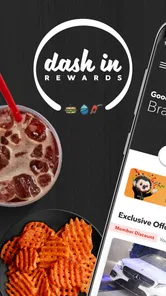
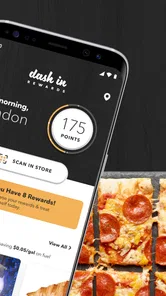
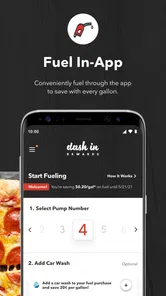
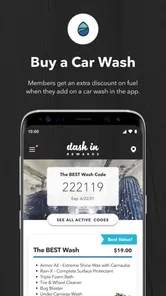
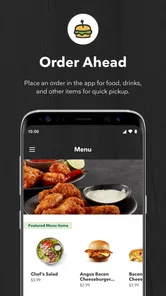
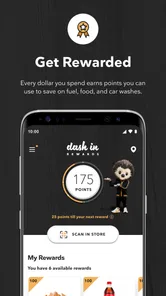
Analysis by Reviewed
I found Dash In Rewards most useful when I treated it as a simple savings companion for regular stops rather than as a complete food-ordering or travel-planning tool. Its central appeal is straightforward: it brings fuel, food, and car-wash savings into one app, so the benefit is tied to a routine many drivers already have. That sounds modest, but it changes how useful the app feels. If I already expect to stop at Dash In, checking the app before paying can become a quick habit with a practical payoff.
This is a free Food & Drink app from Wills Group Loyalty Google Play Account. It is rated for Everyone, works on Android devices running version 7.0 or later, and the current release is 3.1.0. The app has passed the early-adopter stage, with over 100 thousand installs and an average rating of 4.1 from more than 600 ratings. Those figures suggest a reasonably established loyalty app, although they also leave room for the experience to vary depending on how often a person visits participating Dash In locations.
Why the savings capability matters in everyday use
The strongest part of the app is not that it tries to do everything. It is that it focuses on a familiar moment: I am already stopping for fuel, a snack, a drink, or a car wash, and I want to know whether my loyalty account can make that visit better value. The ability to connect those three spending occasions is more useful than a loyalty app limited to a single product type.
Fuel is usually the main reason someone visits a convenience location, but food and car care can easily become extra purchases. A rewards app can help make those related visits feel more organized. In my view, the real advantage is the single routine for fuel, food, and car-wash savings. Instead of keeping separate habits in mind, I can use one place to check what applies before completing a stop.
That does not automatically make every purchase cheaper, and I would not install it expecting dramatic savings on every visit. The value depends on whether Dash In is already part of my route and whether I remember to use the rewards process consistently. For an occasional visitor, the app may feel like another account to maintain. For a frequent driver, that small amount of organization is much more meaningful.
What I would use it for first
My first use would be before a planned fuel stop. I would open the app while parked, review the available reward information, and then decide whether the visit is worth combining with another need. If I also need coffee, a snack, or a wash, the app gives me a reason to think about the whole stop instead of treating each purchase separately.
That workflow is more important than it may appear. Loyalty programs are easy to ignore when they require remembering several rules or switching between different services. A focused app can reduce that mental load, but only if I check it at the right time. Opening it while driving would be unsafe and unnecessary, so I would make the check part of the pre-stop routine or do it after parking.
More From Our News Desk

 Instagram
Instagram’s Power Comes From Its Place in Your Phone
A close look at how Instagram turns Meta’s reach, recommendation systems and everyday camera habits into durable platform power—and what that costs users.

 Gmail
GmailGmail in a Busy Inbox: Who Benefits Most?
From first account to crowded workday, Gmail earns its place through dependable search and flexible sorting—but its best fit depends on how much inbox maintenance you can tolerate.

 Prime Video
Switching to Prime Video: What Changes in Your Viewing Routine
Prime Video can make a compelling second home for streaming, but switching means learning a different catalog, rental layer, and route from browsing to playback.

 Universal TV Remote Control
Universal TV Remote Control Works Best as a Reliable Backup
A phone remote earns its place through quick setup and reliable habits. Here is how to get more from Universal TV Remote Control—and where its limits show.

 Weather - By Xiaomi
Weather by Xiaomi Review: Clear at a Glance, Less Clear Up Close
Xiaomi’s weather app makes everyday forecasts quick to scan, but its calm surface can leave useful details and recovery paths harder to find than they should be.

 X
XX Under Pressure: Can It Recover When Posting Goes Wrong?
A resilience-focused review of X, examining setup, mistaken posts, interruptions, weak connections, and the gaps that matter when recovery needs to be dependable.
Latest News



There is also a useful budgeting angle. I can decide in advance whether I am making a necessary fuel purchase or adding an optional convenience purchase. Rewards should not encourage me to buy something I did not want. Used carefully, the app helps me capture value from a stop I was already going to make rather than creating a reason to spend more.
How the experience fits a normal stop
The practical test for a loyalty app is whether it interrupts the visit. I would expect Dash In Rewards to be most comfortable when I open it before reaching the counter, check the relevant reward information, and keep the phone ready only if the checkout process requires it. That preparation matters because a busy convenience store is not the place where I want to search through menus while people are waiting behind me.
For a driver who makes repeated stops, the best workflow is predictable. I would check the app before leaving home or while safely parked, decide whether the reward applies to the purchase I have in mind, and then complete the transaction without trying to improvise. This is one of the less obvious lessons with loyalty apps: the savings are easier to use when the app becomes a planning tool rather than something opened at the last second.
I would also keep expectations realistic about the difference between seeing a reward and successfully using it. A reward app can show useful information, but the final benefit still depends on following the applicable redemption steps at the store. If I am uncertain, I would ask the cashier before paying instead of assuming that simply having the app installed is enough.
Another practical point is phone readiness. If the battery is low, the connection is unreliable, or I have not signed in beforehand, a quick stop can become slower than expected. I would avoid creating an account or troubleshooting at the pump. Setting up the app at home and checking it once before relying on it is a better approach, especially for someone who wants a smooth commute rather than an experiment during a rushed stop.
A realistic everyday scenario
Imagine I am driving home after work and need fuel. I also know the car is dirty and I have not eaten since lunch. Instead of visiting several unrelated places, I can use the Dash In stop as a chance to handle those needs together. Before pulling in, I check the app while parked or safely stopped, see which rewards are relevant, and decide whether the food or car-wash option makes sense for that visit.
The important benefit in that situation is not just a possible discount. It is the ability to make a quick decision with the information in one place. If the reward does not suit what I need, I can skip the extra purchase. If it does, I can combine errands without having to remember a separate loyalty program for each part of the stop.
This is where I think the app has a clear advantage over relying on paper receipts or trying to remember promotions from memory. A receipt can confirm what happened, but it does not help me plan the next visit. A general coupon app may show many offers, but it can also bury a relevant Dash In benefit among unrelated deals. A dedicated rewards app is narrower, yet that narrowness can make it faster when the destination is already decided.
Where it compares well with usual alternatives
Compared with carrying a physical loyalty card, an app is easier to update and less likely to be forgotten if I already carry my phone. It can also bring fuel, food, and car-wash activity under one rewards identity instead of making me carry separate cards. The trade-off is obvious: the phone must be charged, accessible, and ready to use.
Compared with a broad coupon or cashback service, Dash In Rewards should feel more relevant for a Dash In customer because it is built around that particular shopping context. A general app may be better for comparing offers across different retailers, but it is less focused. I would choose the broader option if I shop at many competing stores and want one place to compare them. I would choose Dash In Rewards if my regular route already takes me to Dash In.
Compared with doing nothing, the app adds a small step before a purchase. That step is worthwhile only when the expected reward is greater than the effort of checking and using it. Frequent visitors can reach that point easily. Someone who stops there once every few months may find that a normal payment method is simpler.
The trade-offs I noticed
The biggest limitation is dependence on habit. Installing the app does not create savings by itself. I need to remember to open it, understand the reward that applies, and use it correctly. If I usually make rushed stops, the app may remain untouched on my phone. That is not a flaw unique to this product, but it is especially important for a loyalty app because forgotten rewards have no practical value.
There is also a risk of confusing convenience with value. A reward can make an optional purchase feel justified even when I did not need it. I would use the app to reduce the cost of planned purchases, not to turn every fuel stop into a larger shopping trip. That distinction keeps the loyalty benefit from working against my budget.
The app is also less compelling if I want a complete fuel-price comparison across every nearby station. Its purpose is loyalty around Dash In, not replacing a dedicated navigation or price-comparison service. If finding the absolute lowest fuel price is my priority, I would use a location-focused tool alongside it and then decide whether the Dash In reward changes the calculation.
Another trade-off is attention. A good rewards workflow should take only a moment, but I still need to pause and look at the app. I would never handle that process while driving. For a passenger, it is easy; for a solo driver, it belongs before departure, after parking, or once I have finished the stop.
Small habits that make it more useful
I would start by opening the app at home rather than at the store. That gives me time to complete setup calmly, understand where the reward information appears, and avoid holding up a purchase while I learn the interface. This is a simple step, but it makes the difference between a loyalty app that feels convenient and one that feels like extra work.
I would then connect the app to a specific routine. For example, I could check it every time I plan a weekly fuel stop, rather than opening it randomly. A fixed trigger is easier to remember than hoping I will think of the app at the counter. This approach also helps me judge whether the rewards are genuinely useful for my spending pattern.
For mixed visits, I would decide the order of my actions before entering the store. If I need fuel, food, and a wash, I would check the relevant reward information first and keep the phone available without using it near moving vehicles. Planning the sequence reduces the chance of forgetting an eligible purchase or discovering too late that I needed to present something earlier in the transaction.
I would also review my receipts or account activity after the first few uses. Not because I expect a problem, but because it confirms that I understand how the rewards are being applied. Once the process is clear, I can stop checking every detail and use the app more quickly. This is a useful compromise between blindly trusting the system and spending too much time monitoring every visit.
Who will gain the most from it
The best match is a driver who regularly passes Dash In locations and already buys more than fuel there. That person can benefit from combining several ordinary needs in one loyalty routine. Commuters, local drivers, and households that make frequent convenience-store stops are more likely to notice the advantage than people who rarely visit.
It can also suit someone who dislikes carrying physical loyalty cards but is comfortable using a phone at checkout. The free price removes the financial barrier to trying it, and the Everyone age rating makes it broadly accessible within its intended everyday setting. Still, accessibility does not mean universal usefulness. A person who avoids loyalty accounts, keeps a very strict no-app phone policy, or always chooses another fuel station should probably skip it.
I would be more cautious about recommending it to someone who wants one app for every retailer. Dash In Rewards is specialized, and that is both its strength and its boundary. It cannot replace a general budgeting app, a broad coupon service, or a navigation tool. It works best as a focused addition to those tools, not as a universal shopping assistant.
My overall view after using the app
I see Dash In Rewards as a practical loyalty app with one clear job: make regular Dash In stops more rewarding across fuel, food, and car-wash purchases. Its strongest feature is the way it brings those related expenses into one routine. That can save time and make rewards easier to remember, especially when I plan the stop before arriving.
Its weakness is equally clear. The app only earns its place on my phone if I visit Dash In often enough to build the checking habit. People looking for broad retailer coverage, detailed fuel-price comparisons, or a full meal-ordering platform should use a different kind of app. Dash In Rewards is not trying to solve those problems.
With a 4.1 average and a growing install base, it looks like a credible option for the right customer, while its free availability makes testing it low risk. My recommendation is simple: if Dash In is already part of your weekly driving routine, install it, set it up before your next stop, and judge it by whether it makes an existing purchase easier or cheaper. If you rarely go there, the extra account and checkout step probably will not justify the space on your phone.
Dash In Rewards Frequently Asked Questions
Can I check whether Dash In Rewards is compatible with my phone before downloading?
Dash In Rewards is an app in the Food & Drink category, and it is free to download. It requires Android 7.0 or later, so check your phone’s operating system before installing. The app is designed for Dash In rewards, which makes it most relevant to customers who visit participating Dash In locations and want to manage offers and benefits on their phone.
What is Dash In Rewards, and how does it work?
Dash In Rewards is a loyalty application designed to help customers earn and manage rewards from participating Dash In locations. After creating an account, users can typically connect their profile with eligible purchases, collect points or promotional benefits, and redeem available rewards. The exact earning rules, participating stores, and redemption options may vary by location, so it is worth checking the in-app details before making a purchase.
Is Dash In Rewards free to download and use?
The Dash In Rewards app is free to download, and creating a rewards account should not require a subscription fee. However, using the app does not make purchases free, and some promotions may have specific spending requirements or limitations. Before relying on a reward, review its expiration date, eligible products, participating locations, and any terms shown in the app to avoid unexpected restrictions.
How do I earn and redeem rewards in Dash In Rewards?
Rewards are usually earned by identifying your account during eligible purchases, such as scanning a membership code, using a registered payment method, or following a promotion displayed in the app. Once a reward becomes available, the app should show its value and redemption conditions. At checkout, follow the instructions provided, because rewards may be limited to certain products, locations, dates, or transaction types.
Does Dash In Rewards require access to my location or personal information?
The app may request information such as your name, email address, phone number, or date of birth when you register, depending on the account requirements. Location access may also be offered to help find nearby participating Dash In stores, but it may not be essential for every feature. Before accepting permissions, review the privacy policy and enable only the access you feel is necessary.
Pros
- Earn rewards and discounts while shopping at participating brands.
- Simple interface makes browsing offers and tracking rewards easy.
- Useful location-based deals can help discover nearby promotions.
- Regular promotions may provide extra value beyond standard loyalty schemes.
- Free to download
- with no upfront cost to access available offers.
Cons
- Rewards are limited to participating stores and available locations.
- Some offers may have expiration dates or strict redemption conditions.
- The app may require location access for nearby deals and promotions.
- Reward availability can vary
- making savings less consistent over time.
- Users may receive marketing notifications and promotional messages.











