

CustomBank
- 19.00
- 4.5
- Installs
- 10.00K
- Price
- Free

Screenshots
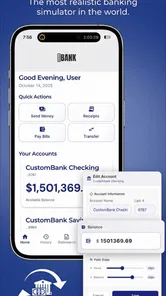
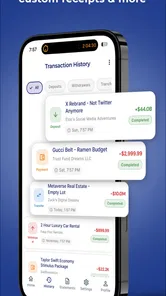
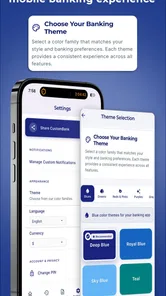
Analysis by Reviewed
I approached CustomBank as a practice tool rather than a replacement for a real banking app. That distinction matters from the first screen: its purpose is to let me explore mobile-banking ideas and build a personal financial setup without using real money. For someone learning how banking apps are organized, planning a fictional budget, or testing how a customized financial world might feel, that is a useful and low-risk starting point.
It is a free finance app from CustomApps LLC, available for users aged Everyone, and it has a 4.5 average from around three hundred ratings. The current release is version 2.12.1, and the app is listed for devices running Android 6.0 or newer. It has passed ten thousand installs, so this is not an entirely unknown experiment, although it remains much smaller than the banking services people use for actual payments.
What the free entry point does—and does not—promise
The download costs nothing, which makes it easy to test whether a simulated banking setup suits the way I learn. That free entry point is the clearest value proposition: I can try the basic idea before deciding whether I want to spend anything. Optional in-app purchases range from $1.99 to $99.99 per item, so I would treat purchase prompts as a reason to pause and consider what a particular addition would do for my practice, rather than assume all customization is included.
The price range is broad enough that I would not make a purchase just because I enjoy the concept. I would first use the free experience for a complete, modest exercise—such as dividing fictional income between regular costs and a savings goal—and see whether the app helps me think more clearly. If the exercise already works, paying may add little to my own use. If a paid item is presented, I would judge it by its specific usefulness, not by the size of the simulated world it might create.
Getting past the first points of friction
The most important thing to understand before opening it is that CustomBank is not connected to real money. I would not approach it expecting account transfers, card payments, deposits, or access to a genuine bank account. The app is built around practice and customization, which makes it closer to a financial sandbox than a conventional banking service.
That expectation prevents the most common kind of confusion. If I wanted to check my real balance, pay a bill, or move money between accounts, I would use my bank’s official application instead. Here, the useful question is different: can I create a financial environment that helps me think through money decisions without risking an actual transaction?
The answer depends heavily on how deliberately I set it up. A fictional banking environment can become valuable when I give it a clear purpose. For example, I might use it to rehearse the steps involved in organizing income, separating spending money from savings, or understanding how different balances affect a monthly plan. If I open it without a specific exercise in mind, the customization can feel more like decoration than a practical learning aid.
More From Our News Desk

 Gmail
GmailGmail in a Busy Inbox: Who Benefits Most?
From first account to crowded workday, Gmail earns its place through dependable search and flexible sorting—but its best fit depends on how much inbox maintenance you can tolerate.

 Prime Video
Switching to Prime Video: What Changes in Your Viewing Routine
Prime Video can make a compelling second home for streaming, but switching means learning a different catalog, rental layer, and route from browsing to playback.

 Universal TV Remote Control
Universal TV Remote Control Works Best as a Reliable Backup
A phone remote earns its place through quick setup and reliable habits. Here is how to get more from Universal TV Remote Control—and where its limits show.

 Weather - By Xiaomi
Weather by Xiaomi Review: Clear at a Glance, Less Clear Up Close
Xiaomi’s weather app makes everyday forecasts quick to scan, but its calm surface can leave useful details and recovery paths harder to find than they should be.

 X
XX Under Pressure: Can It Recover When Posting Goes Wrong?
A resilience-focused review of X, examining setup, mistaken posts, interruptions, weak connections, and the gaps that matter when recovery needs to be dependable.

 Clash of Clans
Clash of Clans Is Won Between the Battles
Its raids are quick; its community is a long-term project of coordination, teaching, rivalry, and shared responsibility—with all the friction that entails.
Latest News



I also found it helpful to decide in advance whether I am building a personal simulation or simply exploring the interface. Those are different sessions. A quick exploration is enough to understand the general idea, while a more consistent setup can support repeated budgeting practice. Keeping that distinction clear makes it easier to judge the app fairly.
Checks worth making before blaming the app
Installation is straightforward on a compatible Android device, but a few simple checks can save time. I would first confirm that the phone is running Android 6.0 or later and that the installation completed normally. If the app closes immediately, behaves strangely, or refuses to open a screen, restarting the device and checking for an available app update are sensible first steps.
The version shown for CustomBank is 2.12.1. If an older build is installed, updating is a reasonable troubleshooting move before changing anything else. I would also make sure the phone has enough free storage for normal app operation and that the operating system is not in an unusually restricted state, such as an aggressive battery-saving mode that stops apps from working properly.
Because this is a practice environment, I would avoid entering sensitive real-world banking details while testing it. The whole point is to work with fictional information and imaginary balances. That habit also makes troubleshooting safer: I can reset my approach without worrying about exposing account numbers, payment credentials, or personal banking records.
Another useful setup check is to define a small test scenario instead of trying to build an elaborate financial world immediately. I might begin with one income source, a few regular expenses, and a savings goal. If that basic arrangement works, I can add more complexity gradually. This makes it much easier to identify whether a problem comes from the app, from an overly complicated setup, or simply from unclear expectations.
In-app purchases range from $1.99 to $99.99 per item, even though the app itself is free to install. I would therefore review any purchase prompt carefully and decide whether the added customization is genuinely useful for my intended exercise. A free download does not automatically mean every part of the experience is free, so this is one area where a cautious approach is worthwhile.
How I recover when a workflow goes wrong
When a practice session becomes confusing, I would not immediately start over or assume that the app has lost something. First, I would retrace the last action and identify what I was trying to represent. Was I organizing a balance, testing a spending decision, or changing the structure of my fictional finances? Separating the goal from the screen I am looking at often reveals that the real problem is an unfinished plan rather than a technical failure.
A useful recovery method is to reduce the scenario to its smallest workable version. I would remove unnecessary categories from my mental model, return to the main balance or central setup, and test one change at a time. If the simplified version behaves as expected, I can rebuild the more detailed scenario carefully. This is more reliable than making several changes at once and then trying to guess which one caused confusion.
I would also keep a short note outside the app when using it for a serious learning exercise. That note could record the fictional starting balance, the purpose of each category, and the result I expect from a particular change. This is not because CustomBank is a bookkeeping replacement; it is because a written reference helps me distinguish a deliberate experiment from an accidental edit.
For a realistic everyday scenario, imagine that I am preparing for a month in which my income arrives once but my expenses appear throughout the month. I could create a fictional version of that situation, assign money to regular obligations, and then test what happens when I reserve part of the balance for a later goal. The value is not in producing an official financial record. The value is in practicing the order of decisions before I apply the same thinking to my real budget.
That workflow also exposes an important limitation. A practice app cannot automatically know whether my fictional assumptions match real bank rules, taxes, fees, interest, or payment timing. I have to supply the context myself. If I treat the result as a rehearsal rather than a prediction, the exercise remains useful. If I treat it as proof that a real transaction will work identically, it becomes misleading.
Separating app problems from device and expectation problems
Not every failed experience points to a defect in CustomBank. A slow or unstable phone, limited storage, an outdated operating system, or a temporary device issue can produce symptoms that look like an app problem. My first response would be basic: close and reopen the app, restart the phone, check compatibility, and install the latest available version.
I would also avoid testing several unfamiliar changes at once. If I alter the setup, switch device settings, and attempt a complicated workflow simultaneously, I lose the ability to identify the cause of the problem. A controlled test with a simple fictional setup is much more informative.
There is also a difference between a missing real-banking function and a malfunction. If I expect a genuine transfer, a live account connection, or a real payment, the absence of that result is not evidence that the app is broken. It reflects the app’s role as a safe practice environment. That is why I would keep it separate from my bank’s official tools and never use it as the place where an urgent financial task needs to be completed.
Privacy-minded users should apply the same common sense they would use with any finance-related application. Since CustomBank is intended for simulated finances, I would keep all examples fictional and avoid copying sensitive information into it. That gives me the learning benefit without turning a practice exercise into an unnecessary data-handling risk.
Who will get the most from CustomBank?
I think CustomBank is best suited to people who learn by doing. A beginner who finds financial concepts abstract may understand them more easily after arranging a fictional balance and testing different priorities. A student could use it to rehearse the logic of a personal budget. Someone preparing to manage their first regular income could use the app to think through categories before committing to a real budgeting routine.
It may also appeal to users who want a private space for experimenting with financial organization without the pressure of real consequences. That is the app’s strongest idea: I can make a mistake in a simulated environment, notice the result, and revise the plan. Traditional banking apps are excellent for secure transactions, but they are not designed for open-ended practice.
The customization angle is more useful when it serves a specific decision. I would create separate fictional structures for different questions rather than trying to make one setup represent every part of my life. For example, one exercise might focus on monthly spending, while another might explore how a savings target changes the amount available for everyday use. This keeps the scenarios understandable and makes comparisons easier.
On the other hand, I would skip it if I need a complete personal-finance system with verified account data, automatic transaction imports, bill reminders, investment tools, or live payment support. A conventional budgeting app would be a better choice for tracking actual spending, while an official bank app would be the right option for secure account management. CustomBank occupies a narrower space, and its usefulness depends on wanting that space.
Choosing it over a spreadsheet or a budgeting app
A spreadsheet is often better when I want precise calculations, a durable record, or a format I can share and adapt freely. A conventional budgeting app is the stronger option when I want to review actual purchases and keep day-to-day spending in one place. CustomBank makes more sense when the goal is to rehearse a banking-style arrangement without making real transactions. Those alternatives are not interchangeable: they answer different questions, and a simulation should not be treated as a substitute for records of actual money.
One practical way to get more from a session is to write down the question before opening the app: “Can I set aside enough for this goal?” or “What changes if I reserve money for bills first?” Then alter one assumption and compare the result with the starting arrangement. This simple discipline turns customization into an experiment instead of an aimless tour, while making it easier to spot where my own assumptions—not the app—are driving the outcome.
When a free download is enough
The free entry point makes it easy to try, but the presence of optional purchases means I would not assume that every customization is included at no cost. Before paying, I would ask whether the purchase improves a particular practice workflow or merely adds variety. For a simple beginner exercise, I would start with the free experience and only consider spending if the app becomes part of a repeated learning routine.
The Everyone content rating makes it approachable for a broad audience, but that does not make every lesson automatically suitable for every learner. A younger user may still benefit from an adult explaining that fictional balances are not real money and that the app cannot validate a real-world financial decision. For independent adults, the same distinction matters: use the exercise to clarify priorities, then check actual figures and rules with the appropriate real-world source.
My final view is positive but deliberately limited. CustomBank is a thoughtful finance practice app for exploring fictional banking situations, and I like the safety of learning without real money involved. Its best results come from a small, clearly defined scenario, careful setup, and realistic expectations about what simulation can and cannot teach.
I would recommend it to a friend who wants to rehearse financial organization, especially someone who feels more comfortable experimenting than reading instructions. I would not recommend replacing a real bank or a full budgeting service with it. Use it as a rehearsal space, not as a financial authority. With that boundary in place, CustomBank offers a practical way to test ideas, recover from mistakes, and build confidence before making real-world money decisions.
CustomBank Frequently Asked Questions
Does CustomBank use real money or connect to my actual bank account?
CustomBank is designed for practicing mobile banking without real money, so it offers a way to explore a customized financial world as a simulation. It is not a place to carry out real banking transactions. Keep that distinction in mind before downloading, especially if you are looking for an app to manage an actual bank account or move funds.
Who makes CustomBank, and which devices can run it?
CustomBank is a finance app developed by CustomApps LLC. It is available for Android devices running version 6.0 or later, and its content rating is Everyone. The app is free to download, so you can try its practice-banking experience without paying upfront. Check that your device meets the operating-system requirement before installing.
What is CustomBank and what can I use it for?
CustomBank is a personal finance and banking app designed to help users manage their financial information from a mobile device. Depending on the services supported by your bank or region, you may be able to review account balances, monitor transactions, organize financial activity, and access selected banking tools. Before downloading, check whether CustomBank supports your institution and the features you need.
Is CustomBank safe to use for managing financial information?
Because CustomBank may handle sensitive banking or personal data, security should be one of the first things you evaluate. The app may use login protection, encryption, device verification, or other security measures, but users should still download it only from an official store and verify the developer name. Never share passwords, verification codes, or banking details through unofficial messages.
Does CustomBank work with every bank and financial institution?
CustomBank is not necessarily compatible with every bank, card provider, or financial institution. Availability can depend on your country, the participating institution, and the version of the app you install. Before creating an account, review the supported institutions and regional requirements in the official listing. If your bank is not supported, some functions may be unavailable.
Pros
- Simple interface makes everyday banking tasks easy to navigate.
- Quick access to balances
- transactions
- and account details.
- Mobile access lets users manage finances while away from a branch.
- Digital statements help reduce paper use and simplify record keeping.
- Useful account alerts can help users monitor activity and stay informed.
Cons
- Some features may depend on the user's bank or account type.
- Advanced banking tools may be less extensive than larger banking apps.
- App performance can vary with network quality or older devices.
- Users may need extra verification when signing in from a new device.
- Limited support hours could make urgent assistance less convenient.











