

Cousins Maine Lobster
- 378.00
- 3.0
- Installs
- 100.00K
- Price
- Free

Screenshots
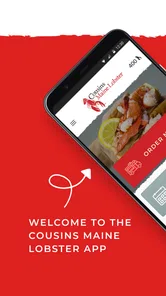
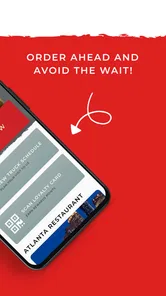
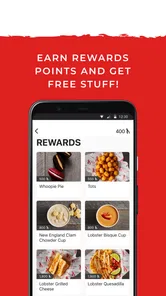
Analysis by Reviewed
I approached Cousins Maine Lobster as a practical food-and-drink app rather than just another restaurant download. Its main purpose is a loyalty program from the developer Cousins Maine Lobster, so the useful question is not whether it replaces every food-ordering app, but whether it makes returning to this particular lobster brand easier and more rewarding. After spending time with it, I found that distinction important: the app is most valuable when you already buy from Cousins Maine Lobster and want a more direct way to keep track of your relationship with the brand.
The app is free, aimed at Everyone, and has been available since May 30, 2018. It runs on Android 7.0 or later, and the current version is 112.20.91. Those details make it accessible to many older phones, although compatibility alone does not guarantee a smooth experience on every device. The public response is mixed, with a 3.0 average from around 673 ratings and around 378 written reviews. That is not a reason to dismiss it, but it is a useful warning to approach the app with realistic expectations rather than assuming the loyalty experience will be flawless for every user.
Where I Found the Biggest Points of Friction
The first thing I would tell a friend is to identify what they expect the app to do. A loyalty app is usually built around repeat visits, account activity, and benefits connected with one business. It is not automatically the same as a broad restaurant marketplace, a universal coupon wallet, or a replacement for a phone call. If you install it while looking for every nearby seafood restaurant, you may feel disappointed before you have even used its central purpose.
The app’s short store description is simply “Cousins Maine Lobster,” while its store summary identifies it as a loyalty program. That combination tells me to treat it as a brand-specific companion. The strongest use case is a customer who already follows Cousins Maine Lobster, visits its trucks or locations when available, and wants a dedicated place for loyalty-related activity. Someone who eats there only once, or who mainly wants to compare menus across many restaurants, will probably get more value from a general food-ordering service or a map app.
Another common sticking point is assuming that installing the app completes the setup. In practice, loyalty tools are only useful when the account, contact details, and purchase activity are connected correctly. If a benefit does not appear, the problem may be an unfinished sign-in, a mismatch in the information used at checkout, or a delay between an interaction and its appearance in the account. I would not immediately uninstall the app after one missing update.
There is also a human factor. People often open a loyalty app while standing in line, using mobile data, with a nearly empty battery and several other apps running. That is exactly when a small loading delay feels like a serious failure. My advice is to open it before reaching the counter, sign in at home, and check that the account looks ready before you are trying to pay or claim anything. This simple habit removes much of the pressure from the moment when you actually need it.
What to check before blaming the app
If the app appears blank, slow, or stuck, I would begin with the basics: confirm that the phone is connected to the internet, switch between Wi-Fi and mobile data if possible, and close and reopen the app. These steps sound obvious, but they separate a temporary connection problem from an account problem. I would also make sure the device is running Android 7.0 or a later release, since that is the stated minimum operating system.
More From Our News Desk

 Instagram
Instagram’s Power Comes From Its Place in Your Phone
A close look at how Instagram turns Meta’s reach, recommendation systems and everyday camera habits into durable platform power—and what that costs users.

 Gmail
GmailGmail in a Busy Inbox: Who Benefits Most?
From first account to crowded workday, Gmail earns its place through dependable search and flexible sorting—but its best fit depends on how much inbox maintenance you can tolerate.

 Prime Video
Switching to Prime Video: What Changes in Your Viewing Routine
Prime Video can make a compelling second home for streaming, but switching means learning a different catalog, rental layer, and route from browsing to playback.

 Universal TV Remote Control
Universal TV Remote Control Works Best as a Reliable Backup
A phone remote earns its place through quick setup and reliable habits. Here is how to get more from Universal TV Remote Control—and where its limits show.

 Weather - By Xiaomi
Weather by Xiaomi Review: Clear at a Glance, Less Clear Up Close
Xiaomi’s weather app makes everyday forecasts quick to scan, but its calm surface can leave useful details and recovery paths harder to find than they should be.

 X
XX Under Pressure: Can It Recover When Posting Goes Wrong?
A resilience-focused review of X, examining setup, mistaken posts, interruptions, weak connections, and the gaps that matter when recovery needs to be dependable.
Latest News



On an older phone, available storage and background activity can matter even when the operating system is supported. I would close demanding apps, restart the phone, and try again rather than repeatedly tapping the same button. If the app was installed a long time ago, checking whether version 112.20.91 is available for the device is sensible. Keeping the application current can resolve compatibility issues, although an update is not a guarantee that every account or network problem will disappear.
Notification settings are another practical check. If you expect reminders or loyalty-related messages, confirm that notifications for the app are allowed at the phone level. I would also review battery-saving settings if the app seems unreliable in the background. Aggressive battery management can delay notifications or stop an app from refreshing until it is opened. This is a phone setting issue, not necessarily a defect in Cousins Maine Lobster.
For sign-in trouble, I would carefully re-enter the account details, check for accidental spaces, and avoid creating multiple accounts while frustrated. Duplicate accounts can make loyalty activity appear to be missing because the user is looking at a different profile from the one used previously. If the app offers a recovery route on the sign-in screen, I would use that rather than guessing passwords repeatedly.
A calmer setup for real visits
My preferred setup is to install the app while I have reliable Wi-Fi, open it immediately, and complete the account process before planning a meal. I would then look through the available account or loyalty area and make sure my basic information is displayed as expected. I would not wait until I am at a busy food truck or restaurant to discover that I still need to finish registration.
Before visiting, I would also check the current app screen rather than relying on an old screenshot or memory. Loyalty programs can change how information is presented across versions, and a button may be located somewhere different from where a friend remembers seeing it. Taking a moment to explore in advance makes the in-person workflow less awkward.
One useful habit is to keep the phone unlocked and the app ready shortly before ordering, while still protecting personal information if other people are nearby. If the account depends on recognizing the same customer details used during a purchase, consistency matters. I would use one account, keep the information accurate, and avoid switching between several login methods unless necessary.
I would also plan for the possibility that a screen will not load at the exact moment I need it. Carrying the relevant account information in a secure, non-public way and knowing how to explain the issue to staff is more practical than repeatedly refreshing the app. The goal is to make the loyalty program support the visit, not to let a phone screen control the entire experience.
Recovering the Workflow When Something Goes Wrong
Suppose I open the app and a loyalty action does not register. My first step would be to note what actually happened: did the app fail to open, did the account load but show old information, or did the interaction complete without appearing afterward? Those are different problems. Restarting the app may help with the first. Waiting for synchronization may help with the second. The third may require keeping a record of the visit and contacting the appropriate support channel.
I would avoid submitting the same action repeatedly just because the screen looks slow. Repeated taps can create confusion, especially if the first request eventually goes through. Instead, I would wait briefly, check whether the screen changes, and then reopen the relevant account area. If the app remains unchanged, I would record the date, location, and what I attempted. That information is far more useful when asking for help than a vague message saying that “it does not work.”
If the app closes unexpectedly, I would restart the phone and try again with other background apps closed. If the problem happens only on mobile data, I would test Wi-Fi. If it happens only on Wi-Fi, mobile data can provide a useful comparison. Testing one variable at a time helps identify whether the issue is tied to the network, the phone, or the account.
Clearing an app’s cache can sometimes help with damaged temporary files, but I would be careful with any option that removes stored app data. Before doing that, I would make sure I know the account sign-in details. A cleanup step that signs me out is manageable; losing access because I cannot recover the account is avoidable. I would treat reinstalling as a later step, not the first reaction.
There is a practical trade-off between convenience and proof. A loyalty app can make repeat visits easier, but if a transaction does not appear, a screenshot or a written note may be the only way to explain what happened later. I would not share sensitive information publicly, but I would preserve enough non-sensitive context to make a support request clear. This is especially important when the missing activity affects a benefit I expected to receive.
How I would handle a missing benefit
I would first confirm that I was signed into the intended account and that the purchase or visit was completed in the way required by the program. Then I would close and reopen the app, check the account again, and give the system a reasonable opportunity to refresh. If it still looked wrong, I would contact Cousins Maine Lobster through its official support route and include the account identifier or transaction details requested there.
I would not assume that staff at a busy location can repair an account instantly. They may be able to explain the normal process, but account history and loyalty records are often handled separately from the food counter. The most effective approach is to stay polite, ask what information support will need, and avoid creating a second account to force the issue.
This is also where expectations matter. A loyalty app is not a substitute for checking the final order, confirming that the correct account is active, or reading the terms attached to a particular benefit. I would treat the app as one part of the visit workflow, alongside the restaurant’s normal ordering and payment process.
When the phone is not the real problem
Sometimes an app appears to fail because the surrounding service is unavailable, a location is busy, or the user is expecting information that belongs to another channel. Since Cousins Maine Lobster is a specific brand, the app’s usefulness depends on whether the brand’s service is relevant to where and when you want to eat. If your main question is whether a truck is nearby today, a general map or local search tool may be faster for discovery, while this app remains more relevant to loyalty activity.
That distinction is one of the most important trade-offs. General restaurant apps are usually better for browsing many businesses, comparing options, and discovering alternatives. A brand-specific loyalty app can be better when you have already chosen the brand and want a focused account experience. I would use both types of tools rather than expecting one app to handle discovery, navigation, ordering, reviews, and loyalty equally well.
Location services can also create confusion. If you are expecting nearby information, check that the phone’s location setting is available and that the app can function with the permissions you have chosen. I would not grant permissions automatically; I would decide based on the feature I am trying to use. If the app works for account access but not for location-related information, that points toward a setting or service issue rather than a complete app failure.
Network congestion is another realistic explanation. Food trucks and popular dining areas can have crowded mobile networks, and a weak signal may make a perfectly functional app seem broken. When possible, I would prepare before arriving, use a stable connection, and avoid making the first login attempt in the busiest part of the visit. This is a small workflow change, but it can make the experience feel much more dependable.
It is also worth separating a design annoyance from a technical defect. If I can complete the task but need too many taps, that is usability friction. If the app crashes or loses account information, that is more serious. The mixed public rating suggests that not every user has had an equally smooth experience, so I would judge it by the specific loyalty tasks I need rather than by assuming either universal success or universal failure.
Who will get the most from it
I think the app makes the most sense for repeat customers who already choose Cousins Maine Lobster and want a dedicated way to engage with its loyalty program. It is also a reasonable fit for someone who prefers keeping brand-specific activity separate from a crowded collection of restaurant apps. The free price removes the financial barrier to trying it, and the Everyone rating makes it suitable for a broad audience.
For a household that orders or visits together, I would decide in advance whose account should receive the loyalty activity. Using several family members’ accounts interchangeably can make records harder to follow. A single, consistently used account is usually easier to manage, provided it reflects the person who should control it.
I would be less enthusiastic for occasional tourists, people who are still deciding where to eat, or anyone who wants a single app for many restaurants. Those users may install it, open it once, and gain little from maintaining another account. The app is not a bad choice for them, but it is a narrowly focused choice, and a broad food-discovery tool may serve them better.
My practical verdict after using it
The best way to use Cousins Maine Lobster is as a prepared loyalty companion, not as an all-purpose restaurant app. Set it up before a visit, keep one account, confirm the phone and network basics, and give the app a chance to refresh before repeating an action. Those habits address the most likely sources of frustration without pretending that every problem can be fixed on the device.
I appreciate the clear focus: the app comes from Cousins Maine Lobster and is designed around staying connected with that brand rather than trying to cover the entire food-and-drink category. That focus can feel convenient when I already know where I want to eat. It can also feel limiting when I want broad restaurant search, flexible comparisons, or a single place to manage several loyalty programs.
The 100K-plus install level shows that it has reached a substantial audience, but the 3.0 average tells me to keep expectations measured. I would try it if I were a regular Cousins Maine Lobster customer, especially because it is free and supports older Android devices. I would skip it if I only need occasional restaurant discovery or do not expect to return to this brand.
My final recommendation is conditional but positive: install it when the loyalty connection is genuinely useful to you, complete the setup away from the counter, and keep a backup plan for a slow connection or delayed account update. Used that way, it can reduce some of the effort of repeat visits. Used as a replacement for every other food app, it will probably feel too specialized.
For iPhone and Android users alike, the deciding factor is not the number of features visible at first launch. It is whether a brand-specific loyalty workflow fits your habits. If it does, Cousins Maine Lobster is worth trying. If it does not, the usual restaurant-search and ordering alternatives will likely be the more practical everyday choice.
Cousins Maine Lobster Frequently Asked Questions
Is Cousins Maine Lobster available on both Android and iOS?
Cousins Maine Lobster is a mobile app in the Food & Drink category, intended for people who want to connect with the brand while on the go. Before downloading, check that your phone’s operating system is compatible and that the app is available in your device’s app store. The app is free to download, though purchases made through it may involve separate costs.
Who makes the Cousins Maine Lobster app, and is it suitable for everyone?
The app is developed by Cousins Maine Lobster and carries an Everyone age rating, so it is presented as suitable for a general audience. Its focus is on the company’s food offerings, locations, and customer features rather than age-restricted content. If you are downloading it for a child, remember that ordering food or using location-related features may involve choices that a parent or guardian should review.
What is the Cousins Maine Lobster app used for?
The Cousins Maine Lobster app is designed to help seafood fans find the brand’s food trucks, restaurants, and scheduled events in participating locations. It can make it easier to check where the lobster truck will be next, browse available menu items, and discover ordering or booking options. Availability and features may vary depending on your city and the current local schedule.
Can I order lobster dishes directly through the Cousins Maine Lobster app?
In some locations, the app may provide access to ordering, pickup, delivery, or event-related purchasing, but these options are not necessarily available everywhere. After selecting a nearby location, you should review the menu, service area, operating hours, and any applicable fees before confirming an order. Some locations may direct you to an external ordering platform instead.
Does the app show where Cousins Maine Lobster food trucks are located?
Yes, one of the most useful purposes of the app is helping users locate Cousins Maine Lobster trucks and follow their upcoming appearances. You can typically browse locations or events by area and check dates, times, and venue details. Because truck schedules can change due to weather, private bookings, or operational issues, it is wise to verify the listing before traveling.
Pros
- Easy access to the Cousins Maine Lobster food truck schedule and locations.
- Menu browsing makes it simple to check lobster rolls and seafood options beforehand.
- Useful for finding nearby trucks while traveling or exploring a new area.
- Restaurant details and ordering information are presented in a straightforward layout.
- Can help fans discover official Cousins Maine Lobster locations and events.
Cons
- Availability depends heavily on your city and the food truck’s current schedule.
- Location data may change
- so listed truck times should be confirmed before visiting.
- The app may offer limited usefulness if no local Cousins Maine Lobster truck operates nearby.
- Menu prices
- items
- and availability can vary by location and may not update instantly.
- Some features may redirect you to external pages instead of completing actions in-app.











