

CoughDrop AAC
- 50.00
- 3.9
- Installs
- 50.00K
- Price
- Free

Screenshots
Analysis by Reviewed
Choosing an AAC app is not the same as choosing an ordinary note-taking or learning tool. The right option has to make communication feel possible in real moments: at home, in class, during therapy, while travelling, or when a person is tired and cannot rely on speech. I approached CoughDrop AAC with that in mind. It is a free education app from MavWare, LLC. designed as a flexible communication and support tool for augmentative and alternative communication.
My overall impression is that it is most useful for people who need a practical starting point rather than an elaborate digital system. It can help a learner, caregiver, teacher, or support professional think through how messages should be organized and accessed. At the same time, AAC is highly personal, so I would not recommend choosing it simply because it costs nothing. The important question is whether its approach suits the communicator’s motor abilities, language level, routine, and support network.
How I would decide whether it fits
I would begin with the person who will actually use the app, not with the device or the app store page. Can they reliably tap individual buttons? Do they need large targets, a very small set of familiar words, or a broader vocabulary? Is communication mainly about requesting, answering, social interaction, learning, or expressing discomfort? These questions matter more than a general claim that an AAC app is simple.
I would also consider the people around the user. A communication system works better when family members, teachers, and aides understand its layout and respond consistently. If several people will support the same user, a flexible tool can be valuable because the vocabulary and presentation may be adjusted as needs change. If nobody has time to maintain or personalize the system, even a capable app can become frustrating.
Another decision point is the setting. A child who needs help participating in classroom activities may need a different arrangement from an adult who mainly communicates at home. Someone recovering from an illness may need a temporary, straightforward board, while a lifelong AAC user may expect a carefully developed language system. I would test the app in the places where communication actually happens instead of judging it only while sitting quietly at a desk.
It is also worth checking the device itself before making a switch. Screen size, touch accuracy, battery habits, and the user’s ability to hold or position the device can change the experience dramatically. An interface that feels comfortable on a larger tablet may be harder to use on a phone. Those practical details are not minor; they can determine whether a person reaches for the tool or abandons it.
A useful first setup is smaller than most people expect
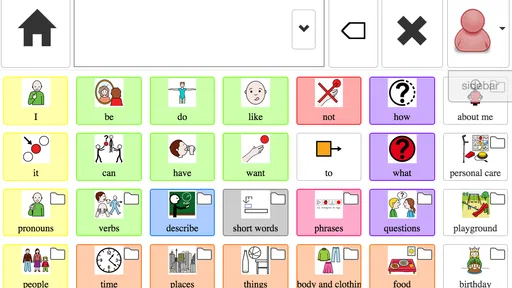
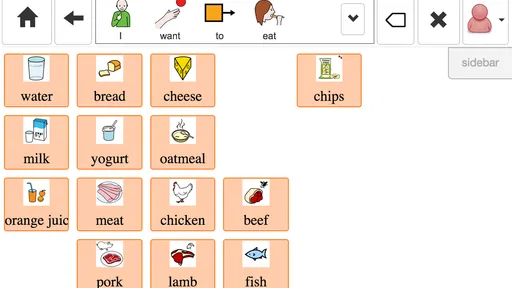
My advice would be to begin with the words and messages that solve immediate problems. A small collection for food, comfort, people, places, activities, yes or no, and help is easier to learn than a crowded board. After the user demonstrates reliable success, I would add vocabulary based on real communication attempts rather than filling every available space in advance.
More From Our News Desk

 Gmail
GmailGmail in a Busy Inbox: Who Benefits Most?
From first account to crowded workday, Gmail earns its place through dependable search and flexible sorting—but its best fit depends on how much inbox maintenance you can tolerate.

 Prime Video
Switching to Prime Video: What Changes in Your Viewing Routine
Prime Video can make a compelling second home for streaming, but switching means learning a different catalog, rental layer, and route from browsing to playback.

 Universal TV Remote Control
Universal TV Remote Control Works Best as a Reliable Backup
A phone remote earns its place through quick setup and reliable habits. Here is how to get more from Universal TV Remote Control—and where its limits show.

 Weather - By Xiaomi
Weather by Xiaomi Review: Clear at a Glance, Less Clear Up Close
Xiaomi’s weather app makes everyday forecasts quick to scan, but its calm surface can leave useful details and recovery paths harder to find than they should be.

 X
XX Under Pressure: Can It Recover When Posting Goes Wrong?
A resilience-focused review of X, examining setup, mistaken posts, interruptions, weak connections, and the gaps that matter when recovery needs to be dependable.

 Clash of Clans
Clash of Clans Is Won Between the Battles
Its raids are quick; its community is a long-term project of coordination, teaching, rivalry, and shared responsibility—with all the friction that entails.
Latest News



That approach reveals an important trade-off. A compact layout can improve speed and confidence, but it may not cover every topic. A larger vocabulary can support richer expression, yet it can also make navigation tiring. With an AAC tool, “more” is not automatically better. The strongest arrangement is the one that lets the user say something meaningful without needing a helper to guess where everything is.
What stands out in everyday use
The main attraction is flexibility. CoughDrop is not presented as a single-purpose flashcard exercise or a narrow phrasebook. I see it as a communication workspace that can be shaped around different users and routines. That makes it suitable for families who want to start carefully, educators who need a support tool in learning situations, and caregivers who want a consistent way to offer choices.
Its education category is also a useful reminder that communication and learning overlap. The app can be part of a classroom routine, but I would not treat it as a replacement for teaching, language therapy, or individualized professional assessment. It can provide a channel for participation; it does not by itself decide which language goals are appropriate.
One non-obvious strength is the possibility of treating the board as a record of a person’s daily life rather than a fixed list of generic requests. I would build around recurring activities: getting dressed, preparing a snack, choosing a game, explaining a problem, or joining a lesson. This makes practice more natural. The user is not drilling isolated words; they are using communication during events that already matter to them.
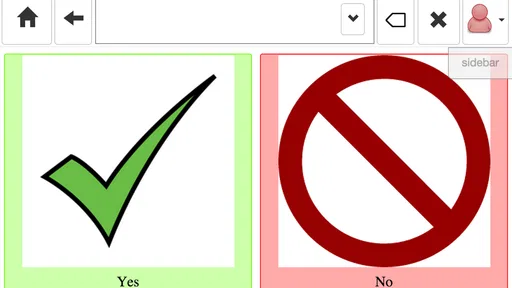
A second useful insight is to separate urgent communication from exploratory communication. Essential messages such as pain, assistance, stopping, yes, and no should be easy to find. More specialized choices can sit elsewhere. If every word has the same visual priority, a critical message may become difficult to reach when the user is upset or under pressure.
A third practical idea is to review the layout with the user after observing actual mistakes. If a person repeatedly selects a neighboring button, the answer may not be more practice. The button may be too small, too close to another target, or placed where the user’s hand naturally lands. I would change the arrangement based on those patterns and then test it again during a normal routine.
A realistic day with the app
Imagine a child using the app before school. At breakfast, the child indicates a preferred drink, rejects another option, and asks for help opening something. Later, a teacher offers choices during an activity, and the same communication system helps the child participate instead of waiting for an adult to interpret behavior. At home, a caregiver adds vocabulary connected with a favorite hobby or a recurring evening routine.
The value in that scenario is continuity. The app is not useful only during a formal session. It becomes more meaningful when the same basic communication habits appear across several settings. I would encourage every supporter to respond to the message, not just to the device. If the user makes an effort and the adult immediately takes over, the technology becomes a prompt for guessing rather than a genuine voice.
There is also a less comfortable side to this scenario. A helper may need to spend time organizing the system, observing which words are missing, and teaching communication partners how to wait. That work is part of using AAC, even when the application itself is easy to install. Families should plan for gradual adjustment rather than expecting a perfect setup on the first day.
What the current app details tell me
CoughDrop AAC has a 3.9 average from roughly 177 ratings, with about 50 written reviews, and it has passed 50K+ installs. Those figures suggest an established but not dominant presence, so I would pay more attention to the individual user’s trial experience than to popularity alone. AAC needs vary too widely for a crowd score to settle the decision.
The app is free and rated for Everyone, which lowers the barrier for families, schools, and support workers who want to explore it without committing money first. It was released on September 14, 2015, and the current version is 3.1.3. It requires Android 7.0 or later, so I would check the device before planning a setup, especially if the phone or tablet is older.
Those practical details make it approachable for a trial, but free access should not be confused with zero effort. The real investment may be time spent selecting vocabulary, arranging access, explaining the system to other people, and maintaining consistency. For a person who needs a dependable communication method every day, that preparation deserves as much attention as the download itself.
Where it wins, and where another category may be better
I’d use this section to weigh the app’s adaptable, everyday communication approach against the needs that call for more specialized tools. The key question is not whether flexibility sounds appealing, but whether it makes the user more independent without creating extra work for supporters. That distinction leads naturally to the situations where another category may be a better fit.
Why its flexible approach can be the right choice
I think this app is strongest when the user’s needs are changing or when a family wants room to experiment. A beginner may start with a modest set of choices and gradually move toward more personal language. A teacher may need a board that supports classroom participation rather than only requesting objects. A caregiver may want to adjust the system after seeing what the user tries to communicate naturally.
It can also be a sensible option when several people need to collaborate without purchasing a specialized communication device immediately. Because it is an app rather than a dedicated hardware system, it may fit into a family’s existing technology routine. That convenience is valuable during an initial evaluation, when nobody yet knows which layout or vocabulary style will work.
I would especially consider it for a user who benefits from visual choices and can access a touchscreen with reasonable consistency. It may suit someone who is beginning to explore AAC, someone whose communication goals are expanding, or someone who needs support in ordinary activities rather than only in therapy. The app’s modern, adaptable positioning makes more sense in those situations than a rigid, one-purpose board.
When a dedicated AAC solution may be preferable
I would look elsewhere if the user has complex access needs that require specialized hardware, alternative switches, eye tracking, or highly individualized physical mounting. A general mobile device can be convenient, but convenience is not the same as reliable access. If touch input is inconsistent or physically exhausting, a dedicated system designed around that person may be the better investment.
I would also be cautious if the user already has a carefully established communication system and depends on a particular vocabulary organization, speech output style, or professional workflow. Switching can disrupt fluency. In that case, the potential benefit of a new app has to outweigh the loss of familiar motor patterns and the time needed to rebuild confidence.
For families seeking only language games, spelling practice, or early educational activities, this may not be the most direct category match. AAC should not be judged like a quiz app. Its purpose is participation and expression. If the main goal is academic practice without a communication need, a conventional learning app may offer clearer lesson structure.
There is another important exception: a person who needs a communication method that works through a highly controlled clinical plan should involve the relevant professional before making changes. I would not replace an established system overnight. Instead, I would test CoughDrop AAC alongside the current method, compare real tasks, and let the user’s comfort and independence guide the decision.
The hidden cost of changing systems
Switching AAC tools can be harder than installing a new app. The user may have memorized locations, colors, or movement patterns. Family members may have developed habits around prompting. Teachers may have prepared activities using a particular vocabulary set. Even a promising alternative can feel worse during the first stage because everyone is slower and less certain.
To reduce that cost, I would document the current system before changing anything. Note the messages the person uses most, the situations that cause breakdowns, and the words supporters often need to add. Then create a transition plan with a limited number of daily activities. Keep the familiar method available while testing the new one, especially for urgent communication.
I would measure success in practical terms: Can the user reject something without distress? Ask for assistance? Join a conversation? Repair a misunderstanding? Express pain or discomfort? These outcomes matter more than how polished the board looks. A visually attractive layout that slows down essential messages is not a successful upgrade.
Supporters should also resist changing several variables at once. If the device, layout, vocabulary, and prompting style all change together, it becomes difficult to understand what helped or caused difficulty. I would adjust one area, observe the result during a familiar routine, and keep notes that can be shared with family, teachers, or therapists.
Questions I would answer before recommending installation
Would I use it as a first experiment? Yes, particularly when cost is a concern and the user can interact with a touchscreen. I would begin with a small, purposeful setup and treat the first week as observation rather than a final judgment. The goal would be to discover whether the person can communicate more independently, not merely whether they can tap buttons.
Would I hand it to a child and expect immediate communication? No. The child needs responsive partners, repeated modeling, and time to understand that the symbols are meaningful. Adults should use the system while speaking, offer genuine choices, and accept the user’s message even when it is slower than speech. The app can support that process, but it cannot provide the social teaching on its own.
Is it suitable for every AAC user? No. People with demanding physical access requirements, complex language needs, or an established specialist system may be better served by a dedicated alternative. I would also avoid making it the only backup for someone whose communication depends on uninterrupted access until the app has been tested thoroughly in daily conditions.
Can a family manage it without professional help? Some families can make a useful beginning, especially for basic choices and routines. However, professional guidance becomes important when communication is complex, progress has stalled, or the user has motor, sensory, cognitive, or language factors that affect access. I would see the app as a tool to evaluate with support, not as a substitute for that support.
What should be tested first? I would choose three situations: one urgent need, one routine choice, and one social interaction. For example, asking for help, choosing a snack, and commenting on a shared activity. If the user can participate more clearly in those situations after a reasonable adjustment period, the app deserves further development.
My recommendation for different readers
For a parent or caregiver starting to investigate AAC, I think CoughDrop AAC is worth trying because it is free, accessible to a broad age range, and flexible enough to support an exploratory process. I would not install it and leave the user alone with it. I would prepare a small board, model its use, and watch carefully for signs that the layout helps or hinders.
For an educator, I would consider it when the priority is giving a learner a practical way to participate in classroom routines. The strongest results will come from coordinating vocabulary with actual lessons and social opportunities. A board filled only with objects may not help a student comment, refuse, ask for clarification, or show an opinion.
For an experienced AAC user, my recommendation is more cautious. The app may be useful if its flexibility matches a desire to reorganize or expand communication, but I would compare it directly with the current system before switching. Familiarity, speed, and reliable access are difficult to replace, and the user should lead that decision.
For someone who only wants a general educational app, I would skip it. Its value comes from supporting communication, not from offering ordinary entertainment or lesson-based practice. Choosing it for the wrong reason can create disappointment and obscure what AAC is supposed to accomplish.
After considering the strengths, limitations, and transition work, my recommendation is to treat this as a thoughtful starting point rather than a universal answer. Its best quality is the chance to build communication around a real person’s routines instead of forcing every user into one fixed pattern. Its biggest weakness is that flexibility places responsibility on the people setting it up and supporting it.
I would download it for a structured trial, involve the person who will communicate, and judge it by independence in real situations. If it makes requests, refusals, choices, and social participation easier, continue refining it. If access remains tiring or the user needs specialized hardware and a mature clinical system, move to a more dedicated alternative without feeling that the app has failed. In my view, CoughDrop AAC is most convincing when used as a practical bridge toward more effective everyday communication.
CoughDrop AAC Frequently Asked Questions
Is CoughDrop AAC suitable for a beginner who has never used an AAC app?
Yes, CoughDrop AAC is intended to support communication through a flexible AAC setup, so it can be considered by people and families who are new to this type of tool. Getting started may involve choosing useful vocabulary and arranging boards in a way that fits the communicator. A caregiver, teacher, or speech-language professional can help make those choices, while the user’s needs and abilities should guide how the app is introduced.
Which devices and operating systems can run CoughDrop AAC?
CoughDrop AAC is available for Android and iOS, and its current version is 3.1.3. The listed minimum operating-system requirement is 7.0, so it is worth checking the device’s software version before downloading. The app is in the Education category, is rated Everyone, and has been available since September 14, 2015. Its developer is MavWare, LLC.
What is CoughDrop AAC, and who is it designed for?
CoughDrop AAC is an augmentative and alternative communication app designed to help people who have difficulty speaking communicate through symbols, text, pictures, and synthesized speech. It can be used by children and adults with conditions such as autism, cerebral palsy, aphasia, apraxia, or other speech and language challenges. Parents, caregivers, teachers, and speech-language professionals can also help configure and manage communication boards.
Does CoughDrop AAC work offline?
CoughDrop AAC can generally be used for communication when an internet connection is unavailable, which is useful at school, home, or while traveling. However, online access may be needed for account synchronization, cloud backups, sharing boards across devices, collaboration, and certain management features. Before relying on it in an emergency or communication-critical situation, users should download the required resources and test the app offline on their particular Android or iOS device.
Can I customize communication boards in CoughDrop AAC?
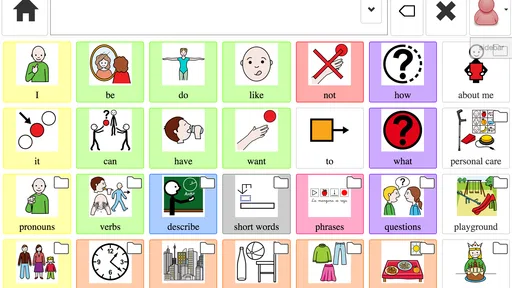
Yes. One of CoughDrop AAC’s main strengths is its flexibility. Users or communication partners can create, edit, and organize boards to match an individual’s vocabulary, routines, motor abilities, and communication goals. Buttons may include symbols, photographs, words, and phrases, while layouts can be adjusted as skills develop. Customization is powerful, but setting up an effective board may require time and guidance from a speech-language professional.
Pros
- Supports customizable AAC communication boards for different needs.
- Works across mobile devices
- helping users keep communication tools consistent.
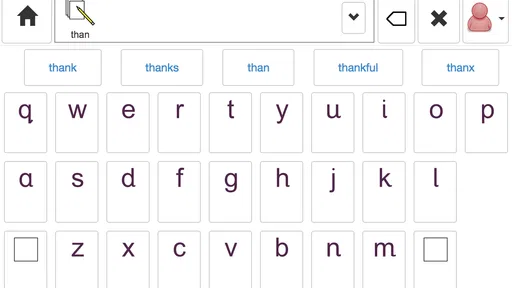
- Includes symbol-based and text-based communication options.
- Offers caregiver and professional tools for monitoring communication progress.
- Cloud syncing can make board updates easier across supported devices.
Cons
- Many useful features may require a paid subscription or account.
- The interface can feel complex for first-time AAC users and caregivers.
- Board customization takes time
- especially for larger vocabulary sets.
- Performance depends partly on internet access for syncing and cloud features.
- Some users may prefer more offline control over their communication data.











