

CookUnity - A Chef Marketplace
- 2.70K
- 4.7
- Installs
- 100.00K
- Price
- Free

Screenshots



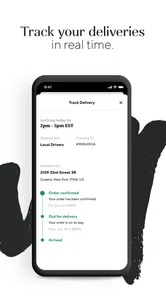
Analysis by Reviewed
I tried CookUnity as someone who enjoys a proper meal but does not always have the time, energy, or planning skills to cook one. My first impression was that it is less like a recipe app and more like a food marketplace built around prepared dishes from chefs. That distinction matters: you are not opening it to learn how to make dinner from scratch. You are opening it to choose a meal that should fit into an already busy day.
CookUnity is a free Food & Drink app from CookUnity Inc., available for Everyone and supported on Android 8.0 and later. It has earned a 4.7 average from around 8,200 ratings, with more than 100,000 installs. Those figures suggest that the idea has found a real audience, but they do not remove the need to decide whether chef-prepared delivery actually suits your routine.
How I judged whether CookUnity was worth using
I looked at the app through a practical question: does it make eating well easier without creating a different kind of hassle? For me, that means checking how quickly I can find something appealing, how much control I have over my choices, whether the meals feel suitable for ordinary weekdays, and how the service compares with the alternatives I already know.
The comparison is not simply between CookUnity and another app with a similar name. The real alternatives are supermarkets, takeaway platforms, meal kits, frozen dinners, and cooking at home. Each solves a different problem. A supermarket gives me control and usually more flexibility, but it still leaves shopping and preparation to me. A takeaway app offers immediate choice, while a meal-kit service gives me the satisfaction of cooking. CookUnity sits between those options: it aims to remove most of the work while keeping the meal-selection experience more personal than grabbing a standard ready meal.
That makes the right decision depend on what I am trying to avoid. If I dislike chopping, washing dishes, and planning several meals ahead, a chef marketplace is appealing. If I mainly want the cheapest possible calories, I would judge it differently. If I need a meal immediately, I would also compare it with local takeaway options rather than assuming a planned delivery service can replace them.
The app is best understood as a menu, not a kitchen companion
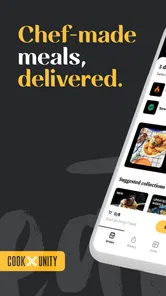
The store summary, “Chefs create, we deliver,” captures the basic relationship, but my useful interpretation is this: the app helps me browse prepared food created by chefs and organize my choices around delivery. It is not trying to turn me into a better cook. That is a strength for people who already know what they like and want fewer decisions after work.
I found it helpful to approach the menu with a short personal checklist before browsing. I would decide whether I wanted something light, filling, familiar, or more adventurous, then look for a dish that matched the occasion. Without that filter, a large chef-led selection can become tiring rather than exciting. The app gives me choice, but I still have to use that choice intelligently.
More From Our News Desk

 Instagram
Instagram’s Power Comes From Its Place in Your Phone
A close look at how Instagram turns Meta’s reach, recommendation systems and everyday camera habits into durable platform power—and what that costs users.

 Gmail
GmailGmail in a Busy Inbox: Who Benefits Most?
From first account to crowded workday, Gmail earns its place through dependable search and flexible sorting—but its best fit depends on how much inbox maintenance you can tolerate.

 Prime Video
Switching to Prime Video: What Changes in Your Viewing Routine
Prime Video can make a compelling second home for streaming, but switching means learning a different catalog, rental layer, and route from browsing to playback.

 Universal TV Remote Control
Universal TV Remote Control Works Best as a Reliable Backup
A phone remote earns its place through quick setup and reliable habits. Here is how to get more from Universal TV Remote Control—and where its limits show.

 Weather - By Xiaomi
Weather by Xiaomi Review: Clear at a Glance, Less Clear Up Close
Xiaomi’s weather app makes everyday forecasts quick to scan, but its calm surface can leave useful details and recovery paths harder to find than they should be.

 X
XX Under Pressure: Can It Recover When Posting Goes Wrong?
A resilience-focused review of X, examining setup, mistaken posts, interruptions, weak connections, and the gaps that matter when recovery needs to be dependable.
Latest News



What I would check before committing
Food delivery is personal, so I would not treat the app’s attractive presentation as enough reason to sign up. I would first check whether delivery is available where I live and whether the available menu reflects my eating habits. Someone who eats broadly may enjoy browsing more than someone with strict dietary, religious, or allergy requirements.
I would also think about refrigerator space and my weekly rhythm. Prepared meals are most useful when I can receive them, store them sensibly, and eat them within the intended window. If my schedule changes constantly, a planned food service may create pressure instead of removing it. I would rather recognize that before ordering than discover that convenience depends on being home and organized.
Another practical question is how much variety I genuinely need. I like having options, but I do not want to spend every week evaluating meals as if I were writing a restaurant guide. The best experience comes when the menu supports a repeatable routine: a few dependable choices for busy nights, plus one or two dishes that make the service feel more interesting than a supermarket shortcut.
Where CookUnity wins in everyday use
The clearest advantage is the combination of chef-focused discovery and reduced preparation. When I return home tired, the difference between “heat and eat” and “decide, shop, cook, and clean” is substantial. CookUnity is designed around that exact moment. It can turn dinner into a selection problem rather than a project.
I also appreciate that the app makes the meal itself the center of attention. Many food apps are dominated by restaurants, delivery distance, promotions, or impulse ordering. A chef marketplace encourages me to think about the dish I want rather than simply choosing the nearest available kitchen. That feels better when I am planning several meals instead of reacting to hunger.
A realistic weekday scenario
Imagine I have a full workday, an evening appointment, and no interest in cooking afterward. With a conventional supermarket solution, I might buy ingredients on the way home, then discover that the recipe takes longer than expected. With takeaway, I can get food quickly, but I may make a rushed choice and pay for convenience in a less planned way. With CookUnity, the useful workflow is to make the decision earlier, receive the prepared meal through the service, and keep the evening focused on eating rather than organizing dinner.
That scenario also shows the limitation: it works best when the meal is part of a plan. It is not the same as asking for a hot dish at the exact moment I become hungry. I would use it for the busy evenings I can anticipate, not as my only answer to every unexpected craving.
Choice without recipe fatigue
Meal kits often sound flexible because they offer many recipes, but flexibility still comes with measuring, cooking, and cleaning. CookUnity appeals to me when I want the feeling of choosing a considered dish without taking on the work behind it. This is particularly useful for people who enjoy food but do not enjoy the process of producing it.
The trade-off is that I lose some control over ingredients and technique. When I cook, I can reduce salt, change the texture, replace an ingredient, or make a larger portion. A prepared meal gives me less room to adjust. I see this as a fair exchange for convenience, but only if I value saved effort more than kitchen control on that particular day.
A better way to browse the menu
My strongest practical tip is to avoid browsing only by appetite. I would consider the whole week: which nights are likely to be rushed, which meals need to be especially filling, and where I would welcome variety. This prevents the common mistake of choosing several dishes that look exciting but do not match the actual schedule.
I would also keep notes on what worked for me. A meal that sounds appealing may not suit my portion expectations, preferred flavors, or reheating habits. Remembering those details makes future selection faster. The app becomes more useful when I treat it as a personal shortlist rather than starting from zero every time.
Useful for households, but not automatically simple for them
For one person, prepared meals can reduce waste because I am not buying a full set of ingredients for a single serving. For a household, the calculation is more complicated. Different people may want different dishes, and the convenience of individual choice can create extra coordination. I would recommend agreeing on a simple ordering routine instead of assuming everyone will browse independently without confusion.
Families should also consider whether the available dishes suit younger eaters. The Everyone age rating describes the app’s general suitability, not the taste preferences or nutritional needs of every household member. Parents may find it useful for their own busy meals while still preparing something separate for children.
What the app’s maturity suggests
CookUnity was released on July 21, 2022, and the current version is 2.46.0. I read that as a sign of an established product that has had time to evolve rather than a brand-new experiment. The 2.7K reviews also give prospective users a meaningful body of public feedback to consider.
Still, app maturity does not guarantee that every screen or workflow will feel perfect on every phone. My advice is to keep the app updated and judge the experience by the parts that matter most to you: browsing, selecting, managing the order, and fitting delivery into your routine.
Where another option may fit better
CookUnity is not automatically better than cooking at home. If I enjoy planning recipes, already keep a well-stocked kitchen, or need precise control over every ingredient, home cooking remains the more adaptable option. It also lets me scale portions and use leftovers in ways a prepared-meal service may not match.
A meal-kit service is a better fit when the activity of cooking is part of the goal. I would choose that route for a relaxed weekend, for learning techniques, or for sharing preparation with someone else. CookUnity wins when I want the result without the lesson or the cleanup.
Supermarket ready meals may be more suitable for someone whose main priority is a quick, familiar backup. They are easy to pick up during an ordinary shop and can be kept as an emergency option. CookUnity is more appealing when I want a curated, chef-oriented selection and am willing to organize around delivery rather than simply buying whatever is available.
Takeaway platforms remain stronger for immediate meals and spontaneous cravings. If I have not planned ahead, a local restaurant order may solve the problem more directly. The downside is that takeaway encourages last-minute decisions, while CookUnity is more naturally suited to managing a broader meal routine.
Dietary needs require careful personal judgment
I would be cautious if I have a serious allergy, a medically prescribed diet, or unusually strict ingredient rules. A chef marketplace can offer appealing choices, but attractive labels and descriptions should not replace checking the details relevant to my health. In that situation, I would favor the option that gives me the clearest control and confidence, even if it requires more preparation.
The same applies to texture and portion expectations. People recovering from illness, managing specific nutritional targets, or feeding someone with sensory sensitivities may need a level of customization that prepared meals do not provide. CookUnity can still be convenient for some dishes, but I would not make it the default without checking each choice carefully.
The hidden cost is not only money
When I compare services, I consider the cost of switching from my current habit. Moving from cooking at home means giving up some ingredient control and possibly changing how I shop. Moving from takeaway means planning earlier. Moving from supermarket meals means accepting a more deliberate delivery routine. The app is worthwhile only when the time and mental effort it saves feel more valuable than those adjustments.
There is also a habit cost. If I rely on the service without thinking about the rest of my week, I may still end up ordering food impulsively on nights that do not fit the plan. The best result comes from assigning the app a clear role, such as covering demanding workdays, rather than expecting it to solve every food decision.
Questions I would answer before using it regularly
Can I use it as an occasional solution? I would treat it as a planned convenience rather than assuming I need to rebuild my entire diet around it. Occasional use makes sense for intense weeks, travel recovery, or periods when cooking is temporarily difficult. Regular use makes more sense when I can identify several predictable occasions where it genuinely saves me time.
Will it replace takeaway? Sometimes, but not completely. It can reduce the number of rushed orders I make when I plan ahead. It does not replace the immediacy or local restaurant choice of a takeaway app, so I would keep both categories separate in my mind.
Is it suitable for someone who likes variety? Yes, if browsing is enjoyable rather than overwhelming. The chef-marketplace approach gives variety a central role, but I would still build a personal shortlist to avoid spending too much time deciding. Variety helps most when it makes planned meals more enjoyable, not when it creates weekly indecision.
What if I prefer cooking? Then I would not use CookUnity as a replacement for that hobby. I might use it selectively on nights when I want a break, but a meal kit or recipe app would better support the part of food preparation I actually enjoy.
Is the free download the whole cost decision? No. The app itself is free, but my real decision would concern the food and delivery arrangement connected with using it. I would review the current choices and terms shown during ordering before treating it as a routine expense, especially if I am comparing it with groceries or home cooking.
My recommendation after weighing the trade-offs
I recommend CookUnity to people who want chef-created prepared meals, dislike weekday cooking, and can plan around delivery. The strongest use case is a busy adult who still cares about eating something more considered than an emergency frozen dinner but does not want to spend the evening in the kitchen.
I would be more hesitant to recommend it to strict-budget shoppers, spontaneous eaters who need food immediately, committed home cooks, or anyone whose dietary requirements demand extensive customization. Those users may be happier with groceries, a carefully chosen takeaway service, or a cooking-focused alternative.
My final advice is to test the service as a targeted solution. Start by identifying the specific nights when it would remove the most friction, then judge whether the menu, delivery routine, and meal experience fit those nights. Do not choose it merely because chef-led food sounds appealing. Choose it if the app changes your actual behavior: fewer rushed decisions, less cleanup, and a more reliable way to handle demanding days.
For me, that is where CookUnity has its clearest value. It does not make every food problem disappear, and it cannot offer the control of cooking or the immediacy of takeaway. What it does well is give planned convenience a more personal, chef-focused shape. If that is the gap in your routine, this free Food & Drink app is worth trying.
CookUnity - A Chef Marketplace Frequently Asked Questions
Is CookUnity free to download, and which devices can run it?
CookUnity is free to download, and its app is listed for everyone. It is a Food & Drink app developed by CookUnity Inc. The current version is 2.46.0, and it requires iOS 8.0 or later. Before installing, check that your device meets that requirement and that the app is available through the store you use.
What is CookUnity, and how does its chef marketplace work?
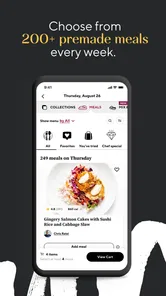
CookUnity is a meal delivery service that connects customers with independent chefs and culinary professionals. Instead of receiving a standard meal-kit box with raw ingredients, you choose from a rotating menu of fully prepared meals created by different chefs. The app lets you browse menus, review dish details, select delivery preferences, and manage upcoming orders from one place.
Are CookUnity meals ready to eat, or do I need to cook them?
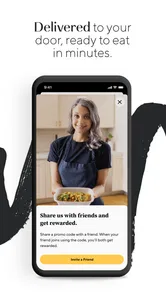
CookUnity meals arrive fully prepared, so they are designed for convenient reheating rather than full cooking. Each dish normally includes heating instructions, and preparation time depends on the meal and appliance you use. This makes the service useful for busy users who want chef-created food without shopping, chopping, or cleaning up, although meals are generally best enjoyed soon after delivery.
Can I find meals that match my dietary preferences or restrictions?
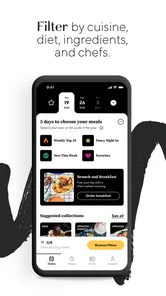
CookUnity provides menu information and filters that can help users discover meals suited to preferences such as vegetarian, low-carb, high-protein, gluten-conscious, or other eating styles. However, anyone with a serious allergy should carefully read the ingredient and allergen information and contact CookUnity or the chef when necessary. Shared preparation environments may mean that cross-contact cannot always be ruled out.
How much does CookUnity cost, and can I skip or cancel deliveries?
Pricing depends on the number of meals ordered, your location, and any current promotion or subscription terms. Before confirming an order, the app displays the applicable meal charges, delivery fees, taxes, and discounts. CookUnity generally provides account controls for skipping upcoming deliveries, changing meal selections, or canceling service, but users should check the relevant deadline because changes may not be available once an order enters processing.
Pros
- Chef-created meals offer more variety than standard meal kits.
- Meals arrive fully prepared
- making them convenient for busy schedules.
- Dietary filters help users find meals matching specific preferences.
- Rotating menus encourage trying different cuisines and cooking styles.
- Portion options can suit individual diners or larger households.
Cons
- Meal availability and delivery coverage vary by location.
- Fresh meals require refrigerator space and careful storage.
- Premium ingredients make subscriptions relatively expensive.
- Some dishes may not reheat evenly due to varied textures.
- Skipping or canceling requires attention before the billing deadline.











