

Color Genie
- 21.00
- 4.2
- Installs
- 1.00K
- Price
- $0.99

Screenshots

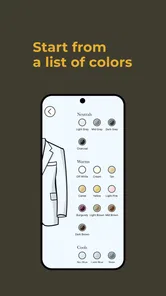
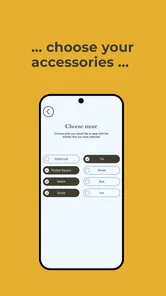
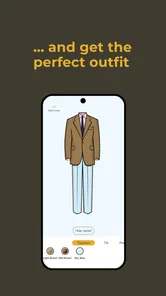
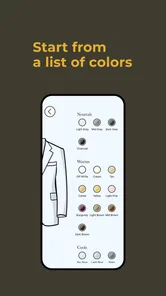
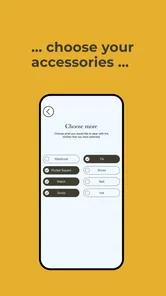

Analysis by Reviewed
I’m often more confident choosing a shirt from a shop display than building an outfit from clothes I already own. That’s why a tool focused on mixing colors for menswear caught my attention: Color Genie is aimed at the point where a closet has plenty of pieces but matching them still feels like guesswork. Its value is not simply showing attractive shades; it is helping turn color choices into combinations you can consider wearing.
Color matching, with a wardrobe in mind
Many color tools are designed for paint, graphics, or broad mood-board work. Those can be useful, but their palettes do not always translate neatly to clothes: a combination that looks striking on a screen may feel too loud for an everyday outfit. Color Genie’s menswear focus gives it a more specific job. I’d use it to think through how the colors in a shirt, trousers, jacket, or shoes might work together before getting dressed or buying another item.
That narrow focus is also a sensible expectation to set. It is a lifestyle app from AskOkey Inc., not a replacement for trying on clothes or checking how fabric looks in daylight. Color advice can help me narrow down options, but fit, texture, occasion, and personal taste still decide whether an outfit works.
Turning a color idea into an outfit decision
I like to begin with the actual wardrobe problem: one piece I want to wear, and a color choice I’m unsure about. This section looks at how Color Genie’s menswear focus can turn that uncertainty into a manageable comparison, then leads into a practical routine for checking ideas against the clothes and occasion in front of me.
A practical way to use it
Rather than asking the app to choose my whole style, I’d start with one item I already plan to wear. If I have a navy jacket, for example, I can use color-mixing guidance to think about which shirt or trouser colors might complement it, then check those options against what is actually in my closet. This makes the result actionable: I am solving a small wardrobe question, not collecting palettes with no plan to use them.
A useful habit is to keep the occasion in view while comparing combinations. A color pairing for a relaxed weekend can feel different from one I would choose for work or a formal event. I’d also treat any suggested mix as a shortlist rather than a verdict. If the colors feel unlike me, there is no benefit in forcing the combination just because it appears coordinated.
Make the color check useful before you shop
I’d also use the app to test a purchase idea before bringing home another shirt or pair of trousers. Start with a piece you wear often, then consider whether the new color could work with more than one item already in rotation. That simple check shifts the question from “Do I like this on its own?” to “Will I actually have outfits for it?” It is a useful distinction when a sale or an appealing display makes an unfamiliar color tempting.
More From Our News Desk

 Gmail
GmailGmail in a Busy Inbox: Who Benefits Most?
From first account to crowded workday, Gmail earns its place through dependable search and flexible sorting—but its best fit depends on how much inbox maintenance you can tolerate.

 Prime Video
Switching to Prime Video: What Changes in Your Viewing Routine
Prime Video can make a compelling second home for streaming, but switching means learning a different catalog, rental layer, and route from browsing to playback.

 Universal TV Remote Control
Universal TV Remote Control Works Best as a Reliable Backup
A phone remote earns its place through quick setup and reliable habits. Here is how to get more from Universal TV Remote Control—and where its limits show.

 Weather - By Xiaomi
Weather by Xiaomi Review: Clear at a Glance, Less Clear Up Close
Xiaomi’s weather app makes everyday forecasts quick to scan, but its calm surface can leave useful details and recovery paths harder to find than they should be.

 X
XX Under Pressure: Can It Recover When Posting Goes Wrong?
A resilience-focused review of X, examining setup, mistaken posts, interruptions, weak connections, and the gaps that matter when recovery needs to be dependable.

 Clash of Clans
Clash of Clans Is Won Between the Battles
Its raids are quick; its community is a long-term project of coordination, teaching, rivalry, and shared responsibility—with all the friction that entails.
Latest News



For a more reliable result, I’d compare the proposed combination with the actual clothes rather than relying on a mental picture. A color name can cover a wide range of shades, and fabric finish changes how a garment reads: a muted blue in a soft knit may feel different from a bright blue in a smooth shirt. I would treat the app as a way to get ideas, then make the final call with the pieces together and under the light where I expect to wear them.
Where it helps most—and where it doesn’t
The best everyday scenario is getting dressed when I have a key piece in mind but keep reaching for the same safe pairing. A quick color check can give me a way to explore another option without shopping first. It can also help when planning a small capsule wardrobe: I can consider whether a new purchase will work with several pieces I own, instead of judging it only as a standalone item. That is a practical way to avoid buying a color that looks appealing in isolation but is hard to wear.
Compared with a general color-wheel tool, a menswear-centered approach is more relevant to outfit decisions. A generic palette maker may offer more freedom for art or room décor, while a styling consultation can account for fit and the person wearing the clothes. Color Genie sits in between: it can support color thinking, but it is not the same as a full wardrobe planner or personal stylist. If I need advice on tailoring, dress codes, or what suits my complexion, I would look beyond color mixing alone.
It is also not the right choice if I want an app to catalog every garment, build a packing list, or recommend products to buy. Those tasks call for a wardrobe-management or shopping tool, where keeping track of individual items is the main purpose. Here, the more useful question is how colors might relate. I would choose the narrower approach when I want to think through a combination, and a broader service when I need the app to organize the rest of my closet or make decisions for me.
Cost, expectations, and who should try it
Color Genie costs $0.99, so I’d approach it as a small, focused purchase rather than a free general-purpose utility. It has a 4.2 average from around 150 ratings, which offers a useful snapshot of user response without telling me whether its particular approach will suit my wardrobe. It is rated for Everyone, and version 1.1.0 runs on Android 6.0 or later. With over 1,000 installs, it is a relatively small app, so I would not choose it expecting the breadth or polish of a major fashion platform.
I’d recommend it most to someone who likes menswear but wants a nudge beyond familiar combinations, especially when coordinating clothes they already own. It is less suited to someone looking for trend reports, shopping recommendations, outfit logging, or detailed personal styling. The practical trade-off is straightforward: a focused color tool may make one decision easier, but it cannot see the full context of the outfit unless I bring that context myself.
The price makes sense if I expect to return to color questions rather than open the app once out of curiosity. Before paying, I’d ask myself whether I regularly hesitate over matching pieces or plan purchases around an existing wardrobe. If my clothes already fall into a small set of colors that I wear comfortably, a general styling article or a quick check in front of the mirror may be enough. If I repeatedly get stuck between two plausible options, a dedicated tool has a clearer job to do.
Discovering the Magic of Colors
One of the first things you’ll notice when you open Color Genie is its user-friendly interface. The app greets you with a clean layout, making navigation a breeze even for those not so tech-savvy. Whether you're a professional designer or just someone trying to pick out a new paint color for your bedroom, this app caters to all.
Features to Explore
Now, let’s talk about features! Color Genie is packed with a palette of functionalities that are both practical and fun. Need to identify a color? Just snap a picture, and the app does the rest. It’s like having your own personal color consultant in your pocket. The color recognition feature is particularly impressive, as it accurately pinpoints colors from any image you upload.
Moreover, the app offers a wide range of pre-set color palettes. Whether you’re looking for something modern, vintage, or even seasonal, there’s a palette for every taste. You can also create and save your own palettes, which is perfect for those who like to keep things personalized.
For menswear, I’d make the most of those palette options by keeping each one tied to a practical question instead of saving colors just because they look appealing. A palette built around a jacket I own, for instance, is easier to act on than a collection of attractive shades without a wardrobe purpose. I’d also save combinations that feel like realistic alternatives to my regular choices, so I can revisit them when I am short on time or planning what to wear for a particular setting.
When using a photo to identify a color, I would be careful about treating the result as an exact match for a garment. A camera image can be affected by lighting, shadows, and the screen used to view it, while fabric itself may have texture or a sheen that changes its appearance. The feature can still help me name or compare a color when I am considering a combination, but I would check the physical item before relying on a close shade match. That small step helps prevent an on-screen idea from becoming a disappointing purchase.
Why You’ll Love It
What really stands out about Color Genie is its ability to inspire creativity. I found myself experimenting with colors I’d never considered before. The app encourages you to play with different shades and combinations, making the whole process of color selection feel less daunting and more like a creative adventure.
Another highlight is the community aspect of the app. You can share your creations with other users and get feedback. This feature is particularly beneficial for designers looking to showcase their work and gain inspiration from others. Plus, the app regularly updates its features, ensuring that you always have fresh tools to play with.
For someone choosing clothes, feedback is most useful when the question is specific. Instead of asking whether a palette is “good,” I’d show a combination and explain where I plan to wear it or what item I am trying to match. That gives another person a clearer basis for responding. Still, I would treat community opinions as ideas, not rules: the people commenting may have different tastes, dress codes, and wardrobes from mine.
If I am choosing an outfit for an important occasion, I would not leave the decision until the last minute or rely on a palette alone. I’d use the app earlier to explore color options, then lay the actual garments together and check that they feel right for the setting. That workflow uses color guidance where it is helpful while leaving room for practical details such as comfort, fit, and whether the outfit feels like something I would genuinely wear.
If you’re someone who struggles with decision-making, especially when it comes to colors, Color Genie is like having a guiding hand. It simplifies the process, offering suggestions and ideas that could help spark your imagination. From interior design to graphic projects, the app supports a multitude of applications.
Final Thoughts
In conclusion, Color Genie is more than just an app; it’s a tool that transforms the way you interact with colors. It’s intuitive, fun, and incredibly useful for anyone and everyone. Whether you’re a seasoned designer or a curious beginner, this app is a fantastic resource to have at your disposal. So, if you’re ready to unleash your inner artist and explore the vibrant world of colors, give it a try. You might just find your new favorite color!
My more measured recommendation is to try it if menswear color matching is a recurring decision for you, not simply because you enjoy looking at palettes. Its strongest role is helping turn a vague question into a few combinations worth checking against the clothes you own. It will not replace trying things on, and it is not a complete styling service, but that is a fair trade if you want focused help rather than a tool that tries to manage every part of getting dressed.
Color Genie Frequently Asked Questions
Is Color Genie suitable for menswear color planning?
Color Genie is an app in the Lifestyle category, and its store summary describes it as “Mixing Colors for Menswear.” That makes it relevant to people interested in exploring color combinations for clothing. If you are looking for a tool specifically focused on menswear colors, this description may help you decide whether it matches your needs before downloading.
What does Color Genie cost, and what should I know before downloading?
Color Genie costs $0.99, so it is a paid download rather than a free app. It is intended for everyone, and it runs on devices using Android 6.0 or later. The app was released on November 24, 2024, and its current version is 1.1.0. Check that your device meets the minimum system requirement before you proceed.
What is Color Genie and how does it work?
Color Genie is a cutting-edge mobile application designed to help users explore and create stunning color palettes for various design projects. It works by allowing users to input colors they like, or by analyzing photos to extract color schemes. This app is perfect for designers, artists, and anyone interested in experimenting with colors. With an intuitive interface, it makes creating and saving color palettes simple and enjoyable.
Is Color Genie free to use, or does it require a subscription?
Color Genie offers a free version with basic features that are sufficient for casual users. However, for professional designers or users needing advanced features, there is a subscription plan available. The premium version includes additional functionalities like unlimited palette saves, access to exclusive color libraries, and other advanced design tools, making it a worthwhile investment for professionals.
Can I use Color Genie offline, or does it require an internet connection?
Color Genie can be used offline for most of its basic functions, such as creating and saving color palettes from scratch. However, to access certain features like syncing across devices, downloading new color libraries, or sharing your palettes on social media, an internet connection is required. This ensures users have access to the latest updates and community features.
Pros
- Intuitive user interface.
- Wide range of color palettes.
- Easy to create custom colors.
- Includes advanced color tools.
- Compatible with multiple design apps.
Cons
- Limited free features.
- Occasional app crashes.
- No offline mode available.
- Subscription can be expensive.
- Lacks tutorial for beginners.











